
Aplazar el flujo de trabajo de la línea de orden de compra
Esta página ofrece un resumen del flujo de trabajo para aplazar líneas de orden de compra. For instructions on how to defer a PO line see Deferring PO Lines. For information on the overall purchasing workflow see Purchasing Workflow. For an overview of working with acquisitions in Alma, including links to relevant sections such as Infrastructure, Invoicing, Configuration, etc., see Introduction to Acquisitions.
Aplazar una línea de orden de compra le permite guardar la orden para volver posteriormente a ella.
The Defer action is not supported for PO lines with the following Acquisition methods:
- Purchase at Vendor System
- Approval Plan
- Approval Plan With Letter
A continuación se muestra una ilustración del flujo de trabajo de una línea de orden de compra aplazada, que determina cómo se maneja una línea de orden de compra desde su aplazamiento hasta que vuelve a ser reactivada o cancelada.
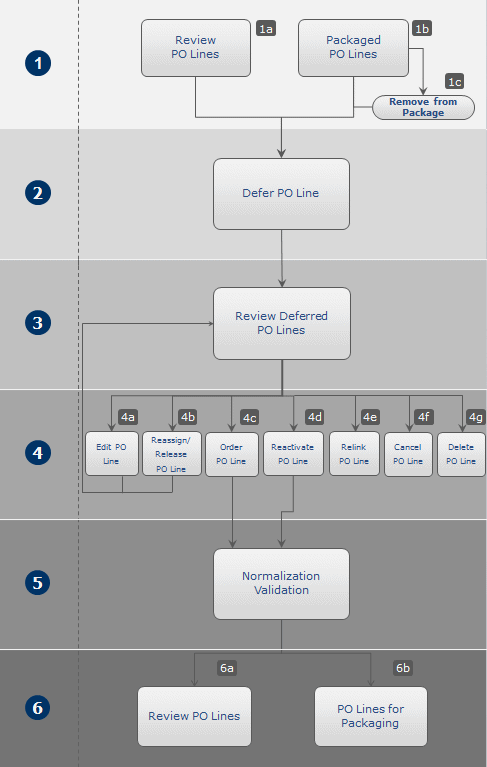
A continuación se detalla una descripción de los pasos a seguir dentro de este flujo de trabajo (con los números que corresponden a los del diagrama):
- El proceso de aplazamiento comienza cuando se selecciona la línea de orden de compra para aplazar. You can defer any PO line except those with the Acquisition method of Approval plan or Purchase at vendor system. PO lines that you want to defer must be at one of the following stages in the purchasing workflow (see Purchasing Workflow):
- In Review – PO lines in review, waiting for correction or to be completed.
- Manual Packaging – PO lines that are complete and ready for packaging, and are configured for manual packaging.
- PO > Review – PO lines that have been packaged but have not yet been approved. Antes de poder aplazar una línea de orden de compra en este estado, debe eliminarla de la orden de compra. Si la línea de orden de compra se agrupa con otras líneas de orden de compra, la línea se elimina de la orden de compra, pero la orden puede seguir enviándose con las líneas de orden de compra restantes. If the PO line is the only one in the packaged PO, the PO is deleted when you remove the PO line from it.
- You defer the PO line by selecting Defer for the PO line, and then entering a date on which you want to be reminded about the PO line and a reason for the deferral. Once you have done this, the Workflow Step (status) of the PO line becomes Deferred.PO line deferral reasons can be configured by an administrator on the Acquisitions Configuration menu (see Configuring PO Line Deferral Reasons). For details on deferring a PO line, see Deferring PO Lines.
- At a later time, you review the deferred PO line and decide how to handle it (see Reviewing Deferred PO Lines).
- Puede llevar a cabo las siguientes acciones en las líneas de orden de compra aplazadas:
- Edit – Edit any of the fields in the PO line. Después de editar la línea de orden de compra, puede guardarla o reactivarla. When you save the PO line, its status remainsDeferred. Si reactiva la línea de la orden de compra, esta vuelve a normalizarse y activarse. If the PO line passes the normalization and validation phase, it moves to the next step in the purchasing workflow (see Purchasing Workflow). If the PO line is still incomplete, its status is set to In Review, and remains thus until it is corrected. For details on editing a PO line, see Editing Deferred PO Lines.
- Assign to or Release assignment – For more about theAssigned to Me,Unassigned, and Assigned to Others tabs, see Assigned to Me, Unassigned, Assigned to Others Tabs.
- Order now— Move the PO line to the purchasing workflow, where it is normalized and validated (see step 5) before being packaged (see step 6) and sent (see Packaging a Deferred PO Line into a PO).If you select Order Now, you receive a message (Order Now Letter) after the order is sent for processing. For information on the Order Now Letter, see ConfiguringAlma Letters.
- Reactivate – Reactivate a PO line, which returns it to the stage of the purchasing workflow that it had reached before deferral. The PO line is normalized and validated (see step 5) before being returned to eitherReview or Automatic/Manual Packaging(see step 6). For details on reactivating a PO line, see Reactivating Deferred PO Lines.
- Relink – Link the PO line to a different bibliographic record (see Relinking PO Lines).
- Cancel – Cancel a PO line that is no longer required (see Canceling Deferred PO Lines).
- Delete – Delete a PO line from Alma (see Deleting PO Lines).
- When the PO line is reactivated or processed using the Order Now option, it moves back into the purchasing workflow (see step 2), where it is normalized and validated.
- Dependiendo de si la línea de orden de compra pasa la etapa de normalización y validación, el flujo de trabajo procede de la siguiente manera:
- If the PO line does not pass the normalization and validation stage, it remains In Review until corrected.
- Si la línea de orden de compra pasa el proceso de normalización y validación satisfactoriamente, esta se mueve a la etapa de agrupación en el flujo de trabajo. Esta se envía después de que se completa el agrupamiento.
Page tags: article:topicproduct:almacontent:Documentationlang:englishdeferraldeferral workflow
