
Procesar y enriquecer citas de forma masiva
Match citations to inventory in bulk if the citations did not automatically match.
For links to all the main fulfillment documentation pages see Fulfillment.
- Operador/Gerente de servicios al usuario
- Administrador de servicios al usuario
- Administrador general del sistema
Cuando las citas son añadidas a listas de lecturas, suelen ser conectadas automáticamente con el inventario físico si una única coincidencia puede ser encontrada. Alma no conecta citas automáticamente si esta característica está desactivada, o si no hay coincidencias o hay múltiples coincidencias para una cita. For more information, see Managing a Citation's Attachment to an Inventory Item.
See also Finding Alternate Resource Suggestions for Citations.
You can match inventory to citations in bulk by running the Process and Enrich Citations job (Fulfillment > Advanced Tools - Reading Lists > Process and Enrich Citations). Esta tarea también se puede usar para validar citas de URL y se puede ejecutar en conjuntos.
Esta tarea no ubica artículos de revistas. Sin embargo, sí que ubica revistas que tienen inventario físico.
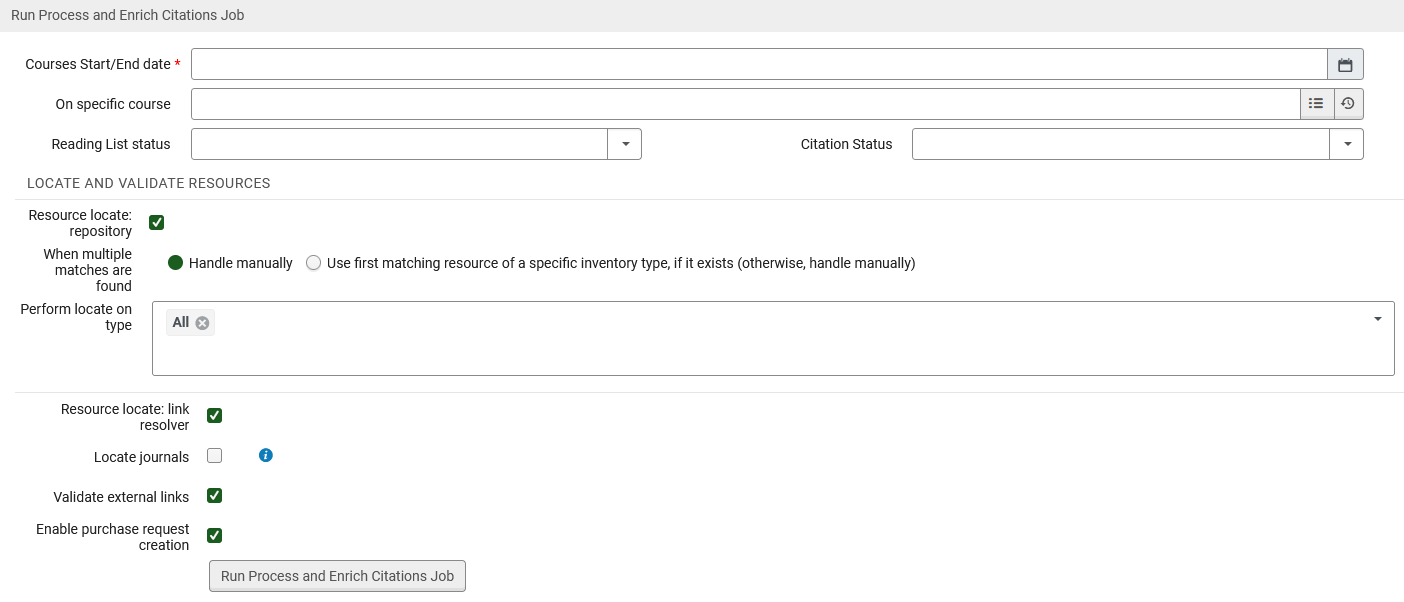
En esta página, se puede elegir hacer coincidir todas las citas de cursos que empiezan en una fecha determinada o después y que terminan en una determinada fecha o antes.
Se pueden añadir criterios opcionales:
- Un curso específico
- Listas de lectura con un estado específico
- Citas con un estado específico
- Seleccionar los tipos de procesos para ejecutar con las citas:
- Resource locate repository- This does a "resource locate" process by trying to find the citation in the repository and assign an MMS ID to the citation. If you select Handle manually, multiple matches are noted in the job report but the citation remains unlinked to any repository entity. If you select Use first matching resource, the first matching resource of the type you select (in priority order) is used when there are multiple matches. Si esto falla, la cita seguirá sin coincidencia.
 Página de la tarea de enriquecimiento masivo del inventario de citas - Prioridad de coincidencia
Tenga en cuenta que verá un mensaje de error si selecciona el mismo valor para más de un tipo de recurso. To set defaults for the above fields, see the parameters resource_locate_multiple_matches and resource_locate_multiple_matches_priority in Configuring Other Settings.
- Perform locate on type- Indicate which material types to perform the locate action on. Automatically populates with the type selected in the Other Settings table (see Configuring Other Settings).
- Resource locate: link resolver- For electronic resources, this tries to resolve the citation using the citation metadata and the Alma link resolver. La localización intenta hacer coincidir los metadatos de la cita con un registro bibliográfico, y si se encuentra una coincidencia, verifica si la biblioteca tiene inventario disponible para ese registro bibliográfico. Si es así, la localización tiene éxito.
- Locate Journals - When selected, Leganto attempts to locate journal citations within the library repository. Esta opción solo debe utilizarse cuando el conjunto contiene revistas y ningún ejemplar de artículo. If a match is found, the item is linked to the library and its status updates to Resource Located. Por defecto, esta casilla de verificación no está seleccionada.
- Validate external links- For URL citations, this attempts to access the URL and checks for a valid HTTP response. The following errors are checked: internal server error (500), page not found (404) or time out (504).
- Enable Purchase Request Creation- When selected, a purchase request will be created to the citation when criteria rules (Configuration Menu > Fulfillment > Courses> Citation Processing Rules) met. Esta opción está seleccionada por defecto.
- Resource locate repository- This does a "resource locate" process by trying to find the citation in the repository and assign an MMS ID to the citation. If you select Handle manually, multiple matches are noted in the job report but the citation remains unlinked to any repository entity. If you select Use first matching resource, the first matching resource of the type you select (in priority order) is used when there are multiple matches. Si esto falla, la cita seguirá sin coincidencia.
- En la página de la tarea de Enriquecimiento del inventario de citas, seleccionar las fechas de los cursos cuyas citas se quiere conectar con el inventario. All courses that start on or after and end before the date you select in Course Start/End date will be processed.
- Opcionalmente, seleccionar criterios de conexión y tipos de procesamiento adicionales para las citas.
- Select Run Process and Enrich Citations Job and select confirm in the confirmation dialog box. La tarea comienza.
- La tarea también (re)conecta con el inventario cualquier cita que haya sido manualmente desconectada del inventario.
- For more information, see Managing a Citation's Attachment to an Inventory Item.
Information about the running job appears on this page, as well as on the Running/History tabs of the Monitor Jobs page (see Viewing Running Jobs). Select Refresh to update the page.
When the job completes, select View Report to see the job's report. El informe de la tarea incluye el número de registros procesados y cuántos intentos de conexión tuvieron éxito o fallaron.
