
Visiting Patrons in an InnReach Network
This page describes how to work with visiting patrons for InnReach. For links to all the main fulfillment documentation pages see Fulfillment.
The Visiting Patron functionality enables INN-Reach and Alma patrons to borrow in person without the extra steps of requesting a book through the central catalog and waiting for the lending site to page and ship the request. This functionality requires initial configuration as described in the InnReach API Implementation Guide. See also Fulfillment Networks in Alma.
Workflow Description
- El usuario tiene una cuenta en la biblioteca A, que es parte de una red INN-Reach.
- El cliente puede entrar a una biblioteca B, seleccionar un libro y llevárselo en préstamo mediante la cuenta de la biblioteca A.
- Cuando el usuario le dice al empleado del mostrador de circulación que pertenece a la biblioteca A:
- El administrador selecciona la biblioteca A de una lista desplegable de sitios.
- The administrator then scans patron's barcode, and the library A site verifies that this patron is a valid patron with no blocks on checking out material
- Se niega el préstamo si el usuario tiene sanciones en su biblioteca sede o si las reglas de INN-Reach que rigen el tipo de material y el tipo de usuario no permiten el préstamo.
- When the administrator scans the book's barcode, a check is done if the item can be loaned
- Si es afirmativa, la solicitud se registra en INN-Reach con una llamada de API.
- Tanto la biblioteca A como la B tienen una tarea continua que descarga las solicitudes de INN-Reach. Ambas escribirán la solicitud correspondiente de préstamo/solicitud de préstamo.
- El usuario puede devolver el ejemplar al sitio al que le pertenece o al sitio del usuario.
Working with Visiting Patrons
To access the Managing Patron Services page, you need to select the relevant patron as described in Selecting a Patron. The Find user in other institution checkbox and the patron's home institution must be selected. The list of institutions is updated by using the Generate List of Agencies button (see InnReach API Implementation Guide).

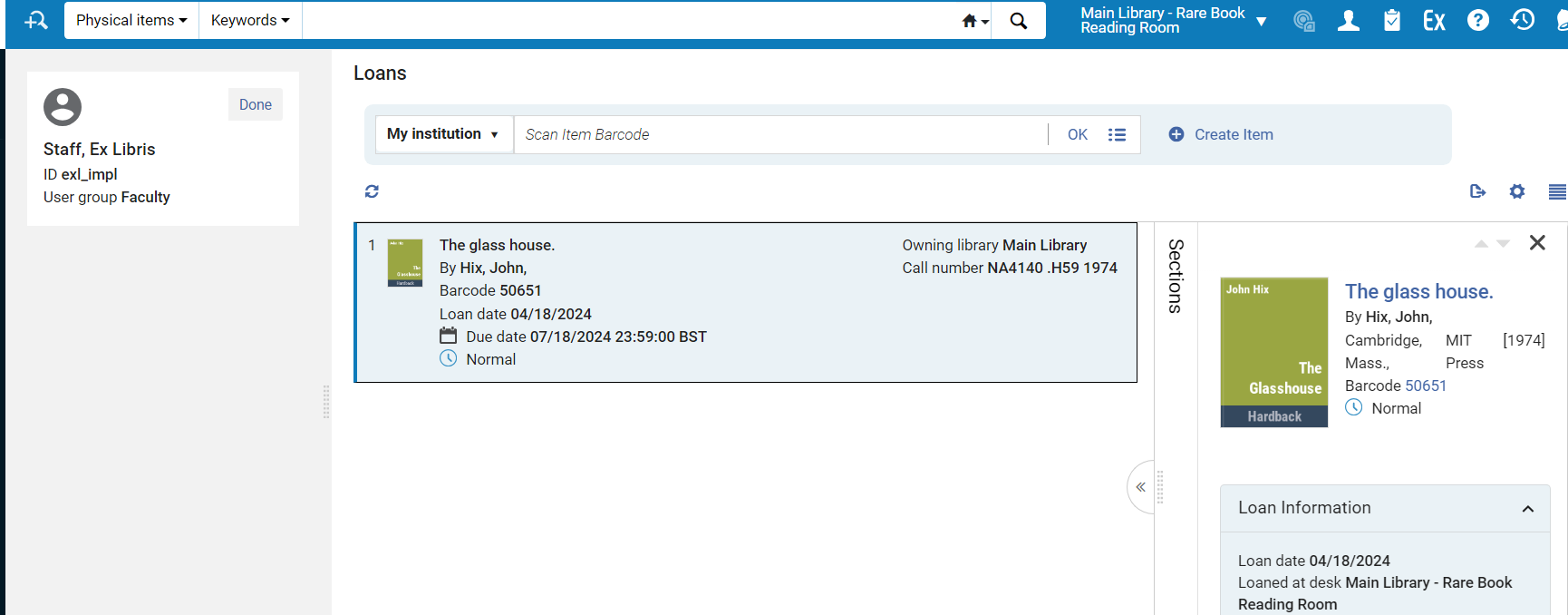 The Managing Patron Services page for InnReach is a limited version of the Loan tab of the regular Patron Services page (see Managing Patron Services at a Circulation Desk). It includes the full information for the item and the basic user information.
Se incluyen los siguientes campos:
- ID de usuario
- Nombre de usuario
- Grupo de usuario
- Título, autor, código de barras.
- Fecha del préstamo, fecha de vencimiento, estado
- Biblioteca propietaria, clasificación, política del ejemplar
- Solicitudes
No se incluyen los siguientes campos:
- Notas
- Vencimiento/insignias de multas
- Identificador de préstamo
