
OpenID Connect
- Administrador general del sistema
Alma integration supports the OpenID Connect standard for user authentication. See the Developer Network for more information.
Cuando un operador de Alma (o usuario de Primo VE) intenta iniciar sesión, la autenticación del usuario se puede procesar con sistemas que sean compatibles con el estándar OpenID Connect tal como Auth0 y Azure. Esto funciona de forma similar al proceso de inicio de sesión social en Alma.
For Primo VE information, see Configuring User Authentication for Primo VE.
Multiple OpenID Connect integration profiles can be defined in Alma. Esto le permite definir una autenticación de usuario diferente para distintos grupos de usuarios como, por ejemplo, para estudiantes y personal de la facultad.
Creating an OpenID Connect Integration Profile
If you want to use this method of authentication, you need to create and configure an OpenID Connect integration profile.
- Open the Integration Profile List page (Configuration Menu > General > External Systems > Integration Profiles).
- Select Add Integration Profile.
- From the Integration Type dropdown, select OpenID Connect.
- From the System dropdown, select the option that represents the OpenID Connect authentication system that you are using.
-
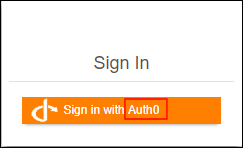
Introduzca un código y un nombre para este perfil de integración. This name is used in the label for the log-in option in Primo:
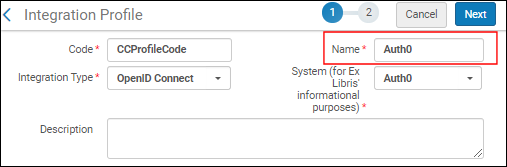
- Select Next.
- Select Active if you want to begin using this integration profile after saving it. Select Inactive if you want to enabled the profile at a later time.
- Introduzca la siguiente información proporcionada por el sistema de autenticación OpenID Connect:
- App ID
- App Secret
- Well-known URL - Select to automatically fill in all the below fields with the default OIDC information. This saves you time and helps ensure that all the fields are defined correctly. Si selecciona no usar la URL conocida, complete los campos siguientes manualmente.
- Authorization endpoint
- Token endpoint
- Scopes - Select a space-delimited list of scopes. El alcance mínimo para el proceso de autenticación es 'openid'.
- Matching Claims - Claim code containing the user ID. Para la mayoría de los proveedores de OpenID, "sub" sería el identificador de la materia. If you elect a different claim code, the "UserInfo endpoint" field opens where you can call the UserInfo endpoint with the access token to retrieve the additional claims. Alma localizará al usuario utilizando la reclamación configurada en el id_token o en la salida de la solicitud UserInfo.
- Force Authentication- Select this if you want to force authentication when Alma authenticates users via OIDC. This helps ensure that the user is properly authenticated with the correct institution.
- Base64 encode the state parameter - Select this to encode the relay state parameter in base64 (instead of URL-encode). Es posible que se necesite para la integración con AWS.
- Logout URL - Add a Logout URL to which the system will redirect after logging out. Esto cierra la sesión del usuario en otros sistemas que están conectados al mismo proveedor de OpenID.
- Login hint - Configure a login hint for single sign-on.
- Select Save.
Page tags: article:topicproduct:almacontent:Documentationlang:english
