
Soporte de LDAP
Configure an LDAP integration profile.
To configure an LDAP type of integration profile, you must have the following role:
- Administrador general del sistema
Alma Lightweight Directory Access Protocol (LDAP) support shares similar characteristics with other Ex Libris LDAP-supported products while providing user name mapping specific to Alma.
For a detailed overview of Alma LDAP support, see https://developers.exlibrisgroup.com/alma/integrations/user-management/authentication/inst_idp/ldap
Ex Libris recomienda que se utilice el mismo perfil LDAP para tanto el servidor de la producción como para el entorno aislado. En este caso, no se necesita que haya una configuración adicional de LDAP en el entorno aislado después de actualizar. For more information, see Recommended Configuration to Account for Sandbox Refresh.
To configure an LDAP type of integration profile:
- On the Integration Profile List page (Configuration > General > External Systems > Integration Profiles), select Add Integration Profile. Se abre la primera página del asistente del perfil de integración.
- Se han de realizar las siguientes acciones en esta página:
- Enter a name and code for the LDAP profile you are defining.
- From the Integration type drop-down list, select LDAP.
- Indicate the type of LDAP system with which you are integrating (for Ex Libris' informational purposes). Téngase en cuenta que esto es obligatorio.
- Si se selecciona Otro en la lista de sistemas, aparecerá el campo Descripción del Sistema para mostrar más información del sistema.
- De forma opcional, se puede introducir una descripción de la integración que se está configurando.
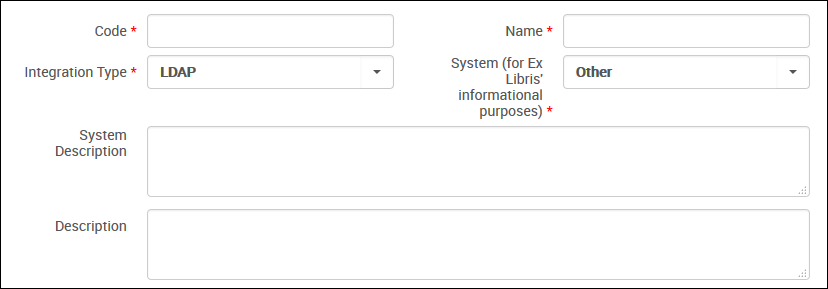
LDAP Profile – Page 1
- Select Next. Aparece la segunda página del asistente.
- Select Actions to indicate that LDAP is active and available for use.
- Under LDAP Definitions, enter the LDAP authentication configuration parameters specific to your institution for the LDAP server interaction, as described in the following table.You can define up to five LDAP definitions.
LDAP Integration Profile Configuration Parameters Campo Descripción Servidor Enter the host name of the remote LDAP server through which LDAP is accessible. Puerto Enter the port for the remote LDAP server. Use secure connection Select this check box to use the SSL protocol to communicate with the LDAP server. This is the only supported option.Use TLS Select the check box to convert the existing connection to use Transport Layer Security (TLS) 1.2, which provides an encrypted connection. This requires LDAP version 3 or later.Connection timeout Specify your preference for the timeout value in milliseconds. The default value is 60000 – one minute for the connection timeout. Initial bind DN Enter the full DN (distinguished name) for the initial bind. Initial bind password Enter the DN password for the initial bind. DN for binding before each search Use this parameter to specify the DN when you want to use dynamic password binding instead of a hard-coded password for the initial bind. Convert password from UTF to charset Leave this field empty. Response encoding Enter UTF8 if response encoding is required. This setting is used to encode the LDAP response before sending it back to the calling application. The only possible value is UTF8. Search base 1 (through Search base 5) Enter the full path search in the LDAP directory tree to the user. The system searches the LDAP tree to locate the user's record based on the Search base and Search filter. The Search base and Search filter parameters can be repeated to search in more than one tree. If the results of the Search base/Search filter are not unique (or a zero-size result), the search step is repeated for the next provided Search base/Search filter.Search filter 1 (through Search filter 5) Enter the parameter by which you want to filter the results to return only one object. The system searches the LDAP tree to locate the user's record based on the Search base and Search filter. (See the note above.) Map Primary Identifier Enter the name of an LDAP attribute, such as CN. This attribute is mapped by Alma to serve as the user identifier. The Alma user name must match one of the LDAP identifiers, such as CN. If it does not, the authentication succeeds but the user is not allocated any permissions/roles. - Select Save. El perfil que se configuró aparece en la Lista de perfiles de integración.
Page tags: article:topicLDAPproduct:almacontent:Documentationlang:englishLDAP integration profile
