
Retiros
- Physical Inventory Operator Extended (with Institution-level scope)
Un retiro es el proceso de borrar ejemplares del catálogo para garantizar que el catálogo esté actualizado y representar solo aquellos ejemplares que realmente están en la colección. Although withdrawn items do not appear in Alma and are not published to Primo, librarians and staff users can view a historical record of these items in Analytics reports. Withdrawn items appear as Lifecycle = Deleted in Analytics.
Esta sección describe los métodos que se usan para retirar ejemplares (uno o más ejemplares o un conjunto de ejemplares).
Users with the purchasing and receiving operator roles will be able to delete items when editing the PO line.
Retirar uno o más ejemplares de la lista de ejemplares
- suppressBibWithDeletedHol— If set to true, Alma suppresses bibliographic records whose holdings records are deleted.
- suppressBibWithSuppressedHol— If set to true, Alma suppresses bibliographic records that contain only suppressed holdings records. If set to false, Alma publishes the bibliographic record.
See Configuring Other Settings for more information regarding configuring suppressBibWithSuppressedHol and suppressBibWithDeletedHol
- Search for the item(s) that you want to withdraw (see Searching in Alma).
- In the search results row containing the item(s) that you want to withdraw, select Items.Depending on the type of search that you initiated and what's available in your inventory, selecting Items may display different results.
- If you selected an All titles search or a Physical titles search and there is only one holdings records, the List of Items page appears with Withdraw items. For more information about the List of Items page, see Working with the List of Items.
- If you selected an All titles search or a Physical titles search and there are multiple holdings records, you must select View all holdings and select the View Items row action for the specific holdings record (see Working with the List of Holdings) from which you want to withdraw multiple items.
- If you selected a Physical items search and the holdings record contains a single item, the Physical Item Editor page appears first. Select View all items to display the List of Items page.
- Procesar una de las siguientes acciones de retiro:
- Select the Withdraw row action and select Confirm in the confirmation dialog box.
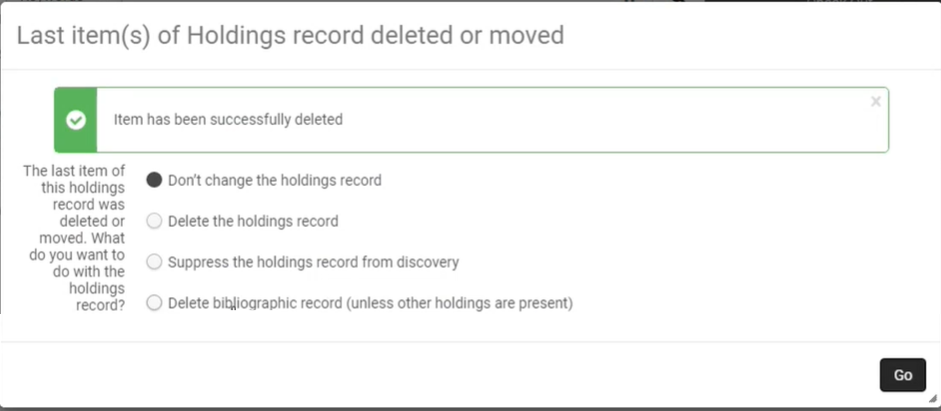 Select one of the following options and then select Go.
- Don't change the holdings record— Select if you do not want to withdraw or suppress the holdings record.
- Delete the holdings record— Select to withdraw the holdings record.
- Suppress the holdings record from discovery— Select if you do not want to withdraw the holdings record, but you want to prevent the record from appearing in Primo or an external discovery system.
- Delete bibliographic records (unless other holdings are present)— Select to delete the bibliographic record with which the item is associated, if the bibliographic record has no other holdings. In this case, both the holdings record and the bibliographic record with which the item is associated are deleted.Si borra un registro bibliográfico en la Zona de la Institución, y usted es la última biblioteca en el consorcio que lo tiene, el registro se borra automáticamente de la Zona de Red. If you do not want it to be deleted automatically in the Network Zone, set the delete_nz_bib_without_inventory parameter (Configuration > Resources > General > Other Settings) to false(see Configuring Other Settings (Resource Management)).
- Use the checkbox column to select one or more items and select Manage Selected > Withdraw items.Esta opción actualmente aparece únicamente cuando hay un solo registro de existencias.
- Select the Withdraw row action and select Confirm in the confirmation dialog box.
Items that are marked as Committed to Retain are not deleted. For more information, see Retention Information.
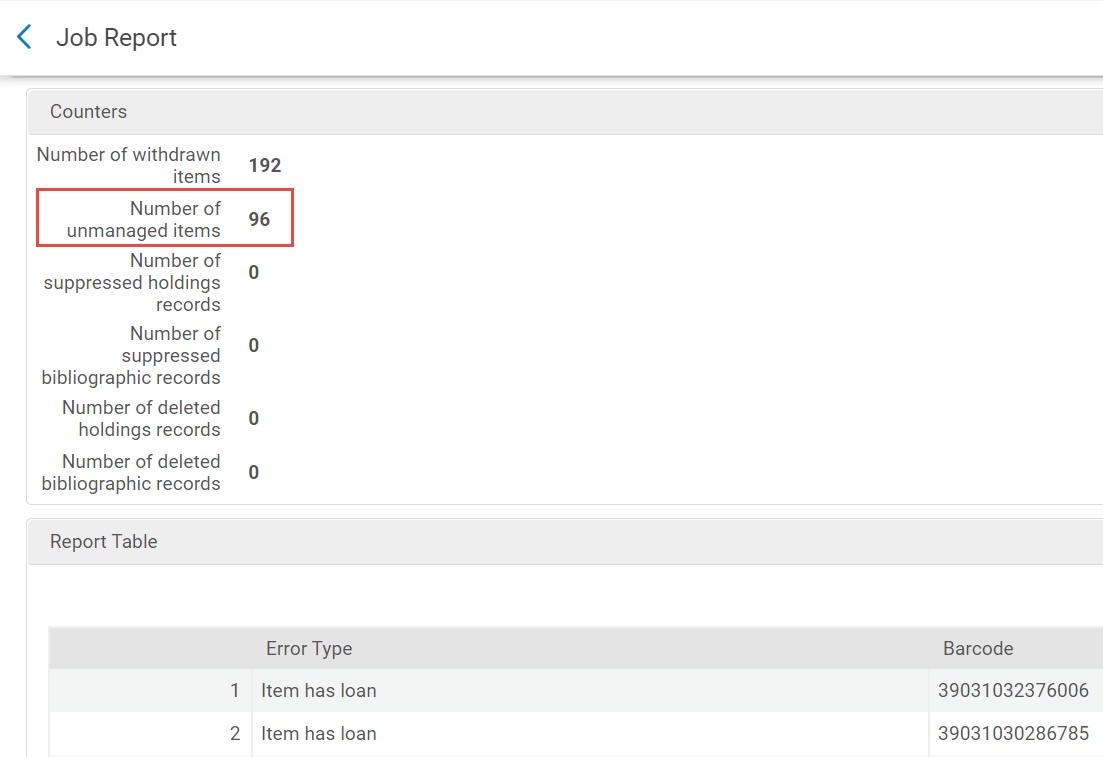
In a Job Report, items not deleted appear in the Counters section under Number of unmanaged items.
Withdrawing an Item from the Repository Search
For the items search, see Withdrawing One or More Items from the Items List.
For the items section in the physical holdings and title searches:
If the withdrawn item belongs to a holdings record that has no other items, you are prompted to choose how to handle the holdings record and the bibliographic record if it does not have any other inventory. Select one of the following options and then select Withdraw:
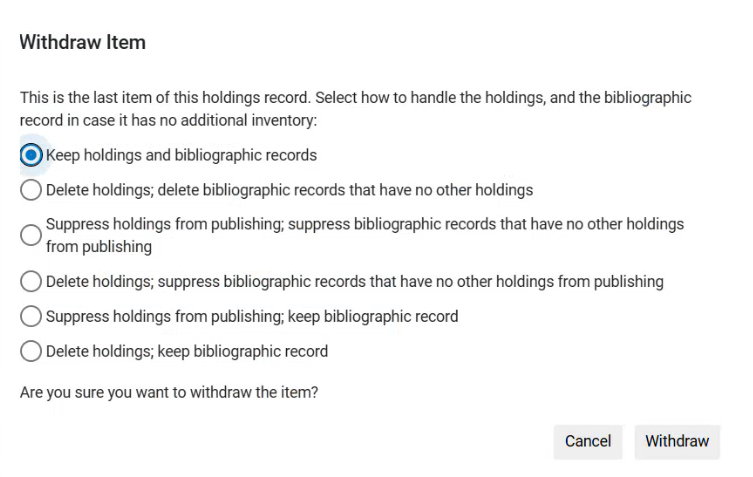
- Keep holdings and bibliographic records— Select if you do not want to delete or suppress the holdings record.
- Suppress holdings from publishing; suppress bibliographic records that have no other holdings from publishing— Select if you do not want to delete the holdings record, but you want to prevent both the holdings and the bibliographic record from appearing in Primo or an external discovery system.
- Delete holdings; suppress bibliographic records that have no other holdings from publishing— Select if you want to delete the holdings record, but you do not want to delete the bibliographic record, only to prevent it from appearing in Primo or an external discovery system.
- Suppress holdings from publishing; keep bibliographic record— Select if you do not want to withdraw the holdings record, but you want to prevent it from appearing in Primo or an external discovery system, without impacting the bibliographic record.
- Delete holdings; keep bibliographic record— Select if you want to delete the holdings record, without impacting the bibliographic record.
Retirar conjuntos de ejemplares
You can withdraw items from either a physical titles or physical items set by running the Withdraw Physical Items job. For more information, see Running Manual Jobs on Defined Sets.
