
Restringir la edición de campos de metadatos
The Consortia central office is now able to control which Network Zone bibliographic metadata fields can be added, edited, or deleted by Network Zone members, allowing the Consortia office to maintain the quality of Network Zone bibliographic records by preventing unwanted edits of specific fields.
A partir de la versión de agosto de 2023, los operadores de la institución de la Zona de Red están extentos de la política de restricciones que se implemente.
There are several use cases in which certain fields within a record can be restricted from add/edit or delete even when the cataloger has privilege's to edit the complete record. For example, the consortia office can protect the Network Zone bibliographic record 035 field from any edits by the consortia members or prevents consortia members from editing bibliographic 6XX fields of a certain vocabulary.
In the event there is one restriction for the 035 field with no prefix defined and another restriction for a 035 field with a prefix, the latter of the two options (with a prefix) overrides the other.
In addition, there is an option to define restrictions based on a user's cataloger level, see Restrictions by Cataloger Level.
Configuración
Para agregar una restricción a un campo específico en los registros de la Zona de Red, se ha añadido una nueva tabla de configuración.
- Access the configuration table, go to Alma Configuration > Resources > Cataloging > Metadata Configuration and select the desired profile to add the restrictions (e.g. MARC21 Bibliographic Record).
- Select the Other Settings tab and select the Fields Restrictions Policy link.
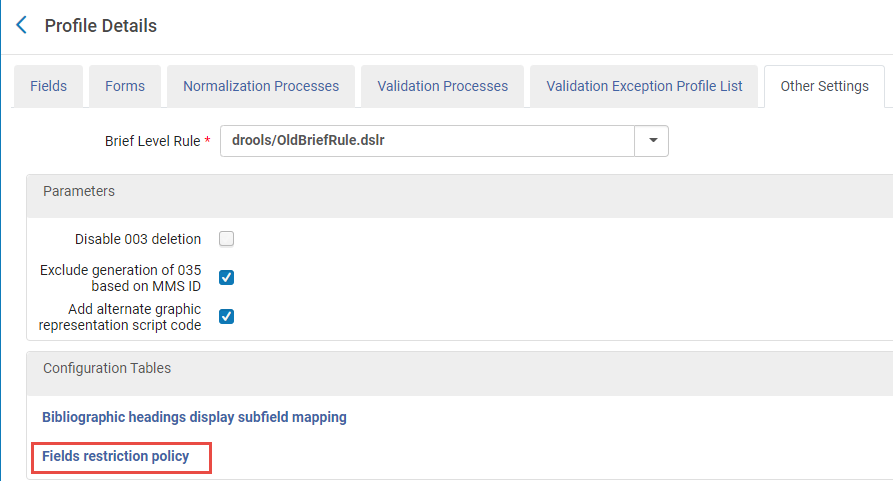 Otros ajustes > enlace a Política de restricciones de campos
- In the Mapping Table, add a row (by selecting Add Row) for each field to be restricted.
- Rellene los campos siguientes:
Opciones de configuración Acción Descripción Etiqueta Campo específico (por ejemplo, 035) o grupo de campos (por ejemplo, 6XX). A partir de la versión de agosto de 2023, el campo 035 se puede restringir por un prefijo.
The supported format for adding restrictions to a group of fields is specifically <number>XX. For instance, you can easily restrict all 9XX fields using this format.
Please note that other formats, such as X<number>X(e.g., X9X),XX<number>(e.g., XX9), and <number><number>X(e.g., 99X), are not supported.
Restringir Añadir/Editar Verdadero o falso. Verdadero restringirá la acción. Restringir borrar Verdadero o falso. Verdadero restringirá la acción. Vocabulario Al definir el código de vocabulario, la restricción de los campos 6XX se aplica al vocabulario específico. Sobreescribir el nivel del catalogador Al definir el nivel de catalogador, los usuarios con un nivel de catalogador "igual a" o "mayor que" están exentos. Clasificación de Cutter Indicates to the Field Restriction Policy that the stated restriction on the 035 field is on the defined prefix, for example; OCoLC. En este ejemplo, solo se restringe el campo 035 con el prefijo "OCoLC". 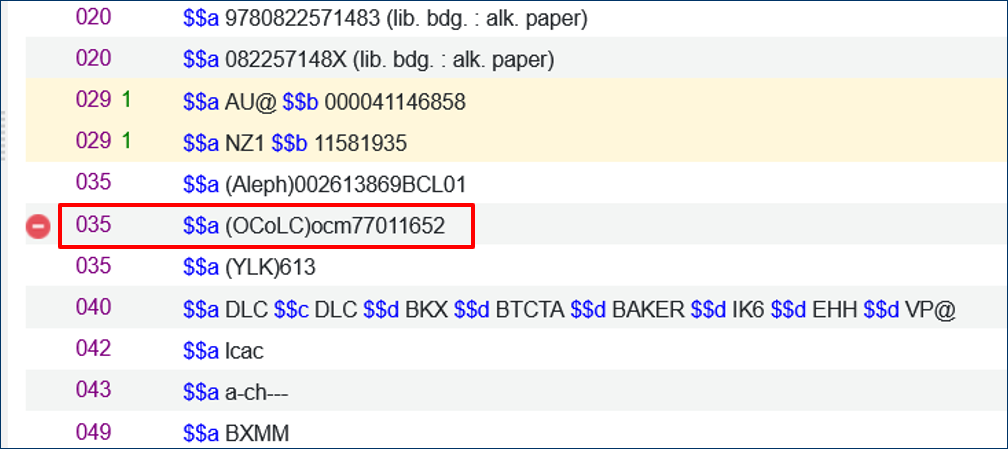
- Select Add Row.
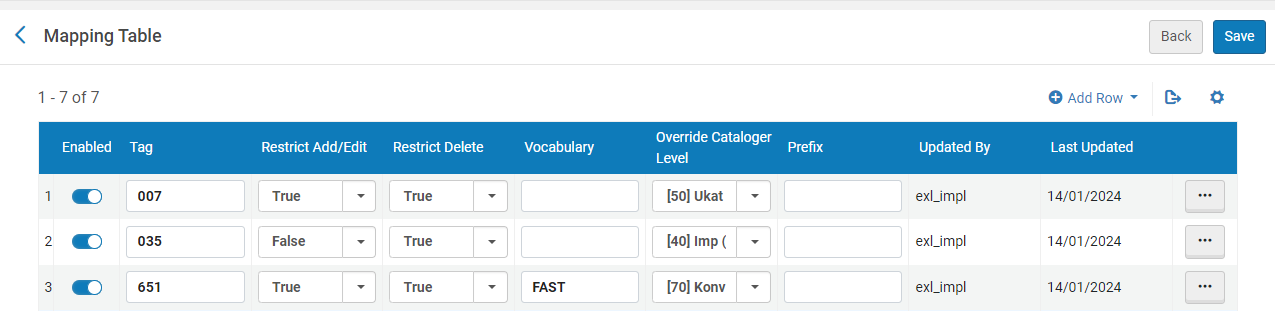 Tabla de mapeo de configuraciones - Restricción de edición
- Rellene los campos siguientes:
- Select Save.
Añadir, editar o eliminar un campo restringido
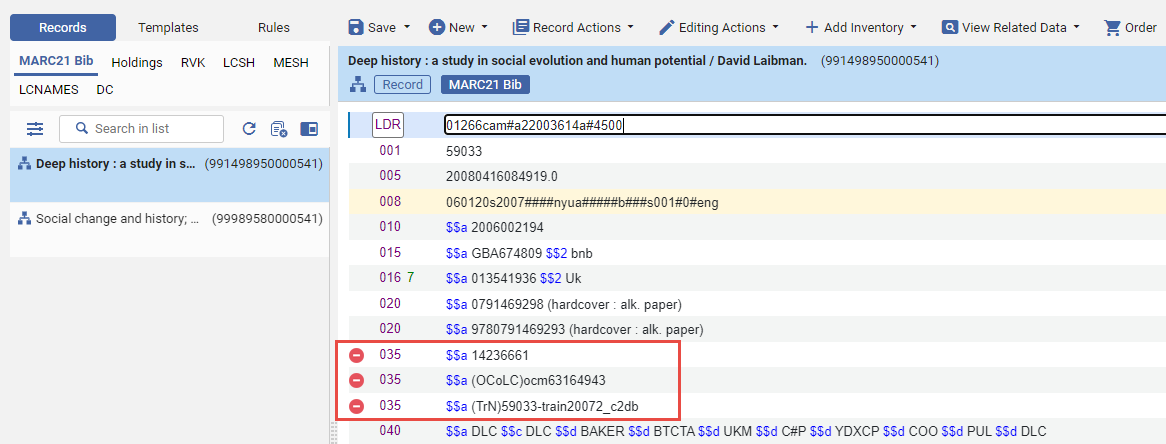
Once a field is restricted, users who access the record and attempt to remove or add/edit the restricted field receive an alert message "You cannot delete/add <field_name> field. This is a restricted action."

A restricted field is displayed with a no-access ( ) icon, indicating the field is restricted and cannot be deleted or added/edited.
Restricciones para grupos de campos
The supported format for adding restrictions to a group of fields is specifically <number>XX. For instance, you can easily restrict all 9XX fields using this format.
Please note that other formats, such as X<number>X(e.g., X9X),XX<number>(e.g., XX9), and <number><number>X(e.g., 99X), are not supported.
Puede restringir un grupo de campos al usar una X en vez de una posición específica (por ejemplo, 00X). When you define the field 00X, this includes all fields that fall between 001 to 009. Esta operación es muy útil al permitir a los usuarios incluir un rango extenso de campos en vez de definirlos uno por uno.
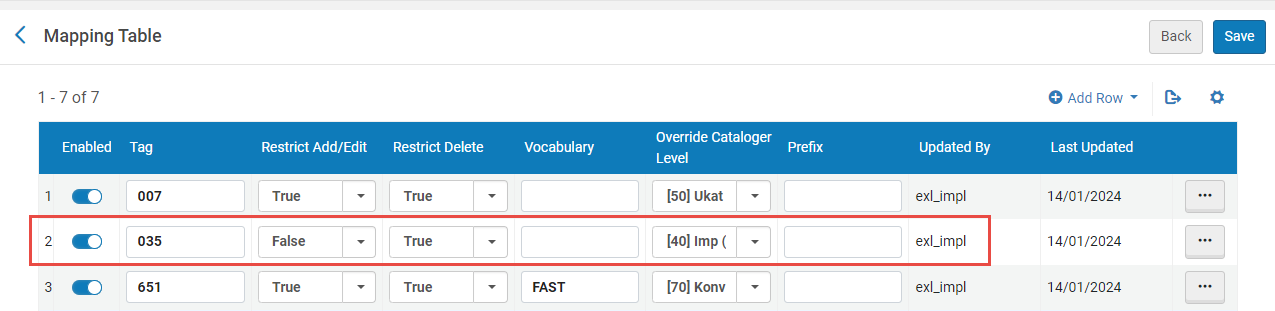
Moreover, when defining a group of fields for subjects (e.g. 6XX), you can specify explicitly the vocabulary code for which this group of fields is restricted. For example, if you define a restriction for the group of "6XX" fields for NLI, the restrictions of these fields will only be for the NLI subjects, see mapping table image above - item # 3.
Restricciones por nivel de catalogador
You can restrict a field or group of fields with an exemption based on cataloger level (which is defined on each restriction row in the configuration). Se puede restringir un campo específico para un nivel específico de catalogador. Esto significa que cualquier usuario con el mismo nivel de catalogador o más alto estará exento de la restricción. For example (below), the tag 035 is restricted for adding/editing and deleting. However, the column Overwrite Cataloger Level is defined with [90] Expert Level. This means that all users are restricted from adding/editing or deleting anything from the 035 fieldexcepta user with a [90] cataloger level or higher.
When defining a Cataloger Level, for instance 60, all users with a cataloger level equal or greater than 60 are exempt. Los usuarios con un nivel de catalogador de 60, 70, 80 y 90 están exentos de restricciones.
Page tags: article:topicproduct:almacontent:Documentationlang:english
