
Configurar otros ajustes (Gestión de recursos)
Additional settings (customer parameters) to turn resource management features on or off or to provide specific parameter values.
- Administrador de catalogación
- Administrador de repositorio
- Administrador general del sistema
Esta opción permite personalizar diversas configuraciones que no son configuraciones específicas de ninguna otra acción de gestión de recursos.
You configure these settings from the Customer Parameters Mapping Table page (Configuration Menu > Resources > General > Other Settings).
Network zone administrators can view and configure the settings only through the Consortia Central Configuration Dashboard.
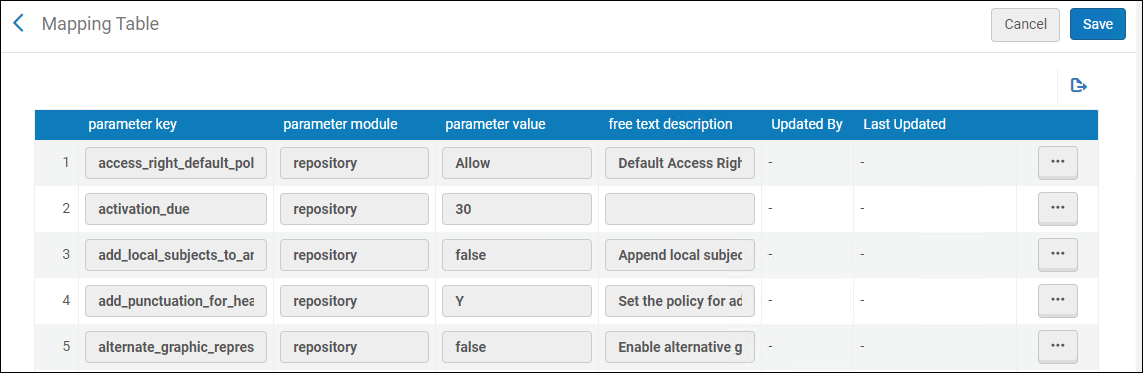
Las opciones de esta página están descritas en la siguiente tabla:
| Clave de parámetro | Descripción | ||||||||||||||
|---|---|---|---|---|---|---|---|---|---|---|---|---|---|---|---|
| access_right_default_policy | The access rights that are applied to all digital inventory that are not attached to access rights (see Configuring Access Rights). Los posibles valores son:
|
||||||||||||||
| activation_due | El número de días para añadir a la fecha actual, para calcular la fecha de vencimiento predeterminada de la tarea de activación electrónica. El valor se añade a todas las tareas de activación electrónica. When the due date passes, a notification is sent to the user that is assigned the e-resource activation task and an alert is displayed in the user's list of tasks. For more information, see Managing Electronic Resource Activation and Manually Creating a PO Line. | ||||||||||||||
| add_local_subjects_to_analytics | La capacidad de anexar materias locales (69 campos) al campo Materias de Analytics. | ||||||||||||||
|
add_punctuation_for_heading |
Usar este parámetro del cliente para controlar cómo se maneja la puntuación cuando un registro bibliográfico se actualiza con la información de los encabezados. Se pueden configurar las siguientes opciones:
Enter Y to add or correct punctuation when bibliographic records are updated by authority records. If the bibliographic record originally had punctuation in a subfield, but the authority record does not have punctuation in that same subfield, when the authority record updates the bibliographic record during the Preferred Term Correction run, the authority record updates the bibliographic record with the latest headings information and runs a script according to the table in Implemented Punctuation Rules for Updated Bibliographic Records section to add or correct punctuation in the heading, before it is added to the bibliographic record. Esta es la configuración por defecto.
Enter N not to add or correct punctuation when bibliographic record are updated by authority records. Si el registro bibliográfico originalmente tenía puntuación en un subcampo, pero el registro de autoridad no tiene puntuación en ese mismo subcampo, cuando el registro de autoridad actualiza el registro bibliográfico, durante la ejecución de Corrección de término preferente, lo actualizará entonces con la última información de encabezados y eliminará la puntuación de ese subcampo del registro bibliográfico.
Enter 'LDR' when you want the system to determine how to handle the punctuation based on the content of position 18 in the LDR. Si la posición 18 contiene c o n (véase el estándar MARC 21), la puntuación no se añade al registro bibliográfico. Para cualquier otra cosa especificada en la posición 18, la puntuación se añade o corrige en el registro bibliográfico.
Estos ajustes de puntuación se aplican si:
|
||||||||||||||
| allow_link_resolver_usage_indications | Use el parámetro del cliente para desactivar la información del "Uso del resolvedor de enlaces" en los resultados de búsqueda y en la herramienta de Análisis superpuesto. When set to false, data about "link resolver usage" in search results and in Overlap Analysis tool will not be available. For more information, see Link Resolver Usage. | ||||||||||||||
| alternate_graphic_representation_editing | Set the value for this parameter to true to enable the Alternate Graphic Representation option in the Edit menu of the MD Editor. The Alternate Graphic Representation function replaces the Add Alternate Graphic Representation function in the Edit menu and can be expanded to provide the following options:
If the value for this parameter is blank or set to false, the Add Alternate Graphic Representation function is the option presented in the Edit menu of the MD Editor. Esta capacidad se proporciona para las instituciones que trabajan principalmente con scripts no latinos. See Working with Linked 880 Fields in Bibliographic Records for more information. |
||||||||||||||
| alternative_mde_enhance_record_shortcut | When enabled, this parameter controls the keyboard shortcut for the Enhance the Record action. When set to false, the shortcut is Ctrl+Alt+E. When set to true, the shortcut is Ctrl+Shift+E. | ||||||||||||||
| asrs_job_message_delay | This parameter sets the delay between ASRS calls in minutes in the Inventory Remote Storage Update Job. | ||||||||||||||
| asrs_remove_diacritics | When set to true (default false), diacritics are removed from outgoing ASRS messages. | ||||||||||||||
| asrs_socket_timeout | No funcional (para uso futuro). | ||||||||||||||
| aut_see_also_link | By default, this parameter is set to true, and if an authority vocabulary does not use authority IDs, selecting the "See also" link generates a search for the term in the 5XX field. The search operator is changed from “contains keywords” to “equals”. La búsqueda se realiza en segundo plano para el término en 5XX y el sistema de origen del registro.
Institutions that prefer the previous keyword-based “See also” search behavior can select to opt out of the enhanced system by setting the customer parameter to false. |
||||||||||||||
|
aut_name_partial_linking
|
When set to true, enables the partial linking behavior. Esto garantiza que cualquier registro bibliográfico nuevo o modificado se incluya en el proceso de enlace parcial.
When activated, the Unlink bib records from authority records job operates in the following manner:
|
||||||||||||||
| authority_control_link_available | When this parameter is set to true, the headings that are successfully linked are reported and available in the Authority Control Task List under the All tab. The default setting for this parameter is false. For more information, see Using the Authority Control Task List. | ||||||||||||||
| authority_ptc_ignore_suffix | Permite a las bibliotecas configurar Alma para corregir encabezados bibliográficos basados en referencias cruzadas de autoridades, actualizándolos al término preferido y cambiando la etiqueta de campo en el registro bibliográfico como corresponde (por ejemplo, de 610 a 630). Esto garantiza que los datos bibliográficos se mantengan alineados con los términos preferidos de los registros de autoridad.
To enable this functionality in your institution, input the vocabulary codes in upper case for the relevant authority vocabularies into the customer parameter, separated by commas, for example, LCNAMES, LCSH, LCGFT, MESH. |
||||||||||||||
| auto_copy_catalog_search_profile_default_id | El Perfil de búsqueda por defecto utilizado para la catalogación automática. | ||||||||||||||
| avoid_fuzzy_search_resolving | When set to true, enables the institution to indicate to Alma to avoid "Fuzzy matches" ("title only" matches) attempts if other information (like identifiers or author) exists in the URL. By default, the new customer parameter is set to false. For more information, see Control Ability to Ignore Title Based Link Resolving. | ||||||||||||||
| bib_heading_check_max_number | El número máximo de encabezados que se pueden verificar. | ||||||||||||||
| bib_heading_correct_max_number | El número máximo de encabezados que se pueden corregir. | ||||||||||||||
| brief_level | Establecer el valor que identifica el umbral de nivel breve para los registros. Los registros con el mismo/igual valor o menos, se consideran registros breves. Para identificar el umbral de nivel breve, se pueden utilizar valores de 00 a 09. El valor por defecto para este parámetro es el 01.
By specifying 00 for the brief_level parameter, all records will be evaluated as not brief since the minimum brief level value that can be saved in a bibliographic record is 01. For institutions that choose not to use brief level criteria for evaluating records and want to avoid the brief level warnings that occur when creating PO lines, for example, the brief_level parameter should be set to 00. The brief_level parameter is used as a threshold to evaluate the brief level of records. No cambia el valor del nivel breve asignado a los registros individuales. For more information, see Working with Brief Record Levels. |
||||||||||||||
|
browse_headings_use_uniform_title_in_names |
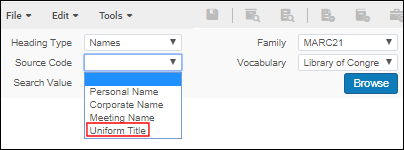
Use this parameter to control the option for Uniform Title when doing a Names browse in Browse Bibliographic Headings (Resources > Cataloging > Browse Bibliographic Headings). The Uniform Title option appears in the Source Code drop-down list when the Heading Type of Names is selected and the browse_headings_use_uniform_title_in_names customer parameter is set to true. Esta es la configuración por defecto del parámetro.
Opción de Código Fuente de Título Uniforme
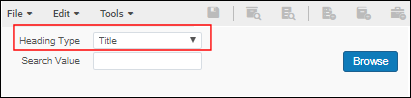
When browse_headings_use_uniform_title_in_names is set to false, Uniform Title does not appear as an option in the Source Code drop-down list for a Names browse. Independientemente de los ajustes de configuración de browse_headings_use_uniform_title_in_names, los títulos uniformes (campos 130, 630 y 730) se indexan bajo el tipo de encabezado del Título y pueden examinarse utilizando esta opción en Navegar encabezados bibliográficos. Browsing of UNIMARC Uniform Titles includes field 500 all subfields and 501 $a data.
Tipo de Encabezado de Título
|
||||||||||||||
|
call_number_type |
Si no se ha especificado el tipo de clasificación de un registro de existencias determinado (primer indicador de MARC 852) y no se ha configurado ningún tipo de número de clasificación predeterminado para la ubicación del registro de existencias, el valor seleccionado será el valor por defecto. Valores compatibles para la clasificación: La clasificación/signatura se realiza sobre un valor normalizado. La normalización difiere según el tipo de clasificación/signatura. En general, existe una normalización genérica por defecto de la clasificación/signatura que elimina los espacios iniciales y finales, empaqueta los espacios, convierte todo a minúsculas y se completa con ceros a la izquierda hasta el 12. This is done for cases that aren't specifically defined to have their own normalization.
Note that the call_number_type parameter is the default call number type that is resorted to, if there is no mapping from a bib field, no definition of call number type in the location, and no call number type defined in the holdings record template. When a new holdings record is created in the MD Editor, the 1st indicator of field 852 comes from the holdings template – and can then be edited by the user. |
||||||||||||||
| cataloging_level_user_preferences | Personalizar el comportamiento de la lista desplegable del Nivel de permiso del catalogador en el Editor MD. When true, the cataloging level that appears in the Cataloger Permission Level drop-down list while working with a record becomes the default cataloging level. This default remains in place as subsequent records are edited, even when you log out and log back in. The default stays the same until another cataloging level from the Cataloger Permission Level drop-down list is selected; and then this new selection becomes the default.
La fijación de un nuevo nivel de catalogador solo se mantiene después de guardar un registro con el nuevo nivel de catalogador. Las opciones son:
Este parámetro controla el nivel de catalogación por defecto de los registros bibliográficos, los registros de autoridades locales y los registros de autoridades administradas externamente. Note that it is overruled by the use_record_cataloging_level_by_default parameter (detailed below). See Cataloging Privileges for more information. |
||||||||||||||
| cdi_consortia_inheritance |
Determinar si las colecciones activadas en la Zona de Red para la búsqueda en CDI serán heredadas por la institución. When set to Y(which is the default for institutions connected to a Network Zone):
When set to N, no inheritance will occur for CDI search activations and full text activations of database type of collections from the network zone. All member institutions that are part of the consortium inherit full text activations for collections with portfolios from the Network Zone. No es posible no heredar las activaciones de la Zona de Red para estos tipos de colecciones. The value of this parameter corresponds to the Inherit Consortium Central office resources check box in the Primo Central Institutional profile, for institutions set up with a Central Office. See Consortium Activation in Primo Central. |
||||||||||||||
|
central_record_management |
Donde los registros se administran en una Zona de red. Para ser configurado en instituciones miembro. For more information, see Network-Managed Records in a Collaborative Network. Las opciones son:
Note that when DEFAULT_NETWORK is selected, the validation of bibliographic records is executed in the Network Zone. As a result, the Institution Zone validation profiles/configurations are not used. |
||||||||||||||
| ckb_descriptive_bib_merge_routine | Si se deben fusionar las reglas para las actualizaciones descriptivas bibliográficas durante la actualización de ckb. | ||||||||||||||
| controlled_vocabulary_remove_punctuation | Editor de metadatos: Cuando se compara el valor en el registro con un vocabulario controlado, el mecanismo de validación del Vocabulario controlado se comporta de la siguiente manera:
|
||||||||||||||
|
course_restricted_bib_data_will_be_deleted
|
Select true to delete a bibliographic record that is created as course restricted when the course is deactivated.
Select false to suppress the record from publication. Also see Adding Citations to a Reading List.
El parámetro solo borra/suprime el registro bibliográfico vinculado al curso si:
Los registros bib no se eliminan si el registro bib tiene cualquiera de lo siguiente:
|
||||||||||||||
| course_restricted_field |
Esta clave de parámetro es relevante solo para Primo. It does not work with Primo VE. El campo en el registro bibliográfico MARC indica si un registro bibliográfico está restringido para ser utilizado por un curso. Téngase en cuenta que en Alma es posible utilizar separadores de subcampos definidos, como dólar dólar $$ o doble cruz ‡. El tipo que se defina como el separador de subcampo también se debe estipular en este campo. Also see Adding Citations to a Reading List. |
||||||||||||||
| cz_clone_last_tested_time | Última vez que se ejecutó la prueba de estado del clon de la Zona de la Comunidad. | ||||||||||||||
| days_to_preform_ingest_jobs_info | El número de días para realizar el informe de información de las tareas de ingesta directa. When set to (-1) - >, the parameter is ignored. | ||||||||||||||
|
db_categories_field |
Para Primo y Primo VE, este campo indica qué campo MARC presenta las categorías de base de datos para la Búsqueda en base de datos. For more details, see Database Search for Primo or Configuring Database Search for Primo VE. | ||||||||||||||
| delete_access_type_via_portfolio_loader | When set to true (default false), the portfolio loader deletes the access type field of given portfolios if the access type column is left empty in the input file. | ||||||||||||||
| delete_nz_bib_without_inventory |
Set to true to enable automatic deletion of the Network Zone bibliographic record when its last inventory is deleted in the NZ member. The delete_nz_bib_without_inventory parameter does not delete NZ electronic inventory (bib and portfolios) linked to CZ. Set to false to leave the bibliographic record in the Network Zone when its last inventory is deleted in the NZ member. En este caso, el usuario del personal deberá borrar el registro bibliográfico de la Zona de la Red en forma manual. Define this parameter in the Network Zone. |
||||||||||||||
| deletion_nz_bib_records_with_relations_new_behavior | When set to true, a cross-consortia check is performed for related records (as configured in the Network Zone). When set to false (default), a single-institution check is performed for any related records. | ||||||||||||||
| deposit_activity_report_last_run | La última vez que fue ejecutado la tarea Informe de Actividad del Depósito. | ||||||||||||||
| direct_ingest_last_loaded_folder_name | El último nombre de carpeta actualizado. | ||||||||||||||
| directional_character_embedding_sign_box_draw | When set to true (default false) use box draw signs for directional characters. | ||||||||||||||
|
disable_preferred_term_correction_job |
When the job Authorities - Preferred Term Correction runs, it:
By default, this parameter is set to true. For more information on this parameter and the Authorities - Preferred Term Correction job, see Working with Authority Records.
|
||||||||||||||
|
display_specific_related_items |
For MARC 21, set this parameter to true to display in repository search results only the specific items identified in $g for related records cataloged with the 773 field. For UNIMARC, set this parameter to true to display in repository search results only the specific items identified in $v for related records cataloged with the 461 or 463 field. In order for this to work properly, you must catalog $g (MARC 21) or $v (UNIMARC) using yr: and no:. For example: $g yr: 2014 $g no: 1 See $g and $v item identification labels on the Configuring Related Records for Physical Inventory page for more information. |
||||||||||||||
| distribute_resource_management_changes_last_run | Para uso futuro. | ||||||||||||||
|
enable_binding_of_items_committed_to_retain
|
When set to true(default false), enable binding of items committed to retain, which means deleting the item in the process.
Al vincular ejemplares, se pierden algunos datos de los ejemplares originales. While the Committed to Retain status is preserved, the Retention Reason and Retention Note fields are not transferred to the resulting item.
|
||||||||||||||
| enable_consortia_actl | When set to true (default false), processing of Network Zone authority control task list entries from consortia members is enabled. | ||||||||||||||
|
enable_deletion_of_linked_nz_record_without_inventory |
This parameter controls the ability for users with cataloging extended privileges to delete recordswithoutinventory for their institution, the Network Zone, and other member institutions. Note that linked (cached) Network Zone recordswithinventory cannot be deleted by the Network Zone or Network Zone members. Also note that this customer parameter affects only linked Network Zone records. That is, a Network Zone record that is not linked to any member institution can be deleted regardless of this parameter's value, either by a member institution or by the Network Zone. This parameter should be set in the Network Zone. The true/false setting for this parameter in the Network Zone affects the delete functionality for all the Network Zone members.
For more information regarding linking/unlinking, see To copy Network Zone records to local records (without linking the records), or to unlink local and Network Zone records. |
||||||||||||||
|
enable_directional_characters |
Set this parameter to true to enable right-to-left and left-to-right directional editing in the Metadata Editor. When you set this parameter to false, the right-to-left and left-to-right directional editing feature is disabled (does not appear) in the Metadata Editor. The default setting for this parameter is true. |
||||||||||||||
| enable_exact_start_with_compare_condition(Not applicable) | No aplicable | ||||||||||||||
|
enable_extender_index_linked_aut |
Set this parameter to true in order to enable the capability to include matches to non-preferred terms in any associated authority records for Keywords, Creator, Uniform Title, Names, Subject, and Subject (LC) repository searches. See Non-Preferred Terms in Repository Search for more information. |
||||||||||||||
|
Set this customer parameter to true to have the system update or create the LDR, 005, or 008 fields of the imported record that is stored in Alma. Para estos campos, el sistema gestiona la importación de la siguiente manera:
The default setting for this parameter is false. When this parameter is set to true, it applies to all imported records/types such as repository, authority, and so forth. |
|||||||||||||||
|
enable_nz_record_assignment This parameter is available only for the Network Zone, since the network sets this policy for all its member. Las instituciones independientes y los miembros de la ZR no tiene acceso a este parámetro. |
Set this customer parameter to true to allow users to assign Bibliographic and Authority Network Zone records to a cataloger from another institution within the network, using the Assign Record to Another Cataloger action in the Metadata Editor. Esta funcionalidad solo está disponible en el nuevo Editor de Metadatos. |
||||||||||||||
|
enable_view_it_show_all_results |
Set this customer parameter to true to be able to view more than 25 entries in View It. See View It for more information. Esta función solo está disponible en entornos Primo VE. If you have an Alma-Primo environment, set this parameter to false to prevent unexpected results. |
||||||||||||||
| enable_xsl_normalization_rules | Set by default to false. When set to true, enables users the option to create/edit XSL normalization rules. Esto ofrece a los usuarios control sobre las nuevas capacidades de las reglas de normalización XSL.
For more information, see Alma XSL Normalization Rule Examples. |
||||||||||||||
|
export_portfolio_file_name_contains_id |
Set this parameter to true when running the export electronic portfolio job with KBART files, and the file name contains diacritics. When this parameter is set to true, the file name will contain an ID and not a package name (with diacritics). El empleo de esta opción evita los problemas que ocurren con nombres de ficheros que contienen signos diacríticos. When you leave this parameter set to the default,false, the system uses the package name in the file name when running the export electronic portfolio job with KBART files. See Export Electronic Portfolios for more information. |
||||||||||||||
| external_central_SFX_API_base_url | Generalmente no es funcional. | ||||||||||||||
| f3_use_network_configuration_in_iz | F3 utiliza configuraciones de la Zona de Red para el número de identificación de red editado en la Zona de la Institución. | ||||||||||||||
| fields_33x_use_controlled_vocabulary_for_search | When set to true (default false), bib and hol fields 336, 337, 338, show controlled vocabulary in the search drop-down. | ||||||||||||||
|
fix_multiple_004_in_oclc_publishing |
Set this parameter to true to avoid having the Publish your Local Holdings Records (LHRs) to OCLC publishing job mistakenly take a bibliographic record 035 field value and add it to the holdings record 004 field when there is already a 004 field, thus creating a second 004 field. |
||||||||||||||
| force_new_cache_cz_records_in_nz | When set to true (default false), set in member inst: Force the new ERM Cache CZ Records in NZ mechanism even in non-production environment. | ||||||||||||||
| generate_unique_barcode_max_retries | Establecer el número máximo de veces para que Alma intente crear un nuevo código de barras único cuando se identifica un código de barras no único durante la validación. The default setting is 3.
Cuando se encuentra un código de barras no único, Alma intenta generar un código de barras único hasta el número máximo de veces especificado. Si no se genera un código de barras único dentro del número de reintentos, aparecerá un mensaje de error. See Configuring Barcode Validation for more information. |
||||||||||||||
| gnd_like_correction | Habilitar la corrección de vocabulario local similar a la corrección especial GND. | ||||||||||||||
| gnd_token | Ingrese el token proporcionado por GND para el valor del parámetro. Al contribuir con registros a GND, GND usa este token para la autenticación.
Para los consorcios, la Zona de Red y las instituciones miembro usan y especifican el mismo token en el valor del parámetro para gnd_token. |
||||||||||||||
| han_proxy_multi_license | Enables users of the HAN proxy who are utilizing HAN's multi-license functionality to manage various licenses in Alma to accommodate the scenario where an electronic resource can have a distinct service per license, in the View It section. Por ejemplo, esta función está destinada a abordar situaciones en las que se requieren diferentes niveles de acceso al recurso electrónico según el tipo de usuario, como investigadores o usuarios externos. | ||||||||||||||
| holdings_accession_number_generation_extended | Set this parameter to institution, library or location in order to configure and use institution-level and library-level accession number sequencing. See Configuring Accession Numbers for more information. | ||||||||||||||
| ignore_cz_records | Diversos procesos de Alma, como los siguientes, utilizan la coincidencia de registro antes de agregar registros al catálogo de la institución:
Para ajustar el proceso de coincidencia, Alma permite indicar en el nivel de la institución si se debe considerar la coincidencia de registros que están vinculados a la Zona de la Comunidad. The valid values for ignore_cz_records are true and false. If this parameter is set to true, Alma matches incoming records with any record that exists in the catalog and ignores bibliographic records that are linked to the Community Zone. If this parameter is set to false(the default setting), Alma presents the following options in the Match Actions section of the import profile for Repository, Update Inventory, or New Order import profiles:
See Community Zone linked records handling for more information. |
||||||||||||||
|
import_unlink_cz_remove_subfield_9_from_local_fields
|
When set to true(default), when selecting Unlink record from Community Zone and create a local record, the subfield 9 of local fields is not deleted.
When set to false, the subfield 9 of local fields is deleted.
|
||||||||||||||
| index_and_display_handle_information | When set to true (default false), index the handle information for staff searches and display it on the record. | ||||||||||||||
| instance_match_profile |
Perfil de coincidencia predeterminado para los registros de instancia BIBFRAME dentro de Alma y al importar registros (a través de la API) basados en los URI de la entidad (el rdf:about o los URI alternativos que representan a la entidad). |
||||||||||||||
| item_call_numbers_generate_enable | Set this parameter to true to use the Generate button on the Physical Item Editor page to create alternative and/or temporary item-level call numbers from sequences defined in the Accession Number configuration.
See Configuring Accession Numbers to configure your call numbers sequences and Updating Item-Level Information for information regarding how to use this capability. |
||||||||||||||
| item_editor_inventory_price_regex |
In the parameter value, configure a regular expression (regex) that will determine which characters may be used when manually entering an inventory price in the item editor. When an item with an invalid value in the inventory price is edited and saved, the operator is alerted that the inventory price does not match the institution's configuration, so they can check and correct the data if needed. Esto ayudará a las bibliotecas a asegurarse de que no se cometen errores al introducir manualmente un precio de inventario. Libraries that populate an inventory price automatically from the PO Line should verify they configure a regex that supports the values in their PO Lines to prevent frequent alerts from being displayed to operators. |
||||||||||||||
| linking_identical_headings |
When set to true(default false), duplicate authority links remain linked in the bibliographic record. Every occurrence for any MARC field, even for identical bibliographic headings within the same record remains linked to the correct authority. If already linked, the PTC does not disrupt the existing link. |
||||||||||||||
| lod_uri_enrichment_for_partial_match | Set this parameter to false to prevent URI enrichment for partially linked authority records and add URIs only for full matches.
El proceso de control de autoridad en Alma a veces genera coincidencias parciales entre los encabezados de materia y los registros de autoridad sin las subdivisiones. En tales casos, el proceso de enriquecimiento de Datos enlazados para registros bibliográficos vinculados a autoridades genera un URI que solo se corresponde parcialmente con la materia completa. Libraries can prevent partial linking and add URIs only for full matches by setting this parameter to false. |
||||||||||||||
| lod_use_lc_converter | When set to true (default false), use the lc convertor. | ||||||||||||||
| marc_holding_in_use | Whether to display holdings records in MARC format (true or false). | ||||||||||||||
| md_import_keep_inventory_fields | Los campos de la pestaña Inventario no se borran si la definición del campo de perfil está vacía. | ||||||||||||||
| merge_method | Las reglas de normalización (Drools) definen la lógica del perfil de fusión utilizada en el editor de metadatos cuando se copia un registro de una fuente externa o se fusionan registros importados a través de un perfil de importación. | ||||||||||||||
| minutes_to_sleep_cache_cz_records_in_nz | La cantidad de minutos que deben transcurrir antes de la próxima ejecución de la tarea CacheCzRecordsInNz. | ||||||||||||||
| network_description_templates_rules_precedence | Úsese este parámetro (de una institución miembro) para identificar si las reglas de descripción de ejemplares de la red o del miembro deben ejecutarse primero. Configurar este parámetro de la siguiente manera:
See Configuring Description Templates for more information regarding item description rules. |
||||||||||||||
| network_label | The value of the Network label for the Placement of new record field on the Quick Cataloging (Resource Management > Create Inventory > Add Physical Item) and New Portfolio (Resource Management > Create Inventory > Add Local Portfolio) pages. See Network-Managed Records in a Collaborative Network. | ||||||||||||||
| network_label_template_rules_precedence | En una Zona de red, configúrese como verdadero, para usar las reglas de inventario generadas por la Zona de red en lugar de las reglas definidas locales (si las hay). See Managing Label Generation Rules Using a Network Zone. | ||||||||||||||
| networkSearchInstitution | El código de la Zona de red | ||||||||||||||
| networkSearchInstitutionId | La ID de la Zona de red | ||||||||||||||
| networkSearchPassword | La contraseña de la Zona red: | ||||||||||||||
| networkSearchServer | El nombre del servidor de la Zona red.
Solo el personal de soporte al cliente de Ex Libris debe hacer los cambios en este parámetro. |
||||||||||||||
| non_serial_match_profile | El perfil de coincidencia predeterminado para ejemplares no seriados en el Editor MD y en Buscar Recursos Externos (los perfiles de coincidencia para los perfiles de importación se definen en otra parte). Inducir una de las siguientes:
For detailed information on all of the below methods, see Match Methods – Explanations and Examples.
In member institutions implementing a Network Zone, the setting is taken from the Network Zone, even if this parameter is set and the Manage in Network flag is not enabled (see Centrally Managing Configuration Tables at the Row Level). |
||||||||||||||
| nz_campus_library_display_format | El formato de despliegue del campus/biblioteca de los miembros del consorcio en la Zona de Red; los valores válidos contienen CAMPUS_LIBRARY_NAME obligatorio e INST_NAME opcional. | ||||||||||||||
| nz_multi_campus_members | When set to true, in the Network Zone institution, Inventory network groups in the network zone can include libraries and campuses from within member institutions, see Configuring Distributed Access to Electronic Resources from the Network Zone. | ||||||||||||||
| oclc_add_hol_to_deleted_bib | When set to true (default false), this profile includes deleted record without its holdings. Las instituciones pueden personalizar este perfil para incluir todas las existencias borradas del registro bibliográfico en el fichero publicado. Esto facilita que OCLC haga coincidir sus símbolos OCLC y procesar la eliminación. For more information, see Publishing Deleted Records. | ||||||||||||||
| po_line_reference_use_contain_search | When set to true (default false), PO line reference searches use contains instead of equals as the search type. | ||||||||||||||
| pre_distribution_number_of_records_to_distribute | El número máximo de registros que se pueden distribuir. | ||||||||||||||
| preferred_term_correction_dont_duplicate_711_sub_e | Cuando se establece en verdadero, la tarea de corrección de términos preferidos por la autoridad no duplica el subcampo e en el campo 711 ni su equivalente 880. | ||||||||||||||
| reload_record_from_central_catalog | Recargar el registro del catálogo central al abrirlo en el Editor de metadatos. | ||||||||||||||
| replace_hash_call_number_type_with_space | Sustituya el signo # por un espacio en el primer indicador del campo 852 de existencias cuando cambie la ubicación permanente de un ejemplar mediante el editor de ejemplares o la tarea Cambiar información de ejemplares. | ||||||||||||||
| repository_search_extended_item_availability_info | Mostrar todas las apariciones de 866/7/8, incluidos los subcampos a, z, 9 | ||||||||||||||
| reset_reminder_timezone | Cuando se establece en verdadero, las horas, minutos y segundos de la fecha del recordatorio serán 00:00:00 | ||||||||||||||
| search_limit | No está en uso. | ||||||||||||||
| serial_match_profile | El perfil de coincidencia por defecto para ejemplares en serie en el Editor MD y en Buscar Recursos Externos (los perfiles de coincidencia para los perfiles de importación se definen en otra parte). Inducir una de las siguientes:
For detailed information on all of the below methods, see Match Methods – Explanations and Examples.
In member institutions implementing a Network Zone, the setting is taken from the Network Zone, even if this parameter is set and the Manage in Network flag is not enabled (see Centrally Managing Configuration Tables at the Row Level). |
||||||||||||||
| share_item_usage_across_network |
When set to True in the Network Zone, then upon network search results, item usage data is shared for all network's members in the Physical Usage tab. When set to False, the Physical Usage tab does not appear. |
||||||||||||||
| sharing_project_merge_method | El perfil de fusión predeterminado sharing_project. | ||||||||||||||
| sharing_project_use_member_profile | The sharing_project use member profile. | ||||||||||||||
| show_all_relevant_work_orders_type_for_bind_items | Este parámetro es para uso de Ex Libris. The default setting for this parameter is false. | ||||||||||||||
| show_item_description_confirmation_message | When set to true, if the operator edits a serial item and updates a field that may be relevant to the item description, a confirmation message is shown if the description field was not updated as well. When false, there is no confirmation message regarding the item description when editing item information, regardless of the type of item or the fields changed. | ||||||||||||||
| show_version_cataloger_name_for_other_members | Se establece en verdadero en la Zona de Red para mostrar los nombres de los catalogadores de otras instituciones miembros al ver las versiones de los registros en el MDE de un miembro (solo se puede configurar a nivel de la Zona de Red). | ||||||||||||||
| sort_library_by_relevance |
Controla el orden en el que se muestran los registros de existencias en las siguientes ubicaciones: The sorting selected in the holdings section in the right pane will be applied in both the holdings section and the holdings drawer in the list results. Además:
The privilege PHYSICAL_INVENTORY_MANAGE is part of the below roles:
|
||||||||||||||
| split_line_including_hebrew_abbreviations | Solución para dividir líneas en Excel con abreviaturas en hebreo | ||||||||||||||
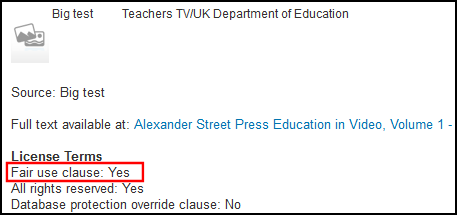
| split_values_in_display_license |
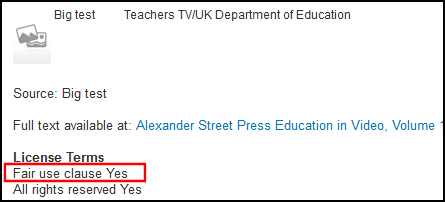
Este parámetro indica si el campo licencia se separa de su contenido en el HTML para View It. Esto le permite especificar un formato separado para el campo y su contenido. When set to true, the license field and its contents appear in separate rows and the colon delimiter is removed from the HTML for View It: <b>Términos de la licencia</b> <br> <c>Fair use clause</c> <c>Yes</c>
Mostrar licencia en View It - Línea de separación en HTML
When set to false, the license field and its contents are delimited by a colon and appear on the same line in the HTML for View It: <b>Términos de la licencia</b> <br> <c>Fair use clause: Yes</c>
Mostrar licencia en View It - Misma línea en HTML
|
||||||||||||||
| statistics_note_controlled | Set this parameter to true in order to implement fixed drop-down lists for Statistics note 1, Statistics note 2, and Statistics note 3 in the Physical Item Editor. (By default, it is set to false and free text can be used in the notes fields of the Physical Item Editor.)
When this parameter is set to true, the Statistics note 1, Statistics note 2, and Statistics note 3 configuration options become available for you to configure in the General section of Resource Management Configuration. See Configuring Statistics Notes for more information. |
||||||||||||||
| suppressBibWithDeletedHol | Use this parameter to suppress a bibliographic record from publishing when all its holdings records are deleted (true or false).
When true, if the last physical item of a holdings record is deleted and the operator chooses to delete the last holdings record of the bib, the bib record is suppressed. This parameter is used only for deletion workflows where the operator cannot choose whether to suppress the bib record and the system determines the behavior. For PrimoVE, the definition of this parameter impacts the physical inventory availability for scope definition. When the value of this parameter is changed, the change is not implemented until re-indexing takes place. |
||||||||||||||
| suppressBibWithSuppressedHol | Use this parameter to suppress a bibliographic record from publishing when all its holdings records are suppressed (true or false).
When set to true, the bib record is suppressed if an operator suppresses all of its holdings records. Tenga en cuenta que esto no marca los registros bibliográficos como eliminados en Alma. For PrimoVE, the definition of this parameter impacts the physical inventory availability for scope definition.
|
||||||||||||||
| system_date_format | Establecer el formato de fecha del sistema usando dd (para el día), MM, MMM o MMMM (para el mes) y aaaa (para el año). Colóquelas en el orden preferido separadas por una barra diagonal, guion o espacio. Por ejemplo, dd/MM/aaaa o MM/dd/aaaa, dd-MMM-aaaa (tal como 30-ene-2017), o dd MMMM aaaa (tal como 30 enero 2017). | ||||||||||||||
| temp_enable_changes_in_overlap_analysis_excel_formatting | Habilitar los cambios del análisis de superposición del formato de Excel. | ||||||||||||||
|
temp_enable_holdings_field_852_subfields_reordering |
Este parámetro es para uso de Ex Libris. The default setting for this parameter is true. |
||||||||||||||
| temp_enable_identifier_combined_search | Este parámetro es para uso de Ex Libris. The default setting for this parameter is true.
The functionality to combine the EISSN and ISSN searches is controlled by the parameter:temp_enable_identifier_combined_search which is set to true by default. This functionality opens URLs generated for items that have EISSN and ISSN and matches them on EISSN. When set to false, the combined search functionality is turned OFF. |
||||||||||||||
| temp_publishing_ignore_file_name_extension | Ignorar la extensión en el prefijo del nombre de fichero al generar su nombre de publicación. | ||||||||||||||
| unimarc_decimal_classification_authority_sorting | Habilitar la clasificación decimal Unimarc. | ||||||||||||||
| unimarc_uniform_title_headings_split | UNIMARC F3 permite encontrar encabezados de autoridad y bibliográficos para el campo 500 y los vincula a los encabezados. The default setting for this parameter is true.
|
||||||||||||||
| update_call_number_type_upon_item_move | When set to true, if the location of an item is changed, this updates the call number type of the new holding according to it.
Default =false(no update to call number type). |
||||||||||||||
| upload_e_holdings_collection_file_prefix | Añade el prefijo del id de la colección al fichero de entrada xlsx para evitar sobrescrituras no deseadas. | ||||||||||||||
| upload_single_record_from_file | El tipo de perfil de importación de repositorio para usar cuando se importa un único registro bibliográfico. El valor debe ser el nombre del perfil (distingue entre mayúsculas y minúsculas). For more information, see Importing Records Using an Import Profile. For more about the profile name, see Creating/Editing an Import Profile: General Profile Information. | ||||||||||||||
| use_holdings_form | Si se utiliza el Formulario de formato para mostrar el registro de existencias en el Editor MD. With this parameter set to true, some of the MD Editor options are unavailable; and you can only edit the following for a holdings record:
|
||||||||||||||
|
use_marc_record_holdings_template |
Set to true when you want to use the default template for holdings records outside the MD Editor such as when placing orders in Acquisitions or doing a repository import of holdings records. See Working with Record Templates and Additional Holdings Record Information for more information. | ||||||||||||||
| use_record_cataloging_level_by_default | Set this parameter to true when you want the cataloging level already stored in the record to be used as the default when editing records. The default setting for this parameter is false. See Using Cataloging Permission Levels in the MD Editor for more information.
Este parámetro anula el parámetro cataloging_level_user_preferences enumerado arriba. |
||||||||||||||
|
use_space_as_call_number_type |
Set this parameter to true to have the system recognize the 852 with a first indicator of a space, blank, or # (when entered in the MD Editor) as a valid value that should not be overridden by a different default call number type that is specified in the call_number_type customer parameter. The default setting for this parameter is false. When this parameter is set to false, a default call number type is specified based on the call_number_type customer parameter setting. See Browsing the Shelf Listing for more information. |
||||||||||||||
| work_match_profile | Perfil de coincidencia predeterminado para los registros de trabajo BIBFRAME dentro de Alma y al importar registros (a través de la API) basados en los URI de la entidad (el rdf:about o los URI alternativos que representan a la entidad). | ||||||||||||||
| working_copy_lock_timeout | Especificar el número de horas después de salir del Editor MD que se desea que un registro bibliográfico que se está editando se bloquee para que otro usuario no lo edite. La cantidad a indicar puede ser de hasta 9999 y excluye el 0. Por defecto es 1 hora.
See Edit Record in the Performing Actions on the Repository Search Results Page section for additional information. |
||||||||||||||
- On the Customer Parameters Mapping Table page, change the Table Description as required.
- Under Mapping Table Rows, locate the setting that you want to edit, and select Customize.
- Modificar el valor del parámetro según sea necesario.
- Select Save. Los parámetros del cliente modificados se guardan en el sistema de Alma.
Page tags: article:topicConfiguring Resource Managementproduct:almacontent:Documentationlang:englishCustomer Parametersother settingsmatch methodsmatch routines
