
Utilizar Análisis de títulos duplicados
Overview of duplicate title analysis and how to run a duplicate title analysis job.
- Gerente del repositorio
- Catalogador
- Administrador de catalogación
- Gerente de catálogo
- Gestor de contenido
- Administrador de contenidos
- Operador de contenido
- Administrador general del sistema
- Administrador de repositorio
The Duplicate Title Analysis job creates a report that identifies duplicate bibliographic records. Records are considered duplicates if they have the same data in one of the following parameters:
- Número de Control del Sistema (campo 035) con o sin un prefijo como (OCLC)
- Otro identificador estándar (campo 024)
- ISSN
- ISBN Note: The ISBN match here is not identical to the ISBN match method in the MD import. Esta coincidencia de ISBN compara los valores de SYSTEM_CONTROL_NUMBER, VALID_ISBN, VALID_ISSN, yVALID_STANDARD_IDENTIFIER, mientras considera los parámetros de la tarea.
After the Duplicate Title Analysis job runs, its results can be viewed from the History tab on the Monitor Jobs page (Admin > Manage Jobs and Sets > Monitor Jobs). The History tab can also be accessed by selecting Job History on the Duplicate Title Analysis page.
El fichero de salida de la tarea Análisis de títulos duplicados puede utilizarse de dos formas:
- Para que la institución analice de forma independiente los registros duplicados.
- As an input file for the Merge Records and Combine Inventory job.
La tarea de Análisis de títulos duplicados se ejecuta solo a nivel de institución. If there is a Network Zone, the job will need to be run at the Network Zone and Institution Zone separately.
Ejecutar el análisis de títulos duplicados
- Open the Duplicate Title Analysis page (Resources > Advanced Tools > Duplicate Title Analysis).
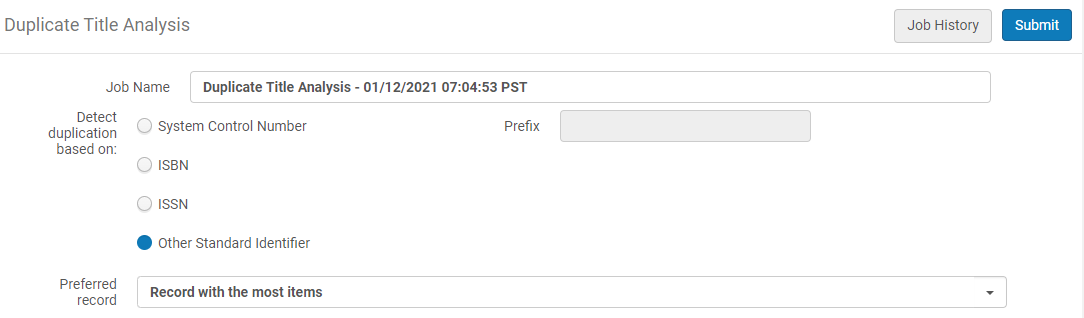
- En el parámetro "Detectar duplicación en función de", seleccionar una de las siguientes opciones para los registros bibliográficos duplicados que coinciden:
- System Control Number / Prefix: The System Control Number parameter uses the MARC 21 035 field for determining a match. Además, un prefijo como (OCoLC) incluido en el campo 035 se puede especificar para limitar los criterios utilizados para la coincidencia en el campo 035. El campo de prefijo es opcional.
- Encontrar
- ISSN
- Other Standard Identifier: The Other Standard Identifier parameter uses the MARC 21 024 field for determining a match
- In the "Preferred record" parameter, select which record will be treated by the system as the preferred record (the record into which the other records are merged):
- Do not calculate – the report does not include the preferred record.
- Record with the most inventory – the preferred record is the one with the highest number of items/portfolios/collections/digital representation in the group. If there are multiple records with the same highest number of entities, the record with the highest brief level is taken as preferred (out of the ones with the most entities). La Zona de red no tiene inventario físico. Es mejor utilizar diferentes criterios para seleccionar el registro preferido.
- Record with highest brief level – the preferred record is the one with the highest brief level (10 is higher than 1). Si hay registros múltiples con el mismo nivel breve más alto, el registro con el mayor número de identidades se toma como el preferido.
- If preferred record cannot be determined(there are multiple records with the same "preferred" characteristics) – the record with the lowest MMS ID is taken as the preferred.
- Select Submit. Se abre la etiqueta de Ejecutar en la página de Control de tareas mostrando el estado de la tarea de En ejecución (o Pendiente, dependiendo de la actividad en la cola de tareas).
- Select the History tab to view the job results when the job has completed running.
- For the Duplicate Title Analysis job that you ran, select Report from the list of row actions to open the Job Report page.
- En la sección de Contadores, seleccionar el enlace para descargar/abrir el Informe de títulos duplicados en formato Excel .csv.
Informe de análisis de títulos duplicados
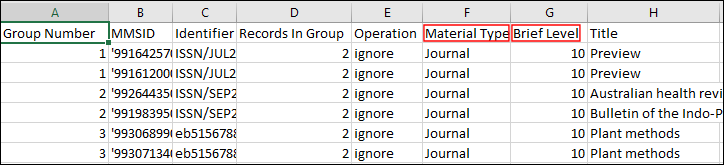
The report displays duplicate records in groups, and provides the following information:
- Group Number – Matching bibliographic records are identified by the same group number in the Group Number column.
- MMS ID
- Identifier – The value upon which the system found a match from the field that was selected for Detect duplication based on in your Duplicate Title Analysis job.
- Records in Group – The total number of records in the same group.
- Operation - Indicates which is the preferred record, as calculated by the system:
- Preferred – for the preferred record
- Merge – for the non-preferred records. Non preferred records in the group are merged into the preferred record according to the selected merge routine. El inventario asociado con los registros no preferidos se combina con el inventario del registro preferido.
- Ignore – for record in a group that has records that do not belong to the institution. For example, if the process is activated in a Network Zone member and a group contains records from the NZ, the group is not handled.
- Not Merged- When it is not possible to merge one of the records in a group, the whole group is not handled and reported as "Not Merged".
- Material Type
- Brief Level
- Title
- Resource Type – This column displays the resource type information as described in The Resource Type Field section.
- Held By – A semicolon-delimited list of the member institutions that have inventory for the record. This only appears in reports when the Duplicate Title Analysis job is run in the Network Zone.
- Si la tarea de análisis de títulos duplicados se ejecuta antes de la tarea Construir relaciones de registro (una tarea del sistema), los registros borrados también se incluyen en este informe.
- Si la tarea de Análisis de títulos duplicados se ejecuta antes de la tarea Constuir relaciones de registro, los registros borrados no se incluyen en este informe.
Page tags: article:topicProd:AlmaResource Managementproduct:almacontent:Documentationlang:englishduplicate title analysis
