
Configurazione delle riserve dei corsi in Primo
Istruzioni per configurare Primo per utilizzare le informazioni sulle riserve dei corsi pubblicate da Alma.
If you are working with Primo VE, see Configuring Course Reserves for Primo VE for more details.
Introduzione
Course reserve information is not published to Primo unless Alma is configured to publish course enrichment information (see the Course information enrichment parameter in Exporting Alma Records to Primo), which is stored in the MARC CNO field. (see The Format of Published Data).
Primo's normalization rules map the course information from Alma to provide the following functionality in the Primo Front End:
-
Visualizza le informazioni sul corso nel brief e visualizzazione completa di una copia
-
Creare un ambito di ricerca per le prenotazioni dei corsi
-
Creare l'Indice di ricerca per le riserve dei corsi
-
Crea faccette per le riserve del corso
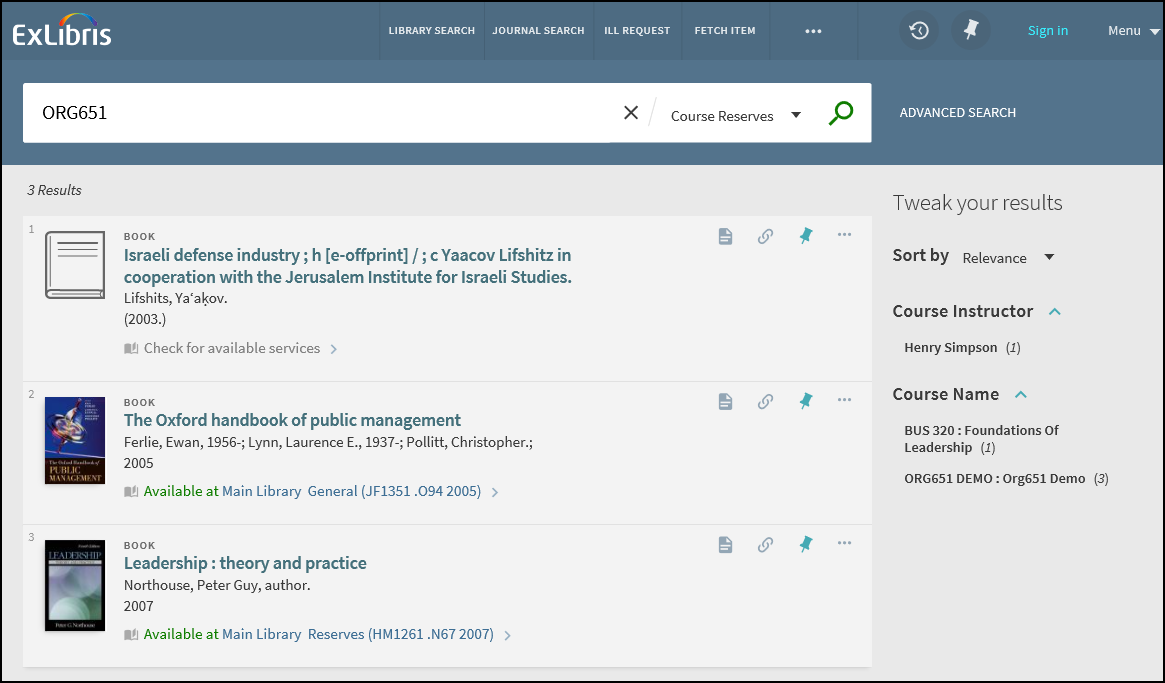
Le sezioni rimanenti descrivono le funzionalità correlate e la configurazione.
Altro dallo stesso corso
The More from the same Course section on the Full Display page allows users to expand the search of the current title to other items in the course and in additional courses that also contain the current title.
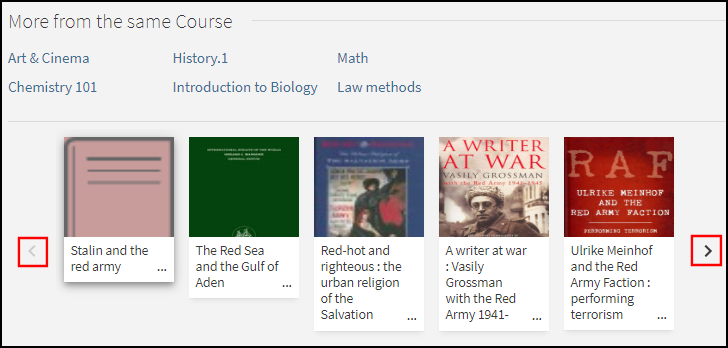
The top half of this section lists all courses to which this titles belongs. Inizialmente vengono visualizzati al massimo sei corsi. Users can select the View all courses icon to view the remaining courses. Se il corso è associato a Leganto, l'Utente può selezionare il corso per visualizzarlo leggendo la Lista in Leganto.
La metà inferiore di questa sezione consente all'Utente di sfogliare le copie che appartengono ai corsi correlati alla copia. L'utente può selezionare una delle seguenti:
-
le frecce Precedente/Successivo per scorrere la lista delle copie
-
an item in the list to open its Full Display.
Opzioni di configurazione
The following table lists the settings used to configure this functionality.
| Elemento | Descrizione |
|---|---|
|
Procedura guidata Visualizzazioni |
To enable this functionality in the new Primo UI, select the following field in the General section of the Views Wizard: More from the same Course. |
|
Etichette aria |
Per supportare l'accessibilità di questa funzionalità è stato aggiunto il seguente codice:
|
|
Tabella codici GetIT! Tab1 |
Per supportare questa funzionalità sono stati aggiunti i seguenti codici:
|
|
Regole di normalizzazione |
In the Alma MARC Template and Alma UNIMARC Template normalization rule templates, the course information is now mapped to following subfields in the display/crsinfo field, but it will not display in the Primo UI:
To include the correct linking information on the Full Display page, make sure that you map the following search fields instead of using local search fields for course information: crsinfo, crsname, crsinstrc, crsid and crsdept. |
Collegamento a Leganto
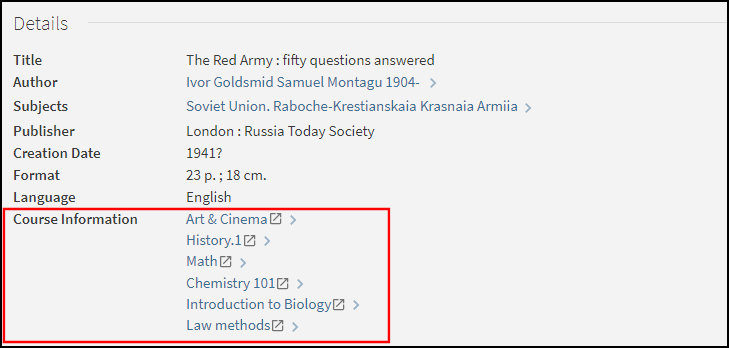
When enabled this functionality improves the integration between Primo and Leganto by allowing users to select a course link from a record's full display and view the relevant reading list in Leganto.
Opzioni di configurazione
Questa funzione è disabilitata di default. La tabella seguente elenca le opzioni di configurazione associate a questa funzionalità.
| Element | Descrizione |
|---|---|
|
Procedura guidata Visualizzazioni |
The following field on the Edit Full Details Attributes page in the Views Wizard enables the linking from the Course Information field in the record's full details: Enable Linking the Course Information to Leganto. |
|
Tabella di mappatura dei template |
The following code creates the links to Leganto for Alma customers:
|
|
Regole di normalizzazione |
In the Alma MARC Template and Alma UNIMARC Template normalization rule templates, the course information is now mapped to following subfields in the display/crsinfo field, but it will not display in the Primo UI:
|
Configurazione del Back Office di Primo
Il PNX e le Regole di normalizzazione sono disponibili con Primo, ma dovrà assicurarsi di aver incluso le regole di riserva del corso nelle Regole di normalizzazione locali.
Configurazione PNX
The following table lists the fields that are used to map course reserve data from Alma. For details on how this information is mapped from Alma to the CNO field, see Publishing to Primo.
| Sezione | Campo | Codice |
|---|---|---|
| Visualizza | Course info – The crsinfo field is created by merging the following Alma CNO subfields into a single line:
|
crsinfo |
| Faccette | Course name Course instructor Course_ID (contains the course code from Alma) Course department (contains the course section from Alma) |
crsname crsinstrc crsid crsdept |
| Cerca | Course name (contains the course name and course code from Alma) Course instructor Course_ID (contains the course code from Alma) Course department (contains the course section from Alma) |
crsname crsinstrc crsid crsdept |
Se desidera che il campo di visualizzazione appaia nei risultati della ricerca, deve modificare la vista nella procedura guidata Visualizzazioni.
Configurazione della tabella di codici
The following table lists the codes that are defined in the code tables under the Front End subsystem to support course reserve information:
| Code Table | Codice | Descrizione |
|---|---|---|
| Etichette Faccetta |
facets.facet.facet_crsname facets.search–box.facet_crsname |
Nome corso |
|
facets.facet.facet_crsinstrc facets.search–box.facet_crsinstrc |
Docente corso | |
|
facets.facet.facet_crsid facets.search–box.facet_crsid |
Course_ID | |
|
facets.facet.facet_crsdept facets.search–box.facet_crsdept |
Dipartimento corso | |
| Campi codice Faccette | facet_crsname | Nome corso |
| facet_crsinstrc | Docente corso | |
| facet_crsid | Course_ID | |
| facet_crsdept | Dipartimento corso | |
| Advanced Index Fields and Basic Index Fields |
crsname |
Nome corso |
| crsinstrc | Docente corso | |
| crsid | Course_ID | |
| dipartimento CRS | Dipartimento corso | |
| Campi di visualizzazione FrontEnd | crsinfo | Informazioni sul corso |
| Visualizzazione completa Etichette | fulldisplay.crsinfo | Informazioni sul corso |
Regole di normalizzazione
The following rules are included in the Alma MARC normalization rules template to allow the mapping of course reserve information. For additional normalization rules, see Alma MARC 21 Template.
-
Sezione di visualizzazione:
A rule concatenates the crsid, crsname, crsdept, and crsinstrc fields into the crsinfo field using the following format:
<Course_ID> : <course name> ; <course department> ; <course instructors>Ad esempio:
PSYCH 101 : Introduction to Psychology ; 01 ; Bube, Kenneth P. -
Sezione Faccette:
The following tables lists the rules that map course reserve information to the Facets section of the PNX:
Nuova Faccetta Regole di normalizzazione Campo Regola Nome corso/Faccetta
Recuperare i dati dal campo MARC CNO, sottocampo j.
Trasformazione: Copia così com'è
Faccetta/Corsi docente
Recuperare i dati dal campo MARC CNO sottocampo g.
Trasformazione: Copia così com'è
Faccetta/Course_ID
Recuperare i dati dal campo MARC CNO sottocampo k.
Trasformazione: Copia così com'è
Faccetta/Dipartimento accademico
Recuperare i dati dal campo Sottocampo l di MARC CNO
Trasformazione: Copia così com'è
-
Sezione di ricerca:
Le tabelle seguenti elencano le regole che mappano le informazioni sulla riserva del corso alla sezione Cerca del PNX:
Nuova ricerca regole di normalizzazione Campo Regola ricerca/Nome Corso
-
Recuperare i dati dal campo MARC CNO, sottocampo j.
Trasformazione: Copia così com'è
-
Recuperare i dati dal campo MARC CNO, sottocampo j.
Trasformazioni: Elimina spazi + Rimuovi punteggiatura + Copia così com'è
-
Recuperare i dati dal campo MARC CNO sottocampo k.
Trasformazione: Copia così com'è
-
Recuperare i dati dal campo MARC CNO sottocampo k.
Trasformazioni: Elimina spazi + Rimuovi punteggiatura + Copia così com'è
-
Recuperare i dati dal campo MARC CNO sottocampo k.
Trasformazioni: elimina spazi
-
Recuperare i dati dal campo MARC CNO sottocampo k.
Trasformazioni: Rimuova la punteggiatura
ricerca/Corso docente
Recuperare i dati dal campo MARC CNO sottocampo g.
Trasformazione: Copia così com'è
ricerca/Course_ID
-
Recuperare i dati dal campo MARC CNO sottocampo k.
Trasformazione: Copia così com'è
-
Recuperare i dati dal campo MARC CNO sottocampo k.
Transformation: Delete spaces
-
Recuperare i dati dal campo MARC CNO sottocampo k.
Transformation: Remove punctuation
-
Recuperare i dati dal campo MARC CNO sottocampo k.
p>Transformations: Delete spaces + Remove Punctuation
Ricerca/Dipartimento accademico
Recuperare i dati dal campo Sottocampo l di MARC CNO
Trasformazione: Copia così com'è
ricerca/ambito ricerca
Recuperare i dati da MARC CNO campo Sottocampo a
Trasformazioni:
Codici Alma Istituzione
Aggiunga alla fine della stringa: _CR
-
The new search scope will be <institution>_CR.
-
I record verranno aggiunti ad Ambiti di ricerca quando esistono dati nel campo MARC CNO.
-
Page tags: article:topic Course Reserves product:alma content:Documentation lang:english course information enrichment CNO field
