
OpenID Connect
- Amministratore di Sistema Generale
Alma integration supports the OpenID Connect standard for user authentication. See the Developer Network for more information.
Quando un utente staff di Alma (o un utente di Primo VE) tenta di accedere, l'autenticazione Utente può essere gestita utilizzando sistemi che supportano lo standard OpenID Connect, come Auth0 e Azure. Funziona in modo simile al processo di accesso social su Alma.
For Primo VE information, see Configuring User Authentication for Primo VE.
Multiple OpenID Connect integration profiles can be defined in Alma. Ciò consente di definire diverse autenticazioni utente per diversi gruppi di utenti, ad esempio per studenti e personale docente.
Creating an OpenID Connect Integration Profile
If you want to use this method of authentication, you need to create and configure an OpenID Connect integration profile.
- Open the Integration Profile List page (Configuration Menu > General > External Systems > Integration Profiles).
- Selezionare Aggiungi profilo d'integrazione.
- Dal menu a discesa Tipo di integrazione, selezioni OpenID Connect.
- From the System dropdown, select the option that represents the OpenID Connect authentication system that you are using.
-
Inserisci un codice e un nome per questo profilo d'integrazione. This name is used in the label for the log-in option in Primo:
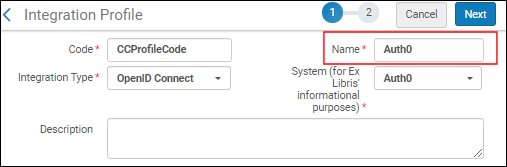
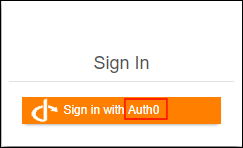
- Selezionare Avanti.
- Selezioni Attivo se desidera iniziare a utilizzare questo profilo d'integrazione dopo averlo salvato. Selezionare Inattivo se desidera abilitare il profilo in un secondo momento.
- Inserisca le seguenti informazioni fornite dal sistema di autenticazione OpenID Connect:
- ID App
- App segreto
- URL noto - Selezioni per compilare automaticamente tutti i campi sottostanti con le informazioni OIDC default. This saves you time and helps ensure that all the fields are defined correctly. Se si sceglie di non utilizzare l'URL conosciuta, compilare manualmente il campo sottostante.
- Endpoint di autorizzazione
- Endpoint del token
- Ambiti - Seleziona un elenco di ambiti delimitato da spazi. L'ambito minimo per il processo di autenticazione è 'openid'.
- Claim corrispondenti - codice claim contenente l'ID Utente. Per la maggior parte dei fornitori OpenID, sarebbe 'sub', il soggetto identificativo. If you elect a different claim code, the "UserInfo endpoint" field opens where you can call the UserInfo endpoint with the access token to retrieve the additional claims. Alma individuerà l'Utente utilizzando il claim configurato in id_token o nell'output della richiesta UserInfo.
- Force Authentication- Select this if you want to force authentication when Alma authenticates users via OIDC. This helps ensure that the user is properly authenticated with the correct institution.
- Base64 encode the state parameter - Select this to encode the relay state parameter in base64 (instead of URL-encode). Potrebbe essere necessario per l'integrazione con AWS.
- Logout URL - Add a Logout URL to which the system will redirect after logging out. Questo disconnette l'Utente da altri sistemi collegati allo stesso fornitore OpenID.
- Suggerimento di accesso - Configura un suggerimento di accesso per l'accesso singolo.
- Seleziona Salva.
Page tags: article:topicproduct:almacontent:Documentationlang:english
