
Ex Libris Identity Service
The Ex Libris Identity Service is based on a dedicated identity management solution. This service replaces the internal authentication method previously used Alma customers. All passwords for internal Alma users are stored in the Ex Libris Identity Service, which is hosted by Ex Libris in its data centers. For more information on this service, see https://developers.exlibrisgroup.com/alma/integrations/user-management/authentication/exl_identity_service.
The following password considerations are applicable with the Ex Libris Identity Service:
- Non è possibile configurare la sicurezza della password.
- The password does not have an expiry date.
- La password viene bloccata per 30 minuti dopo 15 tentativi di accesso falliti.
- When a staff user enters a wrong user and password combination on the Alma login page, the error message includes a Forgot password? link, which links to the reset password page. In order to display a Forgot Password option in Primo/PrimoVE, a configuration update is required. For more information, see the knowledge article,How to add a 'Forgot My Password' link to the login page in the new UI when using Alma for authentication.
Le etichette del Servizio Identity possono essere configurate nella Tabella di codici dei messaggi di accesso interni. See Configuring Identity Service Labels.
For Alma users, a Reset Password Letter is sent to an individual user by selecting the Reset your password for the identity service option in the Send message drop-down list on the User Details page. The letter is sent to a group of users by running the Update/Notify Users job and selecting the Identity Service mail option in the Send notification to user drop-down list on the job parameters page.
- La nuova password deve essere lunga almeno otto caratteri e non può includere il nome utente o alcuna password comunemente usata.
- Quando la comunicazione di reimpostazione della password viene inviata tramite il job Update/Notify Utente o dall'elenco a discesa Invia messaggio, il link è attivo per ventiquattro ore. Quando la comunicazione viene inviata dalla sezione Password dimenticata? link, è attivo per un'ora.
- Nella schermata Reimposta password, agli utenti viene chiesto di inserire il proprio nome utente o indirizzo email. Se gli utenti inseriscono i loro nomi utente, le email vengono inviate agli indirizzi preferiti degli utenti. Se gli utenti digitano indirizzi email, il sistema ricerca gli indirizzi email specificati e, se localizzati, utilizza questi indirizzi email anche se non sono gli indirizzi preferiti. Se un indirizzo email non viene localizzato o appartiene a più di un Utente, non viene inviata alcuna email.
For more information on logging into Alma, see Logging Into and Out of the User Interface.
Autenticazione multifattore (MFA)
This feature requires the mfa_for_alma_hep parameter to be enabled (see User Settings).
È possibile configurare Alma per consigliare (o imporre) l''uso dell''autenticazione a più fattori (MFA). The Login Using One Time Token Letter needs to be enabled to support MFA (see Configuring Alma Letters).
-
If MFA is activated, the Allowed Emails list (see External Systems) should be configured with the email addresses of all staff members who need to be able to login.
Consigliare MFA
This requires the mfa_for_alma_hep parameter to be set to "suggest" (see User Settings).
- When logging in for the first time after setting the mfa_for_alma_hep parameter to "suggest", the user is prompted with the regular username and password.
- After logging in, a message appears recommending that the user enable multi-factor authentication.
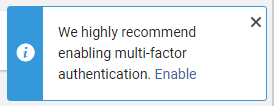
- L'Utente può ignorare il messaggio o annullarlo utilizzando il pulsante X, oppure può selezionare Abilita.
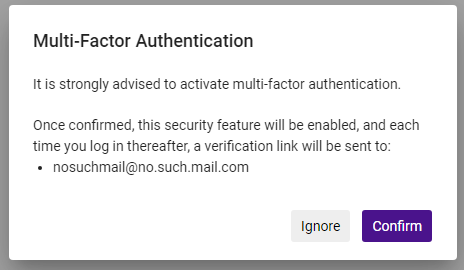
- If the user selects Enable, a message prompts the user to Ignore or Confirm. This message includes the user email address/es to which the login link will be sent.
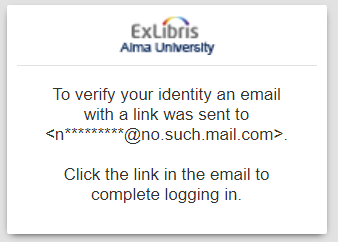
- If the user selects Confirm, the next time they login, a login link is sent to their email/s and a message appears letting them know that the link was sent.
 If the user selects Ignore, the MFA recommendation message will be displayed each time the user logs in.
- Il messaggio apparirà ogni volta che l'utente effettuerà l'accesso (dopo aver convalidato il nome utente e password). The link is active for 10 minutes. L'attivazione del link indirizza l'Utente alla home page del prodotto. Tieni presente che il link è utilizzabile solo nello stesso browser da cui è stato avviato il flusso di accesso.
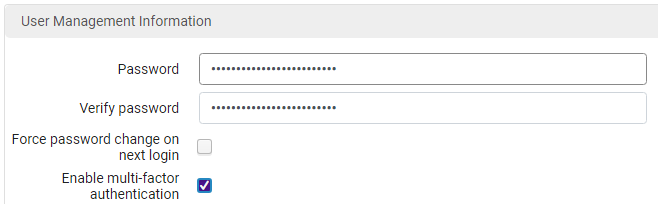
- Users can also enable/disable MFA from the User Management Information page at Admin > Manage Users > Staff > User Management Information.
Forzare MFA
This requires the mfa_for_alma_hep parameter to be set to "force" (see User Settings).
- After setting the mfa_for_alma_hep parameter to "force", all users will be required to authenticate with MFA.
- Quando accedono, agli Utenti verrà richiesto il normale nome Utente e password per l'autenticazione.
- A link will be sent to the user's email before entering the product (from the login page), and a message will appear.
- The link is active for 10 minutes. Activating the link directs the users to their product home page. Tieni presente che il link è utilizzabile solo nello stesso browser da cui è stato avviato il flusso di accesso.
With the mfa_for_alma_hep parameter set to "force", there is no way to turn off the MFA flow for a specific user.
Page tags: article:topicproduct:almacontent:Documentationlang:english
