
評価のワークフロー
このページでは、ベンダーからのオファーの受け取りから購入まで、Alma での評価ワークフローの概要を説明します。For a detailed look at the workflow see Getting the Most Out of Alma - Trials and Evaluations.For a description on how to manage trials in Alma see Managing Trials.For information on the overall purchasing workflow see Purchasing Workflow.For an overview of working with acquisitions in Alma, including links to relevant sections such as Infrastructure, Invoicing, Configuration, etc., see Introduction to Acquisitions.
For a general overview of evaluating and analyzing content for acquisitions, see Best Practice Toolkit: Evaluate and Analyze Content for Acquisition.
ベンダーが評価用に新しい電子資料を機関に提供する場合、または機関のメンバーから電子資料の評価を求めるリクエストを受け取った場合、トライアルを実行して資料を評価できます。
Almaでは、評価とは、資料を使用および評価するワークフローです。トライアルは、評価ワークフローのインスタンスです。
以下は、評価の作成時点から電子資料を購入するかどうかを決定する時点までの、注文明細の評価方法を管理するワークフローの例です。
各ワークフロー手順を実行するユーザーには、これらの手順を実行するための適切な役職(トライアルオペレーター/トライアルマネージャーまたは購入オペレーター)が必要です:
- Trial Operator/Trial Manager— Manages the trial
- Purchasing Operator— Manages the PO
組織の管理上の決定に応じて、ユーザーにこれら両方の役職が割り当てられる場合があります。その場合、すべてのワークフロー段階(以下のステップ5を除く)は同じユーザーが実行します。ワークフローのステップ5は、トライアル参加者が実行します。
Evaluations apply only to electronic collections of the type package, database, and to portfolios.
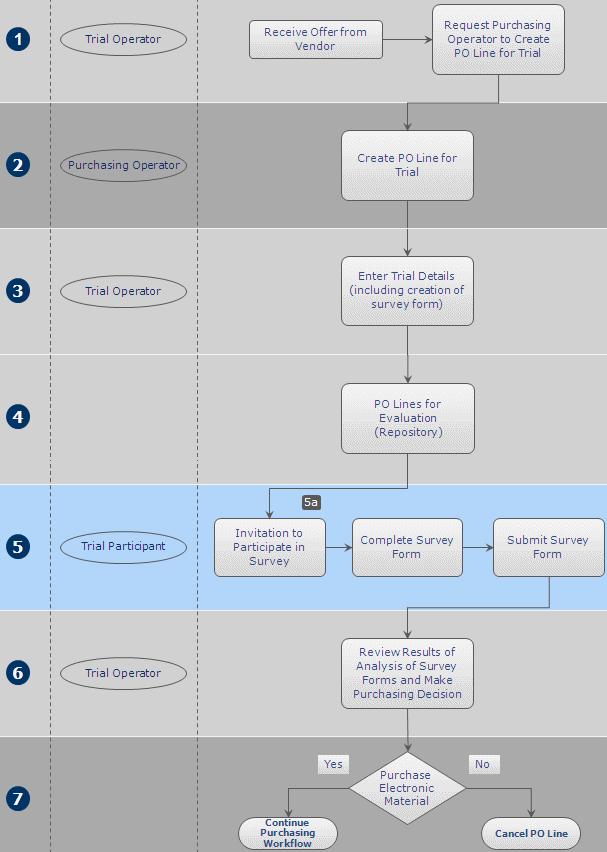
以下は、このワークフローにおけるステップの詳細な説明です(数字は図内の番号に対応)。
- 評価は、ベンダーが評価用に新しい電子資料を機関に提供するとき、または機関のメンバーから電子資料の評価を求めるリクエストを受け取ったときに開始します。これらのリクエストは、トライアルオペレーターに送られ、トライアルオペレーターは購入オペレーターに評価用の新しい注文明細を作成するようリクエストを送信します。
- The Purchasing Operator searches for the relevant e-resource in the Community Zone and manually creates a new PO line for it (see Manually Creating a PO Line).注文明細情報をすべて入力後、購入オペレーターは次のオプションのいずれかを選択します:
- Save and Request Evaluation – The Purchasing Operator selects this if their user account does not also have the Trial Operator role.This option is only available if the PO line is assigned to the user.The PO line's status changes to Under Evaluation and the PO line moves to the Manage Trials page with the status Requested, where the Trial Operator can access it and continue with step 3 below.
- 保存してトライアルを開始 – ユーザー アカウントにトライアル オペレーターの役割があり、トライアルを開始したい場合、購入オペレーターはこれを選択できます。This option is only available if the PO line is assigned to the user.The PO line's status changes to Under Evaluation and the Trial Details page opens in a sliding panel (step 3).
評価中ステータスの注文明細は、トライアルオペレーターの役職であるユーザーが[トライアルを管理]ページのみで編集することができます。 - The Trial Operator enters additional information about the trial (see Managing Trials).When the information is complete, the trial's status changes to Draft and the PO line continues with step 4 in the workflow.
- 正規化および検証され、トライアル開始の準備ができているすべての注文明細は、リポジトリに保存され、ワークフローの次のステップを待機します。
- トライアル参加者はトライアルに関する通知を受け取り、調査フォームに記入して送信します。For notifications to be sent, the Trials – Start and Notify Participants job must be marked as Active on the Monitor Jobs page – see Viewing All Scheduled Jobs.The notification sent is the Trial Letter and can be configured, see Letter Types.
- トライアルが非公開の場合、参加者はトライアルに参加するための招待メールを受け取ります。
- トライアルが公開されている場合は、トライアルの詳細を公開して(社内ウェブサイトや電子メールなどで)、機関のメンバーを招待できます。The URL for the trial uses the path in the Participant Page URL field on the Summary tab of the Trial Details page, as follows:https://<Alma domain>/<participant page url>.URLがあれば誰でもトライアルに参加できます。
- トライアルは終了しました。The Trial Operator evaluates the results of the survey and makes a decision as to whether to purchase the material (see Analyzing Trial Results).
- ワークフローの前のステップでトライアルオペレーターが行った購入決定が実行されます。If the decision is to purchase the material, the PO line continues in the regular PO line workflow described in step 2 of the Purchasing Workflow.If the decision is not to purchase the material, the Purchasing Operator cancels the PO line (see Closing, Reopening, and Relinking PO Lines).Note that a trial must be deleted before any associated PO lines can be cancelled (see Managing Trials).
Page tags: article:topicevaluationproduct:almacontent:Documentationlang:englishtrialevaluation workflowtrial workflowstart trialrequest evaluation
