
SMSコミュニケーション
SMSタイプの統合プロファイルを構成し、通知のSMSチャネルがアクティブになっていることを確認します。
- 一般システム管理者
As part of a library's processes, Alma produces various notifications for the library's users.通知は、Eメールでユーザーに送信されるか、印刷されます。Some of the notifications may also be sent as SMS messages to the user's mobile phone.SMSメッセージを通知チャネルとして使用することは、ユーザーに連絡するための効率的かつ効果的な方法になったため、現在では非常によく利用されています。
For details on configuring SMS communications, see https://developers.exlibrisgroup.com/alma/integrations/sms
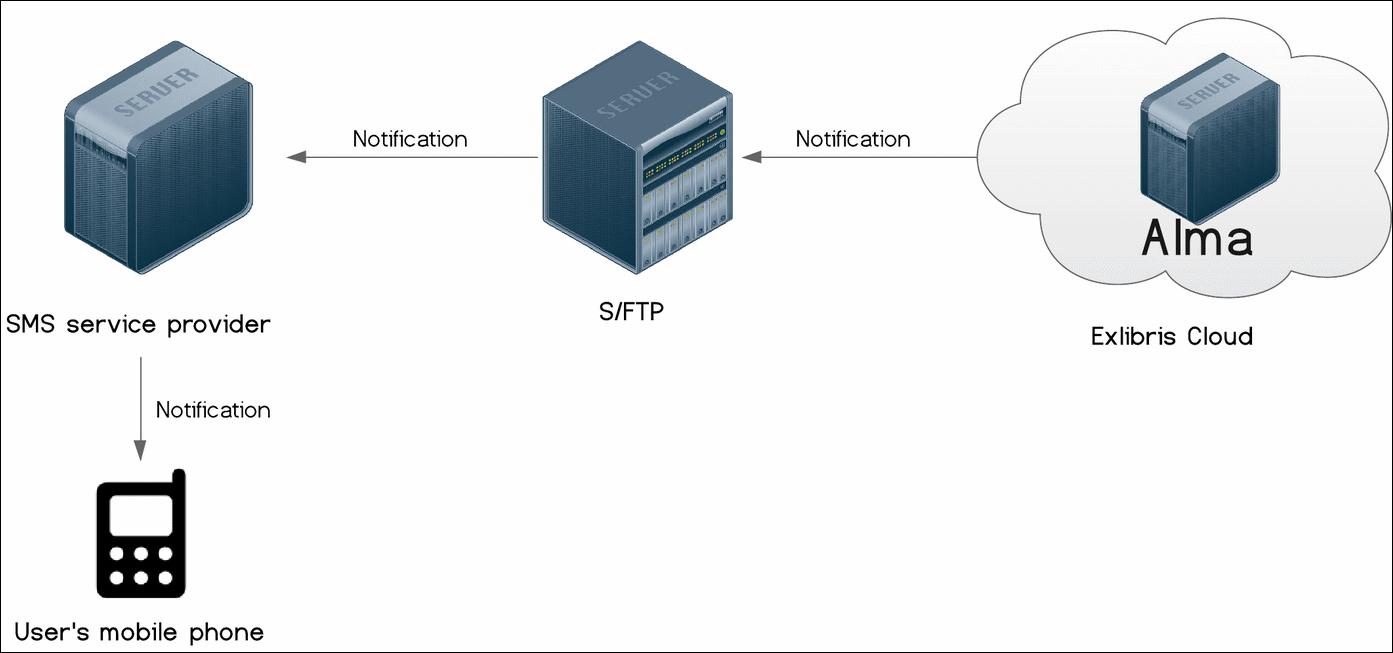
SMSコミュニケーションは、次の通知タイプに対して有効になっています。
- 取置き棚レター (SmsFulPlaceOnHoldShelfLetter)
- Courtesy Letter (SmsFulUserLoansCourtesyLetter)
- 自動貸出更新通知 (SMSFulUserAutomaticLoansRenewLetter)
- Overdue Notice Letter (SmsFulUserOverdueNoticeLetter)
- Change Due Date (SmsFulItemChangeDueDateLetter)
- Request Cancellation (SmsFulCancelRequestLetter)
- 紛失貸与(SmsFulLostLoanLetter)
- Lost Loan Notification (SmsFulLostLoanNotificationLetter)
- Borrowing Activity (SmsFulUserBorrowingActivityLetter)
- 罰金/手数料通知レター (SmsFulFinesFeesNotificationLetter)
- 返却期日短縮レター (SmsFulShortenedDueDateLetter)
SMSメッセージは、優先SMS番号が示されている場合にのみユーザーに送信されます。For more information about the letters, see Configuring Alma Letters.
ユーザーとのSMSコミュニケーションを設定するには、次のアクションを実行する必要があります。
- Configure an S/FTP connection to be used by Alma and the SMS service provider (see Configuring S/FTP Connections).The SMS service provider is chosen by the institution; dealing with issues or questions associated with them should first go through their IT departments.また、FTPのテストを選択して、S/FTP接続をテストすることもお勧めします。FTPのアップロード、ダウンロード、および削除が成功したことを示すメッセージが届くはずです。これらのメッセージが届かなかった場合は、続行する前にS/FTP接続の問題を解決してください。
- SMSタイプの統合プロファイルを設定します(以下を参照)。
- 通知のSMSチャネルがアクティブになっていることを確認します(以下を参照)。
- Define the format of the notification (see https://developers.exlibrisgroup.com/alma/integrations/sms).
- 統合プロファイルリストページ(設定メニュー > 一般 > 外部システム > 統合プロファイル)で、統合プロファイルを追加を選択します。統合プロファイルウィザードの最初のページが開きます。
- このページで次のアクションを実行します。
- 統合タイプのドロップダウンリストから、SMSコミュニケーションを選択します。
- S/FTP接続タイプドロップダウンリストから、過去に定義したFTP接続の名前を選択します。
- 任意で、設定しようとしている統合の説明を入力します。
名前とコードは、システムによって定義されています(いずれもSMSとして)。 - 次へを選択します。ウィザードの2ページ目が開きます。
- In the Export section:
- プロファイルをアクティブにするかどうかを選択します。アクティブなプロファイルのみを実行できることに注意してください。
- サブディレクトリフィールドに、S/FTP接続の作成時に指定したパスのサブディレクトリを入力します。たとえば、S/FTP接続の設定時に サブディレクトリフィールドにAlmaと指定し、このサブディレクトリフィールドにSMSと入力すると、この請求書は Alma/SMS ディレクトリにエクスポートされます。
- 保存を選択します。設定したプロファイルが、統合プロファイルリストに表示されます。
On the Letter Configuration table (Configuration Menu > General > Letters > Letters Configuration), ensure that the desired letter with the SMS channel is enabled.

If it is not enabled, select the Customize button, select the slider so that it becomes blue, and then select Save.
Page tags: article:topicproduct:almacontent:Documentationlang:englishSMS communicationsSMS notifications
