
セルフチェックマシン
セルフチェックタイプの統合プロファイルを設定し、それを貸出・返却受付に関連付けます。
セルフチェックタイプの統合プロファイルを構成するには、次の役職が必要です。
- 統括システム管理者
- フルフィルメント アドミン
Learn about Self-Check machines in the Integration with Self-Service Systems video (23:24 mins).
Almaは、SIP 2.0セルフチェックマシンから受信したSIPメッセージを受信して処理し、これらのマシンに応答を返します。For details on the integration with self check systems, see https://developers.exlibrisgroup.com/alma/integrations/selfcheck.
Almaのセットアップは情報提供のみを目的としており、オペレーターがセルフチェックマシンのセットアップのビューを提供できるようにします。ただし、実際の実行は実際のセルフチェックマシンの設定に従って実行されます。たとえば、図書館はチェックイン\\チェックアウトを許可しないように、Almaセルフチェック プロファイルを設定できます。ただし、これは、自分のマシンがチェックイン\\チェックアウトを許可しないように構成されている場合にのみ実際に実装されます。
Almaとセルフチェックマシン間の通信を設定するには、以下のようにします:
- 統合プロファイルのセルフチェックタイプを構成します(以下の手順を参照)。
- セルフチェックプロファイルを貸出・返却受付に関連付けます(以下の手順を参照)。セルフチェックマシンは、この貸出・返却受付がサービスを提供する場所にのみサービスを提供できます。(Note that a circulation desk, if defined as a primary circulation desk, can service other libraries – see Configuring Fulfillment Services Between Libraries Within an Institution.For general information on circulation desks see Managing Patron Services at a Circulation Desk).機関が実装段階にある場合、この手順は実行できません。Ex Librisプロジェクトマネージャーに連絡して、これを実行してください。
- Configure a secure transmission between Alma and the self-check machine, following the instructions located in the Ex Libris Developer Network:https://developers.exlibrisgroup.com/alma/integrations/selfcheck/stunnel.これらの手順は、Almaでセルフチェック統合プロファイルを設定した後に実行する必要があります。異なる機能を持つセルフチェックマシンの各グループには、個別のセルフチェックプロファイルと対応する証明書(手順5を参照)が必要です(たとえば、1つは料金支払いをサポートするマシン用、もう1つはチェックイン/チェックアウトのみををサポートするマシン用))。各プロファイルは1つの貸出・返却受付のみにリンクできるため、個別の貸出・返却受付にリンクされている各マシンには、個別のプロファイルも必須です。取得した証明書は、プロファイルに加えられた変更に関係なく、統合プロファイルが存在する限り有効であることに注意してください。
- セルフチェックマシンメッセージの日付の形式は、system_time_formatパラメータ(設定メニュー > 一般 > 一般的な設定 > その他の設定)によって決定されます。このパラメータにz記号が含まれている場合、タイムゾーンは、セルフチェックマシンメッセージで送信された日付に含まれています。
- If you want to use a self check machine to handle items from other institutions in your fulfillment network, this may only be done if you are using unique barcodes across the network as defined in the fulfillment_network_unique_barcodes parameter.See Configuring Other Parameters (Fulfillment).
統合プロファイルのセルフチェックタイプを設定するには:
- 統合プロファイルリストページ(設定メニュー > 一般 > 外部システム > 統合プロファイル)で、統合プロファイルを追加を選択します。統合プロファイルウィザードの最初のページが開きます。
- このページで次のアクションを実行します。
- コードと名前フィールドに、自分が定義しているプロファイルのコードと名前を(それぞれ)入力します。
- 統合型のドロップダウンリストから、セルフチェックを選択します。
- In the System (for Ex Libris' informational purposes) field, indicate the type of self-check system with which you are integrating.これは必須です。
- システムのリストから[その他]を選択すると、[システムの説明]フィールドが開き、さらなる詳細が表示されます。
- オプションとして、 説明フィールドに、設定する統合の説明を入力することもできます。
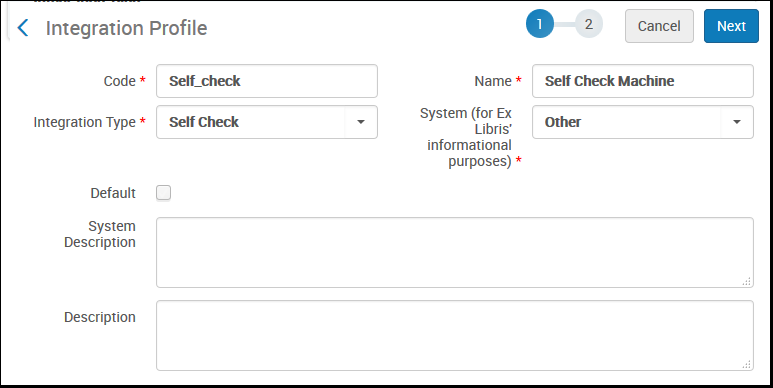 セルフチェックマシン統合プロファイル定義 - ページ1
- 次へを選択します。ウィザードの2ページ目が開きます。
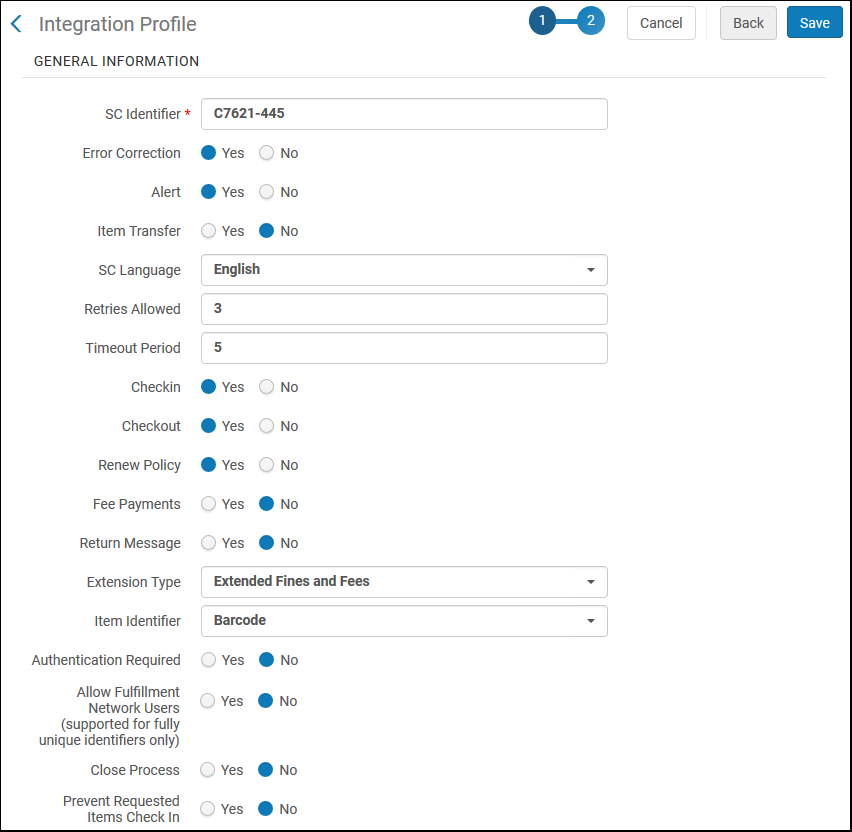 セルフチェック統合プロファイル定義 - ページ2
- 一般情報 の下で、次のアクションを実行します。
- SC識別子フィールドに、任意の文字列を入力します。
- セルフチェックマシンが以下をAlmaに送信するかどうかを選択します。
- エラー訂正 -はいを選択して、Almaが関連メッセージの一部として、シーケンス番号とチェックサムを送信/受領するようにます。この機能がセルフチェックマシンで有効になっている場合は、ここでも有効にする必要があります。このオプションを使用しない場合は、いいえを選択して、セルフチェックのマシン上でも、それをオフにします。
- Alert – Select Yes for Alma to send/receive alert messages.
- Item transfer – Item transfer messages (not currently supported)
- SC言語– Almaとセルフチェックマシンが通信する言語を選択します。
- 再試行の許可およびタイムアウト期間–最初のメッセージが宛先に到達しなかった後、Almaまたはセルフチェックマシンがメッセージの送信を試行する回数、および秒単位での再試行の間隔を入力します。推奨される再試行の許可回数は2〜5回であり、推奨されるタイムアウト期間は0.5~0.7秒です。
- Checkin,Checkout,Renew Policy,Fee Payments,Return Message – Select the actions to be supported (Yes/No) between Alma and the self-check machine.(返信メッセージが現在サポートされていないことに注意してください。)
- 3Mセルフチェックマシンを使用している場合、チェックインオプションは、最初の通信を可能にする3Mの要件のために、はいに設定する必要があります。チェックインアクションが許可されないようにする場合は、3Mセルフチェックマシンを設定するときに必ずブロックするようにしてください。
- If Renew Policy is set to No, Primo indicates to the patron that they should not renew the resource, but this setting has no effect on Alma.いずれにせよ、パトロンが更新をリクエストした場合、Almaによって更新がブロックされることはありません。
- 拡張タイプ–拡張罰金および手数料(拡張チェックインは現在サポートされていません)を選択して、追加のフィールドでセルフチェックメッセージ(SIP2)を強化 します。このオプションには、SIP2ユーザー情報応答メッセージの各オープン料金に対する次の要素が含まれ、リクエストされた時にセルフチェックユーザーがこの情報(利用可能な場合)を表示できるようにします。すべてのセルフチェックマシンがこのオプションをサポートしているわけではありません。このオプションは、貸与と返品のみを処理する(かつ、支払いはしない)セルフチェックマシンにおいては選択しないでください。
- EB-料金にリンクされているアイテムのバーコード(延滞/紛失したアイテムなど)
- ET-料金にリンクされているアイテムのタイトル
- EC-現金取引タイプコード
- ED-現金取引タイプの説明
- EF-合計
- EK-料金ID
- BZ-支払い取引番号
- Item Identifier – select the type of ID—Barcode,Call number, or Item ID—used to match physical items when incoming messages contain item IDs.セルフチェック統合プロファイルの[アイテム識別子]ドロップダウンは、セルフチェックマシンがバーコードまたはPIDのどちらをAlmaに送信するかを設定します。
- 要認証 -ユーザーにパスワード入力を要求したいときにはいを選択します。パスワードはセルフチェック マシンから SIP2 メッセージ内で Alma に伝達される必要があるため、場合によっては SSO 機能に影響する可能性があることに注意してください。The PIN code can be updated by the patron in Primo only if the use_pincode_for_selfcheck_machine parameter is set to true in the Customer Parameters table (see Configuring Other Settings).
- Allow Fulfillment Network Users (supported for fully unique identifiers only) – select Yes for Alma to search for the user locally, then in fulfillment network members.一致が見つかると検索が停止し、リンクされたアカウントが自動的に作成されます。This is only supported if user identifiers are fully unique across the fulfillment network as defined in the network_users_unique_identifiers parameter.See Configuring User Management.When the field is set to No, Alma searches only local users in response to SIP2 messages.
- Allow Fulfillment Network Items – for institutions in fulfillment networks that are set up to only allow fully or partially unique barcodes (this option can be set by Ex Libris support), select Yes to allow SIP2 transactions for items from other institutions, or No to limit the SIP2 to items from the local institution.If Yes is selected, when an item from another institution is handled, Alma checks if duplicate barcodes exist in the network.If they do exist, the self-check transaction is refused and the item can only be loaned at the desk.それ以外の場合、処理は完了します。
- The Close Process field defines how Alma handles a currently active work order on the item (if any), or a purchase order line that is waiting to be received.For example, if the item is in acquisition and being received from the vendor, or if the item has an active work order (such as an acquisitions technical worker order).このフィールドは、セルフチェックマシンでバーコードをスキャンすることによってアイテムからワークオーダーを削除すること、またはセルフチェックマシンで注文したアイテムを受領することを可能にします。
- はいを選択すると、Almaは既存のワークオーダーを完了としてマークします 。For example, for a purchased item arriving from a vendor, Alma receives the item, just as if the user selected Receive on the Receive New Material page (see Receiving New Physical Material).アイテムは恒久的な場所に送信されます(再棚卸リクエストのための通過を使用)。アイテムに現在アクティブな別のワークオーダーまたはリクエストがある場合、Almaはワークフローを完了としてマークし、アイテムのワークフローを続行します。
- いいえを選択すると、Almaは既存のワークオーダーのステータスを変更しません。デフォルト値はいいえです。
- Prevent Requested Items Check In – select Yes to prevent checking in requested items and instruct the patron to return the item at the circulation desk.If you want to enable returns of items from other libraries, this option must be set to No. In addition, in the configuration of the circulation desk (Configuration Menu > Fulfillment > Library Management > Circulation Desks > General Details),Primary must be selected (see Configuring Circulation Desks), and in the configuration of the library (Configuration Menu > General > Libraries > Relationships), the library must have a Circulate for relationship with the owning library (see Configuring Libraries).
- 安全なTCP接続の場合、ダウンロード証明書を選択してダウンロードし、Stunnelを設定するときに使用できるように証明書を保存します(上記の導入部分でステップ3を参照)。
- 保存を選択します。設定したプロファイルが、統合プロファイルリストに表示されます。
セルフチェックプロファイルを貸出・返却受付に関連付けるには:
-
Open the Circulation Desks List page (Configuration Menu > Fulfillment >(ensure you have selected the correct library in the location drop down list)> Library Management > Circulation Desk).
-
過去に定義されたセルフチェックプロファイルに関連付ける貸出・返却受付の行のアクションリストから編集を選択するか、または貸出・返却受付を追加ボタンを選択して、セルフチェックプロファイルを関連付ける新しい貸出・返却受付を作成します。
-
貸出・返却受付 –一般詳細ページのセルフチェック情報の下で セルフチェックありチェックボックスを選択し、統合プロファイルドロップダウンリストから過去に定義したセルフチェックプロファイルを選択します。セルフチェックマシンのパスワードは、 端末のパスワードフィールドに自動的にリストされます。(For information on the other fields on this page, see Configuring Circulation Desks.)
セルフチェック情報セクション セルフチェックのプロファイルに関連付けられた貸出・返却受付で、リーディングルームデスクチェックボックスが選択されていないことを確認してください。選択されている場合、この受付でセルフチェックを介してチェックアウトされたアイテムは減感されません。 -
貸出・返却受付への変更を保存するために保存を選択します。
Page tags: article:topicproduct:almacontent:Documentationlang:englishself-checkself-check machineconfigure a self-check type of integration profileassociate a self-check profile with a circulation desk
