
Library Mobile 2026 Release Notes
Developments
Navbar Analytics
April 2026
A new Navbar dimension is now available in the Home Page and Home Page by Roles subject areas in campusM Analytics. This enables campusM administrators to monitor the app engagement through the taps on the Navbar menu items for their specific institution. For more information, see Home Page and Home Page by Roles on the Subject Areas page.
Notifications Analytics
March 2026
A new Notifications subject area is now available in campusM Analytics. This enables campusM administrators to monitor the app engagement through notifications for their specific institution. Additionally, administrators can compare their data to the average data of the institutions in their region. As notifications may contain sensitive information, the Notifications Analytics data does not include notification content. The Notifications subject area contains the following new fields for both local and regional analysis:
-
Number Sent — The number of notifications sent by the administrators
-
Personalised — Displays whether the notification was personalised or not. Personalised notifications are notifications with fewer than 10 recipients.
-
Number Received — The number of expected recipients of a notification at the time the notification was created
-
Number Read — The number of notifications read by the recipients
-
Engagement — The engagement rate (Number Read divided by Number Received)
For example, after sending a notification, you can cross-reference the data with other Analytics subject areas to determine whether a certain notification drove engagement in the app.
While the Notification Center in App Manager only displays 12 months of data, the Notification Analytics contains all data from 2019 onward. For more information, see the relevant section in campusM Analytics Subject Areas.
Favorites Container
February 2026
A new type of tile container has been introduced to campusM: a Favorites Container. Unlike the regular type containers that are controlled by the administrator, when personalization is enabled for an App Profile, campusM end-users are fully in control of their Favorites Container.
Favorites Containers allows campusM users to keep their favorite tiles in a single tile container. Once users select a tile as one of their favorites, it automatically disappears from its original place and moves to the Favorites Container for easy access.
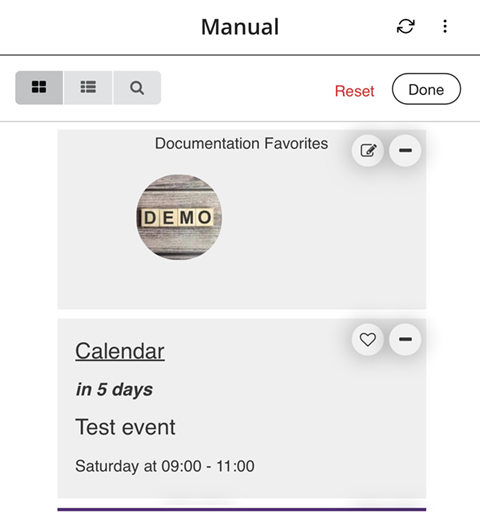
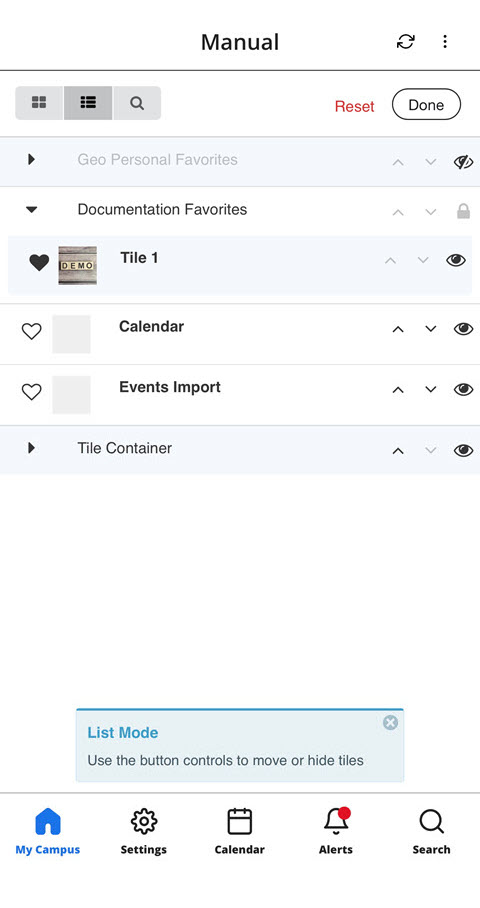
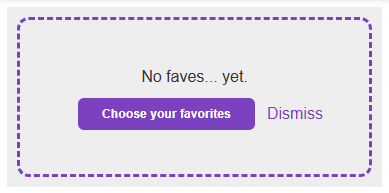
For more information and configuration options, see Configuring Tile Containers.
Tile Containers Analytics
January 2026 CAM-27706URM-253743
Tile Containers are now supported in campusM Analytics. A new Container field was added to the Home Page dimension in Analytics for both the Home Page and Home Page by Roles subject areas. Clicks on tiles within a Tile Container also record the name of that container. The value of the Container field in Analytics is null for clicks on tiles that do not belong to a tile container.
This enables campusM administrators to view the total number of clicks on tile containers by excluding the Menu field from the analysis, as well as see the total number of clicks on tiles by excluding the Container field.
Data collected from the launch of the Tile Containers feature will become available in Analytics beginning January 2026.
Resolved Issues
No resolved issues match your criteria.
- April 2026 Platform:AllSF: 08325321 In some cases, when exporting events registrations from the Events PI, the dates of the events were incorrect. This was fixed.
- April 2026 Platform: iOSSF: 08294146 In some cases, custom fields in the ID card product integration appeared twice after adding the ID card to Apple Wallet. This was fixed.
- April 2026 Platform: iOS, AndroidSF: 08185932 In the Manage Channels Subscription page, long channel names pushed the toggle component off of the edge of the screen. This was fixed.
- April 2026 Platform: AndroidSF: 08294146 Certain components in the Self-Checkout PI were not being announced correctly when using a screen reader. This was fixed.
- April 2026 Platform: Android, iOSSF: 08314294 In some cases, the badge count on Primo/PrimoVE live tiles was not displayed correctly when the tile was placed in a tile container. This was fixed.
- April 2026 Platform: iOS In certain situations the favorites in the Newsfeed PI were not cached correctly. This was fixed.
- April 2026 Platform: All Missing Translation Keys were added for Favorites tiles.
- March 2026 Platform:AllSF: 08115000 In some cases, the HTML editor in Creative Studio did not correctly save the code as inserted. This was fixed.
- March 2026 Platform: Android, iOSSF: 08152834 In some situations, on mobile,Grid Mode was not available when using the Arrange functionality. This was fixed.
- March 2026 Platform: AllSF: 08076310 Previously, when a user opened a URL from inside a specific Alert, the back button directed the user to the Homepage of the app. This was fixed, and now the back button takes the user back to the Alerts screen.
- March 2026 Platform: Android, iOSSF: 08294699 In some cases, the barcode in the ID Card product integration did not appear on mobile devices. This was fixed.
- March 2026 Platform: WebSF: 08128821 Using a campusm:// URL scheme when creating a linkout in Creative Studio did not work as expected. This was fixed.
- March 2026 Platform: WebSF: 08140970 In the Notification Center in App Manager, the popup showing a summary of the last notification in the list caused the screen to flicker. This was fixed.
- February 2026 Platform: All When choosing dates in various parts of the app, the color of the current date, and the selected date were identical. This was fixed.
- February 2026 Platform: iOS In some cases, when using the Maps feature on iOS devices, Google Maps did not appear as expected. This was fixed.
- February 2026 Platform: Mobile In some cases, the red badge on the Alerts icon in the bottom Navigation bar remained visible, despite all alerts being marked as read. This was fixed.
- February 2026 Platform: WebSF: 08264466 In the app settings, navigation to the Manage Notification Channels page was unavailable in from the Setting page. This was fixed.
- February 2026 Platform: iOS In some cases, using the Search function on the Events PI caused the screen to zoom in unexpectedly on iOS. This was fixed.
- February 2026 Platform: iOS In some cases, using the Search function on the Newsfeed PI caused the screen to zoom in unexpectedly on iOS. This was fixed.
- February 2026 Platform: WebSF: 08130870 In some cases, in App manager, the "Test API" button that appears in several Product Integration configuration pages did not function as expected. This was fixed.
- January 2026 Platform:iOSSF: 08152815 In the Library Self-Checkout Product Integration, iOS users could not see the input field when manually typing in a barcode. This was fixed.
- January 2026 Platform: AllSF: 08231777 In the ID Card Product Integration, the user's image did not always appear as expected when it was taken from Alma. This was fixed.
- January 2026 Platform: Android, iOSSF: 08231272 In languages other than English,Calendar reminders were sometimes not translated fully. This was fixed.
- January 2026 Platform: Android, iOSSF: 08232237 In some cases, end-users saw an error message when clicking a link on a content page leading to another content page. This was fixed.
- January 2026 Platform: WebSF: 07702409 Previously, when a Tile/Tile Container/Page has been deleted from campusM, any analytics associated with those objects disappeared from campusM Analytics. This was fixed, and now when a Tile/Tile Container/Page has been deleted, the Menu/Page ID appears instead of its name. This allows campusM Admins to still differentiate between clicks coming from different tiles. However, the tile names are still deleted along with the tiles.
- January 2026 Platform: Android, iOSSF: 08242352 In some cases, deep linking did not open the Native app as expected. This was fixed.
- January 2026 Platform: Android, iOS In Library Mobile, if a user chose the wrong organization, it was not possible to go to the previous screen to search for the correct one without closing the app. This was fixed.
Page tags: article:topiccontent:Release_Notesproduct:campusmlang:english
