
Working Copy March 2025 Release Notes
Developments
No developments match your criteria.
(CAM-26566) Floor Plans
March2025CAM-26566
CM & LM
Updated 21 February 2025
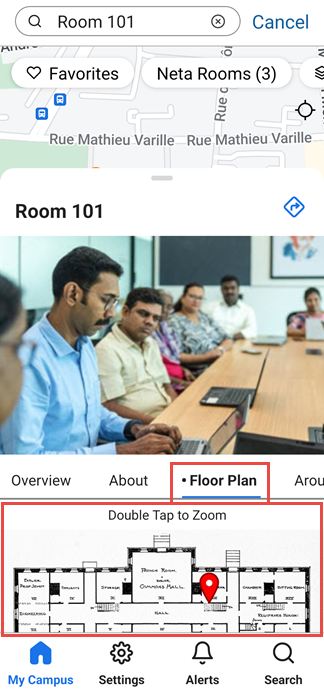
You can now create a map from an image file. If you then link the map to a position, end-users can see the map in the app when they select the position. This can be useful, for example, for providing floor plans of the interiors of buildings, or a custom campus map. The image is displayed in the bottom drawer, in the new Floor Plan tab, and the position it is linked to is marked on the image. In mobile apps under React Native, the image is displayed in the bottom drawer, in the Floor Plan tab, and the position to which it is linked is marked on the image. In the web app, the image is displayed in the Maps tab.
For additional information, see Adding Maps and Locations to Services.
(CAM-26384) Product Integration - Newsfeed
March2025CAM-26384
CM & LM
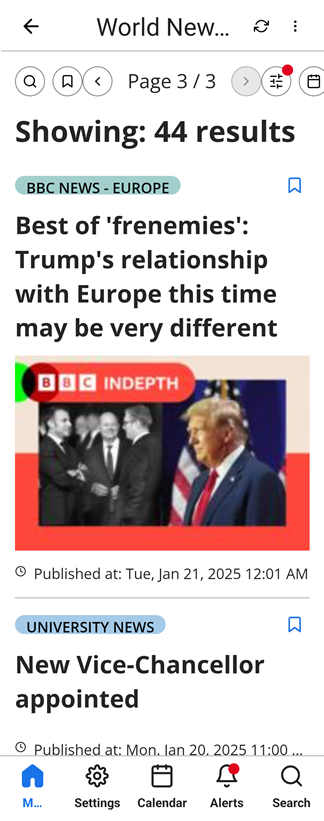
A new product integration has been introduced into campusM: a Newsfeed service. This feature allows you to add one or more feeds, either as RSS feeds or API endpoints, to a Newsfeed page. Users can access this page from a tile on the homepage. The main page of the Newsfeed UI displays the headlines of the items, which it receives from the linked feeds. Users can select these items to view their full content. This feature can be used, for example, to incorporate headlines from two feeds, one an RSS feed of breaking stories from a general news agency, and the other an internal news feed from your organization, supplied via an API endpoint and introducing new developments on campus.
Multiple feeds can be included in a single Newsfeed, and the feeds can be filtered by the end-user to limit the display to selected feeds. Feeds are updated automatically every five minutes, so they are always kept up to date. End-users can also choose to view feed items from preceding days, to save favorites, and to search for items whose titles and authors' names contain a specified string of text.
For more information, see Newsfeed.
(CAM-25799) Login - Logo Displayed on Select a Profile Page
March2025CAM-XXXXX
CM & LM
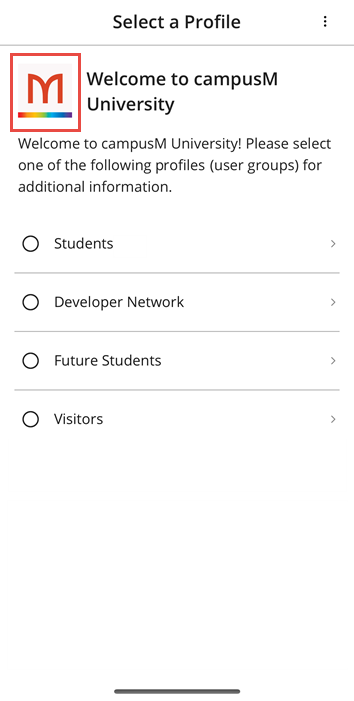
React Native now supports the display of the institution's logo on the Select a Profile page. If a logo is selected in the Change app device icons page (App Settings > App Settings > Web App Icons), this logo is displayed in the Select a Profile page, followed by the Welcome message configured in Change general settings page (App Settings > App Settings > General Settings). (If no logo is selected, it is replaced in the Select a Profile page with the text, "Welcome to [app name]." "Welcome to" in this message is translatable.)
For more information, see Configuring App Basics and Managing Profiles.
(CAM-25605) Notification Center - Advanced Role Notification
March2025CAM-25605
CM & LM
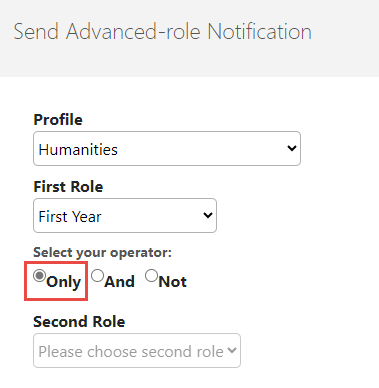
A new option has been added to the Send Advanced-role Notification page: Under Select your operator, the Only option has been added. Select this option if you only want to send the notification to users with the role selected under First Role. This modification does not add any new functionality to the feature. It was adopted after internal testing showed that it improved performance.
For more information, see Working with the Notification Center.
Resolved Issues
No resolved issues match your criteria.
- March 2025 Platform:MobileSF: 07771340 07496112 07187353CAM-25207 CM & LM (CAM-25207) The message that appeared when a user entered incorrect credentials was misleading and ambiguous. This was fixed.
- March2025CAM-26601 CM & LM (CAM-26601) In maps, the initial zoom for location categories and positions has been improved so that the area included in the map when it opens is more useful for users. When a location category is selected, the map shows all the positions that belong to the category. When a single position is selected, a larger area surrounding the position is shown.
- March 2025CAM-26463 CM & LM (CAM-26463) A frame was incorrectly added to certain icons when they were selected. This was fixed.
- March 2025 Platform:MobileSF: 07774868 07749907 07495079 07488524CAM-24567 CM only (CAM-24567) Event details in the calendar were displayed with HTML codes in them when the coding should have been rendered into formatted text, including functional links. This was fixed.
- March 2025SF: 07807937CAM-26493 CM only (CAM-26493) Offline check-in did not work as expected when no IP address was available for validation, causing an error message to appear. This was fixed; the system now handles this situation correctly.
- March 2025SF: 06300247CAM-25633 CM only (CAM-25633) Certain calendar labels appeared in the end-user app in English when the interface language was not English. This was fixed. Note, however, that customers must add the translations to the language packs for the calendar types.
- March 2025 Platform:iOSSF: 07790071 07743027CAM-26373 CM & LM (CAM-26373) When a website containing a background video was opened from a link in the app, the video automatically began playing in full-screen mode. This was fixed.
- March 2025SF: 07694959CAM-26220 CM only (CAM-26220) Calendar reminders teaching timetables were not generated. This was fixed.
- March 2025 Platform:React NativeSF: 07173337CAM-25205 CM & LM (CAM-25205) When a web page was opened from the app, it was not possible to zoom in or out of the page. This was fixed.
- March 2025 Platform:MobileSF: 07764504 07764867 07765192 07772633 07772820 07837049CAM-26302LM only(CAM-26302) Immediately after end-user login, a blank screen was displayed in the app. This was fixed.
Page tags: product:alma_specto
