Borrowing and Lending Request Email Notifications
You can now receive email notifications about active borrowing and lending requests!
Each branch can configure which notifications they receive and who receives the notifications.
- Access the Notifications configuration by clicking on your branch under:
Settings > My profile > Branch and Contact information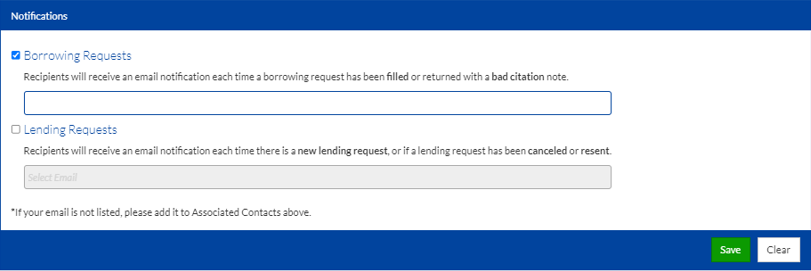
Notifications Configuration - Select to be notified for Borrowing and/or Lending Requests.
- Notifications for borrowing requests include when a borrowing request is filled or returned with a bad citation note.
- Notifications for lending requests include when a new lending request is received or if a lending request is canceled or resent.
- Select who will receive email notifications by choosing an associated contact in the drop-down.
Note:
If you do not see the email you are looking for, add it to the associated contact list in the section above.
Please use department emails and phone numbers and do not enter personal information.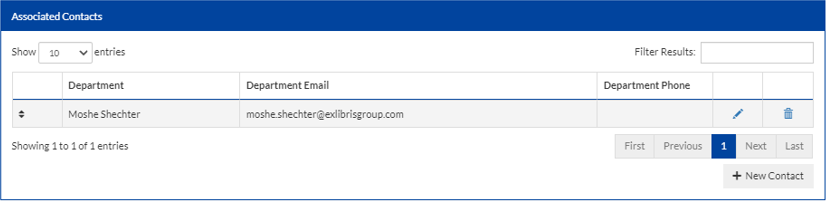
Associated Contacts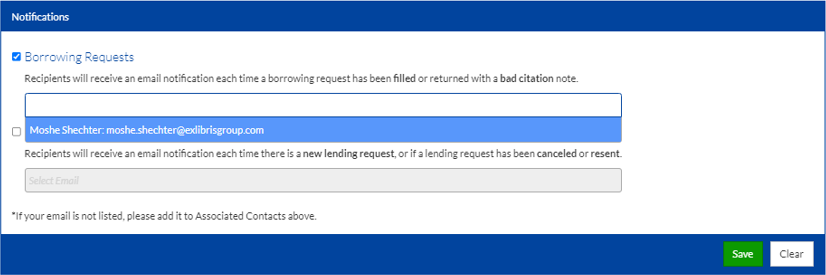
Notifications Configuration - Contact Selected
