
Category Tool
			table#NoBorder {

			border:none;

			}


			table#NoBorder td {

			border:none;

			background-color:white;

		}
You can use the Category tool to manage and configure categories in SFX. For a list of global categories, see Global Categories.
Setup
To start the Category tool, from the Additional KB Tools section of the Setup and Administration area, click Category Tool. Click the Setup tab to configure the Category tool. The following window opens:
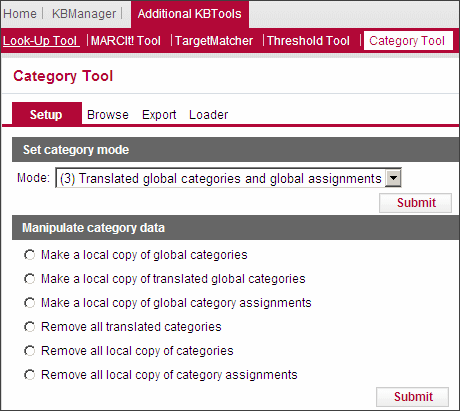
Set Category Mode
You have the option of using the categories provided by Ex Libris in English, using the Ex Libris categories translated into a different language, or creating your own categories. Additionally, you can use the assignments of objects to specific categories provided by Ex Libris or create your own local assignments.
- Select one of the following modes from the Mode drop-down list:
- (1) Global Categories and Assignments – Ex Libris categories in original language (US ENG) and use Ex Libris assignments (default setting).
- (2) Global Categories and Local Assignments – Ex Libris categories but make local category assignments. (Customers do not benefit from Ex Libris updates to the assignment table).
- (3) Translated Global Categories and Global Assignments – Ex Libris categories in a translated version (loaded by customer) and use Ex Libris assignments.
- (4) Translated Global Categories and Local Assignments – Translated Ex Libris categories but make local category assignments. (Customers do not benefit from Ex Libris updates to the assignment table).
- (5) Local Categories and Local Assignments – Local categories and local category assignments (both kept up-to-date by the customer).
- Click Submit.
Manipulate Category Data
You can make a copy of global categories and assignments as well as remove them.
- Select an option:
- Make a local copy of global categories
- Make a local copy of translated global categories
- Make a local copy of global category assignments
- Remove all translated categories
- Remove all local copy of categories
- Remove all local copy of category assignments
- Click Submit.
Browse
In this section, it is possible to view, add, edit, and delete categories, subcategories, and category assignments. Click the Browse tab. The following window opens:
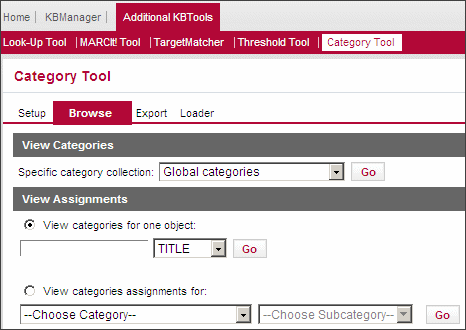
The following activities are available:
- Viewing Global Categories
- Adding Categories
- Viewing Local Categories
- Editing Local Categories and Subcategories
- Adding Local Categories
- Viewing Categories for One Object
- Viewing Category Assignments
Viewing Global Categories
You can view a list of all of the categories in SFX.
- Select one of the following types of categories from the Specify Category Collection drop-down list.
- Global categories
- Global categories (translated)
- Local categories
- Click Go. If you selected Global categories, the following dialog box opens:
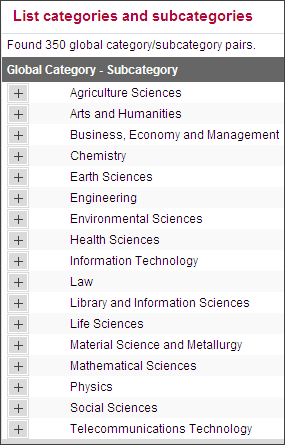
- Click
 to display a list of the subcategories of a category.
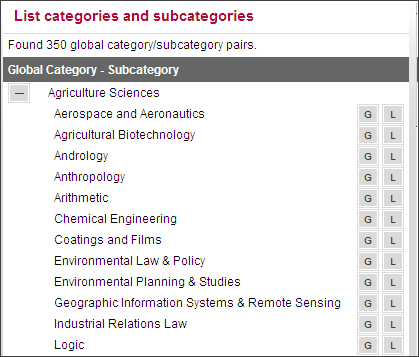
- Click to display the globally assigned objects of the subcategory. The following window appears:
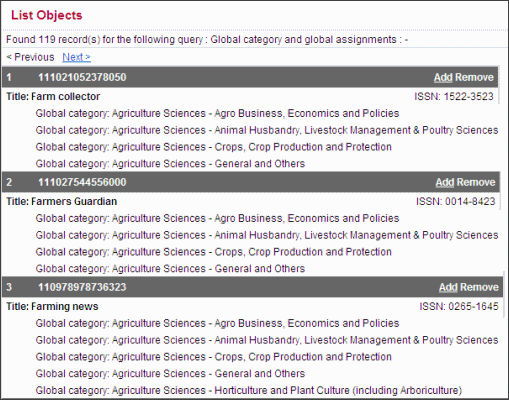
- Click
 to display the locally assigned objects of the subcategory.
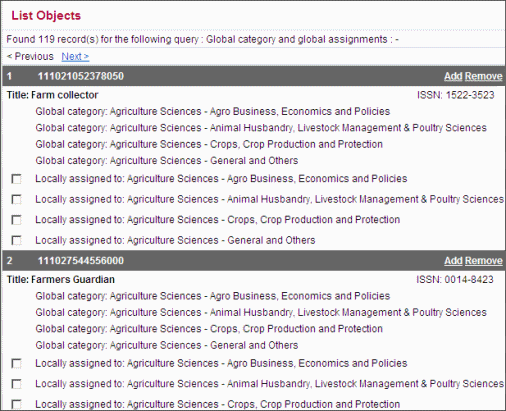
Adding Categories
You can add a local category to the list.
- Click Add. The following dialog box opens:
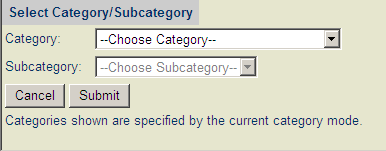
- Select a category and subcategory.
- Click Submit.
Viewing Local Categories
If you select local categories from the Specify Category Collection drop-down list, the following dialog box opens:
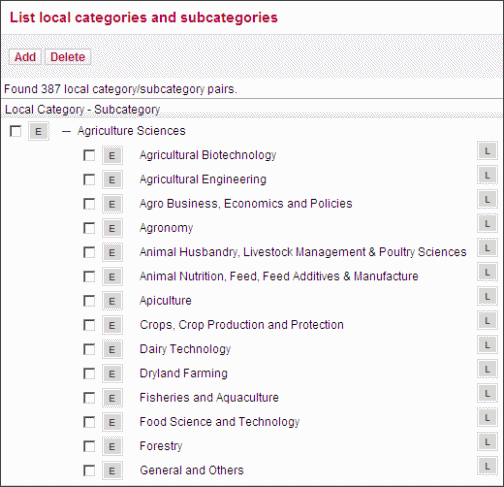
Editing Local Categories and Subcategories
You can edit local categories and subcategories.
Click  . The following dialog box opens:
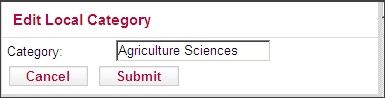
- Edit the category or subcategory.
- Click Submit.
Adding Local Categories
You can add a local category or subcategory.
- Click Add. The following dialog box opens:

- Select Category or Subcategory
- Type a name for the category or subcategory.
- Click Submit.
Viewing Categories for One Object
You can view the categories for one object.
- Select View categories for one object.
- Type the object information in the text box.
- From the drop-down list, select one of the following:
- TITLE
- ISSN
- ISBN
- LCCN
- OBJECT_ID
- Click Go.
The following information is displayed:
- Title
- ISSN
- Global categories
- Global translated categories
- Local categories
- Global assignments
- Local assignments
For example:
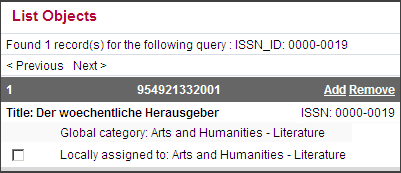
Both the active and inactive categories are displayed, but the inactive ones are grayed out.
Viewing Category Assignments
You can view the objects assigned to a category.
- Select View category assignments for.
- From the Choose Category drop-down list, select a category.
- From the Choose Subcategory drop-down list, select a subcategory.
- Click Go.
The following information is displayed:
- Title
- ISSN
- Global categories
- Global translated categories
- Local categories
- Global assignments
- Local assignments
Export
Click the Export tab to export categories. The following window opens:
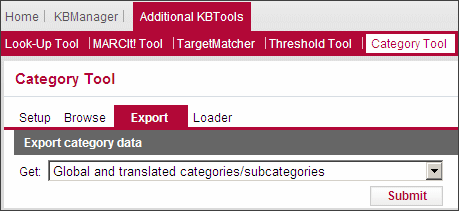
- From the Get drop-down list, select an option:
- Export Ex Libris categories and translated Ex Libris categories
- Report Ex Libris categories where no translated categories exist
- Export all local categories without assignments
- Export all local categories with assigned objects (ISSN, etc)
- Export count total assigned journals per local category
- Export all category information for list of objects (using input file)
- Click Submit. The following window opens:
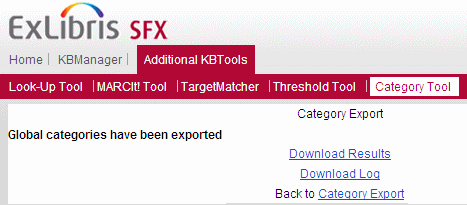
- To download the results, click Download Results.
- To download the log file, click Download Log.
Loader
Click Loader to load categories in the SFX KnowledgeBase. The window opens:
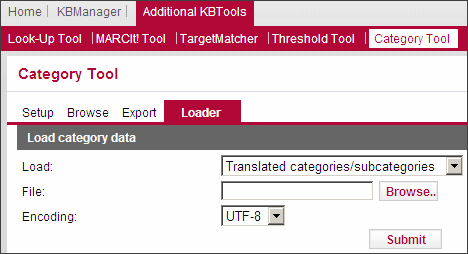
- From the Load drop-down list, select the type of data you want to load. For more information, see Load Options.
- In the File field, click Browse and select the file with the data you want to load.
- From the Encoding drop-down list, select an encoding option.
- Select any additional options available.
- Click Submit.
The following rules apply to loading categories into the SFX KnowledgeBase:
- Categories cannot be loaded without subcategories.
- Journals can be loaded only to a category/subcategory pair (not to categories only or subcategories only).
Load Options
- Translated categories/subcategories – The data in the input file overwrites the old translated category information. The following is the input file format:
Ex Libris CATEGORY <tab> Translated CATEGORY <tab> Ex Libris SUBCATEGORY <tab> Translated SUBCATEGORY
- Local categories/subcategories – The following is the input file format:
LOCAL CATEGORY <tab> LOCAL SUBCATEGORY
Options:
- Add new – Adds new categories/subcategories and leaves existing items in the database—but not in the input file—untouched.
- Add new + remove if not in input file – Adds new categories/subcategories and removes existing items in the database but not in the input file.
- Update existing – The data in the input file overwrites the old information. The input file for this option requires the following format:
LOCAL CATEGORY ID <tab> LOCAL CATEGORY NAME <tab> LOCAL SUBCATEGORY ID <tab> LOCAL SUBCATEGORY NAME
- Assignment of global categories – The following is the input file format:
Primary key <tab> Ex Libris CATEGORY <tab> Ex Libris SUBCATEGORY
The primary key can be: ISSN, ISBN, LCCN, OBJECT (only one primary key per input file)
Options:
- Add new – Adds new categories/subcategories assignments and leaves existing items in the database—but not in the input file—untouched.
- Replace – The data in the input file overwrites the old information.
- Assignment of local categories/subcategories – The following is the input file format:
Primary key <tab> LOCAL CATEGORY <tab> LOCAL SUBCATEGORY
The primary key can be: ISSN, ISBN, LCCN, OBJECT (only one primary key per input file)
Options:
- Add new – Adds new categories/subcategories assignments and leaves existing items in the database—but not in the input file—untouched.
- Replace – The data in the input file overwrites the old information.
Global Categories
| Chemistry | |
| Analytical Chemistry | Nuclear Chemistry |
| Applied Chemistry | Organic Chemistry |
| Biochemistry | Petroleum |
| Chemical Engineering | Pharmaceutical Chemistry |
| Clinical Chemistry | Physical Chemistry |
| Crystallography | Polymers and Plastics |
| Electrochemistry | Radiation Chemistry |
| Environmental Chemistry | Toxicology |
| Inorganic Chemistry | General and Others |
| Kinetics | Synthesis |
| Medicinal Chemistry |
| Earth Sciences | |
| Cartography | Marine Geology and Oceanography |
| Engineering Geology | Meteorology |
| Environmental Geology | Mineralogy |
| Extraterrestrial Geology | Paleontology |
| Geochemistry | Petrology |
| Geographic Information Systems & Remote Sensing | Tectonics, Seismology & Volcanology |
| Geography | General and Others |
| Geology | Stratigraphy |
| Geophysics | Energy Minerals |
| Hydrology |
| Environmental Sciences | |
| Atmospheric Science | Global Warming |
| Biodiversity | Natural Disasters & Industrial Accidents |
| Biomass Energy & Biofuels | Occupational Hazards & Health |
| Conservation | Pollution (Air, Noise, Soil and Water) & Control |
| Desert Ecology & Desertification | Radioactivity & nuclear fallout |
| Ecosystems & Ecology | Sustainable Development |
| Ecotoxicology | Waste management and Recycling |
| Environmental Engineering | General and Others |
| Environmental laws | Energy Conservation &Alternate Energy Sources |
| Environmental Planning & Studies | Hazardous Substance Handling, Management & Disposal |
| Environmental Sciences | |
| Life Sciences | Ornithology |
| Andrology | Toxicology |
| Biochemistry | Virology |
| Biology | Zoology |
| Bioinformatics | General and Others |
| Biophysics | Morphology |
| Biotechnology | Paleontology |
| Botany | Taxonomy & Systematics |
| Entomology | Evolutionary Studies |
| Cytology, Cell Biology | Genomics |
| Genetics | Computational Biosciences |
| Immunology | Ethology |
| Limnology | Animal Physiology |
| Micro and Molecular Biology | Metabolism |
| Mathematical Sciences | |
| Algebra | Numerical Analysis |
| Applied Mathematics | Probability |
| Arithmetic | Set Theory |
| Calculus | Statistics |
| Game Theory | Topology |
| Geometry | General & Others or All |
| Graph Theory | Algorithms |
| Group theory | Stochastic Computation |
| Logic | Combinatorics |
| Mathematical Analysis & Logic | Complex Analysis |
| Mathematical Physics | Algebraic Geometry |
| Number Theory | Differential Geometry |
| Physics | |
| Acoustics | Particle Physics |
| Applied Physics | Plasma Physics |
| Astronomy | Mechanics |
| Astrophysics | Radiation |
| Condensed Matter Physics | Relativity |
| Cryogenics | Solid State Physics |
| Energy | Thermodynamics and Heat Transfer |
| Magnetism | Ultrasonic |
| Optics & Opto Electronics | General and Others |
| Nuclear Physics | Atmospheric Physics |
| Engineering | |
| Aerospace and Aeronautics | Fuel Technology |
| Agricultural Engineering | Industrial Engineering |
| Architecture | Instrumentation |
| Automobile and Transportation | Marine Engineering |
| Biomedical Engineering | Mechanical Engineering |
| Biotechnology | Metrology |
| Chemical Engineering | Mining Engineering |
| Civil Engineering | Nuclear Engineering |
| Control Engineering | Petroleum Engineering |
| Cryotechnology | Pharmaceutical Technology |
| Dairy Technology | Polymer Technology |
| Electrical Engineering | Quality Engineering |
| Electronics | Textile Engineering |
| Energy Engineering | General and Others |
| Environmental Engineering | Production Technology |
| Ergonomics | Satellites, Space Probes & Technology |
| Fluid Engineering | Printing Technology |
| Food Science and Technology | Fire Fighting and Safety Engineering |
| Information Technology | |
| Artificial Intelligence | Healthcare Database & Medical Informatics |
| Computer Science (Hardware & Networks) | Mobile Computing |
| Cybernetics | Computer Architecture, Languages and Compilers |
| Information Science and Systems | Information Extraction, Retrieval and Filtering |
| Internet | Data Storage and Data Mining |
| Multimedia | Graphics |
| Robotics | Computer Security, Confidentiality |
| Software Engineering | Modelling & Simulation |
| General and Others | Computational Biosciences |
| Banking Insurance Financial Systems | Neural Networks |
| Automation | Web Development |
| Embedded Systems | Computer Aided Design & Production Control |
| Database Design & Management |
| Material Science and Metallurgy | |
| Biomaterials | Physical Metallurgy |
| Ceramics | Rubber Technology |
| Coatings and Films | Super Conductors |
| Composites | Treatment & Finishing |
| Corrosion | Textile materials |
| Extractive Metallurgy | Wood, Paper & Cellulosics |
| Melting, Coating, Powder Metallurgy | Working, Forming, Machining & Joining |
| Metals, Minerals, Ores & Alloys | General and Others |
| Packaging Materials & Technology | Nanomaterials |
| Telecommunications Technology | |
| Cables & Optical Fibres | Wireless Communications |
| Communication Networks & Technology | General and Others |
| Digital Signal Processing | Telemedicine |
| Image Processing & Television Technology |
| Business, Economy and Management | |
| Accounting and Auditing | Trade and Commerce |
| Actuarial Science, Insurance and Risk Management | General and Others |
| Banking and Investment | Organizational Communication, Business Writing |
| Business Management | International Business & Transnational Corporations |
| E-Commerce | Strategic Management & Business Policy |
| Economics | Organizational change and Development |
| Finance | Organizational Psychology |
| Marketing and Sales | Quality Management |
| Personnel Management & Training | Operations Research |
| Projects and Consultancies | Multimodal Transport & Logistics |
| Public Relations | Material & Supply Chain Management |
| Stocks and Shares |
| Library and Information Sciences | |
| Abstracting and Indexing | Library Automation |
| Acquisition | Library Networks |
| Cataloguing | Library Management |
| Classification | Serials Control |
| Digital Libraries | General and Others |
| Information Sources, Services and Retrieval | Archives & Preservation |
| Librarianship and Libraries |
| Social Sciences | |
| Anthropology | Regional and International Studies |
| Archaeology | Rehabilitation |
| Behavioral Science (Psychology) and Counselling | Sociology |
| Communities and Urban Planning | General and Others |
| Demographic Studies | Gender Studies |
| Foreign Policy, Defence and Internal Security | Museums & Heritage Organizations |
| Journalism, Mass Communication, Media & Publishing | Developmental Issues & Socioeconomic Studies |
| Political Science | Disability Studies & Assistance |
| Public Policy & Administration | Community Based Awareness and Relief Service |
| Law | |
| Banking Law | Investment Laws |
| Constitution and Judicial System | Corporate laws |
| Crime, Criminology and Law Enforcement | Policies |
| Environmental Law & Policy | Regional and International Law |
| Foreign Trade & Commercial Transactions | Taxation Laws |
| Industrial Relations Law | General and Others |
| Insurance Law | Domicile and Immigration Laws |
| Intellectual Property | Arbitration, Education & Training |
| Arts and Humanities | |
| Architecture, Fine and Decorative Arts | Philosophy |
| Fashion & Entertainment | Religion |
| History | Society and Culture |
| Human Rights, Women's Studies & Child Welfare | General and Others |
| Language & Linguistics | Education & Careers |
| Literature | Current Events & News |
| Performing Arts, Travel and Leisure |
| Agriculture Sciences | |
| Agricultural Biotechnology | Horticulture and Plant Culture (including Arboriculture) |
| Agricultural Engineering | Organic Farming, Rural Development, Sustainable Agriculture |
| Agro Business, Economics and Policies | Pests, Pest Control & Integrated Pest Management |
| Agronomy | Soil Chemistry, Microbiology, Fertility & Fertilizers |
| Animal Husbandry, Livestock Management & Poultry Sciences | Veterinary Science |
| Apiculture | Water and Water Resources |
| Crops, Crop Production and Protection | General and Others |
| Dairy Technology | Plant Pathology |
| Dryland Farming | Plant Breeding |
| Fisheries and Aquaculture | Post Harvesting Operations and Storage |
| Food Science and Technology | Seed Technology & Propagation |
| Forestry | Animal Nutrition, Feed, Feed Additives & Manufacture |
| Health Sciences | |
| Allergy | Obstetrics and Gynecology |
| Alternative Medicine | Oncology |
| Anesthesiology | Ophthalmology |
| Anatomy | Orthopedics |
| Cardiology | Pediatrics |
| Clinical Medicine | Pathology |
| Dentistry | Pharmacy and Pharmacology |
| Dermatology | Physiology |
| Diabetes and Hypertension | Psychiatry & Psychology |
| Diseases | Public health |
| Emergency Medicine and Critical Care | Radiology |
| Endocrinology | Reproduction & Reproductive Medicine |
| ENT | Rheumatology |
| Forensic Science | Sports medicine |
| Gastroenterology | Surgery |
| Genetics | Therapeutics |
| Geriatrics | Urology and Nephrology |
| Hematology | Veterinary Science |
| Hepatology | General and Others |
| Histology | Diagnostics |
| Immunology | Medical Education, Training & Research |
| Legal Medicine | Physiotherapy |
| Venereology | Andrology |
| Medical Informatics | Tuberculosis |
| Medical Specialties | Embryology |
| Morphology | HIV & AIDS |
| Neurology | Preventive Medicine |
| Nuclear Medicine | Family Medicine |
| Nursing | Cerebrovascular Diseases & Strok |
| Nutrition and Dietetics |
