
TargetMatcher
table#NoBorder {

   border:none;

}


table#NoBorder td {

   border:none;

   background-color:white;

}
TargetMatcher Overview
TargetMatcher is a tool that allows you to do the following:
- Create a report of active target services in the database
- Activate target services in the database
TargetMatcher can also be used to determine an object’s target, which is necessary for batch activations using DataLoader.
TargetMatcher is useful for libraries that have a list of objects to which they subscribe and need to obtain a list of matching targets in order to use the DataLoader tool.
To start TargetMatcher, from the Additional KB Tools section of the Setup and Administration area, click TargetMatcher. The following window opens:

- Using Microsoft Excel, prepare a tab-delimited input file. In the first column of the file, list the primary key, which can be ISSN, ISBN, LCCN, or Object ID numbers. In the second column you can list any information you want—for example, thresholds.
- Click the Browse button and select the file or place it manually in the scratch directory of the SFX instance.
- From the Check the input file against drop-down list, select the type of target against which to check the input file. The following options are available:
- ACTIVE
- INACTIVE
- SPECIFIC
- ALL
- ACTIVE_FULLTXT
- INACTIVE_FULLTXT
- ALL_FULLTXT
If you select Specific, select the targets against which you want to check the input file from the list and click Add.
- From Select Mode, select Report to produce a report of items in the KnowledgeBase or Activation to activate the targets in the input file.
- From Select Key, select the type of primary key in the input file.
- Click Submit to start the TargetMatcher process.
Reading Files Generated in Report Mode
If you select Report, a window opens that contains links to files that are generated by TargetMatcher.
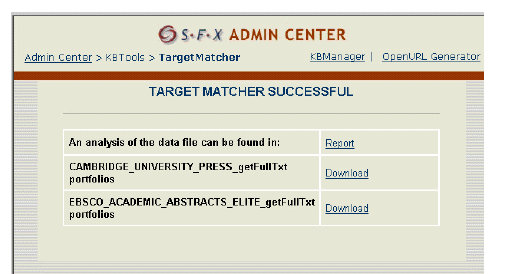
To download the full report, click Report after An analysis of the data file can be found in. This report is also available in the scratch directory and is named <name_of_your_original_file>.txt.ok.err. The report file lists the items that are not found in the database. The following is an example of a report:
|
Report |
NotFound |
0269-3879 |
no target service found for 0269-3879 |
|
Report |
NotFound |
0424-7760 |
no target service found for 0424-7760 |
|
Report |
NotFound |
0890-2070 |
no target service found for 0890-2070 |
To download reports for each target and its target services, click Download next to the target for which you want to download the report. The report is a tab-delimited file that contains a list of objects of the portfolios that are found. The following is an example of a report:
|
0886-9383 |
Journal of Chemometrics |
Reading Files Generated in Activation Mode
If you select Activation, a window is displayed that contains links to files that are generated by TargetMatcher.
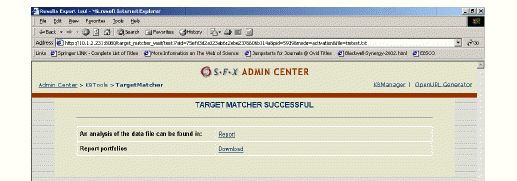
To download a report of items that are not found in the database, click Report after An analysis of the data file can be found in. This report is also available in the scratch directory and is named
|
Report |
NotFound |
0269-3879 |
no target service found for 0269-3879 |
|
Report |
NotFound |
0424-7760 |
no target service found for 0424-7760 |
|
Report |
NotFound |
0890-2070 |
no target service found for 0890-2070 |
To download a report of the activated items in the database, as well as the targets and target services activated during the TargetMatcher process, click Download next to Reportportfolios. This report is also available in the scratch directory and is named
|
Activated ELSEVIER getFullTxt 0894-3370 |
|
Activated ELSEVIER getFullTxt 0894-3370 |
|
Activated BIOONE getFullTxt 0886-9383 |
|
Activated CAMBRIDGE_UNIVERSITY_PRESS getFullTxt 0952-3499 |
|
Activated NEW getFullTxt 0002-8231 |
|
|
|
Activated 4 portfolios |
|
|
|
Activated ELSEVIER getFullTxt |
|
|
|
Activated BIOONE getFullTxt |
|
|
|
Activated CAMBRIDGE_UNIVERSITY_PRESS getFullTxt |
|
|
|
Activated NEW getFullTxt |
