Viewing System Status in Admin App
Viewing System Status in the Admin App is available in Sierra 6.5 and later.
To log in to the Sierra Administration Application, your login must be assigned the access to the Sierra Administration Application and the .
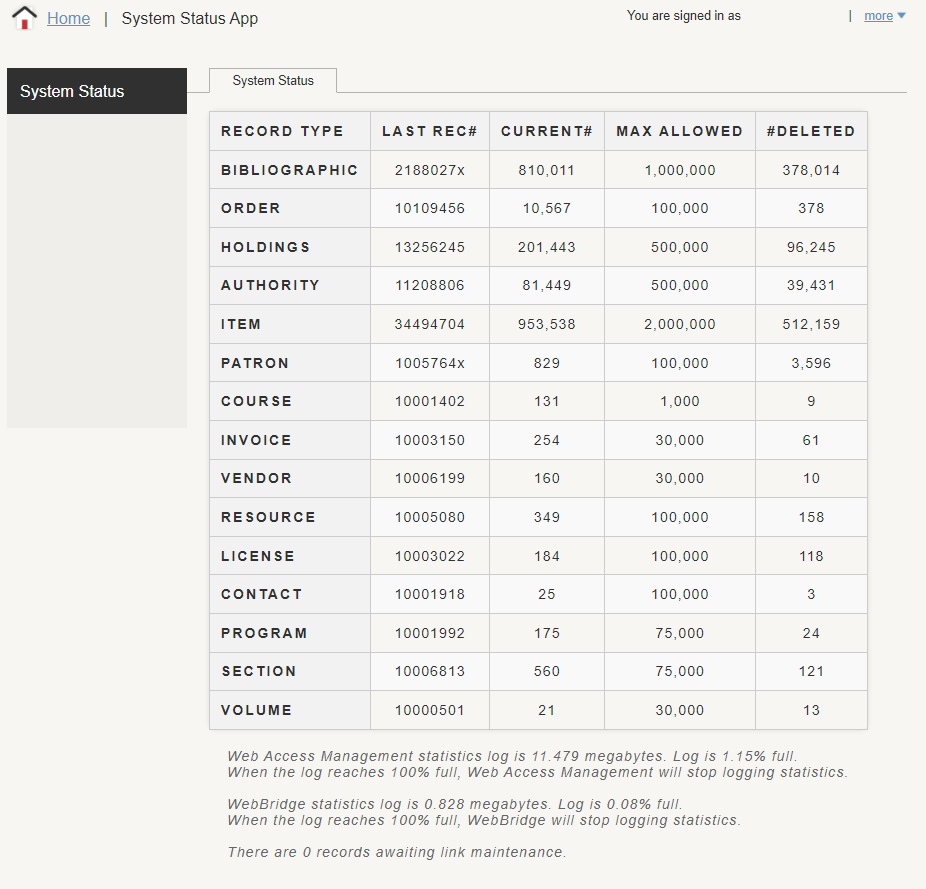
You can view the System Status in the Sierra Administration Web Application under the System Information area. The System Status component in Sierra Administration Web Application displays information about the number of records in your system and the status of certain log files.
This option allows you to view the following view counts:
-
Record type
-
Last record #
-
Current record #
-
Max allowed
-
Number of deleted records
-
Selected log stats
The information displayed is view-only.
Viewing System Status in Sierra Administration Web Application
To view System Status in Sierra Administration Web Application:
-
Select System Information under Back End Management.
The System Information screen displays.
-
Select System Status.
The System Status screen appears.