
Method A: Single Library Source Fund
This method of handling a deposit account uses a single library source fund for the deposit account, and is similar to Method B. This method differs, however, by using a negative expenditure to fund the deposit account (whereas method B funds the deposit account via an appropriation). As the vendor supplies items, you can expend them against the deposit account, thus decreasing the remaining balance. For further information on the fund balances, see Understanding the Balances in Fund Accounts Using Method A.
Example Funds
To show how this method works, the examples below use govpb to represent the source fund and dpgpo to represent the deposit account fund.
To set up the funds using this method, do the following.
- Create a fund to use as the source fund if one doesn't already exist.
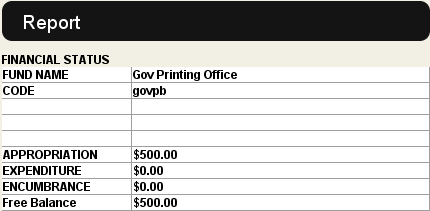
For example, if you create the source fund with an appropriation of $500.00, the initial fund report displays as follows.
- Create a fund for the deposit account if one doesn't already exist. Innovative recommends creating mnemonic codes like "dpgpo", with the beginning portion indicating it is a deposit account, for example, "dp", and the end portion specifying the vendor, for example, "gpo" for the U.S. Government Printing Office.
- When you make the prepayment to the vendor, record this as usual in the source fund (govpb). You can do this in one of two ways:
- Enter an x record in an invoice for the prepayment. Choose this method if your accounting office requires an invoice register or voucher to issue the prepayment check.
- Use the Fund Adjustment Table to enter an expenditure.
- Using the Fund Adjustment Table, enter a negative expenditure in the deposit account fund (dpgpo) in the same amount as the prepayment you recorded in the step above.
For example, if your prepayment to the vendor is $100.00, your fund reports display as follows after recording the prepayment.
| govpb (source fund) | dpgpo (deposit account fund) | ||||
| Appropriation | Expenditure | Free Balance | Appropriation | Expenditure | Free Balance |
| $500.00 | $100.00 | $400.00 | $0.00 | -$100.00 | $100.00 |
After you finish setting up your funds, you can begin ordering items from the vendor. When you enter orders, enter the deposit account fund in the order record. As items are received, you can process them using the invoicing functions.
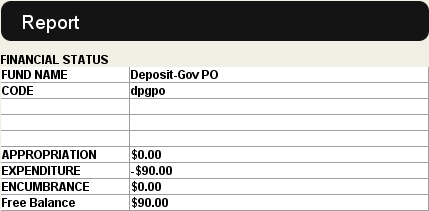
For example, if you process an item for $10.00, the fund report for the deposit account fund shows:
Subfund Codes
You can use the subfund codes in the deposit account fund to break down the payments made against the deposit account by order type or other areas of interest.
Understanding the Balances in Fund Accounts Using Method A
Just as with Method B, the balance of the general (source) fund is the actual cash amount remaining in the library's possession. The deposit account balance is the amount of credit left with the vendor. If you produce a fund report with a total for both balances, that total reflects the library's true assets, that is, those in its own cash account AND those which the vendor is holding in anticipation of orders for material.
