
Clearing the JAR Cache
Clearing the JAR cache is available in Sierra 6.3 and later.
Each time you launch the Sierra Desktop Application, the system automatically removes old and unused Java ARchive (JAR) files from the jarcache directory on your machine. You can also trigger this process manually in the Sierra Desktop Application.
To manually clear the JAR cache:
- Select Help | About. The About Sierra window opens.
- Click Clear JAR Cache. The Clear JAR Cache window opens.
- (Optional) Enter a reason why you are clearing the JAR cache. This information can help Innovative in future releases to prevent the conditions in future releases that caused you to clear the JAR cache.
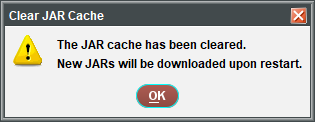
- Click Yes. Sierra displays the following confirmation message:
NOTE
Because the Sierra Desktop Application is currently running, Sierra cannot delete the JAR files at this time. Instead, the system deletes the jar.cache file (a file that identifies all of the JAR files necessary for Sierra). This deletion triggers Sierra to delete the JAR files and download new ones from the server the next time you launch the Sierra Desktop Application.
- Click OK to close the message window.
- Click OK again to close the About Sierra window.
