
2024 Release Notes
December 4, 2024
The following enhancements and fixes are included in this maintenance release.
-
Staff can now directly add or paste JS/CSS code into the Summon Admin Console rather than calling an external script. For more information, see Summon 2.0 External Script.
-
The Chicago Manual of Style (18th Edition) citation style has been added to Summon Citation formats.
-
The Summon Help Document now displays in selected UI language after a UI language change.
-
Facet Scrolling: Scroll back to top for new search.
-
Back to results now works correctly after using Quick Look.
November 6, 2024
Below are some details for features and improvements in the current release. This summary applies to Summon, Summon over Alma, Sierra via Summon, and Summon API customers. The Summon preview environment for this release is available on October 23.
Enhancements:
-
New! Carousel widget for marketing library content in any external website:
Now you can highlight your unique resources, new subscriptions, special collections, or local creators’ content and drive users to Summon for additional research. Using the integrated Widget Builder, you can quickly and easily create an embeddable code snippet of a Summon query that can be used in websites like LibGuides, researchers’ pages, the main university or library page, and so forth.
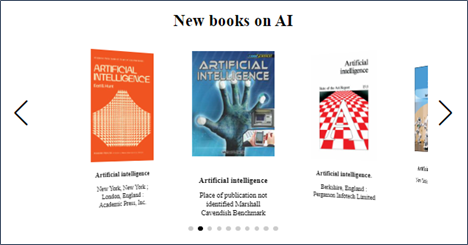
For details on how create your showcase carousels, please see Summon: Creating a Search Box, Search Widget, or Carousel.
-
Improved user experience for facets application–
 NERS Enhancement:
Previously, if users scrolled to the bottom of a results page, the facets were not visible, and they had to scroll back up to use them. This new, opt-in feature enables a facet panel that scrolls independently of the results set. Thus, users can easily select and apply refinements regardless of where they are in the results list.
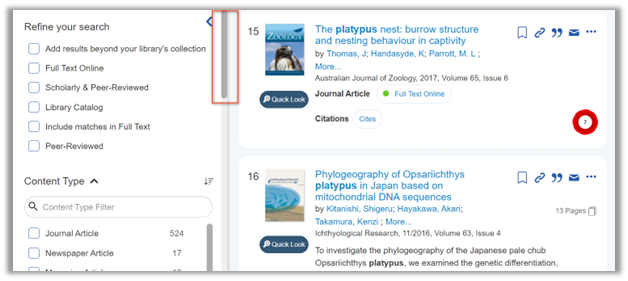
To enable this feature, set the new Independent Scrolling Enabled parameter to ON on the Summon Admin Console > Settings > Facet page. For additional information, see Summon Settings: Facets.
-
Open “Search within [journal name]” results in a new tab–
NERS Enhancement:Previously, the “Search within [journal name]” feature executed the new search in the same tab/window. In response to customer requests, Summon will now open a new tab for searching within the specified journal so as not to lose the original results set and context.
August 7, 2024
Below are some details for features and improvements in the current release. This summary applies to Summon, Summon over Alma, Sierra via Summon, and Summon API customers. The Summon preview environment for this release was available on July 24.
Enhancements:
-
Save Items between Sessions:
NERS EnhancementUsers can permanently save items to their Google, Microsoft, and Ex Libris cloud drives if users are signed-in. For more information, see Saving Items (Citations).
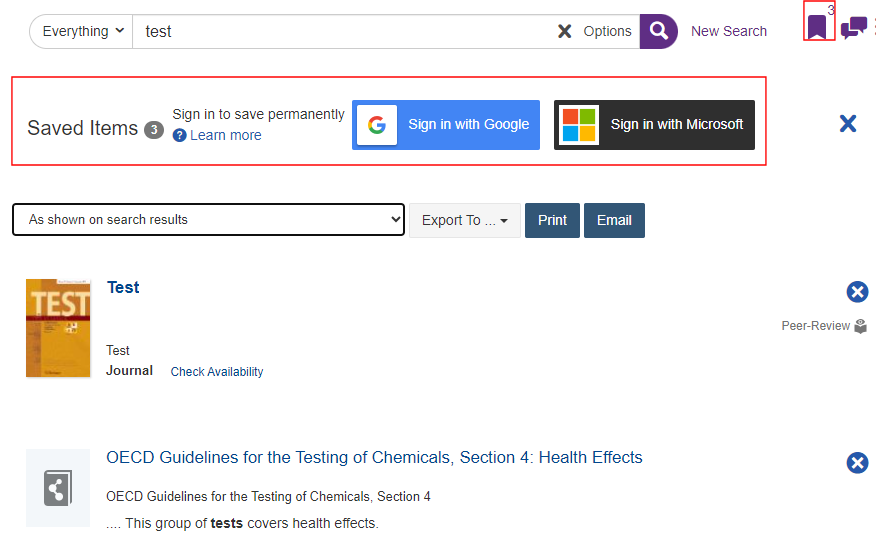
To enable this feature, set the new Saved Items Enabled parameter to ON on the Summon Admin Console > Settings > Advanced Search page.
-
Bulk Export for Search Results:
NERS EnhancementThe Bulk export of search results (up to 1000) functionality, which has been available for several preview releases, is now available in Production and includes the following changes based on your feedback:
-
Translations for email subject, report title, and default email message text.
-
Return a URL for the Summon search result in the BookMark field in the .csv export report instead of the bookmark hash.
-
Return the standardized date format YYYY-MM-DD.
-
Clearer messaging for the 1000 item limit.
For more information, see Exporting Search Results and Saved Citations.
-
-
Replace Summon Auto-Scroll with Pagination:
To address a critical accessibility concern, we have removed the “infinite” or auto-scroll navigation for search results and now provide paged results of either 10 or 25 items per page.
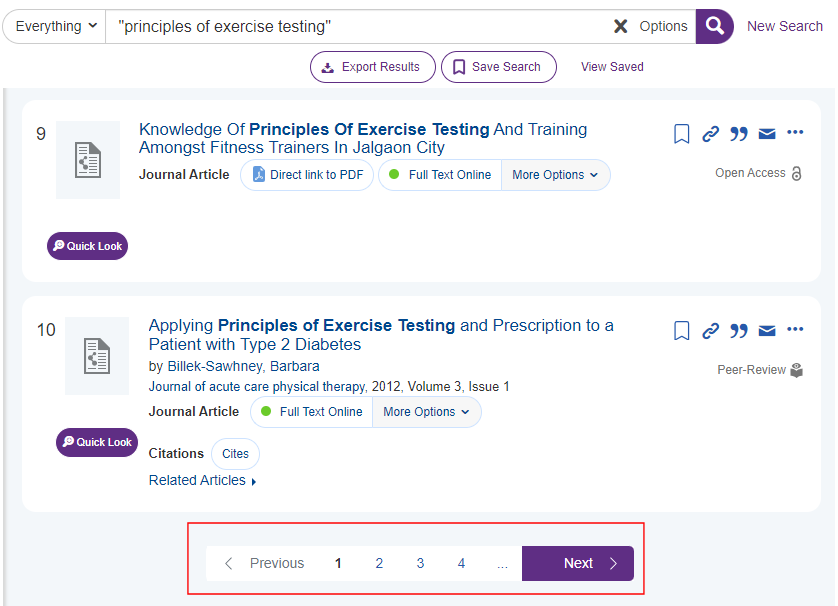
You can configure whether to display 10 or 25 results per page by configuring the Default Number of Search Results parameter on the Summon Admin Console > Settings > General page.
-
Verbatim Search Operator for Exact Matching:
NERS EnhancementUsers can now disable linguistic features (such as stemming, spelling/casing/character normalizations and synonyms) to match exact phrases verbatim. This is done by adding an equals sign (=) after the closing double quote of an exact phrase. Examples:
-
"sea otter"=– Disables pluralization to retrieve results that include the exact phrase sea otter and not sea otters.
-
"theatre"=– Disables spelling variations to retrieve results that include the exact phrase theatre and not theater.
-
July 10, 2024
Enhancements:
As a reminder, Bulk Export will be available in Production in the August release. We’ve made a number of enhancements for the Preview environment based on your feedback and have additional ones scheduled.
-
Return a URL for the Summon search result in the BookMark field in the .csv export report instead of the bookmark hash.
-
Return the standardized date format YYYY-MM-DD.
-
Bulk export email not sent for some language results (CJK, Russian).
Resolved Issues:
-
Summon Quick Look pane was prefixing the 590 note with the text MARC_.
-
A hash tag in a notes field broke the text into separate lines in the display.
-
Search Scopes were missing translations for the following labels:Collections to search for and You are about to leave.
-
Summon over Alma only: the language parameter in the link to My Account was not resolving correctly.
June 5, 2024
Below are some details for various fixes and and improvements. This summary applies to Summon, Summon over Alma, Sierra via Summon, and Summon API customers.
Enhancements:
-
The Summon Notes field was removed from the default search fields in November 2023 for performance reasons. We implemented a new solution for libraries that want to search Notes by default, in addition to the existing “Notes:” syntax and dedicated Notes index in the Advanced Search options.
-
If you would like Notes fields searched by default, please open a case with Support to enable this feature.
-
This applies to Summon UI users as well as Summon API users.
-
API users, please see Include Notes Matches on the Ex Libris Developer Network
-
-
New authentication option: Summon now supports the ability to immediately redirect users to a SAML login rather than the Summon splash page if they are not already IP authenticated. This scenario is primarily for secured, private libraries but can be used by any Summon customer. Please contact support if this is an option you’d like to enable.
-
Normalized Subject headings now display in alphabetical order.
-
The default value of the s.include.ft.matches API parameter is changing to false to be consistent with the default behavior of the Summon UI. Setting it to false helps return more focused search results for users.
Resolved Issues:
-
Customizer: missing translation in preview environment - "This item cannot be requested" for Summon via Sierra libraries.
-
For some customers a subset of titles linked to the OPAC instead of the Summon details page.
-
Library Notes (5XX) displays incorrectly due to hash character.
-
The permalink label pop-up in Summon obscures the "x" to close the permalink pop-up.
-
Summon via Sierra users cannot access My Library Card if there are no checked-out items on their account.
-
Removed the errant “Leave Site?” prompt when attempting to save changes to the Summon Admin Console > Pages > Sections page.
May 1, 2024
Below are some details for features in the current release as well as various fixes and and improvement. This summary applies to Summon, Summon over Alma, Sierra via Summon, and Summon API customers. The Summon preview environment for this release was available on April 17.
Enhancements:
-
Bulk Export of Search Results:
NERS Enhancement from the Idea Exchange
Preview only! This will not be released to production on May 1. We are interested in gathering feedback from the Summon community before finalizing feature details. Please provide feedback by submitting a new Support case or by posting to the Summon Listserv.
Bulk export allows users to download the results (up to 1000) of a search query in one action, as opposed to exporting titles individually. The results are sent to the designated email address in a .csv file with commonly used metadata fields.
To enable this feature, go to Summon Administration Console (Preview version only) > Settings > Search Results and enable the new parameter Allow Download Search Results.

Once enabled, when a search query yields 1000 or fewer results a new button labelled “Export Results” will appear at the top of the results list.
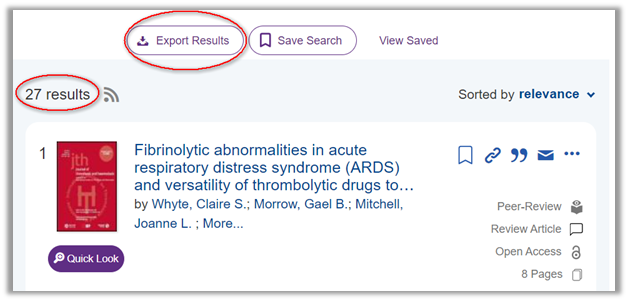
If the query yields more than 1000 results the, button will not appear.
Selecting Export Results opens a new form that asks for a mandatory email address, optional message text, and a reCAPTCHA confirmation the first time patrons use the feature in a session.
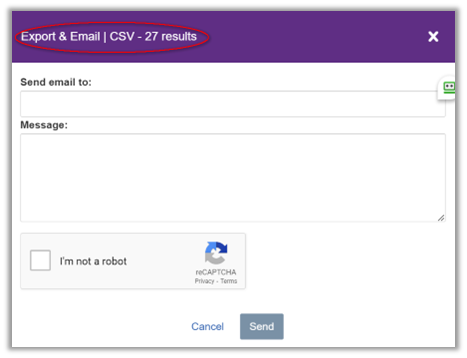
After submitting the form, a confirmation message appears on the screen for several seconds. Depending on the size of the file, it may take several minutes to reach the email account.

-
Display Full Title on Hover:
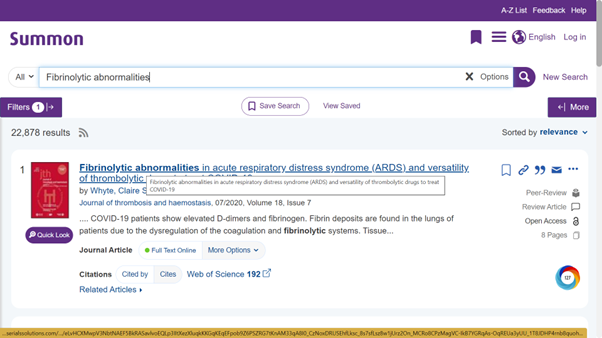
NERS Enhancement from theIdea ExchangeTo provide more clarity and context to users with smaller screens and screen resolutions, hovering over the title of a result will now display the full title.
-
Auto-enable Quicklinks
With the May release, we will enable Quicklinks for all Summon libraries automatically! Why? Quicklinks, which have been live since 2021, enable users to go directly to the full text with one click to either a PDF or HTML file. Quicklinks have a 99% linking accuracy rate to more than 1.5 billion records and are supported by many providers.
To support this feature, the Auto Activate Quicklinks May 2024 parameter has been added to the Settings page (Summon Administration Console > Settings > Search Results):
-
If you currently have Quicklinks enabled, take no action.
-
If you want to enable Quicklinks on May 1, take no action.
-
If you do NOT want to Quicklinks enabled automatically, set the Auto Activate Quicklinks May 2024 parameter to OFF.

After the May release, you may opt out of using Quicklinks at any time.
-
February 14, 2024
Below are some details for features in the current release as well as various fixes and and improvement. This summary applies to Summon, Summon over Alma, Sierra via Summon, and Summon API customers. Please note that there is no Summon preview environment for this release.
Enhancements:
-
Summon + Canvas LTI Integration
Summon + Canvas clients are now able to take advantage of LTI (Learning Tools Interoperability), a standard that helps securely integrate learning management systems with remote platforms. Once the integration is configured in both systems, Canvas users (instructors and students) can access full text content in Summon directly from Canvas without the need for a proxy or other authentication system.
This integration supports the following workflows:
-
A Canvas administrator can make a Summon Canvas app available to instructors.
-
A Canvas course instructor can:
-
Add the library’s Summon URL to the course as a virtual tool.
-
Add a bookmark to a specific record in Summon with appropriate descriptive text.
-
Add a Summon search URL.
-
-
A course participant can
-
View Summon records (bookmarks).
-
Launch search results in Summon from the pre-defined URL as an authenticated library user (i.e. no additional proxy or login required).
-
-
-
Auto-enable Quicklinks
We are preparing to enable Quicklinks for all Summon libraries in May! Why? Quicklinks, which have been live since 2021, enable users to go directly to the full text with one click to either a PDF or HTML file. Quicklinks have a 99% linking accuracy rate to more than 1.5 billion records and are supported by many providers.
Please note that you may opt out of using Quicklinks any time you want.

What does this mean for you?
-
If you currently have Quicklinks enabled, take no action.
-
If you do not already have Quicklinks enabled, the new setting (above) will default to On in the February release. For now this is information only. Once the May release is live:
-
Quicklinks are automatically enabled if this parameter’s value is On.
-
Quicklinks are disabled if you change the parameter’s value to Off.
-
-
-
Notes Search Field in Summon Advanced Search
There is now a dedicated field for searching notes in the Advanced Search interface. You can add “Notes” to the list of visible fields in Summon Administration Console > Settings > Advanced Search. Enabling this field will make the field appear in the options in the order specified.

By default these fields are included in the Notes search, but each library may have customized the mapping:
500 $a, 502 $a$b$c$d$g$o, 362 $a $z; 506 $a$b$c$d$e; 510 $a$b$c; 511 $a; 518 $a; 530 $a$b$c$d; 533 $a$b$c$d$e$f$m$n; 534 $p$a$b$c$e$f$k$l$m$n$t; 538 $a$i; 583 $a$b$c$d$e$f$h$i$j$k$l$n$o$x$z
Resolved Issues
On the "Cited by" tab trying to scroll beyond the Default Number of Search Results yielded a “Citations failed to load. Please try again." message. This is now resolved.
Translations:
-
New: “(Search Scope) All”
-
“Retracted Publication” now accurately displays the translated phrase
-
New: “Secondary Content Type”
-
SoA Real Time Availability: “Available” now successfully translates
Page tags: article:topiccontent:Release_Noteslang:englishproduct:summon
