
2026 Release Notes
November 4, 2026
Summon New Features
Database filtering in Search Scopes
A new optional Database facet is now available in the Advanced Search facet settings, allowing administrators to add database filtering to Search Scopes. As with the existing Database facet, selected databases are combined using OR logic. The Database facet is then combined with the top-level Refine Your Search facets using AND logic. This enhancement was delivered through the CERV process in response to community requests.
-
Libraries can add Database filter in the search scope by enabling Database facet in the Advanced Search section, and selecting database filters when configuring Search Scopes in the Administration Console.
October 7, 2026
Summon New Features
Download Content Type Mappings from the Summon Administration Console
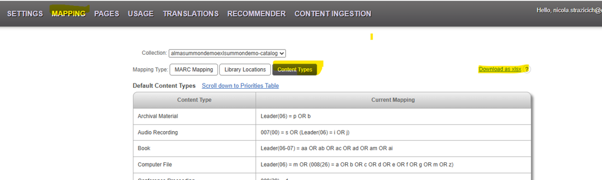
Summon administrators can now view and download their catalog's Content Type mappings directly from the Mapping > Content Types page in the Summon Administration Console. The exported Excel file includes separate worksheets for default content types and additional content types, providing greater visibility into local configuration and supporting catalog review and troubleshooting workflows.
The rollout of this functionality will be phased, beginning with catalogs that most closely match the default content type mapping structure. Initially, the feature will be available for select institutions, and it will be rolled to all customers in a later release. Institutions that are eligible for the feature will see an active download option in the Summon Administration Console > Mapping section:
Email Notifications for Location Mapping Updates
Summon now automatically sends email notifications when submitted Library Location Mapping updates have been indexed and verified in production. This enhancement helps administrators track the completion of mapping requests without needing to manually verify deployment status.
This feature is available only for traditional Summon environments. It is not applicable to Summon over Alma institutions because location mapping information is updated directly from Alma.
Migration from RefWorks to EndNote Fusion
As part of the ongoing transition from RefWorks to EndNote Fusion, Summon has been updated to reflect the new branding and product naming.
This release includes:
- Updated Summon user interface labels and icons
- Updated Customizer settings and references
- URL redirects to support the new branding
- Backward compatibility for existing export workflows
These updates provide a seamless transition experience for users while maintaining support for existing citation export processes.
Summon Improvements and Fixes
Open Access Indicator Display Corrected
Resolved an issue introduced in the August 2026 release that could cause the Open Access indicator to appear in an incorrect position within search results. The Open Access flag now displays in its intended location, restoring a consistent user experience.
Improved Content Ingestion Reporting
Resolved an issue where the Summon Content Ingestion Report referenced an attached error file that did not exist. Reporting has been corrected to ensure that report references accurately reflect available attachments and processing results.
September 2, 2026
Summon Resolved Issues
Improved Display of Collection Names in New Full Load Notifications
The Summon Admin Console has been updated to correctly display collection names in the Content Ingestion > New Full Load Notification page. In some cases, collection names were not being displayed, even though notification requests were processed successfully. The issue has been resolved, and collection information now appears as expected.
ISBN Values Now Passed Correctly in Link Rules
Resolved an issue where the {ISBN} field was not consistently passed from Summon records to link resolver rules. The fix ensures ISBN, eISBN, ISSN, and eISSN values are properly available for linking workflows when present in the record.
Enhanced French Canadian Translation Support
Addressed the following issues affecting French Canadian localization in Summon.
-
Additional French Canadian translation strings have been added, including labels and interface text that previously could not be configured through the Summon Admin Console. This includes support for various search filters, Open Access labels, Quick Look pages, citation pages, and other user interface elements.
-
Resolved an issue that prevented configured French Canadian translations from being applied to the user interface. Libraries using French Canadian customizations will now see translated labels and interface elements displayed correctly across the Summon experience.
DOI Missing from CSL Citations (APA and MLA styles)
DOI information was not included in some CSL-generated citations even when DOI metadata exists in the Summon record. This issue was resolved by updating the APA and MLA styles. Work is ongoing with the RefWorks/Endnote Fusion team to address the issue for other styles.
Syndetics Unbound Integration Investigation and Compatibility Update
Resolved an issue affecting display of Syndetics Unbound content on the Summon Details page.
August 5, 2026
Summon New Features
Localized Real-Time Availability
Real-Time Availability (RTA) information, including status values such as "Available" and "Not Available," is now displayed in the language selected in the Summon UI.This enhancement was delivered through the CERV process in response to community requests.
-
Libraries can add and customize availability translations via the Translations table in the Administration Console.
-
Translations apply to the Brief Result, Quick Look, and Catalog Detail Page views.
Enhanced Institutional Branding
Summon now supports more flexible institutional logo sizing. Administrators can configure custom dimensions for both large and small logos via the Administration Console, allowing libraries to better brand their Summon instances with official logos that are no longer restricted to the previous fixed dimensions. This enhancement was delivered through the CERV process in response to community requests.
-
Large logo pixel allowances:
-
Width 180-400 pixels
-
Height 30-72
-
-
Small logo pixel allowances:
-
Width 140 -280
-
Height 24-56
-
Accessibility: Skip Links and Keyboard Navigation
Skip links have been added to the Summon results page and home page to allow assistive technology users to bypass repetitive navigation regions. Keyboard navigation via Tab, Shift+Tab, Enter, Arrow Keys, and Escape is now consistently supported across search results, facet panels, action menus, Quick Look, and the header.
New Content Type: Blu-ray
Blu-ray is a new CDI Content Type. In Summon, Blu-ray records can be returned from:
-
Local catalog records that customers map to the Blu-ray content type (requires a new mapping form and full record load).
-
Rapido Global Title Index records included in Expanded Search. These records will display Blu-ray in the Content Type facet and can be filtered accordingly.
Summon Resolved Issues
-
Fixed an issue in Research Assistant where short Japanese-language queries were incorrectly detected as Chinese, causing results to be returned in the wrong language.
-
Fixed an issue where custom Translations configured for the "About Research Assistant" page were not applied, causing the default text to display instead of the customer-configured content.
-
Fixed a display issue where the top half of text characters was clipped in Summon search results when searching by ISSN on desktop browsers.Fixed an issue where Summon Bulk Export failed with a 502 Bad Gateway error, preventing customers from exporting search results via email.
-
Fixed an intermittent issue where Saved Items did not persist when authenticated via SAML. The UI would report a successful save, but the item would not actually be written, resulting in a decremented count upon re-login.
-
Fixed reCAPTCHA "invalid domain" errors that occurred when accessing Summon through EZProxy or other proxy server configurations. Affected proxied domains have been whitelisted.
-
Fixed a Sierra Real-Time Availability issue where non-numeric hashed bib IDs from electronic records caused the entire batch availability request to fail, resulting in all records on the page falling back to "Check Availability." Non-numeric IDs are now filtered out, and electronic records are surfaced as "available online."
July 1, 2026
Summon Resolved Issues
-
Accessibility (WCAG Level A) fixes — Resolved 73 violations across 11 rule categories on the Summon search results page, including fixes to menus, modals, filters, pagination, and interactive controls.
-
Course reserve pagination fixed — The first page of course reserves now displays a consistent 20 items (previously showed 38), matching subsequent pages.
-
Saved Item detail page redirect fixed — Clicking a saved item title now correctly opens the internal Detail Page instead of redirecting to an external URL.
-
Saved Items persistence with SAML fixed — All saved items now persist correctly after logging out and back in with SAML authentication. Previously the first saved item would disappear.
-
Google Analytics & Tag Manager alignment — Updated GA event tracking to align with current Summon UI behavior and added Google Tag Manager support documentation to this page.
CDI Improvements
-
Peer Review indicator accuracy improved — Records augmented with content type "Book Review" no longer receive a Peer Reviewed flag, reducing incorrect peer-reviewed indications in CDI results.
-
Book Review augmentation expanded — Additional ISBN format variants (e.g., ISBN (paperback): ...) are now recognized for automatic Book Review content type classification.
June 3, 2026
Summon Resolved Issues
Clearer access to content
-
Provider names now display correctly in the More Options link, making it easier for users to identify and trust their content sources at a glance.
More reliable saved items experience
-
Resolved an issue that caused saved items and saved searches to appear duplicated, ensuring counts are accurate and collections remain clean and manageable.
-
Fixed a problem where saved items lists could disappear while counts remained visible, restoring full access to users’ saved content.
-
Users can now print complete saved item lists across all pages, supporting more seamless research workflows and offline use.
Improved consistency and localization
-
Addressed a missing translation for the temporary message “Checking if item can be requested…”
Better link handling
-
Fixed an issue where custom links displayed encoded spaces, ensuring links appear correctly and maintain a polished, professional look.
More stable integrations and configurations
-
Resolved a problem where Web of Science Free View settings could unintentionally turn off, improving the reliability of configured access.
-
Fixed a SAML login issue that caused access errors, ensuring a smoother and more dependable sign-in experience for affected users.
May 6, 2026
Summon New Feature
There is now an updated default mapping for catalog records related to the 008(26) field to better distinguish between web and music resources. This enhancement was delivered through the CERV process in response to community requests.
Currently, the default MARC field mapping for web resources and computer files includes 008(26), which is used to indicate online/electronic access. However, for music scores and sound recordings, the 008(26) position represents accompanying matter (e.g., historical information, biographical content, or discographies). Using 008(26) as a default mapping across all content types can lead to misclassification of music resources as web resources or computer files.
How to enable:
-
Provide an updated mapping spreadsheet
-
Submit a request for a catalog reload
Metadata guidance:
-
The Content Operations team analyzed the issue and concluded that mapping “Computer File” and “Web Resource” content types based solely on 008(26) is incorrect and may produce false results. As a result, the default MARC21 content type mapping instructions will be updated to remove this conditions.
-
Going forward, “Computer File” will be mapped based on LDR(06)=m only. “Web Resource” will be mapped using LDR(05–06)=ai or 007(00)=c, with a newly introduced fallback condition based on 008(23)=s|o when none of the other conditions apply.
Summon Resolved Issues
-
Fixed the issue where Summon was only displaying a single coverage date range when multiple are available.
360 Link New Feature
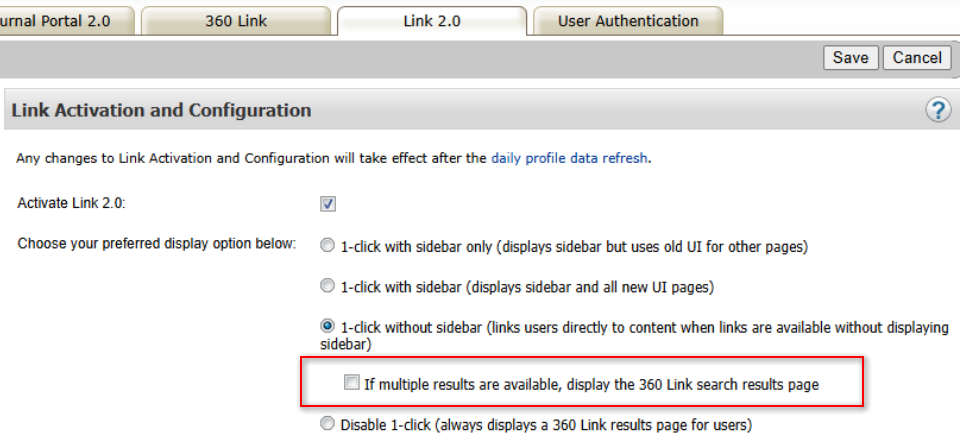
In the scenario where multiple holdings are available for a result, it is now possible to show the full 360 Link results page with all available holdings targets when 1-click is enabled. Previously 360 Link would only select one holding, preventing the user from choosing a desired target or recovering from a broken link.
How to enable:
-
Open the 360 Link Administration Console > Link 2.0 tab
-
Check the "If multiple results are available, display the 360 Link search results page" option
April 1, 2026
Summon New Feature
New Content Type “Game” is now supported as a Content Type in Summon libraries. This enhancement was delivered through the CERV process in response to community requests.
Games are an increasingly important medium for teaching and learning across higher education and teacher training. As collections grow, users benefit from the ability to easily discover games within library resources.
How to enable:
-
Provide an updated mapping spreadsheet
-
Submit a request for a catalog reload
Metadata guidance:
-
The community recommends using 008 character position 33 = “g” when the Leader type is o, r, g, or k
-
This configuration can be customized to fit your institution’s metadata practices
Summon Resolved Issues
-
Authentication via the Authentication Banner now correctly refreshes search results to include restricted content
-
Added a Content Security Policy header to
/auth/redirectfor improved security -
Improved title linking behavior in search results:
-
Users are now directed straight to content (instead of the catalog record) when:
-
Content Type is e-book, e-journal, journal, web resource, streaming audio, or streaming video, and
-
Only a single 856 link is available
-
-
-
Newly added Custom Links no longer encode spaces incorrectly
-
Fixed an issue where deleting Saved Items could affect the wrong item under specific conditions
Summon Research Assistant Resolved Issues
-
“Related research questions” no longer prompts users to sign in after returning from View related results
-
Users who open Research Assistant from Summon and then sign in will now remain in Research Assistant (previously redirected back to Summon in certain cases)
March 4, 2026
Summon Resolved Issues
-
Summon Topics feature shows empty articles for new clients
-
Summon Custom Links instability
-
Summon Usage link redirects to Oracle login prompt
-
SAML login/logout loop occurs when accessing Summon search results from Research Assistant and using private site/splash page configuration
Summon Research Assistant Resolved Issues
- Accessibility improvements completed for screen reader usage
- “Related research questions" does not work after displaying "View Related Results"
- Incorrect alert shows when viewing "Related Results" from Summon RA
- RA View related result button not showing correctly
February 4, 2026
Summon Research Assistant Enhancement
-
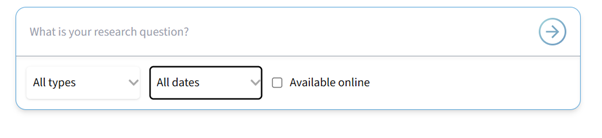
To make the search limits capability more obvious and useful to users, the interface has been updated:
-
Removed "beta" flag from the Research Assistant tab
-
Resolved the SAML login/logout loop when accessing Summon search results from Research Assistant and using private site/splash page configuration
Near-Real-Time Record Corrections Enhancement
To address provider-supplied metadata errors that may break full text linking, Clarivate staff are now able to correct some display fields and push the correction out in a matter of minutes. This means that once the Support analyst updates the record, the fix is available long before the next Search Update cycle.
Notes:
The correction impacts display only. For a limited time, there may be a mismatch between searching and faceting and display. Once the next Search Update cycle is completed, searching, facets, and display will be in sync.
Eligible fields for near-real-time corrections:
-
Title
-
DOI
-
Start Page
-
Issue
-
Volume
-
End Page
-
EISBN
-
EISSN
-
Publication Title
-
URI
-
Author (deletion only, no editing)
-
Abstract (deletion only, no editing)
Accessibility Resolved Issues
-
Summon search results cannot be scrolled through at 400% Zoom in Microsoft Edge browser
-
Floating panel occupies the entire screen at 400% zoom and 320 pixel width
-
Summon homepage large logo no longer automatically scales large images down
Summon Resolved Issues
-
Summon Saved Searches disappeared in some cases
-
Summon Saved Items disappeared - counts show but list is gone
-
More Options link label is not correct and differs from the actual link (OpenURL link rule)
-
Sierra: Reservation Error Failed
-
Sierra: HTTP DELETE returns 404 and failing request
-
Sierra: Library Card page shows no content
