
Release Date: October 7, 2025
MEEP Winner: Ability to Send Test Notice Emails with Data from ILS
You can now send test notice emails using live data from your ILS (Versions Sierra 6.0+ and Polaris 7.3+). This enhancement makes it easier to preview how your notices will look with real patron and with multiple real items.
How it works:
-
Select Send a Test from your notice editor.
-
Enter a Patron Record ID or Patron Barcode.
-
Provide up to 5 Item IDs (just the numeric part, no prefixes).
-
Add one or more Recipient Email Addresses.
-
Click Send Test Email.
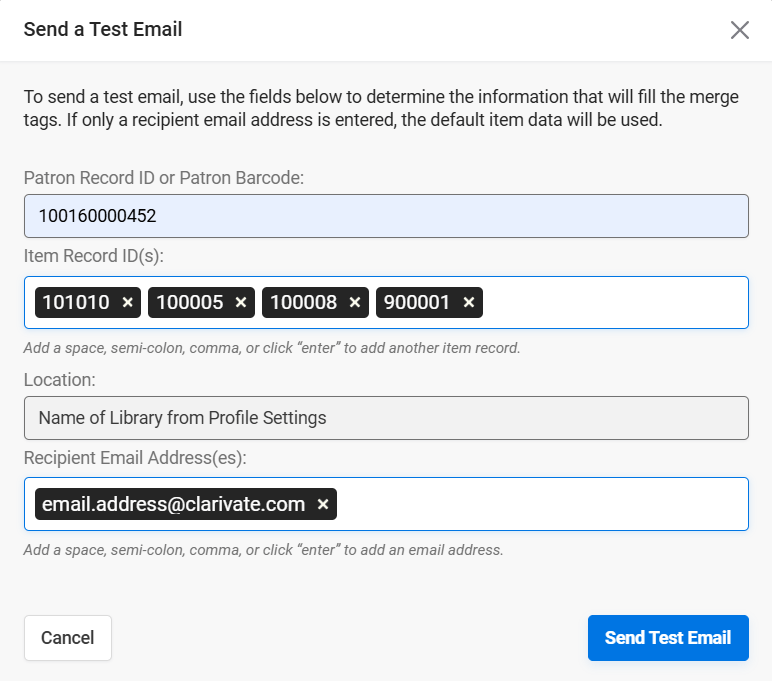
The system will pull data from your ILS and insert it into the notice, replacing merge tags with actual values. If you don’t enter any IDs, it’ll use default sample data to fill in the gaps.
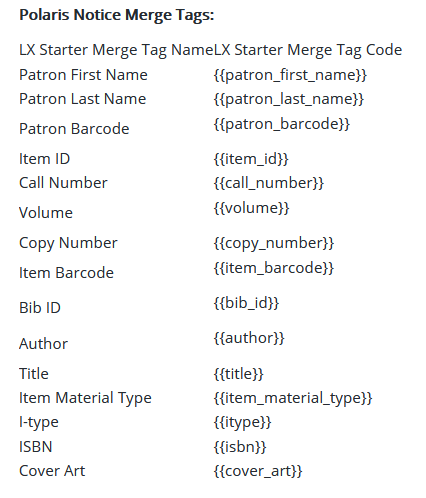
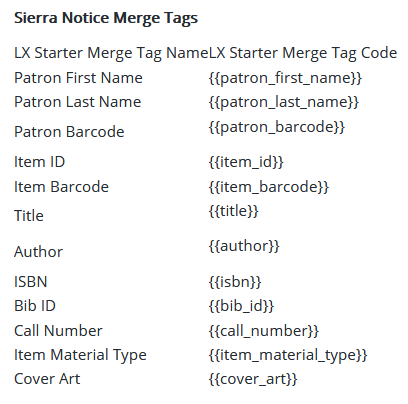
The merge tags populated automatically when ILS data is used are listed in the following tables for Polaris and Sierra, respectively.
Test Notice Emails Use Actual Sender
Test notice emails will now use the actual sender address, so you can preview exactly how it will appear in recipients’ inboxes.
