
Configurar reservas de curso en Primo
Instructions used to configure Primo to utilize course reserve information published by Alma.
If you are working with Primo VE, see Configuring Course Reserves for Primo VE for more details.
Introducción
Course reserve information is not published to Primo unless Alma is configured to publish course enrichment information (see the Course information enrichment parameter in Exporting Alma Records to Primo), which is stored in the MARC CNO field. (see The Format of Published Data).
Primo's normalization rules map the course information from Alma to provide the following functionality in the Primo Front End:
-
Muestra la información del curso en la visualización breve y completa de un elemento
-
Crear un alcance de la búsqueda para las reservas del curso
-
Crear índices de búsqueda para las reservas del curso
-
Crear facetas para las reservas del curso
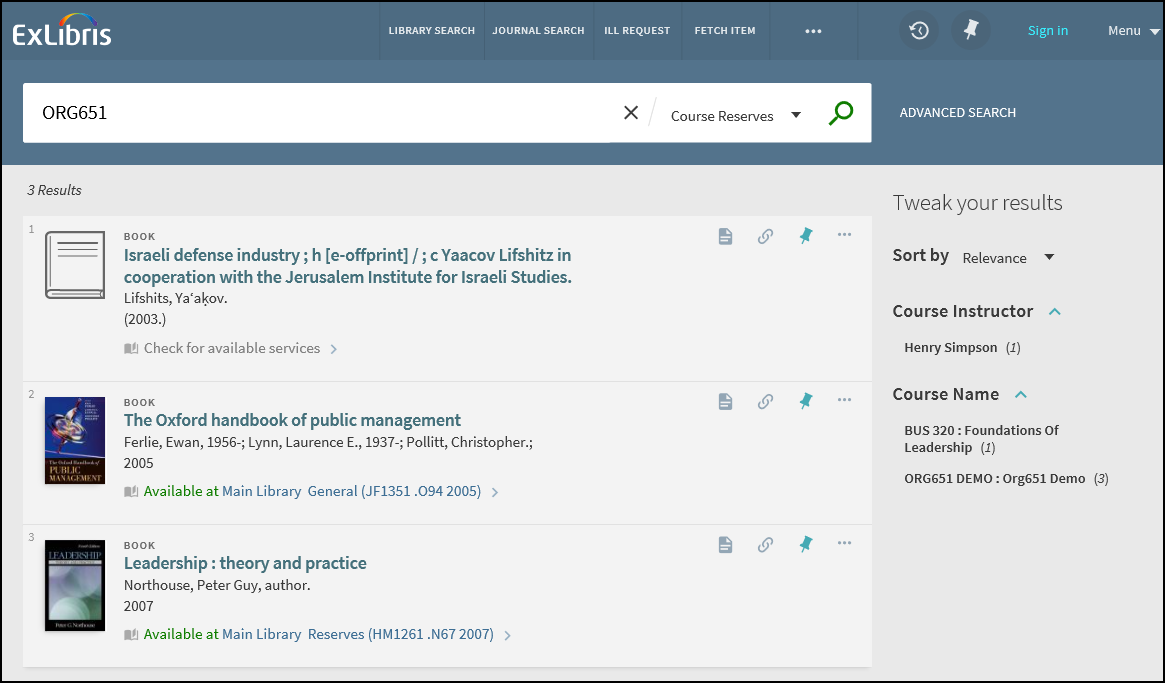
El resto de las secciones describen funcionalidades y configuraciones relacionadas.
Más del mismo curso
The More from the same Course section on the Full Display page allows users to expand the search of the current title to other items in the course and in additional courses that also contain the current title.
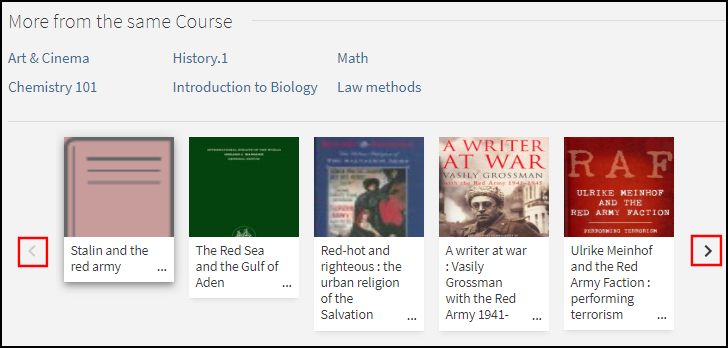
The top half of this section lists all courses to which this titles belongs. Inicialmente se muestra un máximo de seis cursos. Users can select the View all courses icon to view the remaining courses. Si el curso está asociado a Leganto, los usuarios pueden seleccionar el curso para ver su lista de lecturas en Leganto.
La mitad inferior de esta sección permite a los usuarios examinar los ejemplares que pertenecen a los cursos relacionados con el ejemplar. Los usuarios pueden seleccionar cualquiera de los siguientes:
-
las flechas Previo/Siguiente para desplazarse a través de la lista de ejemplares
-
an item in the list to open its Full Display.
Opciones de configuración
The following table lists the settings used to configure this functionality.
| Elemento | Descripción |
|---|---|
|
Asistente de Visualización |
To enable this functionality in the new Primo UI, select the following field in the General section of the Views Wizard: More from the same Course. |
|
Etiquetas Aria |
Se agregó el siguiente código para permitir la accesibilidad para esta función:
|
|
GetIT! Pestaña1 tabla de código |
Se agregaron los siguientes códigos para permitir esta función:
|
|
Reglas de normalización: |
In the Alma MARC Template and Alma UNIMARC Template normalization rule templates, the course information is now mapped to following subfields in the display/crsinfo field, but it will not display in the Primo UI:
To include the correct linking information on the Full Display page, make sure that you map the following search fields instead of using local search fields for course information: crsinfo, crsname, crsinstrc, crsid and crsdept. |
Enlazar a Leganto
When enabled this functionality improves the integration between Primo and Leganto by allowing users to select a course link from a record's full display and view the relevant reading list in Leganto.
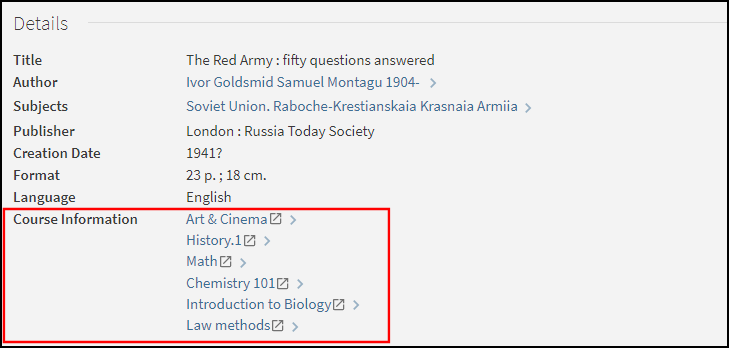
Opciones de configuración
Esta característica está deshabilitada por defecto. La siguiente tabla muestra las opciones de configuración asociadas con esta funcionalidad.
| Elemento | Descripción |
|---|---|
|
Asistente de Visualización |
The following field on the Edit Full Details Attributes page in the Views Wizard enables the linking from the Course Information field in the record's full details: Enable Linking the Course Information to Leganto. |
|
Tabla de mapeo de plantillas |
The following code creates the links to Leganto for Alma customers:
|
|
Reglas de normalización: |
In the Alma MARC Template and Alma UNIMARC Template normalization rule templates, the course information is now mapped to following subfields in the display/crsinfo field, but it will not display in the Primo UI:
|
Configuración administrativa de Primo
El PNX y las reglas de normalización están disponibles de manera inmediata con Primo, pero hay que comprobar que se han incluido las reglas de reserva del curso en las reglas de normalización locales.
Configuración PNX
The following table lists the fields that are used to map course reserve data from Alma. For details on how this information is mapped from Alma to the CNO field, see Publishing to Primo.
| Sección | Campo | Código |
|---|---|---|
| Pantalla | Course info – The crsinfo field is created by merging the following Alma CNO subfields into a single line:
|
crsinfo |
| Facetas | Course name Course instructor Course_ID (contains the course code from Alma) Course department (contains the course section from Alma) |
crsname crsinstrc crsid crsdept |
| Buscar | Course name (contains the course name and course code from Alma) Course instructor Course_ID (contains the course code from Alma) Course department (contains the course section from Alma) |
crsname crsinstrc crsid crsdept |
Si desea que los campos de visualización aparezcan en sus resultados de búsqueda, debe modificar la vista en el Asistente de vistas.
Configuración de la Tabla de códigos
The following table lists the codes that are defined in the code tables under the Front End subsystem to support course reserve information:
| Tabla de código | Código | Descripción |
|---|---|---|
| Etiquetas de faceta |
facets.facet.facet_crsname facets.search-box.facet_crsname |
Nombre del curso |
|
facets.facet.facet_crsinstrc facets.search-box.facet_crsinstrc |
Instructor del curso | |
|
facets.facet.facet_crsid facets.search-box.facet_crsid |
ID_curso | |
|
facets.facet.facet_crsdept facets.search-box.facet_crsdept |
Departamento del curso | |
| Campos de Código de facetas | facet_crsname | Nombre del curso |
| facet_crsinstrc | Instructor del curso | |
| facet_crsid | ID_curso | |
| facet_crsdept | Departamento del curso | |
| Advanced Index Fields and Basic Index Fields |
facet_crsid |
Nombre del curso |
| crsinstrc | Instructor del curso | |
| crsid | ID_curso | |
| crsid | Departamento del curso | |
| Mostrar campos de la Interfaz de Usuario | crsinfo | Información del curso |
| Etiquetas de visualización completa | fulldisplay.crsinfo | Información del curso |
Reglas de normalización:
The following rules are included in the Alma MARC normalization rules template to allow the mapping of course reserve information. For additional normalization rules, see Alma MARC 21 Template.
-
Display Section:
A rule concatenates the crsid, crsname, crsdept, and crsinstrc fields into the crsinfo field using the following format:
<Course_ID> : <course name> ; <course department> ; <course instructors>Por ejemplo:
PSYCH 101 : Introduction to Psychology ; 01 ; Bube, Kenneth P. -
Facets Section:
The following tables lists the rules that map course reserve information to the Facets section of the PNX:
Nueva regla de Normalización de faceta Campo Regla Faceta/Nombre del curso
Recuperar datos del subcampo j del campo MARC CNO
Transformación: Copiar tal cual
Faceta/Instructor del curso
Recuperar datos del subcampo g del campo MARC CNO
Transformación: Copiar tal cual
faceta/ID_curso
Recuperar datos del subcampo k del campo MARC CNO
Transformación: Copiar tal cual
Faceta/Departamento del curso
Recuperar datos del subcampo l del campo MARC CNO
Transformación: Copiar tal cual
-
Search Section:
Las siguientes tablas enumeran las reglas que asignan la información de reserva de cursos a la sección de Búsqueda del PNX:
Nueva búsqueda de las Reglas de Normalización Campo Regla buscar/Nombre del curso
-
Recuperar datos del subcampo j del campo MARC CNO
Transformación: Copiar tal cual
-
Recuperar datos del subcampo j del campo MARC CNO
Transformaciones: Borrar espacios + Eliminar puntuación + Copiar en el estado en que se encuentra
-
Recuperar datos del subcampo k del campo MARC CNO
Transformación: Copiar tal cual
-
Recuperar datos del subcampo k del campo MARC CNO
Transformaciones: Borrar espacios + Eliminar puntuación + Copiar en el estado en que se encuentra
-
Recuperar datos del subcampo k del campo MARC CNO
Transformaciones: Borrar espacios
-
Recuperar datos del subcampo k del campo MARC CNO
Transformaciones: Eliminar puntuación
buscar/Instructor de curso
Recuperar datos del subcampo g del campo MARC CNO
Transformación: Copiar tal cual
search/Course_ID
-
Recuperar datos del subcampo k del campo MARC CNO
Transformación: Copiar tal cual
-
Recuperar datos del subcampo k del campo MARC CNO
Transformation: Delete spaces
-
Recuperar datos del subcampo k del campo MARC CNO
Transformation: Remove punctuation
-
Recuperar datos del subcampo k del campo MARC CNO
p>Transformations: Delete spaces + Remove Punctuation
search/Departamento del curso
Recuperar datos del subcampo l del campo MARC CNO
Transformación: Copiar tal cual
buscar/alcance de la búsqueda
Recuperar datos del subcampo a del campo MARC CNO
Transformaciones:
Usar la tabla mapeo: Código de Institución Alma
Añadir al final de la secuencia: _CR
-
El nuevo ámbito de búsqueda será <institution>_CR.
-
Los registros se añadirán al ámbito de búsqueda cuando existan datos del campo MARC CNO.
-
Page tags: article:topic Course Reserves product:alma content:Documentation lang:english course information enrichment CNO field
