Acceso a servicios
Duration: 8 min.
- Código
- Descripción
- c.uresolver.ServicesForRelatedTitles
- Servicios para títulos relacionados
- c.uresolver.viewit.related_type_list.PRECEDES
- Precede
Refer to the documents under Alma and SFX that provides specific linking parameters which are required to enable full text linking.
Display Condition Rules
El Resolvedor de enlaces de Alma (y Verlo en Primo) admite reglas que determinan las condiciones en las que se presenta una colección electrónica a un usuario. Las reglas de las condiciones de visualización están definidas en la base de conocimientos de la Zona de la Comunidad e incluyen, por ejemplo, un requisito de que la OpenURL entrante incluya elementos de metadatos a nivel de artículo. Las reglas de condiciones están disponibles para colecciones electrónicas de periódicos y colecciones electrónicas como CCC Get It Now.
After you activate or edit the electronic collection, you can view the display condition information and rules. Obsérvese que las reglas de las condiciones de visualización no se pueden editar ni crearse localmente. To view this information, select the Linking tab on the Electronic Service Editor page; and next to Availability rules, select the Service display condition rules link (for newspaper electronic collections) or the Service filter condition rules link (for the CCC Get It Now electronic collection).
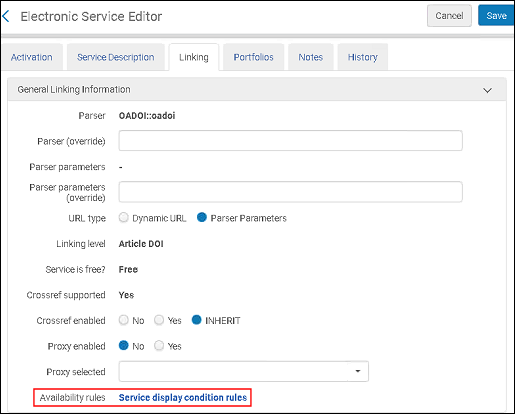
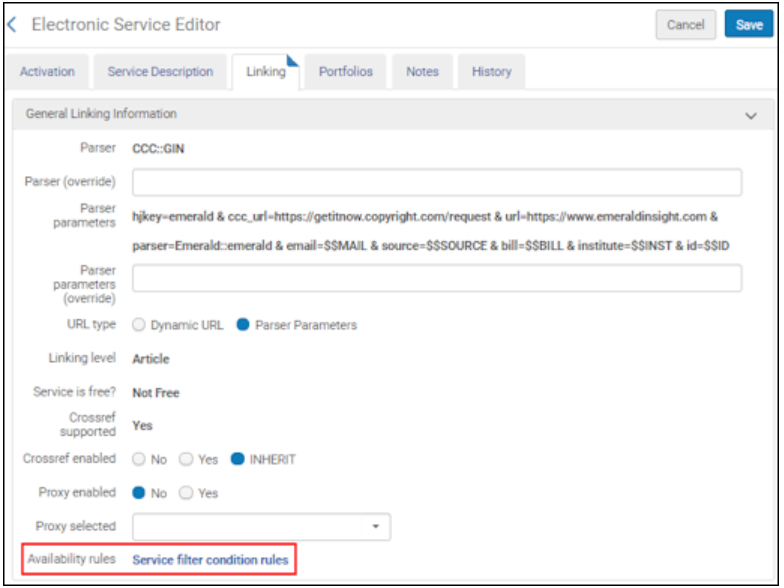
This opens the Service Display Condition Rules page (for newspaper electronic collections) or the Service Filter Condition Rules page (for the CCC Get It Now electronic collection).
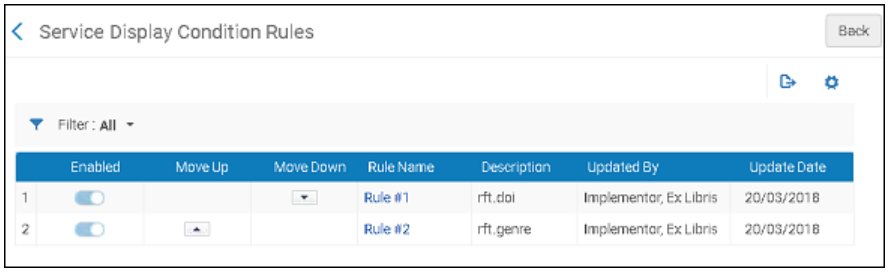
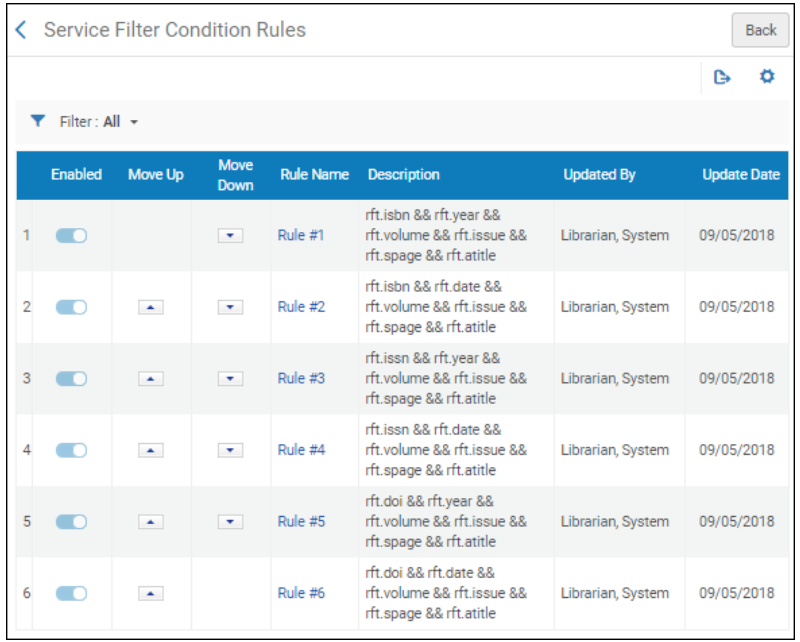
Por defecto, hay una lógica OR aplicada entre las reglas identificadas en la columna Nombre de Regla. Esto significa que, cuando se cumple cualquiera de las reglas en estos ejemplos, la colección electrónica de periódicos o la colección electrónica CCC Get It Now aparecen cuando se usa el Resolvedor de enlaces de Alma o Verlo en Primo. Si no se cumple ninguna de las reglas, la colección electrónica de periódicos o la colección electrónica CCC Get It Now no aparecen en el Resolvedor de enlaces de Alma ni en Verlo en Primo.
Para ver los detalles de cada regla, seleccionar el enlace del número de la regla en la columna Nombre de regla. Ver a continuación unos ejemplos de estas reglas.
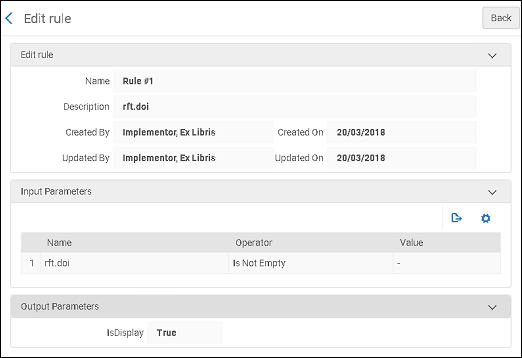
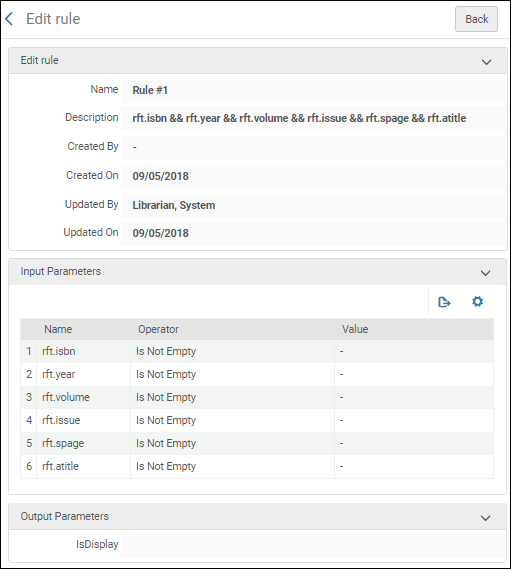
Configuring Dynamic URLs for Electronic Collections and Portfolios
- Operador de inventario electrónico
- Técnico del inventario electrónico extendido (obligatorio para borrar operaciones)
- Gerente del repositorio
En lugar de gestionar los enlaces estáticos para colecciones electrónicas y portafolios locales, se pueden crear URLs dinámicas sofisticadas para colecciones electrónicas y portafolios locales e incrustar la información de metadatos OpenURL dinámicamente. Además, se pueden utilizar URLs dinámicas para ignorar el enlace proporcionado por la base de conocimiento de la comunidad.
Las páginas Editor de servicio electrónico y Editor de portafolio electrónico permiten definir una lista de condiciones que se utilizan para seleccionar una URL de enlace para el servicio o el portafolio, respectivamente.
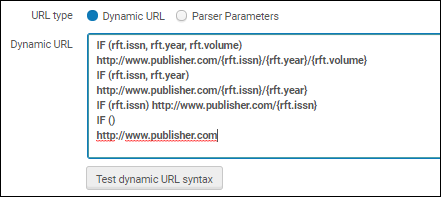
When using dynamic URLs, each condition must start with an IF statement that checks for the existence of ContextObject and OpenURL parameters. Si todos los parámetros existen para una condición que empieza en lo alto de la lista, la URL específica para esa condición se utiliza para enlazar. Sino, la siguiente condición será verificada, y así sucesivamente. To catch any case (use this to match if all other checks fail), use IF () <url>.
Por ejemplo:
IF (rft.issn, rft.year, rft.volume)
http://www.publisher.com/{rft.issn}/{rft.year}/{rft.volume}
IF (rft.issn, rft.year)
http://www.publisher.com/{rft.issn}/{rft.year}
IF (rft.issn)http://www.publisher.com/{rft.issn}
IF ()
http://www.publisher.com
Si la primera condición se cumple en el ejemplo de arriba, la URL dinámica resultante se parecerá a la siguiente:
http://www.publisher.com/1364-0321/2010/2In addition to rft.year, you can also use rft.month,rft.day, and rft.date attributes.
Test dynamic URL syntax enables you to verify the syntax of your conditions.
See Commonly Used OpenURL Attributes for the URL Template for more information.
Funciones URL
Además, la URL dinámica puede incluir cualquiera de las siguientes funciones para manipular los valores devueltos en los parámetros especificados:
- SUBSTR (string, from, length)- Return a substring of the specified string, based on the starting position and length of the string. If {rft.date} contains 2010-08-01, and the first four characters from the beginning of the string are specified, as follows:http://www.publisher.com/{rft.issn}/SUBSTR({rft.date},0,4)Alma utiliza la siguiente URL:http://www.publisher.com/1824-6321/2010
- REPLACE (string, search, replace)- Replace text in the specified string, based on search and replacement text. If {rft.isbn} contains dashes (for example,978-1-285-13563-2) and no replacement text is specified, as follows:IF (rtf.isbn)http://www.publisher.com/REPLACE({rft.isbn},-,"")Alma utiliza la siguiente URL:http://www.publisher.com/9781285135632
To replace a special character, use the encoded value of the replacement string.
Por ejemplo:
REPLACE({rft.isbn},%3F,"")
En lugar de
REPLACE({rft.isbn},?,"")
- URLENCODE (string)- Encode special characters in the specified string. If {rft.atitle} contains the title The Grapes of Wrath, and encoding is requested, as follows:http://www.publisher.com/URLENCODE({rft.atitle})Alma utiliza la siguiente URL:http://www.publisher.com/The%20Grapes%20of%20Wrath
Las colecciones electrónicas están disponibles (para ser publicadas en Primo) después de que hayan sido activadas. La excepción a esto son las colecciones electrónicas de tipo base de datos, las cuales están disponibles para ser publicadas tan pronto como sean definidas por una URL y un registro bibliográfico no suprimido asociado.
Resolver Proxies
- Administrador general del sistema
Para permitir a usuarios fuera del campus acceder a servicios de texto completo en diferentes ubicaciones del proveedor, se debe definir un servidor proxy, que se utiliza para autenticar a estos usuarios.
El Resolvedor de Enlaces de Alma responde a una OpenURL entrante y la convierte en un enlace electrónico al incluir automáticamente información adicional del proxy en la URL resuelta. Algunas instituciones utilizan un único servidor proxy, en cuyo caso solo debería definirse un perfil proxy. Si una institución utiliza varios servidores proxy, debería definirse un perfil proxy para cada servidor proxy. Se debe definir el proxy relevante para cada servicio, portafolio o colección electrónica.
Al distribuir el acceso a los recursos electrónicos a través de la Zona de red a los miembros, los servidores proxy deben administrarse en la Zona de la institución en lugar de la Zona de red. El proxy de la Zona de la institución invalidará cualquier proxy definido en una colección de Zona de red.
Véase lo siguiente para obtener más información sobre proxy:
- Linking Information Tab Options – describes the Linking Information tab options of the Electronic Service Editor
- Electronic Collection Editor Tabs and Fields – describes the Additional Information tab options of the Electronic Collection Editor
- Electronic Portfolio Editor Page – describes the Linking Information tab options of the Electronic Portfolio Editor
Relaciones Proxy
The following table presents the relationships between the proxy-enabled setting for electronic collections, services, and portfolios. Los portafolios heredan la configuración de proxy-habilitado de la configuración de al nivel de servicio a la cual están adjuntados. As a result, set a portfolio-level proxy-enabled setting only when you want it to be different from the service-level setting (in which case, leave the Proxy selected field on the service level blank). Las configuraciones de proxy-habilitado de una colección electrónica no son heredadas por los portafolios.
Relaciones Proxy
| Proxy habilitado para el Nivel de Colección Electrónica | Proxy habilitado para Nivel de Servicio | Proxy habilitado para Nivel de Portafolio | Resultados de Configuración Proxy habilitado |
|---|---|---|---|
| N | N | N | Redireccionado hacia recurso |
| N | N | S | Redireccionado hacia acceso proxy |
| N | S | N | Redireccionado hacia acceso proxy
El portafolio hereda la configuración del servicio |
| N | S | S |
La colección electrónica no hereda las configuraciones proxy del servicio o portafolios. Si se selecciona un perfil proxy al nivel de servicio, los portafolios heredan las configuraciones proxy del nivel de servicio. To set the proxy for the portfolio level, leave the Proxy selected field of the service-level setting blank.
|
| S | N | N | Redireccionado hacia el recurso
El proxy de Colección Electrónica no es heredado por el nivel de portafolio o servicio |
| S | N | S | Redireccionado hacia acceso proxy |
| S | S | N | Redireccionado hacia acceso proxy
El portadolio hereda la configuración del servicio |
| S | S | S | Redireccionado hacia acceso proxy |
- Para aplicar un proxy de 'Ajustes de grupo' para portafolios, el proxy necesita aplicarse en la pestaña 'Ajustes de grupo' del Servicio electrónico.
- Para aplicar un proxy de 'Ajustes de grupo' para la colección electrónica, el proxy necesita aplicarse en la pestaña 'Ajustes de grupo' del Editor de la colección electrónica.
Configuring a Proxy
Para configurar un perfil de integración del tipo Proxy del resolvedor:
-
On the Integration Profile List page (Configuration Menu > General > External Systems > Integration Profiles), select Add Integration Profile.
The first page of the integration profile wizard appears. -
Select Resolver Proxy for Integration Type.
-
Introducir un nombre (Código) para el perfil que se está definiendo y, opcionalmente, introducir una descripción.
-
Select Default if you want the profile you are defining to be the default proxy definition profile.
(If you previously defined another profile as the default profile, clear the Default selection in the other profile before selecting Default in this profile).
If the proxy is set as the default, and Actions(see below) is set to Always, then this proxy is used for resolving any resource, even resources that do not have ProxyEnabled=Yes. -
Select Next. Aparecerá la segunda página del asistente.
-
Seleccionar el tipo de servidor proxy que se desea configurar para este perfil.
No hay opción para introducir múltiples direcciones IP. El campo "Proxy IP" debe tener la dirección IP del servidor proxy y no un rango permitido de IP. In case the OpenUrl request is received from this IP address, the proxy is not added to the target Url, and this is to avoid looping.
Las siguientes opciones están disponibles:
-
Biblio-Pam – This server proxy uses the following URL structure:
The <Biblio-PAM URL> portion of the structure is the vendor-provided URL from Biblio-PAM.
The <shortened target URL> is the target URL without the http:// or https://.
-
https://<Biblio-PAM URL>/http/<shortened target URL>
-
https://<Biblio-PAM URL>/https/<shortened target URL>
-
-
EZProxy – This option uses the following URL structure where $@ is the placeholder for the target URL:
- https://www.ezproxy.unibo.it/login?
See EZProxy URL Database for more information.
-
HAN – This option uses the following URL structure:
- http://<HAN server>/hanapi/?hash=<HASH>
Enter the http://<HAN server> portion for the Proxy url parameter.
The remainder of the URL structure is constructed by Alma and appended to the portion of the URL that you entered in the Proxy url parameter.
For the HAN proxy server type, you need to enter a Salt parameter. The Salt parameter is a free text field that may contain any alpha-numeric value. The value that you enter must identically match the salt value in the HAN proxy server configuration in your HAN account. When you create the HAN salt value in your HAN account, copy it to the Salt parameter in Alma.
-
LIBProxy
-
OpenAthens Redirector – This option uses the following URL structure:
- https://<OpenAthens Redirector URL>?url=<encoded target URL>
The <OpenAthens Redirector URL> portion of the structure is the vendor-provided URL from OpenAthens.
Enter https://go.openathens.net/redirector/<your domain> for the Proxy url parameter.The ?url= portion of the URL is added by Alma.The <encoded target URL> is the target URL in its encoded form.
Tenga en cuenta que aunque el Redireccionador no es un servidor proxy, se puede usar la configuración del servidor proxy de Alma.
-
WAM
Note that you should omit the 0- at the beginning of your proxy URL.
-
RemoteXS
Las instituciones que utilizan el proxy RemoteXS tienen la capacidad de configurar el resolvedor de enlaces de Alma para integrarse a la perfección con este proxy.
-
-
Enter the proxy URL as provided by the vendor (including http:// or https://) and the proxy IP address.
-
Select one of the following values for Use Proxy:
-
Always – The proxy is used for any resolving.
If this proxy is selected as default, it is used for any resolving, even for resources (services, collections, or portfolios) with EnableProxy=No.
If this proxy is not selected as default, it is used for resources where EnableProxy=Yes and this proxy is selected.
Esta configuración sobrescribe la configuración en la Zona de red. -
Never – This proxy is never used for resolving, even if it is enabled and selected for a particular resource.
-
Selective – This proxy is used for resources where EnableProxy=Yes and this proxy is selected (this is equivalent to selecting Always for a non-default proxy).
Incluso cuando el proxy sea seleccionado por defecto, debe ser añadido al recurso explícitamente.
-
-
Select Save. El perfil se guardará.
Personalización de Mensajes
La página Servicios electrónicos muestra un mensaje cuando no hay servicios de texto completo disponibles para la solicitud de OpenURL. Un administrador puede personalizar el texto de un mensaje.
Esta configuración es aplicable a los entornos Alma-Primo y no aplica a Primo VE.
Para personalizar el mensaje "sin texto completo":
- Open the Discovery Interface Labels code table (Configuration Menu > Fulfillment > Discovery Interface Display Logic > Labels).
- Locate the row with c.uresolver.emptyList in the Code column.
- Select Customize. La celda de la columna Descripción relativa a esta fila se abre y permite personalizar el texto del mensaje.
- Introducir el texto que se quiere que aparezca en la página Servicios electrónicos cuando un texto completo no está disponible.
Si se prefiere que no se muestre ningún mensaje cuando el texto completo no está disponible, se deja esta opción en blanco.
- Select Save.
Solución de problemas: utilización de la herramienta de depuración del resolvedor de enlaces OpenURL
Se puede utilizar una herramienta de depuración para resolver los problemas de los servicios de contexto que el Resolvedor de enlace OpenURL ofrece.
The tool enables you to get the following information:
- Determinar el cálculo de servicio:
- Ver el objecto de contexto que se ha calculado en base al análisis OpenURL, al aumento y al servicio relacionado.
- Comprender cómo el objeto de los servicios de contexto se genera:
- ¿Cuáles eran los servicios potenciales?
- ¿Qué servicios se han añadido en base al cálculo de servicios relacionados?
- ¿Qué servicios se han filtrado en base a la cobertura o las reglas para servicios electrónicos generales y la lógica de visualización?
- Determinar la resolución del enlace y cómo la OpenURL se ha generado:
- ¿Qué analizador de destino se ha utilizado?
- ¿Se ha utilizado un proxy?
- ¿Era una URL estática en el nivel de portafolio?
- ¿Hay un enlace directo?
- Ver la URL de destino generada.
- Ver la OpenURL original en el contenido de depuración proporcionado.
-
El enriquecimiento de datos (objecto de contexto) del CrossRef utilizando el DOI se gestiona antes de la correspondencia.
-
For information about debugging a citation's uResolver (OpenURL) link, see the knowledge article Debugging Citation uResolver Links.
To debug the Open URL:
-
Buscar en el repositorio el título electrónico o el portafolio el acceso al cual se quiere probar.
Para entornos Primo VE, también puede utilizarse Primo VE para buscar y mostrar completamente el registro electrónico. Skip to step ii in the Primo VE section.
-
Dependiendo del tipo de entorno Primo, realizar los siguientes pasos:
-
Alma-Primo:
-
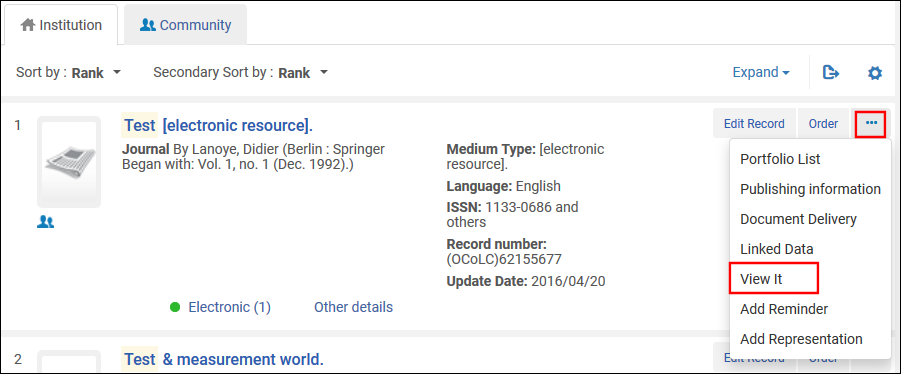
Depending on the type of results, select View It (electronic titles) or Test Access (electronic portfolios) for an item in the results list. También se puede probar el acceso desde la página Lista de portafolios y la pestaña Portafolios en la página Editor de servicio electrónico.
-
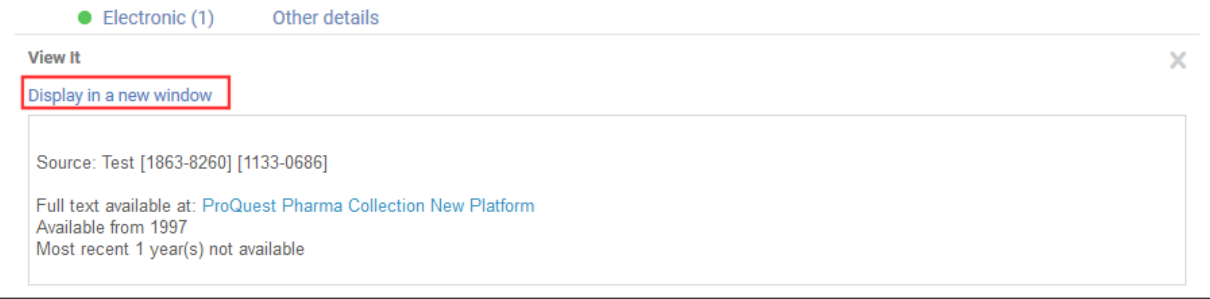
In the View It tab, select Display in a new window.
-
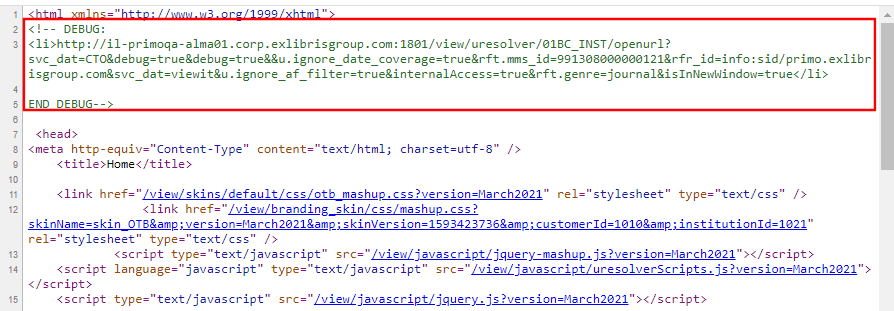
Right-click the Electronic Services page and select the option View Source to view the page source or frame source.
The option label may be somewhat different for each browser. -
Localice la sección DEBUG en la parte superior de la vista fuente. Seleccione y copie la URL.
-
Open a new browser page or tab, paste the debug URL that you copied into the address bar, and press enter to view the XML debugger output.
-
-
Primo VE: To debug, you will enable the Display CTO button, which is hidden in regular use. Selecting this button displays the Context Object (CTO) that provides you with additional information about the result, to help you troubleshoot the context services that are offered by the OpenURL Link Resolver.
-
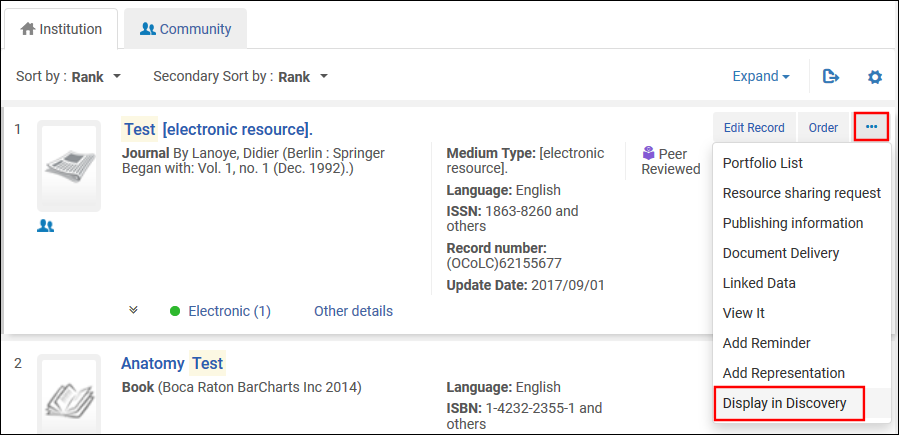
For a record in the results list, select Display in Discovery to open its full display.
-
To enable the Display CTO button, add the following parameter to the end of the record's full display URL and then press enter:&displayCTO=true.
Por ejemplo:
https://<Alma instance>/discovery/fulldisplay?docid=alma9926095600521&context=U&vid=PRIMO_OAP_INST:Alma&lang=en &displayCTO=true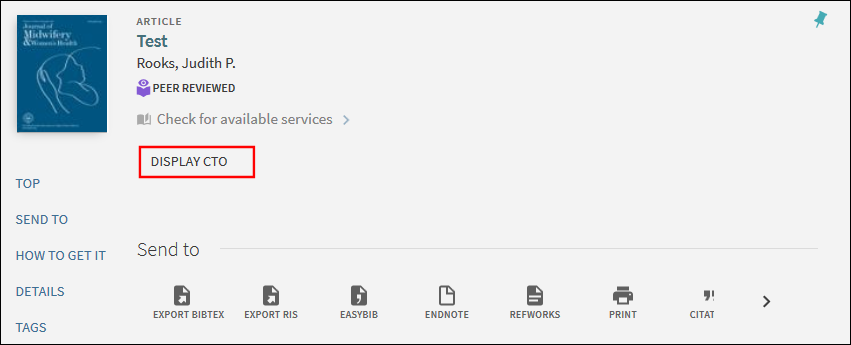
-
Select Display CTO to display the XML debugger output.
-
-
-
Scroll through the XML output to analyze/debug your search result issues.
La salida XML
La salida XML se compone de dos elementos:
- The <context object> element - this is the container for the metadata information about the OpenURL object. This element is a container of all the metadata information, such as the ISSN, the title, the publication date, etc. This is the metadata that Alma collected as part of the analysis of this OpenURL.
- The <context services> element - contains information regarding service type, parsing, proxy, the target URL, and so forth. Alma calculated these services as relevant for this OpenURL. This element also contains the target_url.
This is an example of XML Debugger Output:
<uresolver_content xmlns="http://com/exlibris/urm/uresolver/xmlbeans/u"
xmlns:xsi="http://www.w3.org/2001/XMLSchema-instance">
<context_object>
<keys>
<key id="rft.stitle">Test</key>
<key id="rft.pub">Springer</key>
<key id="rft.place">Berlin :</key>
<key id="licenseEnable">true</key>
<key id="sfx.sid">primo.exlibrisgroup.com</key>
<key id="rft.jtitle">Test</key>
<key id="available_services">viewit</key>
<key id="available_services">getit</key>
<key id="rft.genre">journal</key>
<key id="Incoming_URL">http%3A%2F%2Fdocedu-na01.alma.exlibrisgroup.com%2Fview%2Furesolver%2FTRAINING_1_INST%2Fopenurl%3Fdebug%3Dtrue%26svc_dat%3DCTO%26debug%3Dtrue%26debug%3Dtrue%26%26u.ignore_date_coverage%3Dtrue%26rft.mms_id%3D9926095600521%26rfr_id%3Dinfo%3Asid%2Fprimo.exlibrisgroup.com%26svc_dat%3Dviewit%26u.ignore_af_filter%3Dtrue%26internalAccess%3Dtrue%26isInNewWindow%3Dtrue</key>
<key id="institution">521</key>
<key id="internalAccess">true</key>
<key id="rft.oclcnum">62155677</key>
<key id="u.ignore_af_filter">true</key>
<key id="req.id" xsi:nil="true"/>
<key id="rft.mms_id">9926095600521</key>
<key id="user_ip" xsi:nil="true"/>
<key id="debug">true</key>
<key id="inventory_id">519285510000521</key>
<key id="rfr_id">info:sid/primo.exlibrisgroup.com</key>
<key id="rft.inventory_id">519285510000521</key>
<key id="publication_place">Berlin :</key>
<key id="rft.object_type">JOURNAL</key>
<key id="isInNewWindow">true</key>
<key id="rft.publisher">Springer</key>
<key id="ctx_id">1325448060000521</key>
<key id="rft.pubdate">Began with: Vol. 1, no. 1 (Dec. 1992).</key>
<key id="full_text_indicator">true</key>
<key id="u.ignore_date_coverage">true</key>
<key id="rft.title">Test</key>
<key id="rft.lccn">2009252997</key>
<key id="customer">510</key>
<key id="rfr.rfr">primo.exlibrisgroup.com</key>
<key id="rft.eissn">1863-8260</key>
<key id="rft.eissn">1133-0686</key>
</keys>
</context_object>
<context_services>
<context_service service_type="getFullTxt"
context_service_id="1325447980000521">
<keys>
<key id="package_name">ProQuest New Platform</key>
<key id="package_public_name">ProQuest Pharma Collection New Platform</key>
<key id="package_display_name">ProQuest Pharma Collection New Platform</key>
<key id="package_internal_name">PROQUEST_PHARMA_COLLECTION_NEW_PLATFORM</key>
<key id="interface_name">ProQuest New Platform</key>
<key id="package_pid">619246910000521</key>
<key id="service_type_description">Full text available via</key>
<key id="character_set">iso-8859-1</key>
<key id="Is_free">0</key>
<key id="portfolio_PID">5310098520000521</key>
<key id="cz_link_id">532670000001098994</key>
<key id="electronic_material_type">JOURNAL</key>
<key id="Availability">
Available from 1997<br> Most recent 1 year(s) not available<br>
</key>
<key id="static_url">true</key>
<key id="parser_program">PROQUEST::open</key>
<key id="parse_parameters">
url=http://gateway.proquest.com/openurl & clientid= &
url2=http://search.proquest.com&jkey=1486339
</key>
<key id="Authentication_note"/>
<key id="public_note"/>
<key id="proxy_enabled">false</key>
<key id="proxy_selected">DEFAULT</key>
<key id="related_title">@TITLE (@RelationType)</key>
<key id="is_related_service">false</key>
<key id="is_closly_related">false</key>
<key id="license_exist">false</key>
<key id="crossref_enabled">no</key>
</keys>
<resolution_url>
https://docedu-na01.alma.exlibrisgro...customerId=510
</resolution_url>
<target_url>
http://gateway.proquest.com/openurl?...%2Fsid%3Aprimo
</target_url>
Note: to get the <target_url> result in Primo VE, it's not sufficient to use showCTO=true. You must open the CTO, take the "incoming URL" and add debug=true&svc_dat=CTO to it (debug=true is needed for the target URL to be displayed).
<is_error>false</is_error>
<error_code>null</error_code>
</context_service>
</context_services>
<performance_counters>
<performance_counter name="TOTAL" duration="0.0"/>
<performance_counter name="MMS_LOOKUP" duration="0.0"/>
<performance_counter name="ENRICH" duration="0.0"/>
<performance_counter name="PARSE" duration="0.0"/>
<performance_counter name="GET_SERVICES" duration="0.01"/>
<performance_counter name="FILTER" duration="0.003"/>
<performance_counter name="SAVE" duration="0.005"/>
<performance_counter name="GET_ZERO_TITLE_SERVICES" duration="0.0"/>
<performance_counter name="FETCH_SERVICE_THRESHOLD_RULES" duration="0.0"/>
<performance_counter name="CREATE_ZERO_TITLE_SERVICES" duration="0.0"/>
<performance_counter name="SAVE_ZERO_TITLE_SERVICES" duration="0.0"/>
<performance_counter name="GET_SINGLE_SERVICE" duration="0.0"/>
<performance_counter name="EXECUTE_TARGET_PARSER" duration="0.0"/>
<performance_counter name="GET_URESOLVER_CONTENT" duration="0.0"/>
<performance_counter name="UPDATE_SELECTED" duration="0.0"/>
</performance_counters>
</uresolver_content>Analyzing/Debugging Search Result Issues
The debugger provides information about the processing of the OpenURL, about the calculation of services, and also provides the target_url that was created in order to link to a title.
Looking at the <context services> element, we can see all services that Alma calculated as being relevant to this OpenURL. Esto puedo resultar útil de la siguiente manera:
- The target_url key displays the link that was generated by Alma. This can help you see if this is a problem with the URL that was created by Alma, or a problem with the vendor side. El enlace tiene información que le puede ayudar a depurar algunos de los problemas que experimente.
- You can also better understand the Linker Service page. Por ejemplo, si esperaba que apareciera un cierto servicio pero no aparece, verifique lo siguiente:
- Información de cobertura Es posible que el servicio esperado no se corresponda con la información de cobertura. Por ejemplo, quizá esté buscando el volumen 1, fascículo 1, pero la biblioteca solo ha adquirido el acceso a partir del volumen 2. Thus, Alma filtered out this specific service.
- Número ISBN/ISSN. The link might be one that requires an ISBN. Your citation might be one that has an ISSN. Thus, the link to Alma is not appearing.
- Reglas de lógica de visualización. También es posible que se filtren los servicios debido a las reglas de lógica de visualización que se definieron.
Note that in cases where records were filtered out from displaying in the results, the XML output contains key IDs for Filter(true or false) and Filter reason. For example, if Filter reason contains Date Filter and the OpenURL input specified a data parameter of year=2010, this may indicate that the record was filtered out because it was outside of the specified date range.
Informes de Analytics del uso del resolvedor de enlaces.
For information about the fields available in Alma Analytics with which you can create analytics reports concerning link resolver usage, see Link Resolver Usage. For general information on Alma Analytics, see Analytics.
Servicios especiales del Resolvedor de enlaces de Alma
Open Access
Los usuarios pueden activar un servicio de resolvedor de enlaces para artículos Unpaywall de acceso abierto.
- To enable the service, set the enable_open_access_services_from_unpaywall_api customer parameter to true(see enable_open_access_services_from_unpaywall_api in Configuring Other Settings (Fulfillment).
- Where the open access information is placed can be configured in the Online Services Order configuration (Configuration Menu > Fulfillment > Discovery Interface Display Logic > Online Services Order). See the section Configuring the Order of Online Services for more information. La colocación por defecto de la información de acceso abierto se sitúa al final.
- Las reglas de acceso abierto se pueden configurar para especificar lo que aparece o se oculta según el acceso abierto. See Configuring Display Logic Rules for more information.
- También se pueden configurar enlaces directos para el acceso abierto. See Configuring Direct Linking for more information.
- En relación a los resultados de búsqueda de los artículos de Acceso Abierto de Unpaywall, tenga en cuenta que Alma solo busca el acceso de texto completo de Unpaywall, al abrir la vista completa de un registro desde descubrimiento (Primo VE). Si la única fuente de texto completo disponible para un artículo o recurso es a través de Unpaywall, no aparecerá en los resultados de búsqueda (a menos que se aplique el filtro Expandir mis resultados en Primo).
- Además, si no hay respuesta para un PDF en la Respuesta API Unpaywall, no se mostrará ningún servicio Unpaywall.
- El servicio Unpaywall limita las clasificaciones en función del correo electrónico enviado en la solicitud de API. Si el correo electrónico institucional no está definido, cree un correo electrónico general no válido específico de una institución e inclúyalo en la API. Go to Configuration > General > Add a Library or Edit Library Information > Contact information.
- Indication added to verify no proxy used in CDI Links for OA Links. Alma verifies that links returned by CDI do not use a proxy for OA links. This is especially useful for customers that have a proxy set up but do not want to use the proxy for OA links. Para verificar que no se usa el proxy, se agrega una indicación OA. La indicación se aplica a los siguientes enlaces devueltos por CDI:
- linktorsc (enlaces regulares 'Enlace en el registro')
- linktorsradditional (Todos los enlaces)
- linktopdf (Enlaces rápidos)
- linktohtml (Enlaces rápidos)
<linktorsradditional>$$U<link>$$G<Provider>$$H<OA></linktorsradditional>
<linktorsradditional>$$U<link>$$G<Provider>$$H<OA></linktorsradditional>
<linktorscr>$$U<link>$$G<Provider>$$H<OA></linktorscr>
</links>
Examples:
<linktorsrcadditional>$$Uhttp://api.digitalnz.org/records/43...n_$$GDigitalNZ$$Hfree_to_read</linktorsrcadditional>
<linktohtml>$$Uhttps://www.proquest.com/docview/18...P50$$Gproquest$$Hfree_for_read</linktohtml>
<linktopdf>$$Uhttps://www.sciencedirect.com/scien...hub$$GElsevier$$Hfree_for_read</linktopdf>
Resolvedor de enlaces - Servicios para registros relacionados
Configurar registros relacionados para servicios electrónicos
Esta sección se aplica únicamente a Primo. For information on how to configure related records in Primo VE, see Configuring Related Record Services for Primo VE
Los registros relacionados indican al resolvedor de enlaces OpenURL que, cuando un usuario recibe cierto registro en los resultados de una búsqueda, debe mostrarse otro registro como relacionado. Ciertos campos MARC, llamados entradas de enlace (como los campos MARC 76X-78X), les permiten a los registros enlazar con registros bibliográficos relacionados y diferenciar sus relaciones con los usuarios. For a full list of MARC fields that are used as linking entries, see Modifying the Display Labels for Related Electronic Services. For additional information regarding physical resources, see Configuring Related Records for Physical Inventory.
Para servicios electrónicos, es útil la configuración de registros relacionados por las siguientes razones:
- Los artículos buscados por los usuarios pueden estar disponibles solo en versiones relacionadas de la revista.
- Los metadatos en el OpenURL pueden ser para una publicación, pero de hecho, una revista relacionada por otro nombre es lo que el usuario final busca.
- Los proveedores pueden enumerar versiones antiguas o más recientes en sus existencias, lo que genera inconsistencias en la Zona de la Comunidad. For example, the journal Civil Engineering Systems is now named Civil Engineering and Environmental Systems.
En el siguiente ejemplo, View It muestra los servicios disponibles para el registro descubierto y el registro relacionado:
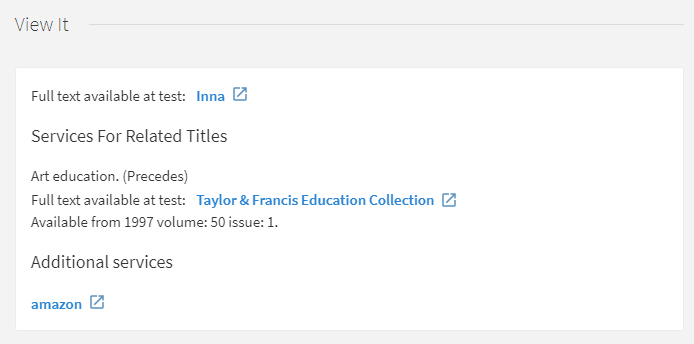
A close relation indicates that the two records should be considered identically useful in the search results. If the record requested in the OpenURL has close relations (a CONTAINS or PART_OF relation type) with another record, electronic services for the related record are included in View It, with no indication that these services are for the related record. Para el usuario parece como si esos servicios fueran para el registro enviado en el OpenURL. Ya que este tipo de relación es muy cercana, puede considerarse equivalente; y por lo que respecta al usuario, no es necesaria hacer ninguna distinción. Other types of relations are considered remote and are listed under the Services for Related Titles section in View It.
To configure close relations to appear in the same section as the related titles in View It, see the Display closely related record services option in Enabling the Display of Related Records in Primo.
Si hay un filtro en 773$g y el campo del ejemplar correspondiente está vacío, el ejemplar cumple la condición del filtro.
Modifying the Display Labels for Related Electronic Services
The Discovery Interface Labels code table (Configuration > Fulfillment > Discovery Interface Display Logic > Labels) enables you to customize and translate the following labels in View It:
- Title – The label that displays above the list of related records in View It:
- Relationship – The label that appears for each related entry in View It and Get It. Para modificar la etiqueta, véase la relación relevante en la tabla de abajo.
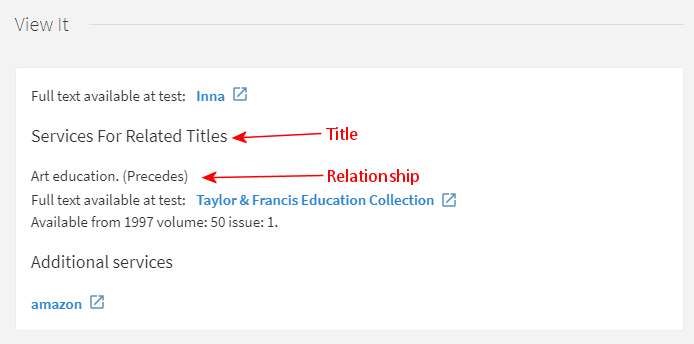
For the example above, you can customize the labels for the title and relationship by modifying the Description field for the following codes in the Discovery Interface Labels code table:
La siguiente tabla presenta la correlación entre los campos MARC definidos en el registro bibliográfico y las etiquetas listas para usar, que aparecen para cada tipo de relación en View It. For information on modifying labels, see Configuring Service Labels in the Discovery Interface.
The labels and information that appear in the Primo's Details section is determined by the normalization rules that are defined in Primo.
Tipos de registros relacionados
| Relación / Tipo | Campo MARC | Campo UNIMARC | Ubicación en Primo |
|---|---|---|---|
| Entrada principal de series (remoto) | 760 | 410 | View It: c.uresolver.viewit.related_type_list.MAIN_SERIES = Main Series |
| Indicadores 0# | |||
| $w, $x | $1 y comienza por 001 | ||
| Asiento de subserie (remoto) | 762 | 411 | View It: c.uresolver.viewit.related_type_list.SUBSERIES = Subseries |
| Indicadores 0# | |||
| $w, $x | $1 y comienza por 001 | ||
| Idioma original de la entrada (remoto) | 765 | 454 | View It: c.uresolver.viewit.related_type_list.ORIGINAL_LANGUAGE = Original Language |
| Indicadores 0# | |||
| $w, $x, $z | $1 y comienza por 001 | ||
| Entrada traducida (remoto) | 767 | 453 | View It: c.uresolver.viewit.related_type_list.TRANSLATION = Translation |
| Indicadores 0# | |||
| $w, $x, $z | $1 y comienza por 001 | ||
| Entrada suplementaria (remoto) | 770 | 421 | View It: c.uresolver.viewit.related_type_list.SUPPLEMENT = Supplement |
| Indicadores 0# | |||
| $w, $x, $z | $1 y comienza por 001 | ||
| Entrada suplemento del padre (remoto) | 772 | 422 | View It: c.uresolver.viewit.related_type_list.SUPPLEMENT_PARENT = Supplement Parent |
| Indicadores 00 | |||
| $w, $x, $z | $1 y comienza por 001 | ||
|
Entrada de ejemplar de servidor (cercano)
|
773
|
461
|
View It and Get It: c.uresolver.viewit.related_type_list.PART_OF = Part Of
Details: Display/Is Part Of (defined in Primo normalization rules
For Primo VE, Get It does not display the type of relation after the title, and closely related items always appear under the Locations for Related Titles section.
|
| Indicadores ## | |||
| $w, $x, $z | $1 y comienza por 001 | ||
|
Entrada de unidad constituyente (cercano)
|
774
|
462-464
|
View It and Get It: c.uresolver.viewit.related_type_list.CONTAINS = Contains
For Primo VE, Get It does not display the type of relation after the title, and closely related items will always appear under the Locations for Related Titles section.
|
| Indicadores 0# | |||
| $w | 462 $1 and starts with 001 463 $1 and starts with 001 464 $1 and starts with 001 | ||
| $x | |||
| $z | |||
| Entrada otra edición (remoto) | 775 | 451 | View It: c.uresolver.viewit.related_type_list.OTHER_EDITION = Other Edition |
| Indicadores 0# | |||
| $w, $x, $z | $1 y comienza por 001 | ||
| Entrada de formulario adicional físico (remoto) | 776 | 452 | View It: c.uresolver.viewit.related_type_list.ADDITIONAL_FORM = Additional form |
| Indicadores 0# | |||
| $w, $x, $z | $1 y comienza por 001 | ||
| Entrada publicado con (remoto) | 777 | 423 | View It: c.uresolver.viewit.related_type_list.ISSUED_WITH = Issued With |
| Indicadores 0# | |||
| $x | $1 y comienza por 001 | ||
| $w | |||
| Entrada que precede (remoto) | 780 | 430 431 432 433 434 435 436 437 | View It: c.uresolver.viewit.related_type_list.PRECEDES = Precedes
Details: Display/Relation – Related Titles: Earlier Title (defined in Primo normalization rules) |
| Indicadores 00, 01, 02, 03, 04, 05, 06, 07 | |||
| $w, $x, $z | $1 y comienza por 001 | ||
| Entrada precede (remoto) | 785 | 440 441 442 443 444 445 446 447 | View It: c.uresolver.viewit.related_type_list.SUCCEEDS = Succeeds
Details: Display/Relation – Related Titles : Later Title (defined in Primo normalization rules) |
| Indicadores 00, 01, 02, 03, 04, 05, 06, 07, 08 | |||
| $w, $x, $z | $1 y comienza por 001 | ||
| Entrada fuente de datos | 786
$w, $x, $z |
View It: c.uresolver.viewit.related_type_list.CONTAINS = Contains | |
| Entrada otra relación (remoto) | 787 | 412 413 424 425 455 456 470 481 482 488 | View It: c.uresolver.viewit.related_type_list.OTHER_RELATIONSHIP = Other Relationship |
| Indicadores 0# | |||
| $w, $x, $z | $1 y comienza por 001 | ||
| Entrada serie añadida-Nombre personal | 800
$w, $x |
View It: c.uresolver.viewit.related_type_list.CONTAINS = Contains
Details: Display/Relation – Series: (defined in Primo normalization rules) |
|
| Entrada serie añadida-Nombre corporativo | 810
$w, $x |
View It: c.uresolver.viewit.related_type_list.CONTAINS = Contains
Details: Display/Relation – Series: (defined in Primo normalization rules) |
|
| Entrada serie añadida-Nombre del congreso | 811
$w, $x |
View It: c.uresolver.viewit.related_type_list.CONTAINS = Contains
Details: Display/Relation – Series: (defined in Primo normalization rules) |
|
| Entrada serie añadida-Título uniforme | 830
$w, $x |
View It: c.uresolver.viewit.related_type_list.CONTAINS = Contains
Details: Display/Relation – Series: (defined in Primo normalization rules) |
|
| ISBN, ISSN, u otro número estándar válido (remoto) | 020 $a, $e | 010 $a | View It: c.uresolver.viewit.related_type_list.REPLACED_BY = Replaced By |
| 022 $a, $e | 011 $a | ||
| 024 $a | 013 $a, 014 $a, 015 $a, 016 $a, 017 $a, 072 $a, 073 $a | ||
| ISBN, ISSN, u otro número estándar cancelado/no válido (remoto) | 020 $z | 010 $z | View It: c.uresolver.viewit.related_type_list.REPLACES = Replaces |
| 022 $y, $z | 011 $g, 011 $y, 011 $z | ||
| 024 $z | 013 $z, 014 $z, 015 $z, 01 $z, 017 $z, 072 $z, 073 $z | ||
| Enlace ISSN (remoto) | 022 $l | 011 $f | View It: c.uresolver.viewit.related_type_list.LINKS_TO = Links To |
For more information about configuring related records, see Configuring Related Records for Electronic Services.
Enabling the Display of Related Records in Primo
- Administrador general del sistema
- Administrador de servicios al usuario
La página Configuración de servicios de registros relacionados permite configurar los servicios electrónicos y el inventario físico para títulos relacionados que aparecen en View It y Get It para Primo/Primo VE.
-
Open the Related Record Services Configuration page (Configuration Menu > Fulfillment > Discovery Interface Display Logic > Related Records).
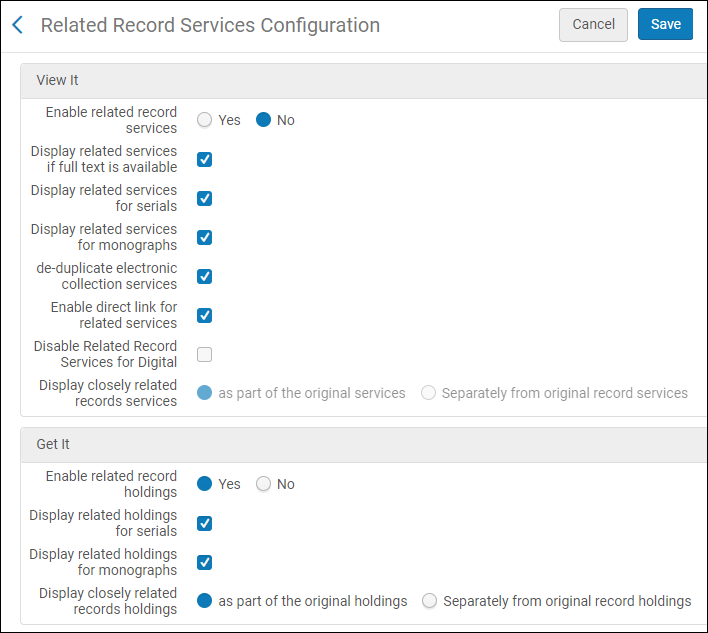
-
Para inventario electrónico, consulte la siguiente tabla para configurar cómo mostrar registros relacionados en View It. For more information, see Configuring Related Records for Electronic Services and Modifying the Display Labels for Related Electronic Services.
Related Record Services Configuration Options – View It Section
Parámetro Descripción Permitir servicios de registro relacionados
Select Yes if you want to display a record's related titles in View It and enable the following fields to restrict or modify the display of related titles for specific types of records.
When set to Yes, View It will display only the services for related records and will not display matching records from the NZ if a matching title is not found in the IZ for environments using Distributed Access to Electronic Resources from the NZ.
Select No if you do not want to display a record's related titles in View It.
When set to No, View It will display matching records from the NZ if a matching title is not found in the IZ for environments using Distributed Access to Electronic Resources from the NZ.
Mostrar servicios relacionados si está disponible el texto completo
Mostrar servicios para registros relacionados si está disponible el texto completo Los servicios para registros relacionados no se muestran si hay un servicio de texto completo para el registro original en OpenURL.
Mostrar servicios relacionados para publicaciones seriadas
Mostrar servicios relacionados para publicaciones seriadas (que tienen un material tipo Revista).
Mostrar servicios relacionados para monografías
Incluye servicios relacionados para monografías (que tienen un material tipo Libro).
Deduplicar servicios de colecciones electrónicas
Usar la deduplicación de servicios de colecciones electrónicas para servicios relacionados remotos. Esto hace que Primo solo muestre un servicio si hay registros relacionados asociados con la misma colección electrónica.
This function is handled by Duplicate of local filter, which cannot be turned off.
Permitir enlace directo para servicios relacionados
Activar la característica de enlace directo.
Deshabilitar servicios de registros relacionados para digital
Desactive el despliegue de registros relacionados para registros digitales.
Mostrar los servicios de registros estrechamente relacionados
Cómo deben aparecer los servicios estrechamente relacionados (definidos con los campos MARC 773 o 774 en el registro bibliográfico) en View It:
-
As part of the original services – Closely related services are placed in the list of regular services in View It with no indication that these services are for related titles.
-
Separately from the original record services – Closely related services are placed under the Services for Related Titles section in View It.
-
-
Para inventario físico, consulte la siguiente tabla para configurar cómo mostrar registros relacionados en Get It. For additional information, see Configuring Related Records for Physical Inventory.
Sección Opciones de Configuración de Servicios de Registros Relacionados – Get It
Parámetro Descripción Permitir registros de existencias relacionados
Select Yes if you want to display a record's related titles in Get It. Si está habilitado, los campos restantes le permiten restringir o modificar el despliegue de títulos relacionados para determinados tipos de registros.
Los registros relacionados se muestran en Get It incluso si se suprime un registro bibliográfico relacionado. Si no desea mostrar las existencias relacionadas de los registros relacionados suprimidos, debe suprimir sus existencias.
Mostrar existencias relacionados para publicaciones seriadas
Seleccione esta opción para mostrar los registros de existencias relacionados para publicaciones seriadas.
Mostrar existencias relacionadas para las monografías
Seleccione esta opción para mostrar los registros de existencias relacionados para monografías.
Tenga en cuenta que para monografías, se considera el inventario relacionado que aparece en Get It, al cumplir solicitudes a nivel de título realizadas por el usuario. If you disable the display of related records for monographs, the related records' inventory that isn't displayed is not considered when fulfilling title-level requests.
Display closely related records holdings
Seleccione una de las opciones siguientes para indicar cómo desea que aparezcan los registros estrechamente relacionados (definidos con los campos MARC 773 o 774 en el registro bibliográfico) en Get It:
-
As part of the original holdings – Closely related records are placed in the list with the original holdings in Get It with an indication that these are related holdings, including title and relation type.
-
Separately from the original record holdings – Closely related records are placed under the Locations for Related Titles section in Get It. See c.uresolver.getit2.display_related_holding_separately_from_original_record in the table above for more information.
- En Primo VE, los registros relacionados se muestran por separado, con independencia de su configuración.
- Un máximo de 10 ubicaciones para títulos relacionados se muestran por defecto. To increase the maximum number of locations, edit the max_holding_per_record parameter in the Discovery Customer Settings mapping table (Configuration Menu > Discovery > Other > Customer Settings).
-
-
Select Save.