
Contributing to the Resource Sharing Directory
Esta página proporciona una descripción general de cómo contribuir al directorio de intercambio de recursos en Alma, incluida la adición de miembros, la pestaña de políticas de préstamo de ejemplares físicos y la actualización de los detalles de los miembros.
For more information on resource sharing including locating items for resource sharing, working with resource sharing partners, managing borrowing and lending requests and contributing to the resource sharing directory, see Resource Sharing.
Para configurar el directorio de recursos compartidos, necesita uno de los siguientes permisos:
- Administrador general
- Administrador de servicios al usuario
What is the Resource Sharing Directory?
El directorio es un lugar central con información actualizada sobre las bibliotecas para compartir recursos en Alma. Las bibliotecas se registran y se definen a sí mismas en el directorio con unos simples pasos. Estar en el directorio le permitirá a otras bibliotecas encontrar su institución y crear una relación de uso compartido de recursos de igual a igual con usted de forma simple y con menos comunicación en ambos sentidos sobre detalles técnicos de conexión.
En el directorio, se puede definit una conexión Alma o una conexión ILLiad según su interfaz de personal preferida.
For more information, see The Ex Libris Resource Sharing Directory (5:11 min.).
For more information on the various workflows for resource sharing, including broker and peer to peer based, managing resource sharing partners, borrowing/lending requests and contributing to the resource sharing directory, see Resource Sharing.
What are the steps?
- Como requisito previo, necesitará tener definida una biblioteca de recursos compartidos en Alma. Puede ser una biblioteca o muchas según sus necesidades específicas. Cada biblioteca de recursos compartidos en Alma necesitará un miembro correspondiente en el directorio.
- Finally, you must define Participating Items for each member.
This content is for institutions that already have their resource sharing libraries defined in Alma.
Add a Member
Si su institución tiene múltiples campus/bibliotecas que gestionan sus operaciones para compartir recursos por separado y de forma independiente, añada un miembro por biblioteca de recursos compartidos.
From the Resource Sharing Members page (Configuration > Resource Sharing > Members), select Add new member either from a New Resource Sharing Library or an Existing Resource Sharing Library.

See Lending Customization for more information about setting up Rapido members.
From the Resource Sharing Members page (Configuration > Fulfillment > Contribute to Resource Sharing Directory > Resource Sharing Directory Member), select Add new member either from a New Resource Sharing Library or an Existing Resource Sharing Library.
Member Attributes Tab
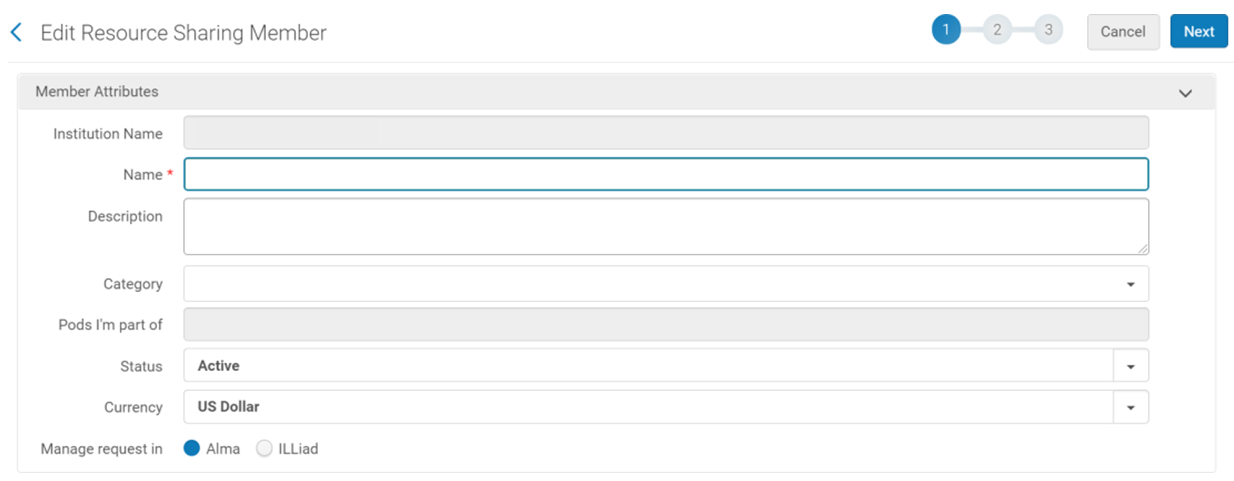
Se despliegan los siguientes campos en el directorio para ayudar a las demás instituciones a buscarlo e identificarlo.
- Nombre
- Description – libraries can include instructions on how to communicate with them. This information is displayed on the Resource Sharing Partner List Community tab (Fulfillment > Resource Sharing > Partners).
- Status – refers to the current status of the member (active/inactive).
Pods I'm part of is a field that is configured by the Ex Libris Resource Sharing team based on your participation in pods available in your region. Please contact Ex Libris if you would like to join a pod.
Su institución no tiene que usar Rapido para ser parte de un pod.
Manage requests in enables you to define whether you would like to send and receive ILL requests in Alma or ILLiad.
Cuando selecciona ILLiad, necesita definir detalles adicionales de conexión.
Member Address - The address that is used for displaying the shipping address. La dirección de envío es la que se define en la pestaña de información de contacto de la biblioteca RS. El correo electrónico y el teléfono de envío también se muestran cuando otra institución lo descarga como socio de recursos compartidos. Note that some information such as the shipping email address and ISIL code/ISO symbol, cannot be updated in this screen. They can be updated in the Contact Information page (Configuration > Fulfillment > Library Details > Contact Information tab), when in the scope of the Resource Sharing library. Once the member is added, you can also select Edit Resource Sharing Library from the row actions menu to edit the information.
Physical Items Lending Policies Tab
Una vez que rellene los datos de miembro, continúe con la siguiente pestaña.
Defining Participating items lets you indicate which physical items you are willing to lend.
Properly defining participating items cuts down on staff time having to reject requests that are not lendable.
- Supplies physical items must be checked if you plan on sharing physical items.
- Add Participating Items.
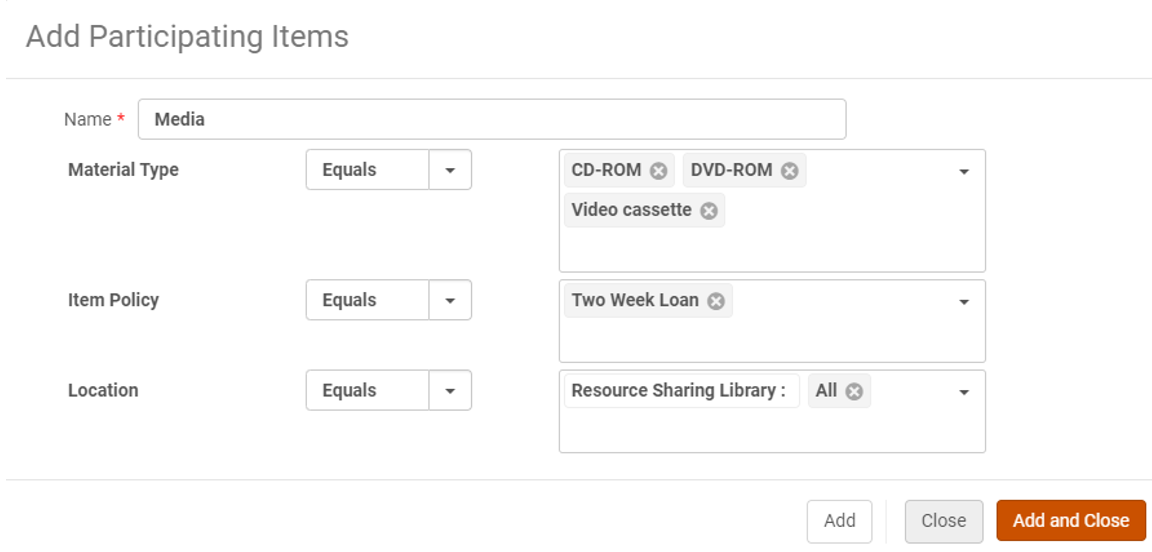
Selecting Add Participating Item opens the screen below. Puede definir los ejemplares físicos que ha autorizado para compartir recursos según el tipo de material, la política del ejemplar y la ubicación.
Physical items are only available for lending when Supplies physical items is checked.
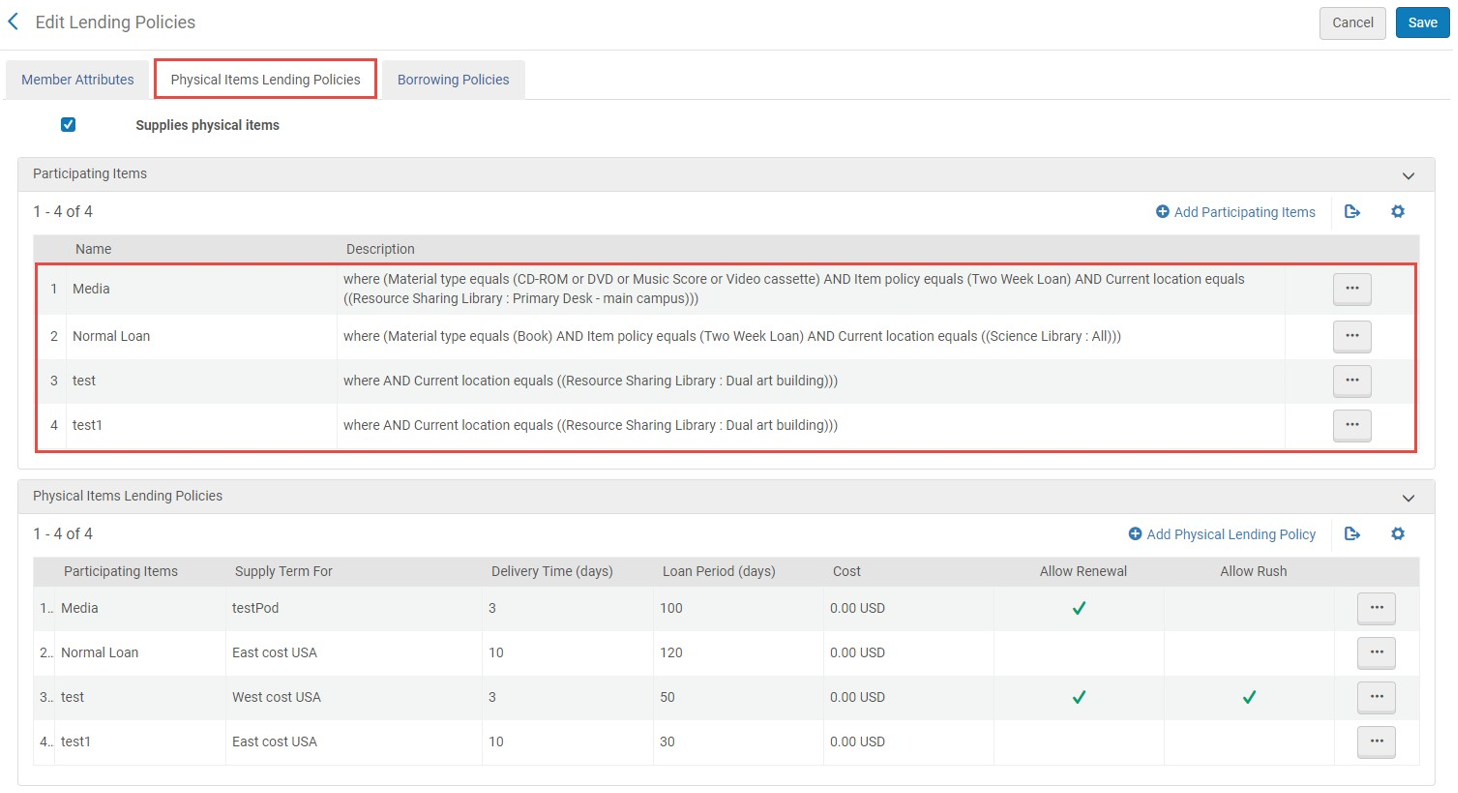
Si ha solicitado un pod recíproco y se ha unido a él, necesita enlazar sus ejemplares participantes a ese pod. This is complete when the pod appears under Pods I'm part of.
Updating Member Details in the Resource Sharing Directory
Si en cualquier momento necesita cambiar la información en el repositorio, puede editar sus datos de miembro. The directory automatically updates the following day.
Las actualizaciones se diseminan a socios descargados desde el Directorio de recursos compartidos de Ex Libris. If an institution makes changes that impact the partner information in the Resource Sharing Directory (using the Edit Resource Sharing Library row action), such as email, address, etc., this information is updated on the partner record downloaded by other institutions.
