
RapidILL Based Resource Sharing Workflow
Esta página proporciona información sobre cómo trabajar con el intercambio de recursos basado en RapidILL. For more information on resource sharing including locating items for resource sharing, working with resource sharing partners, managing borrowing and lending requests and contributing to the resource sharing directory, see Resource Sharing.
Para configurar la integración entre Alma y el sistema RapidILL, debe tener el siguiente rol:
- Gestor de socios de recursos compartidos
Esta página describe las configuraciones que son necesarias para integrar a RapidILL en el flujo de trabajo de recursos compartidos de Alma. Esto permite que todas las actividades del flujo de trabajo tanto del prestatario como del prestador se realicen en Alma. Las diferentes opciones de flujo de trabajo del prestatario y del prestador se describen mostrando cómo RapidILL se integra a la perfección en la interfaz de Alma.
For more information, watch RapidILL/Alma Integrated Workflow (5:00 min.).
Este documento describe las configuraciones requeridas de Alma. Se necesita activación adicional en RapidILL. Contacte con el soporte de Ex Libris para esta activación.
Esta página contiene las siguientes secciones:
Configuring Alma to be Integrated with RapidILL
LLeve a cabo los siguientes pasos para integrar RapidILL con Alma.
- Configure RapidILL as a Resource Sharing Partner
- Configure a Rota Template with RapidILL as a Member
- Configure a Rota Assignment Rule
- Configure Required Settings to Activate Alma Integration
- Configure Other Settings
Configure RapidILL as a Resource Sharing Partner
You configure RapidILL as a resource sharing partner from the Resource Sharing Partner page (Fulfillment > Resource Sharing > Partners > Add a Partner).
It is recommended not to assign a workflow profile to Rapid ILL partners unless you want to allow patrons and/or staff to cancel requests, or if you want to be able to reactivate and resubmit a completed Rapid ILL request (for example, because of a bad scan). En caso de desear habilitar estas acciones, asignar un perfil de flujo de trabajo de préstamo al socio de Rapid ILL.
- To allow cancelling by patrons from Primo, make sure the workflow profile has the “Cancelled by patron”” actions checked.
- To allow cancelling by staff from Alma, make sure the workflow profile has the “Cancelled by staff” action checked.
- To allow reactivating and resubmitting a completed request, make sure the workflow profile has the “Reactivate” action checked.
For the Profile Type and System Type, select RapidILL. Fill out the other fields on this page as described at Resource Sharing Partners.
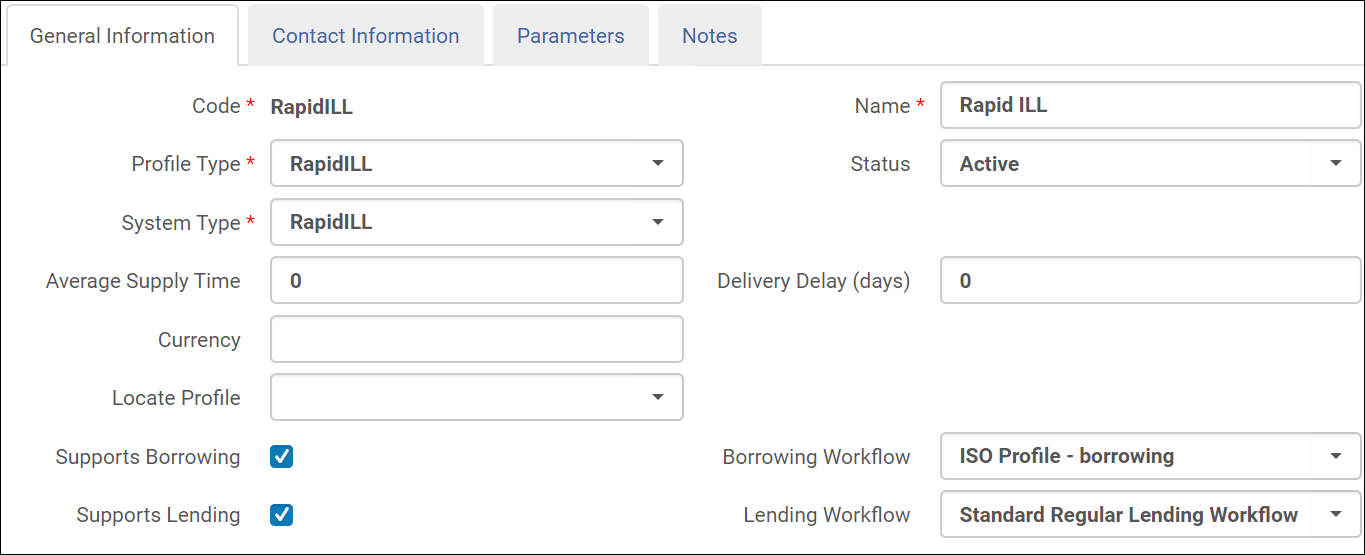
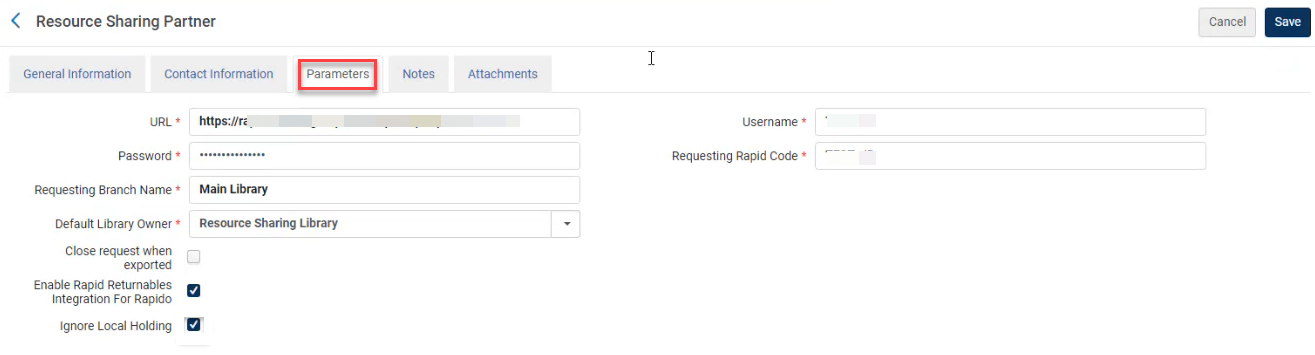
On the Parameters tab, for the Default Library Owner, select the library to be used when creating lending requests. Las solicitudes de préstamos recibidas desde RapidILL se crean en la Biblioteca de recursos compartidos seleccionada. Fill out the other fields on the Parameters tab as described at RapidILL Parameters.
Configure a Rota Template with RapidILL as a Member
Configure a Rota template from Fulfillment > Resource Sharing > Rota Templates > Add a Template.

From the Template Members tab, add RapidILL as a member of the Rota template.
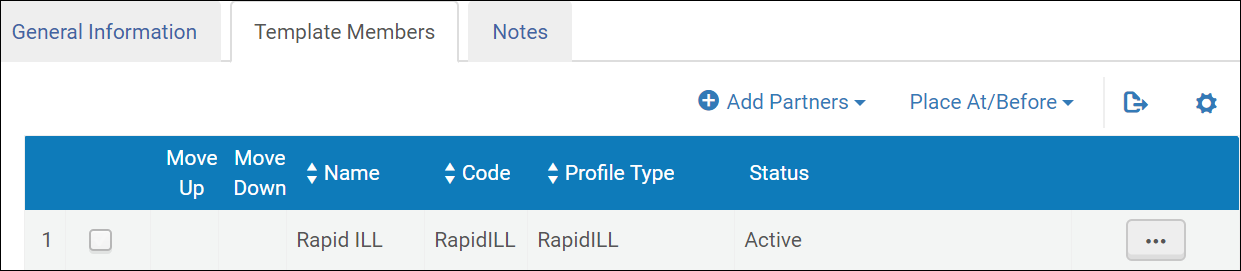
For more information, see Configuring Rota Templates.
Configure a Rota Assignment Rule
Configure una regla de asignación de ruta para asignar automáticamente una solicitud de préstamo digital en la plantilla de ruta de RapidILL. You configure rota assignment rules from Configuration > Fulfillment > Resource Sharing > Rota Assignment Rules:
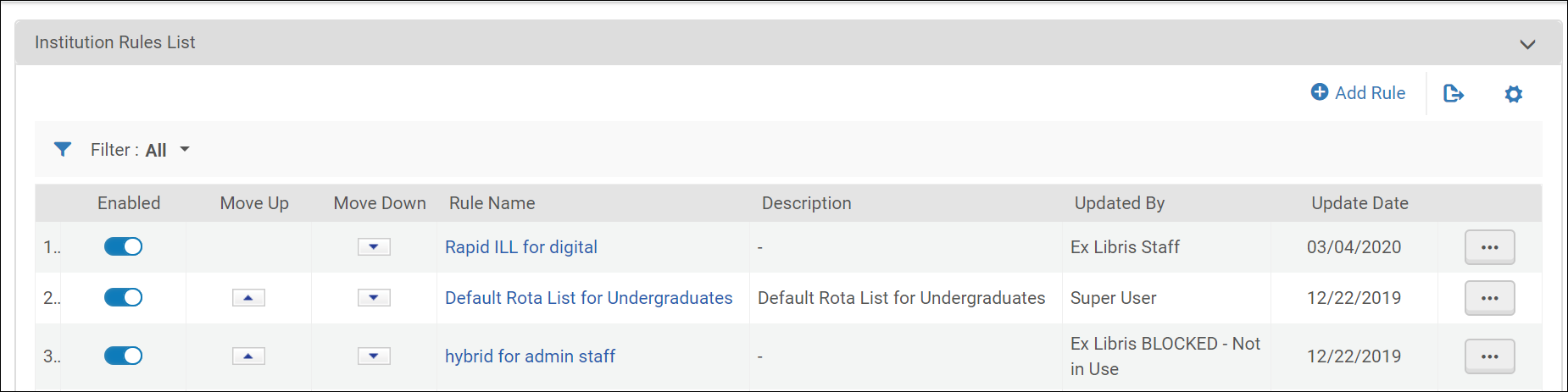
Select Add a Rule:
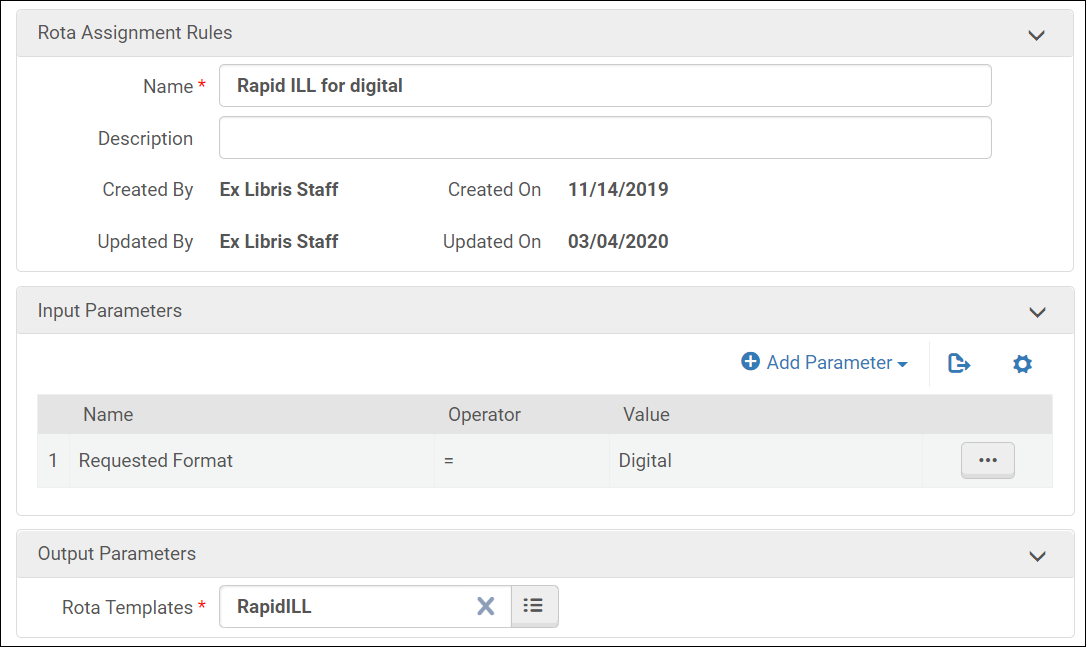
Añada una regla de asignación de ruta para utilizar la plantilla de ruta creada cuando el formato solicitado es digital.
For more information, see Configuring Rota Assignment Rules.
Se recomienda que esta regla sea la primera de la lista de reglas de asignación de ruta.
Configure a Sending Borrowing Request Rule
Configure the Sending Borrowing Request Rule to automatically send the digital borrowing request to RapidILL. Configure the rota assignment rules from Configuration > Fulfillment > Resource Sharing > Sending Borrowing Request Rules:
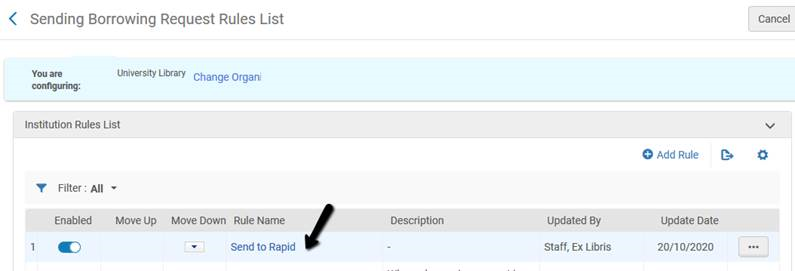
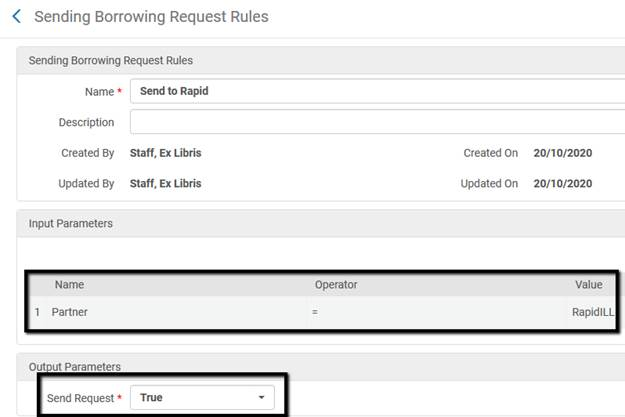
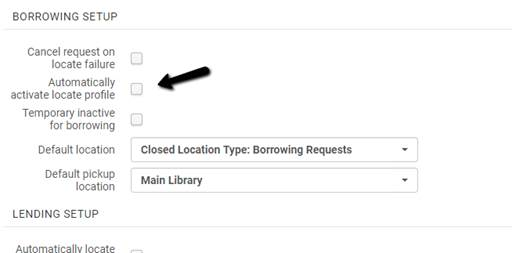
La regla de envío de solicitudes de préstamo se activa solo si la biblioteca se configura para localizarse automáticamente. The Automatically activate locate profile option should be selected at the Resource Sharing Library configuration (General > Add a Library or Edit Library Information).
The Document Delivery Page
The document download page that Alma opens when the patron clicks on the email link uses your institution's CNAME (e.g. instituitonA.alma.exlibrisgroup.com) and not the classic link (e.g., ap01-.alma.exlibrisgroup.com/institution/01INSTITUTIONA_INST) link. Esto puede requerir actualizaciones por parte de su TI si no ha autorizado la URL de CNAME.
In addition, the document download page uses the logo that is defined in your General > Alma Logo and Color Scheme menu as the login page logo. Por ejemplo:
Configure Required and Other Settings
Configure the following parameters located at Configuration > Fulfillment > General > Other Settings as follows:
| Parámetro | Valor por defecto | Descripción |
|---|---|---|
| rs_keep_rejected_request_active | Ninguno | Mantenga activas las solicitudes de recursos compartidos rechazadas como una solicitud de préstamo para mantenerla abierta si RapidLL la rechaza |
| borrower_document_delivery_maximum_views | 2 | La cantidad máxima de veces que los usuarios pueden acceder al enlace para la entrega de documentos de RapidLL. |
| borrower_document_delivery_send_automatically | verdad |
Este parámetro está obsoleto. Originalmente, se utilizaba para configurar si el correo electrónico al usuario se enviaba automáticamente cuando se recibía un documento por parte del prestatario. (See also Advanced Resource Sharing Configuration for Alma). |
| document_delivery_cleanup_days | Por defecto: 30
Máximo: 90 |
Número de días después del cual se elimina el fichero digital. |
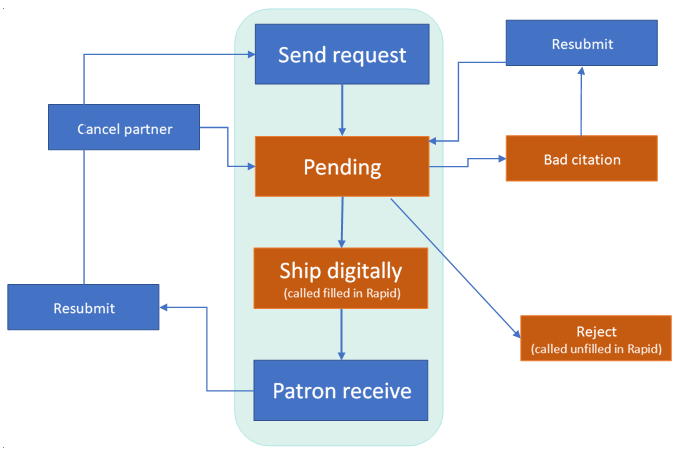
RapidILL Workflow
- El prestamista envía una solicitud de préstamo de recursos compartidos a Alma a través de Primo.
- La información de solicitud de préstamos aparece en Alma.
- La solicitud se envía al socio de recursos compartidos RapidILL.
- Si la plantilla de ruta, la regla de asignación de ruta y la regla de enviar solicitud de préstamo se configuran según las instrucciones de arriba, esto sucederá automáticamente. Si no, también se puede hacer manualmente.
- La biblioteca prestataria recibe la solicitud desde RapidLL. La información de solicitud de préstamos aparece en Alma.
- El prestatario produce el fichero solicitado.
- From the row actions menu, the lender uses selects Ship Digitally to upload a file to send to RapidILL.
- Solo cargue ficheros PDF para completar solicitudes de préstamo RapidILL.
- No use la opción de URL de fichero externo, ya que no funciona con RapidILL.
- El fichero se entrega a RapidILL que procesa el fichero y lo envía a la biblioteca solicitante.
- La biblioteca solicitante recibe el fichero procesado.
- Según las Configuraciones de cartas de Alma descritas arriba, se puede enviar automáticament un correo electrónico al usuario con un enlace a su fichero. A letter can also be sent manually via the Send File to Patron action.
- Cancel partner – The request to the RapidILL lender is cancelled and the request is sent to the next lender (This action should be used infrequently.)
- Resubmit – Resubmit a borrowing request:
- Cuando el prestador rechaza una solicitud y el prestatario debe corregirla y reenviarla.
- Cuando se recibe un recurso no solicitado
- View local resource – Turns the borrowing request to a hold\digitization request
The Request is Submitted and Sent to RapidILL
Después de que el usuario envía una solicitud de recursos compartidos, la solicitud se envía a RapidLL de acuerdo con las reglas de asignación y las plantillas de ruta. La información de solicitud aparece en Alma. You can have the request sent to the lender automatically or you can do so manually by selecting Send for the request.
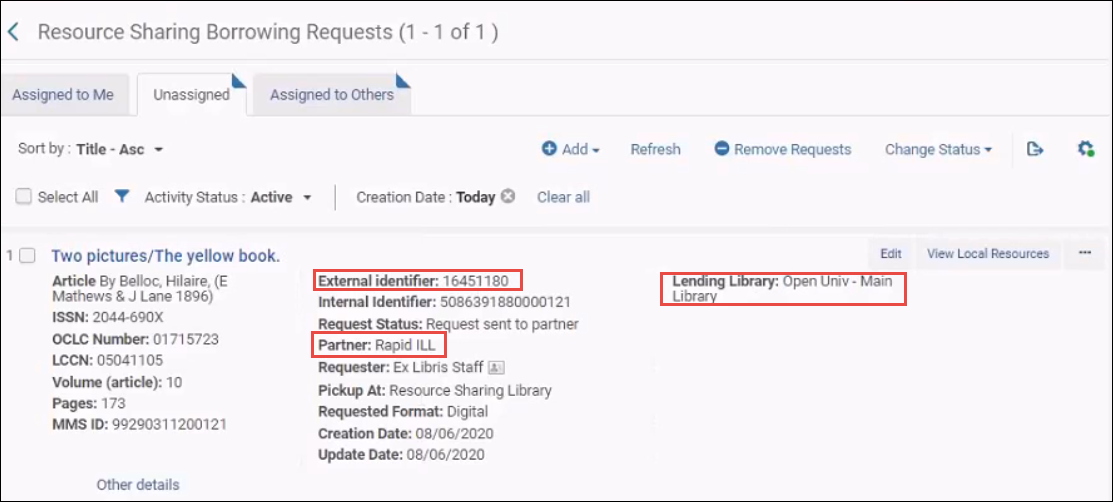
El socio aparece incluido en RapidLL, el ID externo es el ID de RapidLL y aparece el nombre de la biblioteca prestataria a la que se envía la solicitud de RapidLL.
Si RapidLL no encuentra el ejemplar solicitado en la biblioteca prestataria:
- The Rapid partner receives a status of Rejected.
- La ruta de Alma avanza hasta el siguiente socio.
- The note Unable to find matching Journal is added to the request.
- If this is the only partner in the Rota, the request status is determined by the keep_rejected_request parameter. (See Configure Other Settings.)
If Rapid rejects the request because of local holdings, then the request is assigned the Local Holding status. Esto permite identificar rápidamente intentos de envío automáticos a Rapid que se rechazaron debido a las existencias locales. The Override local holding action allows you to override the Rapid rejection. When using the manual Send action to send a request to Rapid, the operator is notified by Alma if Rapid found a local match for the request. El operador tiene la opción de ignorar esto.
The Request is Received by the Lender
La biblioteca prestataria recibe la solicitud.
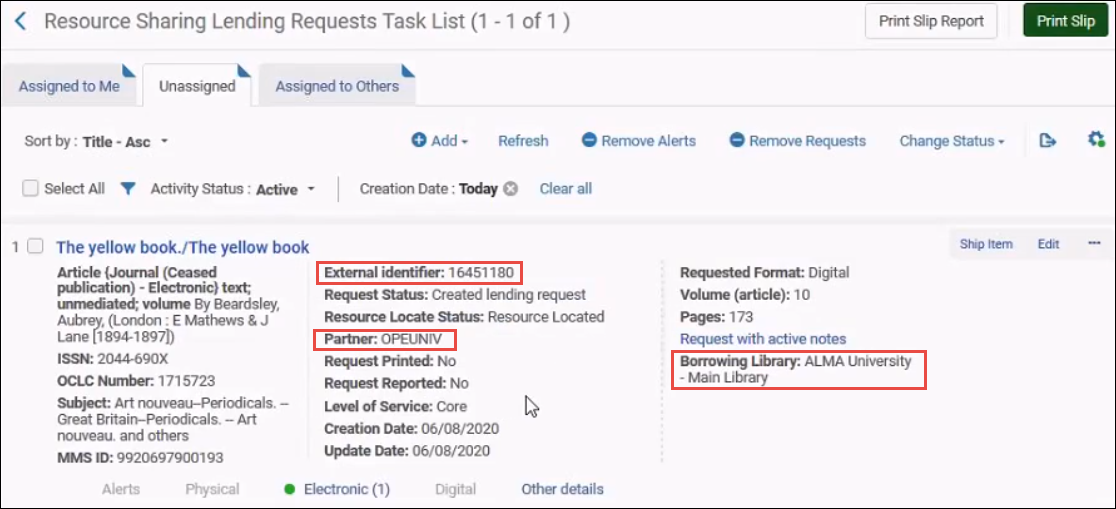
El ID externo es el mismo que el ID de RapidLL en la solicitud de préstamo. El socio es el socio de tipo RapidLL y la biblioteca prestataria es la biblioteca que realiza la solicitud de préstamo de recursos compartidos.
The Lending Library Downloads the File and Sends it to the Borrower
La biblioteca prestataria puede ver el fichero solicitado. It downloads the file from the Manage Fulfillment Options link and sends it to the patron by selecting the Ship Digitally option. The request status is changed to Shipped Digitally. To ensure the requests are closed automatically after digital shipping, verify that Waiting for receive digitally is disabled in your workflow profile. El fichero pasa a RapidILL, que luego envía el fichero a Alma. For more information, see Managing Resource Sharing Lending Requests.
La opción de enviar la URL cuando no se admite enviar una solicitud utilizando RapidILL.
Las siguientes opciones adicionales también están disponibles para la biblioteca prestataria:
- Rechazar (sin completar en Rapid): envíe un estado sin completar a RapidILL y envíe la solicitud a otro prestador. No necesita dar una razón.
- Cita errónea: seleccione esta opción si hay un problema con la solicitud del prestatario. La solicitud se configura como rechazada y se vuelve a enviar al prestatario para que la corrija y vuelva a enviar. La biblioteca prestataria puede añadir una nota que explique la razón del rechazo de la solicitud.No necesariamente volverá a recibir esta solicitud después de que se haya corregido. Puede que la reciba otro prestador.
The File is Delivered to the Patron
You can configure Alma to automatically send an email with a link to the patron or you can do so manually according to the borrower_document_delivery_send_automatically parameter. (See Configure Other Settings.)
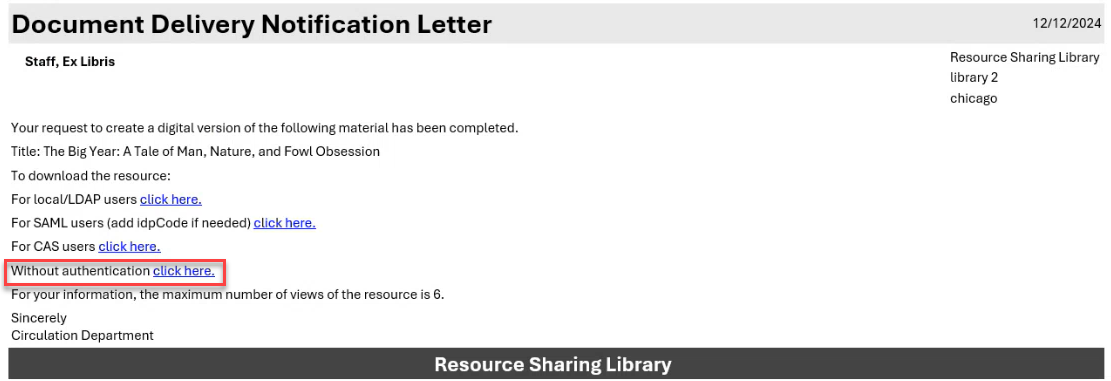
Alma sends the Document Delivery Notification Letter to the patron. Refer to the zip file on the Developers Network blog for an example of the letter.
To View a Letter Example:
-
Navigate to Configuration > General > Letters > Letters Configuration.
-
Search for Document Delivery Notification Letter and then select the letter name.
-
Select Letter Examples.
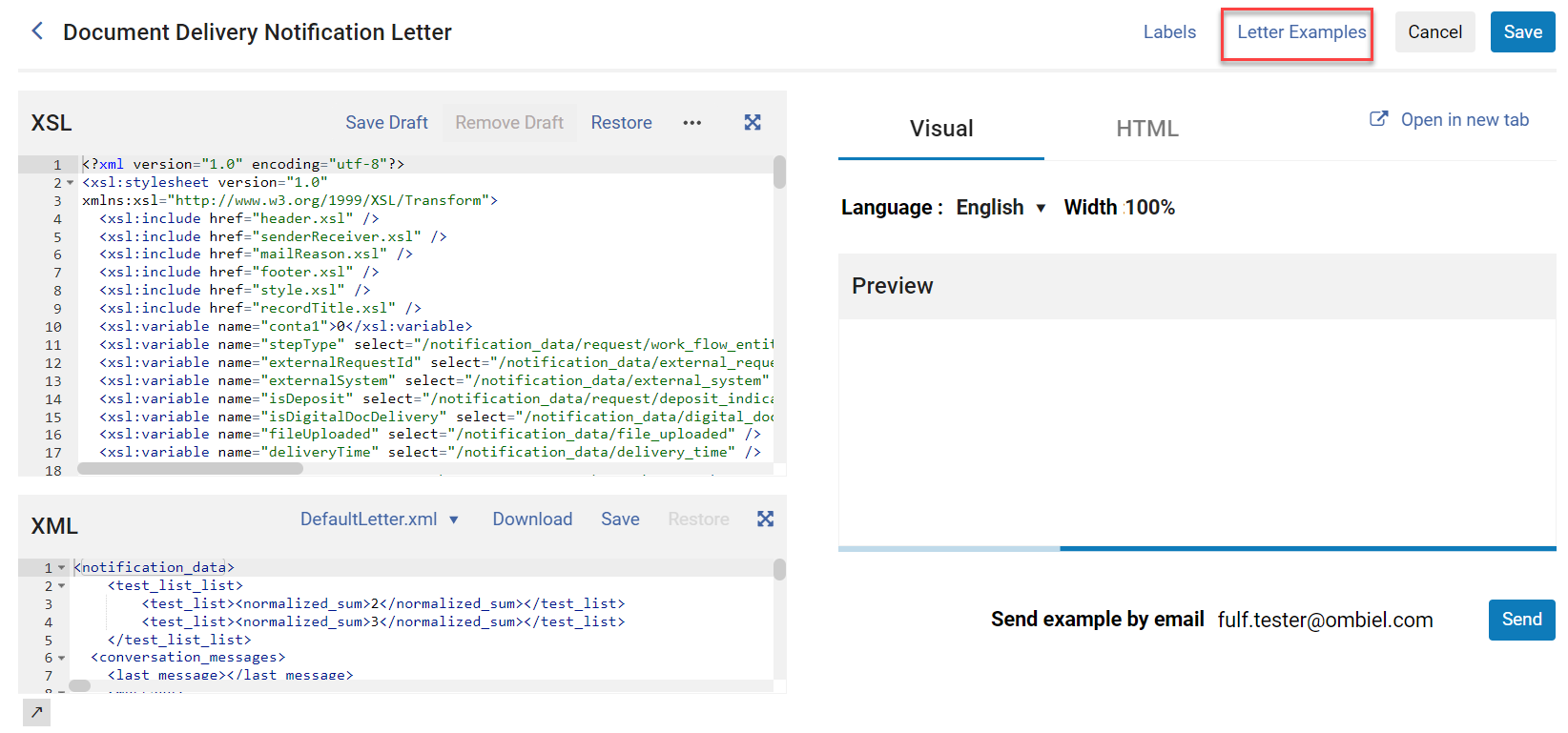
-
Select Upload letter example (XML).

Automatic Delivery
If Alma is configured to deliver the requested file automatically, the request status in Alma on the borrower side is set to Request Completed. If the lender filled shipping terms of use (see Delivering Digitized Items Using the Document Delivery Page), then the digital resource is not automatically forwarded and the request remains in the Shipped Digitally status, waiting for manual processing.
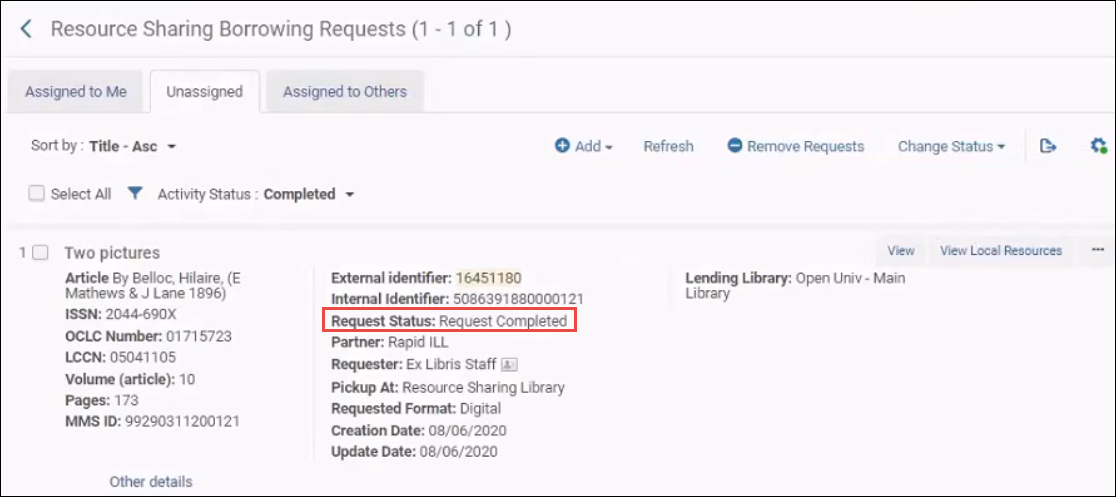
El usuario recibe un correo electrónico con un enlace al fichero solicitado. La carta es la Carta de notificación de entrega de documentos de digitalización de Alma, que debe estar activada.
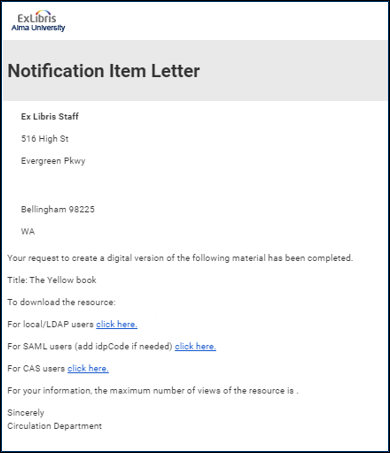
La carta predeterminada tiene enlaces para todos los métodos de autenticación posibles de Alma: local/LDAP, SAML o CAS. Los enlaces no necesitan otra configuración, pero puede eliminar los métodos de autenticación que no sean relevantes para su biblioteca y editar el texto de la carta. For more information, see Configuring Alma Letters.
Al seleccionar un enlace de autenticación, se muestra una página de autenticación. Después de la autenticación, se muestra el fichero solicitado con una portada de RapidILL que se añade automáticamente.
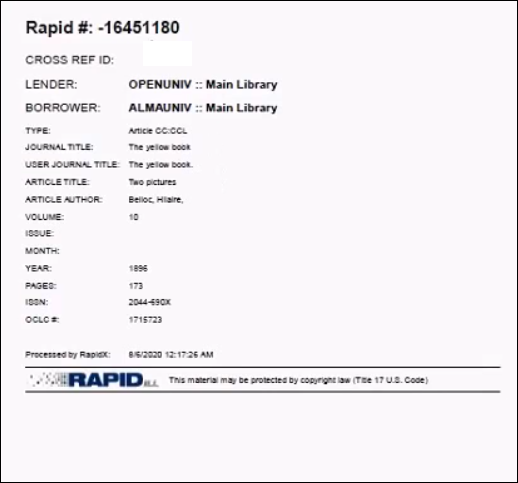
Aún con la entrega automática, el personal puede ver el fichero y reenviárselo al usuario.
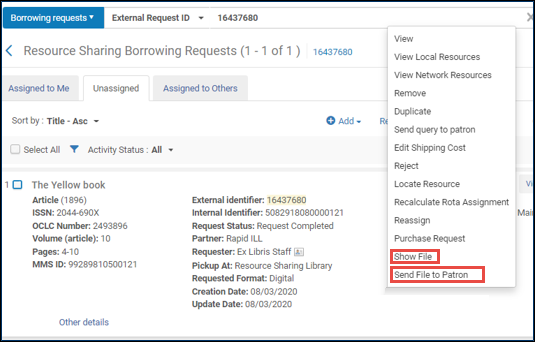
Manual Delivery
If Alma is configured to deliver the requested file to the patron manually, the request status in Alma is set to Shipped Digitally.
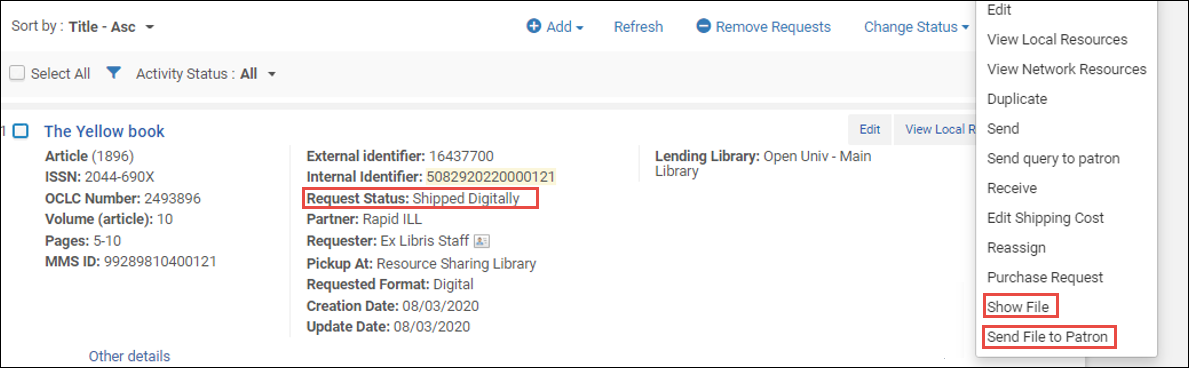
You can select the Show File option to review the file.
Select Send File to Patron to send the file to the patron. The patron receives the email as described in Automatic Delivery.
Additional Borrower Actions
El siguiente apartado describe acciones adicionales prestatario que están fuera del flujo de trabajo estándar. (For more information, see Managing Resource Sharing Borrowing Requests):
- La solicitud es rechazada por el prestador - Si Rapid encuentra otro prestador, la solicitud permanece con el socio de RapidLL y el campo Biblioteca prestataria se actualiza con la nueva biblioteca prestataria. Si RapidLL no encuentra otro posible prestador, Alma envía la solicitud de préstamo al siguiente socio de la ruta.
-
The lender returns the request with a Bad Citation indication – The request status changes to Bad Citation. Tenga en cuenta la pestaña Notas de la solicitud para los comentarios del prestador. The Borrower can correct the request and select Resubmit to resend the request into the RapidILL workflow and receive a new external (Rapid ILL) ID.
The request's metadata must be updated before resubmitting the request.
-
Cancelar socio: si no se recibe respuesta para una solicitud de préstamo, el prestatario puede cancelar el socio (prestador) y pasar al siguiente prestador de la ruta.
Por defecto, las solicitudes que no se completan se envían a otro prestador por RapidLL; esta acción se debe usar con poca frecuencia.
- Resubmit – If there are issues with the document you receive (i.e. blurry scan or missing pages), you can Resubmit the request back into RapidILL after it was filled. La solicitud no necesariamente regresará al mismo prestatario.
- Recurso local: cuando una solicitud se envía a RapidLL, revisa si el ejemplar solicitado existe en sus existencias locales. Si el ejemplar se mantiene de manera local, RapidLL rechaza la solicitud. Hay dos opciones:
- Select the View Local Resource option and change the request to a hold\digitization request.
- If you nevertheless want to fulfill the request in RapidILL, for example, because the item is missing from the shelf or the RapidILL holdings update has not run yet, log in to RapidILL and select the Override Local Holding option.
The Request Form
Rapid exige los siguientes campos cuando recibe una solicitud a través de Alma:
- Para artículos de revista:
- Se debe proporcionar un número de ISSN u OCLC.
- Se debe proporcionar un año o un volumen.
- Para solicitudes de capítulos de libro:
- Se debe proporcionar un número de ISBN u OCLC.
- Se debe proporcionar un título de capítulo o páginas.
It is recommended to configure the Primo request forms to mandate these fields, see Customizing Primo Resource Sharing Forms.
Also note that for article requests, either start/end or pages to photocopy can be used.
