
Configuración de lanzamiento de características
Configuring the rollout options of new Alma features for the institution
Para configurar los parámetros de lanzamiento para su institución, debe tener el siguiente rol:
- Administrador general del sistema
The instructions on this page apply to users with the Staff Record Type (see Managing Users).
Las nuevas características de Alma se lanzan en etapas. Esto posibilita que el personal de Ex Libris se asegure de estar trabajando correctamente y que los usuarios de Alma se familiaricen con ellas antes de que las mismas reemplacen por completo cualquier proceso existente.
El lanzamiento de una nueva característica atraviesa las siguientes etapas:
- Sandbox: Two weeks before its official rollout, a new feature is made available to institutions for preliminary testing purposes in the sandbox environment (see Alma Sandbox Environments).
- Phase 1 (Off by default): The official rollout of the new feature – phase 1 – takes place as part of a quarterly release. Durante esta fase, la nueva característica no está activada por defecto, pero está disponible para que las instituciones y los usuarios individuales la activen si deciden hacerlo.
- Phase 2 (On by default): Some time after the official layout, as part of a later quarterly release, phase 2 of the rollout begins. Durante esta fase, la nueva característica está activada por defecto, pero las instituciones y los usuarios individuales pueden desactivarla si deciden hacerlo.
- Full implementation: The final stage of a rollout takes place as part of a later quarterly release. En esta versión, la nueva característica se implementa para todos los usuarios. A partir de ahora, ni las instituciones ni los usuarios individuales pueden rechazarla.
During phases 1 and 2, administrators can override the default handling of a rollout in their institution. Por ejemplo, ellos pueden, en su institución, activar por defecto una nueva característica durante la fase 1 del lanzamiento. In addition, they can choose to completely opt out of a new feature for their entire institution (although this is not generally recommended; see Turn off and hide, below), and they can monitor the adoption of new features by individual users.
This page explains how to configure the institution-level configuration options. For information about how individual users can manage their own settings, see Opting In or Out of a New Feature.
Configurar los ajustes de lanzamiento para la institución
The Feature Rollout Configuration page (Configuration Menu > General > User Interface Settings > Feature Rollout Configuration) lists all of the features that are currently in the process of being rolled out. La lista aparece en el panel izquierdo (#1 en la ilustración), junto con información sobre si la característica está actualmente habilitada o deshabilitada a nivel global en su institución (p. ej., #2). Para cada nueva característica que está siendo lanzada, los administradores pueden elegir cómo se la adopta en sus instituciones durante el lanzamiento (#3) y supervisar su adopción por parte de los usuarios.
This page uses the New Layout that is being rolled out in some Alma pages beginning with the August 2022 release. For information about working with this layout, see New Layout 2022.
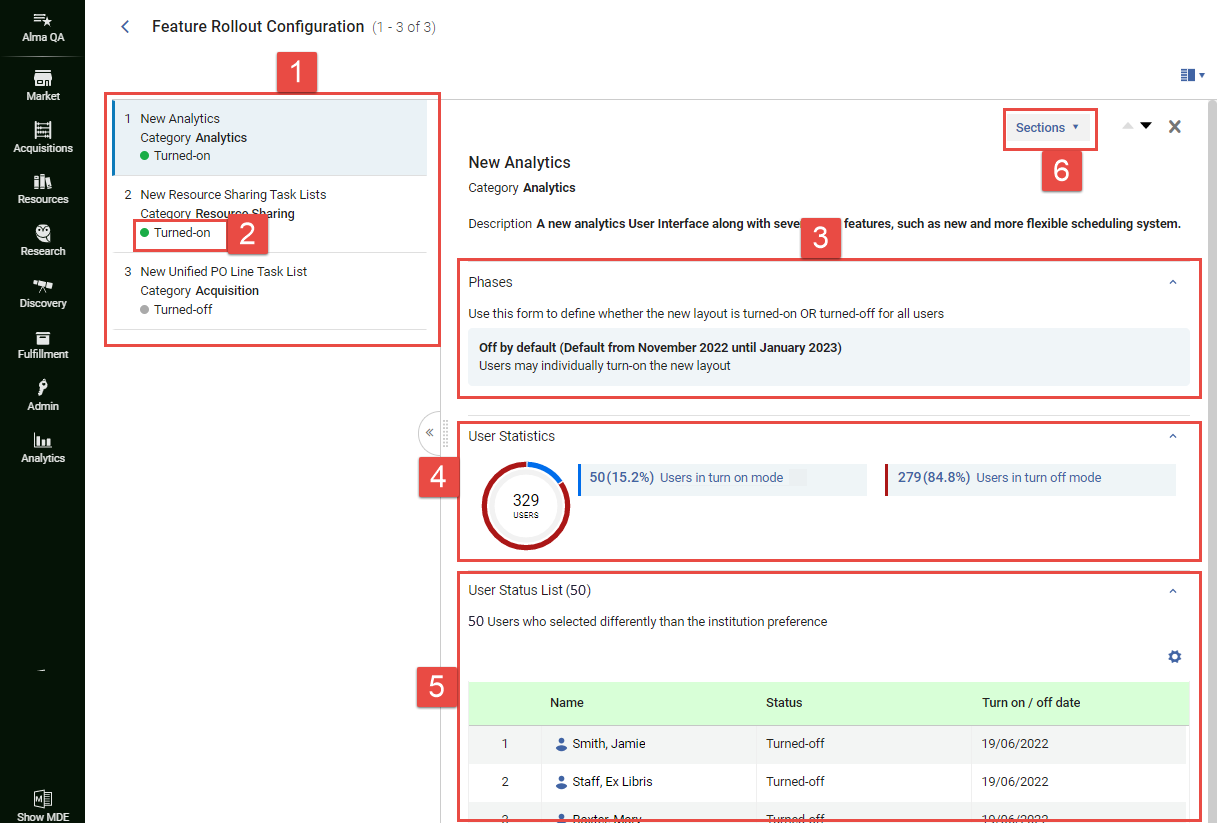
- In the Feature Rollout Configuration page (Configuration Menu > General > User Interface Settings > Feature Rollout Configuration), in the left panel (#1), select the feature. En el panel derecho se muestra una breve descripción de la característica. The currently selected rollout setting is displayed in the Phases section (#3). For the Off by default and On by default options, the time period in which this option is activated by default is also shown. For example,Off by default (Default from November 2022 until January 2023) indicates that the currently selected option is Off by default, and that this option is selected by default when the November 2022 quarterly release is active.
- Select the line in which the currently selected option appears.
 Selección de la línea de la opción actualmente seleccionada.The Edit Phases box opens and lists the available options. In parentheses beside the Off by default(#7 below) and On by default(#8) options, the time period in which each of these options would be activated by default is also shown.
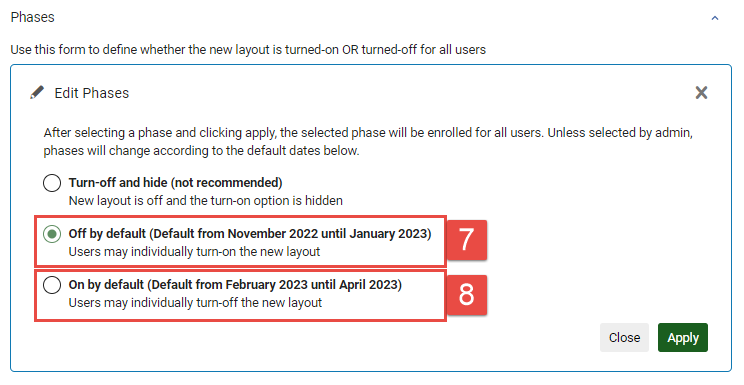 La ventana Editar fases
- Seleccione la opción requerida como se indica a continuación:
- Turn off and hide: Turn the feature off for the entire institution, and do not allow individual users to override this selection. When this option is selected, individual users will not see this feature in the list of features they can choose to turn on or off (see Opting In or Out of a New Feature). No se recomienda esta opción, y solo está pensada para ser implementada en casos en los que la nueva característica realmente esté generando un problema serio en su sistema. En ese caso, luego de elegir esta opción, por favor contacte con el soporte técnico y descríbales el problema.
- Off by default: Turn the feature off for the entire institution, but allow individual users to turn it on if they wish.
- On by default: Turn the feature on for the entire institution, but allow individual users to turn it off if they wish.
- Select Apply. La selección se implementa en su institución e ignora los ajustes existentes seleccionados por los usuarios individuales. (If you selected Off by default or On by default, the users can then re-select the options they had chosen before, if they wish.) The Feature Rollout Configuration page closes, and the Alma home page opens. El ajuste que usted elige permanece vigente en su institución hasta que se lo cambia manualmente o se llega al final de la fase (momento en el cual se implementa la opción por defecto para la nueva fase).
Supervisar la adopción de nuevas características
La página Configuración de lanzamiento de características incluye información sobre cuántos usuarios de su institución han adoptado cada una de las nuevas características y sobre qué usuarios han decidido no seguir el ajuste recomendado de la institución. Puede utilizar esta información como ayuda para localizar problemas que han surgido con la nueva característica, y para identificar usuarios con el fin de contactarlos y averiguar por qué han tomado la decisión que tomaron. When a feature is selected in the left panel, this information appears in the User Statistics and User Status List sections of the right panel (#4 and #5).
It may take up to a minute for the user data to load, especially in large institutions with many users.
Estadísticas de usuario
Under User Statistics(#4), the breakdown of users who have and have-not retained the institution-default setting is presented in two formats:
- Un gráfico de torta codificado con colores
- A key showing which group is represented by each color and presenting more detailed data about each group.
Lista de estados de usuario
Under User Status List(#5), information is displayed about which users have opted not to retain the institution-default setting. Seleccione el nombre de un usuario para acceder a su información de contacto (dirección de correo electrónico y número de teléfono).
Page tags: article:topicproduct:almacontent:Documentationlang:english
