
Comunicaciones por SMS
Configure an SMS type of integration profile and ensure that the SMS channel of notification is activated.
- Administrador general del sistema
As part of a library's processes, Alma produces various notifications for the library's users. Las notificaciones se pueden enviar a un usuario por correo electrónico o se pueden imprimir. Some of the notifications may also be sent as SMS messages to the user's mobile phone. Usar mensajes SMS como canal de notificación es ahora bastante popular, ya que se ha convertido en una forma eficiente y efectiva de contactar con los usuarios.
For details on configuring SMS communications, see https://developers.exlibrisgroup.com/alma/integrations/sms
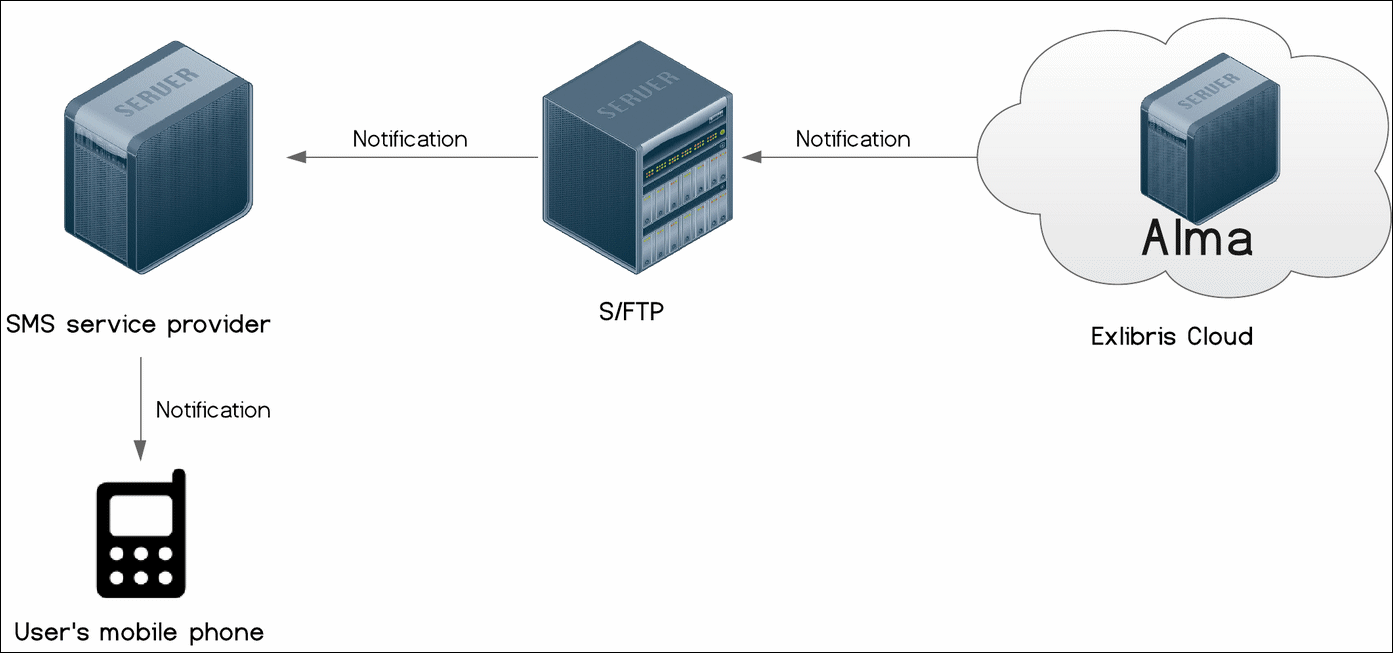
La comunicación por SMS está habilitada para los siguientes tipos de notificaciones:
-
Automatic Loans Renew Notice (Sms Automatic Loans Renew Notice)
-
Cancel Request Letter (Sms Cancel Request)
-
Courtesy Letter (Sms Courtesy Notice)
-
Delivery Registration Status Letter (SMS Delivery Registration Status Letter)
-
Ful Fines/Fees Notification Letter (SMS Fines\Fees Notification Letter)
-
Ful Lost Loan Letter (Sms Lost Loan Letter)
-
Ful Lost Loan Notification Letter (Sms Lost Loan Notification Letter)
-
Ful Overdue And Lost Loan Letter (Sms Overdue And Lost Loan Letter)
-
Ful Overdue And Lost Loan Notification Letter (Sms Overdue And Lost Loan Notification Letter)
-
Ful User Borrowing Activity Letter (Sms User Borrowing Activity)
-
Hold Shelf Expiry Date Update Letter (Sms Hold Shelf Expiry Update Letter)
-
Item Change Due Date Letter (Sms Change Due Date)
-
On Hold Shelf Letter (Sms On Hold Shelf Letter)
-
Overdue Notice Letter (Sms Due Items)
-
Shortened Due Date Letter (Sms Shortened Due Date)
Los mensajes SMS se envían a los usuarios solo si se indican los números SMS preferidos. For more information about the letters, see Configuring Alma Letters.
Para configurar la comunicación por SMS con los usuarios, se deben realizar las siguientes acciones:
- Configure an S/FTP connection to be used by Alma and the SMS service provider (see Configuring S/FTP Connections).The SMS service provider is chosen by the institution; dealing with issues or questions associated with them should first go through their IT departments. It is also recommended that you test your S/FTP connection by selecting Test FTP. Se deben recibir mensajes indicando que la carga, descarga y borrado a través del FTP se ha realizado correctamente. Si no se han recibido dichos mensajes, se deben resolver los problemas con la conexión S/FTP antes de continuar.
- Configurar un tipo de perfil de integración SMS (véase a continuación).
- Se debe asegurar de que el canal de notificación por SMS esté activado (véase a continuación).
- Define the format of the notification (see https://developers.exlibrisgroup.com/alma/integrations/sms).
- On the Integration Profile List page (Configuration Menu > General > External Systems > Integration Profiles), select Add Integration Profile. Se abre la primera página del asistente del perfil de integración.
- Se han de realizar las siguientes acciones en esta página:
- From the Integration type drop-down list, select SMS Communication.
- From the S/FTP connection type drop-down list, select the name of the FTP connection that you previously defined.
- De forma opcional, se puede introducir una descripción de la integración que se está configurando.
The name and code are defined for you by the system (both as SMS). - Select Next. Aparece la segunda página del asistente.
- In the Export section:
- Seleccionar si se desea que el perfil esté activo. Téngase en cuenta que solo se pueden ejecutar los perfiles activos.
- In the Sub-directory field, enter a subdirectory of the path specified when creating the S/FTP connection. For example, if you specified Alma in the Sub-directory field during S/FTP connection configuration and you enter SMS in this Sub-directory field, the invoices are exported to the Alma/SMS directory.
- Select Save. El perfil que se configuró aparece en la Lista de perfiles de integración.
On the Letter Configuration table (Configuration Menu > General > Letters > Letters Configuration), ensure that the desired letter with the SMS channel is enabled.

If it is not enabled, select the Customize button, select the slider so that it becomes blue, and then select Save.
Page tags: article:topicproduct:almacontent:Documentationlang:englishSMS communicationsSMS notifications
