
Mapeo de clasificaciones a existencias
- Administrador de catalogación
- Administrador general del sistema
For a video on the call number mapping table, watch Call Number Mapping.
La tabla de Mapeo de Clasificaciones permite personalizar la manera en la cual la información de Clasificaciones es mapeada desde los registros bibliográficos a los registros de existencias. En esta tabla de mapeo se utilizan los siguientes métodos:
- Guardar un nuevo registro de existencias en el Editor MD. Téngase en cuenta que las clasificaciones no son mapeadas para modificar registros de existencias, excepto que se utilice alguno de los otros métodos.
- Running the Update from Bibliographic tool for a new or modified holdings record from the Record Actions menu in the MD Editor.In order to use the Update from Bibliographic feature, the Normalize on Save normalization process (Configuration > Resources > Metadata configuration > MARC21 Holding > Normalization processes) needs to be enabled, and have the "852 field normalization" task first in the list.
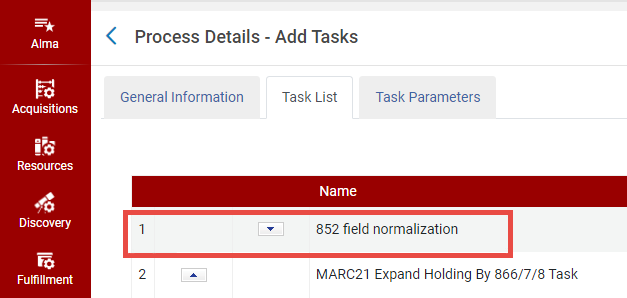
Normalización del campo 852
- Ejecutar tarea de importación de perfil.
- Change Holding Information job (see Manual Jobs and Their Relevant Parameters)
Alma uses the first matching row in the mapping table to map the call number for each record. To determine the matching row, Alma compares each record with each enabled mapping row (starting at the top of the table) and stops checking when a mapping row matches all of the following conditions:
- The first indicator of the 852 field in the holdings record matches the indicator specified in the 852 Ist Ind column of the mapping table.
- If the first indicator of the 852 field in the holdings record is a 7, the value specified in the 852 Subfield 2 column must also match the corresponding value in the holdings record.
- The MARC tag specified in the Bib Field to Copy column of the mapping record exists in the bibliographic record.
If a matching row is found, the fields and subfields specified in the Bib Field Copy and Bib Subfields to Copy columns are copied from the bibliographic record to the 852 subfields specified in the 852 Subfield Destinations columns. En caso de que no se cumplan todas las condiciones, el sistema continúa en la siguiente fila dentro de la tabla de mapeos.
De forma predeterminada, la tabla de mapeos utiliza las siguientes reglas para mapear la información:
- For the 0 indicator, replaces the h and i subfields with the content of the bibliographic record's 090 a and b subfields (respectively). Si no hay ningún campo 090 en el registro bibliográfico, se utilizan en su lugar los subcampos a y b del campo 050.
- For the 1 indicator, replaces the h and i subfields with the content of the bibliographic record's 082 a and b subfields (respectively).
- For the 2 indicator, replaces the h and i subfields with the content of the bibliographic record's 060 a and b subfields (respectively).
- For the 3 indicator, adds the h and i subfields with the content of the bibliographic record's 086 a and b subfields (respectively). Si los subcampos h e i ya se encuentran completados, sus valores permanecen como estaban y no son reemplazados.
- For the 8 indicator, adds the h subfield with a concatenation of the bibliographic record's 084 a subfield values. (If the h subfield is already populated, its value is left as is.) Also replaces the i subfield with a concatenation of the 084 b subfield values.
Adding a Call Number Mapping
- On the Call Number Mapping page (Configuration Menu > Resources > General > Call Number Mapping), enter the following fields:
- 852 1st Indicator – Enter the value of the first indicator to be matched in the holdings record. Introducir el símbolo # para indicar que se desea colocar un espacio para el primer indicador. Este es un campo obligatorio.
- Bib Field To Copy – Enter the 5-digit field from which to map the call number from the bibliographic record to the holdings record. To specify wildcards, use a question mark (for example,963??). Este es un campo obligatorio.
- Bib Subfields To Copy – Specify which subfields are to be copied from the field specified in the Bib Field to Copy field to the holdings record. Múltiples subcampos deben ser separados por una coma sin espacios. Este es un campo obligatorio.
- 852 Subfield Destinations – Enter the 852 subfields to which the call number is mapped in the holdings record. Múltiples subcampos deben ser separados por una coma sin espacios. Este es un campo obligatorio.
- Description – Enter an optional description for the rule.

Introducir un Mapeo de Clasificaciones - Select Add to add a new mapping row.
- Seleccionar las flechas hacia arriba y hacia abajo en la nueva fila de mapeo para cambiar el orden en el cual la regla es verificada.
- Select Save.
Desactivar un Mapeo de Clasificación
- Utilizar la columna Activada para desactivar un mapeo de clasificación existente.
- Select Save.
Eliminar un Mapeo de Clasificación
- Select the Delete row action to remove a rule that is no longer needed.
- Select Save.
