
Visiting Patrons in an InnReach Network
Questa pagina descrive come gestire i clienti in visita per InnReach. For links to all the main fulfillment documentation pages see Fulfillment.
The Visiting Patron functionality enables INN-Reach and Alma patrons to borrow in person without the extra steps of requesting a book through the central catalog and waiting for the lending site to page and ship the request. This functionality requires initial configuration as described in the InnReach API Implementation Guide. See also Fulfillment Networks in Alma.
Workflow Description
- L'utente ha un account presso la biblioteca A, che fa parte di una rete INN-Reach.
- L'utente può entrare nella biblioteca B, scegliere un libro e prenderlo in prestito utilizzando l'account della biblioteca A.
- Quando l'utente comunica all'addetto al banco di circolazione che appartiene alla biblioteca A:
- L'amministratore sceglie la biblioteca A da un elenco a discesa di siti.
- The administrator then scans patron's barcode, and the library A site verifies that this patron is a valid patron with no blocks on checking out material
- Il prestito è negato se l'utente è bloccato presso la biblioteca home o se le regole di prestito INN-Reach che disciplinano il tipo di materiale e il tipo di utente non consentono il prestito
- When the administrator scans the book's barcode, a check is done if the item can be loaned
- Se sì, la richiesta viene registrata in INN-Reach tramite una chiamata API
- Sia la biblioteca A che la biblioteca B hanno un processo in corso che scarica richieste da Inn-Reach. Entrambi scriveranno una richiesta di prestito/riconsegna corrispondente
- L'utente può restituire la copia al sito proprietario o al proprio sito.
Working with Visiting Patrons
To access the Managing Patron Services page, you need to select the relevant patron as described in Selecting a Patron. The Find user in other institution checkbox and the patron's home institution must be selected. The list of institutions is updated by using the Generate List of Agencies button (see InnReach API Implementation Guide).

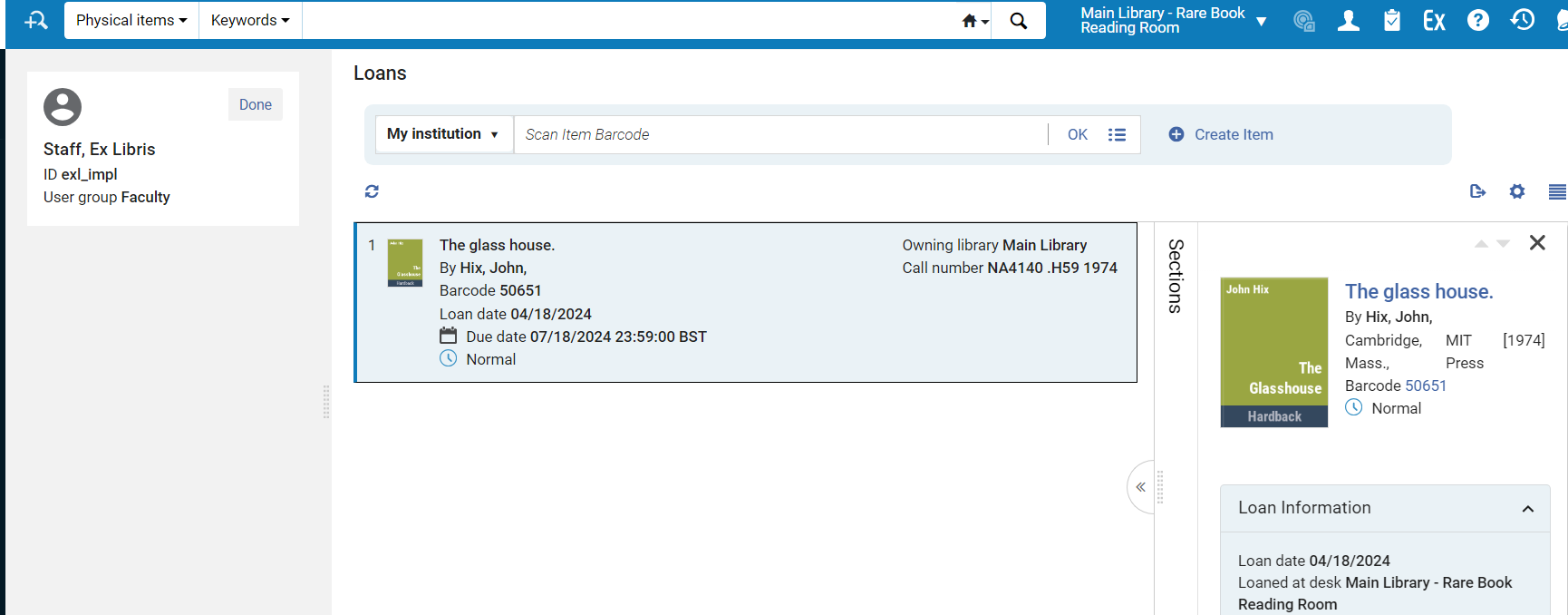 The Managing Patron Services page for InnReach is a limited version of the Loan tab of the regular Patron Services page (see Managing Patron Services at a Circulation Desk). It includes the full information for the item and the basic user information.
Sono inclusi i seguenti campi:
- ID utente
- Nome utente
- Gruppo utenti
- Titolo, autore, barcode
- Data del prestito, data di scadenza, stato
- Biblioteca proprietaria, numero di collocazione, policy di copia
- Richieste
I seguenti campi non sono inclusi:
- Note
- Badge di ritardo/multe
- ID prestito
