
Browsing Bibliographic Headings
Panoramica e istruzioni per la navigazione delle intestazioni bibliografiche
- Catalogatore
- Gestore catalogo
- Amministratore catalogo
To generally browse Bibliographic Headings:
- Tutti gli Utenti possono consultare le intestazioni bibliografiche, ma non possono modificarle.
Alma consente di sfogliare le intestazioni bibliografiche per supportare i vari moduli di catalogazione del flusso. È possibile sfogliare per nome autore, soggetto, serie e titolo.
For cases when a person appears both as a creator and as a subject (i.e., 'Agatha Christie' might be both the subject and an author), you can select between the below options of mapping the MARC 21 600, 610, 611 and 647 fields: To enable this option in your institutions, go to Configuration Menu > Resources > Cataloging > MARC21 / KORMARC and browse Bib Headings Names / Subjects. For more information, see Configuring Browsing Bib Headings Names / Subjects.
- Names — When browsing bibliographic headings using this option, the 6XX fields appear under Names.
- Subjects — When browsing bibliographic headings using this option, the 6XX fields are not found.
- Names (without MARC21 600/610/611/647) — When browsing using this option, the 6XX fields are not found. Questa opzione troverà comunque i record con intestazioni da un campo 6XX e un altro campo rilevante.
- Subjects (with MARC21 600/610/611/647) — When browsing using this option, the 6XX fields appear under Subjects. Le intestazioni dei nomi che appaiono sono quelle che compaiono quando si naviga con il tipo di intestazione "Nomi". They belong to the vocabulary determined by the customer parameter set by Ex Libris for authority names.
The Names (without MARC21 600/610/611/647) and Subjects (with MARC21 600/610/611/647) options are available only in the new Metadata Editor. For details about the new MDE, see Usability Improvements.
Esplorazione delle Intestazioni Bibliografiche
When utilizing Browsing Bibliographic Headings and Browse Authority Headings, the previously selected options from the drop-down menu are retained. Alma upholds the selected "Heading Type", along with the selected "Source Code" and "Vocabulary" for each respective type.
All users can Browse Bibliographic Headings and view the headings and the records but only authorized users with Cataloging roles can edit. Si noti che alcune delle funzionalità descritte di seguito non sono disponibili per l'utente senza un ruolo autorizzato.
- Aprire le opzioni di navigazione delle intestazioni bibliografiche nell'Editor MD utilizzando uno dei seguenti metodi:
- Select Browse Bibliographic Headings (Resources > Cataloging > Browse Bibliographic Headings). La pagina dell'Editor MD appare con le opzioni di navigazione delle intestazioni bibliografiche.
- Open the MD Editor (Resources > Cataloging > Open Metadata Editor), and select Browse Bibliographic Headings in the Search & Browse menu.
- Per un'istituzione membro in una Network Zone, selezioni dove desidera navigare utilizzando il parametro Sfoglia in. Le opzioni sono di sfogliare il Titolo a livello di istituzione (istituzione) o a livello di Network (Network). When selecting Institution, the linking information appears for Institution. Se i record sono collegati nella Zona Network, il collegamento viene visualizzato solo nei risultati della Lista Network. The records cached from the network are displayed without linkage information (
 ); names are browsed under the first authority name defined for the institution.
- Selezioni il tipo di intestazioni da sfogliare tra le opzioni sottostanti.
Quando si seleziona un'opzione di tipo di intestazione diversa da quella default (Nomi), la pagina si aggiorna per visualizzare le opzioni appropriate per il tipo di intestazione selezionato. Per una descrizione delle opzioni relative al tipo di intestazione, vedere la tabella sottostante.
Headings Type Options Tipo di intestazione Opzioni La tabella seguente è accompagnata da una tabella delle eccezioni. For more information, see Configurations That are Not Supported.Nomi
Family — If more than one active registry has been configured for your system, use this option to select the preferred registry (such as MARC 21, UNIMARC, or CNMARC) for browsing.
Source Code — Select one of the following options:
- Nome Ente
- Nome Convegno
- Nome personale
- Nome dell’evento
- Uniform Title — This option appears when browse_headings_use_uniform_title_in_names is set to true. See Configurazione di altre impostazioni (Gestione delle risorse) for more information. Si noti che è possibile consultare anche il Titolo uniforme selezionando il tipo di intestazione Titolo. See Title for more information.
Vocabulary —This options appears when there is more than one vocabulary defined for Names. Il vocabolario dei nomi che vengono cercati per Sfoglia intestazioni bibliografiche è determinato dal parametro impostato dal cliente da Ex Libris per i nomi delle autorità. Se viene specificato più di un vocabolario Nomi, la priorità del vocabolario che appare nella lista a discesa per questa opzione è determinata dall'ordine specificato nel parametro impostato da Ex Libris. Utilizzare questa opzione per selezionare il vocabolario che desiderate utilizzare per sfogliare le intestazioni bibliografiche. See Authority Priorities for more information.
Search Value — Enter a names value for which you want to search.
MARC 21
Il tipo di intestazione Nomi utilizza il seguente indice campo/sottocampo MARC 21:
- Nome Ente
- 110 a-d, g, n
- 610 tutti i sottocampi tranne 0-9, e, E
- 710 a-d, g, n
- Nome Convegno
- 111 a-e, g, n
- 611 tutti i sottocampi tranne il sottocampo numerico
- 711 a-e, g, n
- Nome personale
- 100 a-d
- 600 tutti i sottocampi tranne 0-9, e, E
- 700 a.C.-d.C.
Titolo uniforme - si noti che i seguenti campi/sottocampi sono esplorabili con Nomi e Titolo uniforme selezionati quando il parametro cliente browse_headings_use_uniform_title_in_names è impostato su true. See Configurazione di altre impostazioni (Gestione delle risorse) for more information.
- 130
- 210 a
- 222 a
- 240 a-g, k-s (Note that the 240 field needs to be configured as an access point as described in Working with the 240 Field and Uniform Title Bibliographic Headings.)
- 242 a, b, n, p
- 245
- 246 a-g, n, p
- 247 a-g, n, p
- 249 c, v (concatenati con il 245 nel seguente modo quando visualizzati: 245 dati; 249 $a / 249 $v :
- 505 tonnellate
- 630 tutti i sottocampi tranne 0-9, e, E
- 710 m
- 711 n-p, s, t
- 730
UNIMARC
Il tipo di intestazione Nomi utilizza i seguenti Indici campo/Sottocampo UNIMARC:
- Nome Ente
- 601 primo indicatore (di campo) = 0 tutto
- 710 first indicator=0 all
- 711 first indicator=0 all
- 712 first indicator=0 all
- 713 first indicator=0 all
- Nome Convegno
- 601 primo indicatore (di campo)=1 tutto
- 710 first indicator=1 all
- 711 first indicator=1 all
- 712 first indicator=1 all
- 713 first indicator=1 all
- Nome personale
- 700 all
- 701 all
- 702 all
- 703 all
- Titolo uniforme
- 500 a,c,d,h
- 501 a
- 506 tutto
- 730 tutto
- 740 all
- 741 all
- 742 all
- Cognome
- 602 all
- 720 all
- 721 all
- 722 all
- 723 all
- Marchio
- 716 all
Names (without MARC21 600/ 610/ 611 /647) Come sopra. MARC 21
As above, but the MARC 21 indexed fields 600, 610, 611, 647 are not included when browsing this heading type.
UNIMARC
N/D.
Serie Family — If more than one active registry has been configured for your system, use this option to select the preferred registry (such as MARC 21, UNIMARC, or CNMARC) for browsing.
Source Code — Select one of the following options:
- Nome Ente
- Nome Convegno
- Nome personale
- Nome dell’evento
- Titolo uniforme
Search Value — Enter a value for which you want to search.
MARC 21
Il tipo di intestazione della serie utilizza il seguente indice campo/sottocampo MARC 21:
- Nome Ente
- 810 tutti i sottocampi tranne il sottocampo numerico
- Nome Convegno
- 811 tutti i Sottocampi tranne quelli numerici
- Nome personale
- 800 tutti i sottocampi tranne il sottocampo numerico
- Titolo uniforme
- 440 a-z, 0-9
- 490 a, l (minuscola "L"), v
- 830 tutti i sottocampi tranne il sottocampo numerico
UNIMARC
Il tipo di intestazione della serie utilizza il seguente indice campo/sottocampo UNIMARC:
- 225 a,c,d,e,h,i
- Titolo uniforme
- 410 a,c,d,e,h,i
- 411 a,h,i
Oggetti Vocabulary — Select one of the vocabularies from the available options in the drop-down list such as Library of Congress Subject Headings or U.S. National Library of Medicine, Medical Subject Headings. Le opzioni per il vocabolario definito localmente variano a seconda del vocabolario locale che avete configurato nel vostro sistema. Per i record bibliografici MARC 21 che contengono il campo 651 con un secondo indicatore di campo pari a 0 (e soggetto è selezionato per il tipo di intestazione), è necessario sfogliare le intestazioni bibliografiche utilizzando l'opzione del vocabolario record di autorità della Biblioteca del Congresso per 651, oltre all'opzione del vocabolario Intestazioni di soggetto della Biblioteca del Congresso, per visualizzare l'intera gamma di intestazioni utilizzate nella vostra istituzione.Source Code — Select one of the following options:
- Termine cronologico
- Genere/Forma
- Geographic Name (see 751 Field for more information)
- Mezzo della rappresentazione
- Termine topico
- Uncontrolled Subject Terms - only for UNIMARC format. Per attivare, contattare l'assistenza clienti.
Search Value — Enter a value for which you want to search.
MARC 21 Il tipo di intestazione soggetto utilizza i seguenti campi/sottocampi MARC 21:
- Termine cronologico
- 648 tutti i sottocampi tranne il sottocampo numerico
- Genere/forma termine
- 655 tutti i sottocampi tranne il sottocampo numerico
- 689 tutti i sottocampi tranne 0-9, A, D (quando A=f)
- 689 tutti i sottocampi tranne 0-9, A, D ed e (quando D=b)
- Nome geografico
- 651 tutti i sottocampi tranne 0-9, e, E
- 751 tutti i sottocampi tranne 0-9, e, E
- 752 tutti i sottocampi tranne il sottocampo numerico
- Mezzo della rappresentazione
- 382 a, b, c, d, e, f, g, h
- Identificazione tassonomica
- 754 all subfields except for numeric subfields
- Termine topico
- 650 tutti i sottocampi tranne 0-9, e, E
- 654 tutti i sottocampi tranne 0-9, e, E
- 689 tutti i sottocampi tranne 0-9, A, D (quando A=f)
- 689 tutti i sottocampi tranne 0-9, A, D ed e (quando D=b)
UNIMARC Il tipo di intestazione soggetto utilizza i seguenti campi/sottocampi UNIMARC:
- Genere/forma termine
- 608 tutto
- 616 tutto
- Nome geografico
- 607 a-d,f-z
- 617 a-d,f-z
- Termine topico
- 606 a-d,f-z
- Nome personale
- 600 tutti
- Nome Ente
- 601 primo indicatore (di campo) = 0 tutto
- Nome del convegno
- 601 primo indicatore (di campo)=1 tutto
- Cognome
- Nome/Titolo
- 604 tutti
- Titolo uniforme
- 605 tutto
- Luogo di pubblicazione
- 620 a-d, f-z
- 621 a-d, f-z
- Termini di Soggetto non controllati
- 610 primo Indicatore (di campo)=0 a-d,f-z
- 610 primo Indicatore (di campo)=1 a-d,f-z
Subjects (with MARC21 600 / 610/ 611/647) As above, but the Source Code contains these options as well:
- Nome Ente
- Nome Convegno
- Nome personale
- Uniform Title — This option appears when browse_headings_use_uniform_title_in_names is set to true. See Configurazione di altre impostazioni (Gestione delle risorse) for more information. Si noti che è possibile consultare anche il Titolo uniforme selezionando il tipo di intestazione Titolo. See Title for more information.
MARC 21
As above, but the Names headings type uses the following MARC 21 indexed fields/subfields:
Nome Ente- 610 tutti i sottocampi tranne 0-9, e, E
- 611 tutti i sottocampi tranne il sottocampo numerico
- 600 tutti i sottocampi tranne 0-9, e, E
UNIMARC
N/D.
Title Search Value — Enter a value for which you want to search.
For uniform titles, see Configurazione di altre impostazioni (Gestione delle risorse) for more information.
MARC 21 Il tipo di intestazione Titolo utilizza l'Indice campo/Sottocampo MARC 21 elencato di seguito. Si noti che i seguenti campi/sottocampi sono esplorabili con Titolo selezionato quando il parametro cliente browse_headings_use_uniform_title_in_names è impostato su false. See Configurazione di altre impostazioni (Gestione delle risorse) for more information.
- 130 (Titolo uniforme)
- 210 a
- 222 a
- 240 a-g, k-s (Note that the 240 field needs to be configured as an access point as described in Working with the 240 Field and Uniform Title Bibliographic Headings.)
- 242 a, b, n, p
- 245
- 246 a-g, n, p
- 247 a-g, n, p
- 249 a, b (concatenati con il 245 nel modo seguente quando visualizzati: 245 dati; 249 $a / 249 $v :
- 505 tonnellate
- 630 (Titolo uniforme)
- 700 m-p, r-t
- 710 m-t
- 711 n-p, s, t
- 730 (Titolo uniforme)
UNIMARC / CNMARC The Title headings type uses the following UNIMARC and CNMARC indexed fields/subfields:
- 200 a,c,d,e,h,i
Collocazione/classificazione Family — If more than one active registry has been configured for your system, use this option to select the preferred registry (such as MARC 21, UNIMARC, or CNMARC) for browsing. Source Code — Select one of the following options for MARC 21 or UNIMARC:
- Collocazione Library of Congress
- Collocazione della National Library of Medicine
- Collocazione della National Agricultural Library
- Numero collocazione 09X (dieci diverse opzioni)
- Classificazione geografica
- Numeri di classificazione assegnati in Canada
- Numero di classificazione decimale universale
- Numero di classificazione decimale Dewey
- Numero aggiuntivo di classificazione decimale Dewey
- Altro numero di classificazione
- Componenti del numero di classificazione sintetizzati
- Numero di classificazione documento governativo
Source Code — Select one of the following options for CNMARC:
- Collocazione per classificazioni libro cinese
Per questa opzione è implementato uno speciale ordinamento ASCII affinché determinati segni di punteggiatura siano prioritizzati rispetto alle cifre.
- Classificazione biblioteca cinese
- Classificazione della biblioteca dell'Accademia cinese delle Scienze
- Altro numero di classificazione cinese
Vocabulary — When Other Classification Number is selected for the Source Code, enter the vocabulary code for the headings that you want to browse. Il sistema cerca un codice vocabolario corrispondente nel campo 084 $2.
Search Value — Enter a call number or classification value for which you want to search.
MARC 21 Il tipo di intestazione numero di collocazione/Classificazioni utilizza il seguente indice di campo/sottocampo MARC 21:
- 050 a, b
- 052 a, b, d
- 055 a, b, d
- 060 a, b
- 070 a, b
- 080 a, b, x
- 082 a, b, m, q
- 083 a, c, m, q, y, z
- 084 a, b, q
- 085 a, b, c, f, r, s, t, u, v, w, y, z
- 086 a, z
- 090 a-z, 0, 1, 3, 4, 5, 7, 9
- 091 a-z, 0, 1, 3, 4, 5, 7, 9
- 092 a-z, 0, 1, 3, 4, 5, 7, 9
- 093 a-z, 0, 1, 3, 4, 5, 7, 9
- 094 a-z, 0, 1, 3, 4, 5, 7, 9
- 095 a-z, 0, 1, 3, 4, 5, 7, 9
- 096 a-z, 0, 1, 3, 4, 5, 7, 9
- 097 a-z, 0, 1, 3, 4, 5, 7, 9
- 098 a-z, 0, 1, 3, 4, 5, 7, 9
- 099 a-z, 0, 1, 3, 4, 5, 7, 9
UNIMARC The Call Number/Classifications headings type uses the following UNIMARC indexed fields/subfields:
- Numero di classificazione decimale universale
- 675 a
- Numero di classificazione della Biblioteca del Congresso
- 680 a
- Numero di classificazione decimale Dewey
- 676 a
- Altro numero di classificazione
- 680 a.C.
CNMARC Il tipo di intestazione numero di collocazione/Classificazioni utilizza il seguente indice di campo/sottocampo CNMARC:
- Collocazione per classificazioni libro cinese
- 090 a, b
- 905 f
- 905 secondi
- Classificazione biblioteca cinese
- 690 a
- Classificazione della biblioteca dell'Accademia cinese delle Scienze
- 692 a
- Altro numero di classificazione cinese
- 694 a
- 696 a
- Nomi (l'opzione default)
- Serie
- Soggetto
- titolo
- Collocazione/classificazione
- Completi le opzioni di navigazione per l'azione che desidera eseguire.
- Selezionare Naviga. I risultati compaiono nelle seguenti colonne:
- Column 1 — An icon to indicate whether the bibliographic subject heading is connected to an authority record.
- Column 2 — The number of bibliographic record headings found for a particular subject, name, series, or title headings row. If there are more than 20 headings found for a particular row, this column displays 20+.
- Column 3 — The bibliographic record headings subject, name, series, or title found.
- Column 4 — A View button for viewing the complete bibliographic record.
For various issues related to display of the browsing results, see the sections below. - Use the less than/greater than symbols (< >) to browse the list backward and forward. Man mano che si scorre avanti e indietro tra le pagine, la prima riga della pagina visualizzata appare come l'ultima riga della pagina precedente.
- Quando avrà individuato un record di intestazione che desidera visualizzare più in dettaglio, selezioni Visualizza per quella riga. For bibliographic headings records identified with the authority
 icon, the detail in the split-screen view displays both an Authority tab and a Bibliographic Records tab:
- La Autorità tab presenta il record di autorità associato al record delle intestazioni bibliografiche.
- La tab Record bibliografici mostra il numero totale di record bibliografici trovati tra parentesi. Dalla scheda Record bibliografici tab, è possibile visualizzare e/o modificare i risultati. While viewing the bibliographic records, when there is more than one page, you can page forward and backward through the bibliographic records using the list page number or Greater Than </Less Than > symbols. Alternatively, you can select Open in Repository Search to view the results in the repository.
Relevant Results
The relevant result, based on the browse criteria that you entered, appears in the second row of the results. In questo modo, la lista dei risultati ti mostra cosa viene prima e dopo il risultato rilevante:
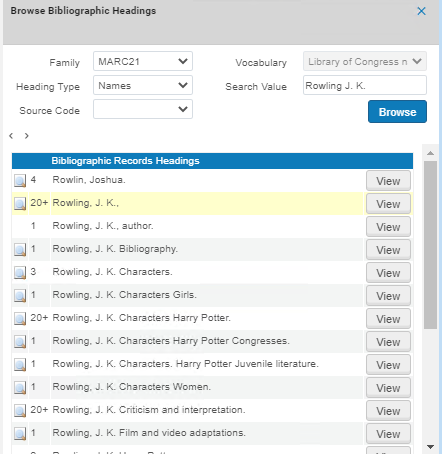
Sottocampo ordinamento ordine
I risultati nella colonna Intestazioni del record bibliografico sono ordinati nel Sottocampo Ordine. For example,650 0 $a Gardening $z England $v Bibliography appears as Gardening England Bibliography:

Risultati di navigazione non in inglese
Browsing CJK Results
Per l'indirizzo CJK (cinese, giapponese e coreano) e altri requisiti per l'ordinamento dei risultati della lista di navigazione, il testo non archiviabile viene rimosso secondo tutte le opzioni possibili, come l'indicatore del record bibliografico e i caratteri speciali non archiviabili. See Using Non-Filing Markers and Using Non-Filing Indicators in KORMARC for more information.
Quando si naviga nei contenuti CJK, tutti i segni di punteggiatura tra i caratteri CJK vengono ignorati durante l'ordinamento dei risultati. Note that with this capability the punctuation marks continue to appear in the display of CJK content. For Hong Kong institutions, Alma also handles TSVCC variants when browsing bibliographic headings (see Hong Kong TSVCC for more information).
Per tutte le istituzioni, l'ordinamento del contenuto Hanzi per la consultazione delle intestazioni bibliografiche (e delle intestazioni di autorità quando si utilizza F3 nell'Editor MD) verrà effettuato traslitterando il contenuto Hanzi in latino per l'ordinamento primario e, quando necessario, utilizzando il contenuto Hanzi ordinato per il livello di ordinamento secondario. Pertanto, quando ci sono più voci latine identiche, l'Ordinamento Hanzi determinerà l'ordine di consultazione dei record che hanno la stessa voce latina.
Per i contenuti giapponesi e coreani, le intestazioni bibliografiche e di autorità verranno gestite utilizzando un Ordinamento CJK per tutte le istituzioni.
Per ulteriori informazioni, vedere:
- Chinese and Korean Characters
- Japanese Characters
- CKJ Punctuation
- Hong Kong TSVCC
Browsing Other Language Results
For institutions that have other language settings (German, Spanish, Polish, Icelandic, Lithuanian), the special language characters are handled in the same manner for browsing bibliographic headings as they are for searching in the Alma repository. Per ulteriori informazioni, vedere:
- German Characters
- Spanish and Catalan Characters
- Polish Characters
- Icelandic Characters
- Lithuanian Characters
Configuring Browsing Bib Headings Names / Subjects
You configure the heading types on the MARC21 / KORMARC - Browse Bib Headings Names / Subjects code table (Configuration > Resources > Cataloging > MARC21 / KORMARC - Browse Bib Headings Names / Subjects). For more information about code tables, see Code Tables.
For Primo VE: if you want to enable update_names_without and update_subjects_with, contact Ex Libris support, as configuration changes are needed.
You can choose to have all four options available, or only part of them.
Può modificare i nomi default e i nomi delle lingue configurati per la Sua istituzione.

Configuring Browse Bibliographic Headings and Selection Display
Ex Libris supports the ability to configure the display and sorting values for bibliographic headings, so that each institution can define its own mapping, based on the pre-defined mapping provided by Ex Libris out-of-the-box. This helps librarians that are browsing through bibliographic headings to see the information they find relevant for their institution.
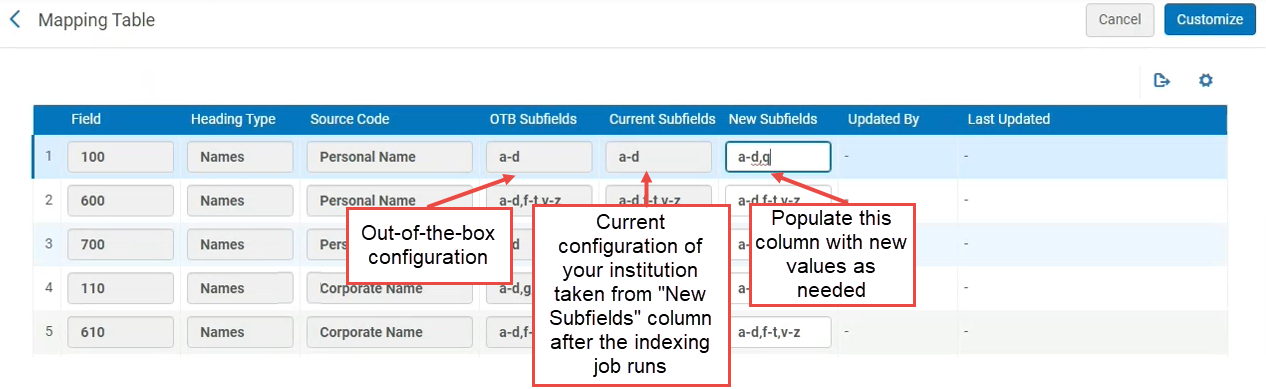
For example, out-of-the-box, the heading type "Names", source code "Personal Name" is mapped to MARC21 field 100 $$a-d. Now institutions can modify that mapping to other subfields, for example to field 100 $$a-d,q.
Attualmente, questa funzionalità esiste solo per MARC21. Sarà rilasciato per il profilo UNIMARC/CNMARC nelle prossime versioni.
To support this ability, a new configuration table Bibliographic Headings Display Subfield Mapping was added to the configuration of the bibliographic profiles. This table shows the out-of-the-box values and the mapping that is currently implemented for the institution, and enables the institution to define a new mapping of subfields.
Configurazione delle intestazioni bibliografiche di navigazione e della visualizzazione della selezione
This configuration takes effect only after the indexing job builds the headings.
- Open the Metadata Configuration table (Configuration Menu > Resources > Cataloging > Metadata Configuration).
- Selezionare il link del profilo per il profilo bibliografico desiderato.
- On the Profile Details page, open the Other Settings tab.
- In the Configuration Tables, select the Bibliographic Headings Display Subfield Mapping link.
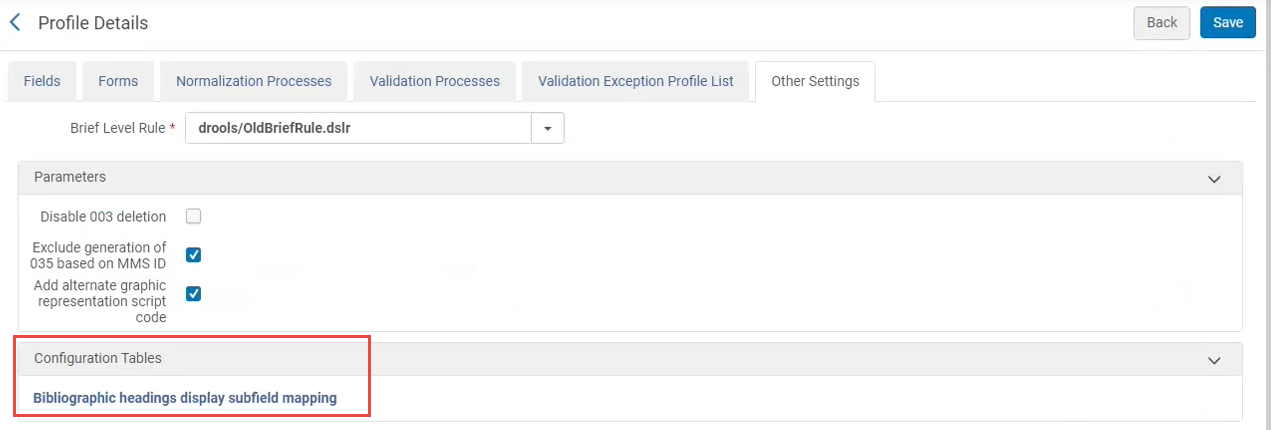
- Si apre la tavola di mappatura. It displays out-of-the-box values and the mapping that is currently implemented by the institution. To modify the mapping, enter a list of subfields separated by a comma or by a dash (from-to) in the New Subfields column.Note: In rows where the mapping was not modified, all three columns display the out-of-the-box values.
Configurations That are Not Supported
Le seguenti configurazioni di sottocampo MARC21 non sono attualmente supportate. Even if these fields are configured, they will not appear in F3 in the heading from the bibliographic records tab.
| Campo | Sottocampi |
|---|---|
| 100 | e |
| 110 | e |
| 111 | j |
| 385 | m |
| 386 | m |
| 600 | e |
| 610 | e |
| 611 | j |
| 630 | e |
| 650 | e |
| 651 | e |
| 654 | e |
| 689 | e, A, B, C |
| 700 | e |
| 7XX | i |
| 710 | e |
| 711 | j |
| 720 | e |
| 751 | e |
| 800 | contro |
| 810 | contro |
| 811 | v, j |
| 830 | v, x, y, z |
Configurazione delle intestazioni bibliografiche e della visualizzazione della selezione in una Network Zone
The Network Zone central office can define and share the configuration table with all Network Zone members via the Manage Table in Network option (see Centrally Managing Configurations in a Network Zone).
When member institutions view the bibliographic headings in the Network Zone, the headings are according to the setup in the Network Zone.
Page tags: article:topicbrowseproduct:almacontent:DocumentationBrowse Bibliographic HeadingsBibliographic Headings Browselang:english
