
Strumento di Analisi Sovrapposizione e Raccolta Migliorato
To work with the Overlap and Collection Analysis tool, you must have one of the following roles:
- Operatore Acquisti
- Gestore Acquisti
- Gestore dell’archivio
- Operatore inventario elettronico
Overlap and Collection Analysis Tool - Summary of Enhancements
An enhanced version of the Overlap and Collection Analysis tool was included in the Alma Feb 2023 release, although it is not currently the default version. The following enhancements were implemented in the new version:
- Support for a Community Zone or Network Zone electronic collection as a source, in addition to Institution Zone electronic collections, which were already supported.
- Ability to compare in a single click all Institution Zone holdings with those of a specific electronic collection in the Institution Zone (to determine content overlap for possible cancellations) or with those of a specific electronic collection in the Community Zone (to determine content-overlap for possible new purchases) or with those of a specific electronic collection in the Network Zone.
- Ability to select a Network Zone electronic collection as a target.
- New summary report in which you can view an overview of the data at a glimpse (various reports overlap percentage)
Working with the Network Zone is enabled for consortia members only.
For a description of the previous (pre-enhancement) functionality of this tool, which is still the default tool in Alma, see Working with Overlap and Collection Analysis.
The enhanced Overlap and Collection Analysis tool is disabled by default. Contact Ex Libris staff to activate it in your institution.
Enhanced Overlap Analysis Tool
The Enhanced Overlap and Collection Analysis tool can perform two different types of analyses of your electronic collections:
- Compare Electronic Collections- Compare an Alma electronic collection in the Institution Zone with the titles of one or more electronic collections in the Institution, Community, or Network Zone (if NZ is enabled), to find titles with overlapping coverage dates in these collections. Questo confronto abbina i record Alma a livello di Titolo, utilizzando identificativi come ISSN o ISBN, e confronta le informazioni sulla copertura a livello di portafoglio. See Performing Compare Electronic Collections Analysis below for more information.
- Look Up Titles - Compare a list of identifiers contained in an Excel spreadsheet with Alma records from various population scopes to generate overlap-analysis reports. See Performing Look Up Titles Analysis below for more information.
When you perform an overlap analysis (using either of these two methods), the analysis searches for matching electronic collections that have a service type of FullText or SelectedFullText.
Comparing Electronic Collections
You can compare the titles in an Alma electronic collection in the Institution Zone with the titles of one or more electronic collections in the Institution, Community or Network Zone (if NZ is enabled) to find titles with overlapping coverage dates in these collections. Questo confronto abbina i record Alma a livello di Titolo, utilizzando identificativi come ISSN o ISBN, e confronta le informazioni sulla copertura a livello di portafoglio.
The comparison generates a number of reports; see Compare Electronic Collections Reports below.
- Open the Overlap and Collection Analysis page (Resources > Advanced Tools > Overlap and Collection Analysis).
- Select New Analysis and then select Compare Collections. A page opens where you can see existing report templates on the left side, or create a new report template on the right side.
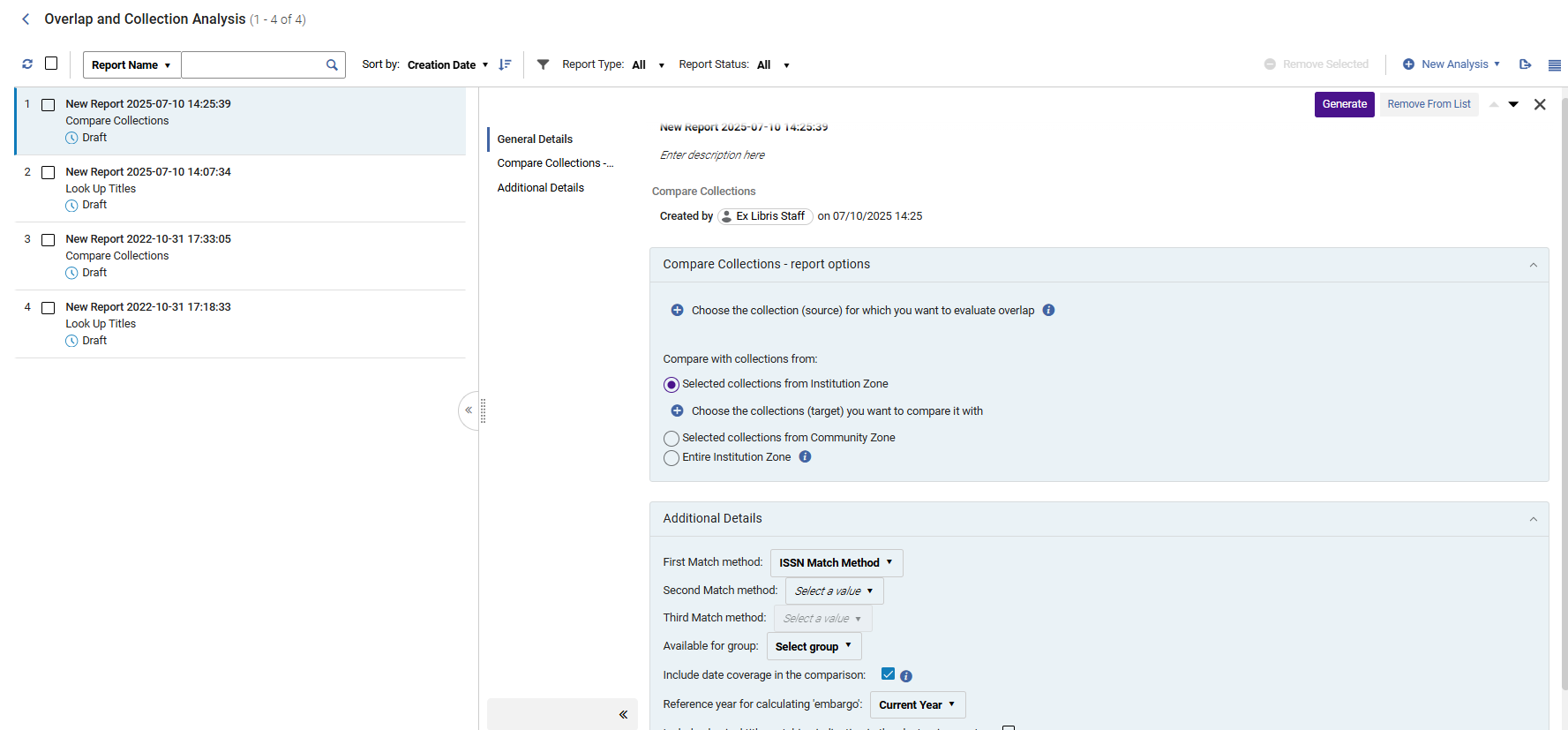
- Name your new report and provide a description. To do that, click inside the field and start typing. To exit, click anywhere outside of the fields.
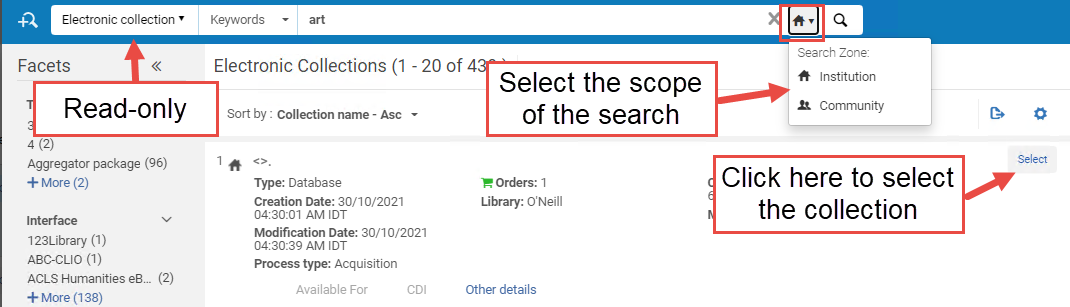
- Seleziona Scegli la raccolta per la quale desidera valutare la sovrapposizione. A sliding panel opens where you can search for your electronic collection within your Institution/ Community / Network Zone. To select it, click Select.Once selected, the search panel is closed automatically, and the selected electronic collection is added to the Overlap and Collection Analysis page.
- Sotto Confronta con la raccolta da, selezioni il tipo di raccolta target che desidera confrontare con la raccolta di origine:The selected source collection cannot be included in the target collections. If you select, as the target, the options Entire Institution Zone or Entire Network Zone, and the selected source is part of that target, the source collection itself is excluded from the target collection during the analysis.
Collezione target Descrizione Caso d'uso Collezioni selezionate dalla Institution Zone Selezionare la collezione elettronica dalla zona dell'Istituzione come collezione target per il confronto. This option helps you learn which parts of your electronic collection are already included in other electronic collections available in your IZ electronic inventory.
Collezioni selezionate dalla Network Zone
Disponibile solo per i consorzi membri dell'istituzione.
Select electronic collections from the Network Zone (NZ) as the target collections for comparison.
You can select only the NZ collections that are available to your institution.
Questa opzione La aiuta a:
- When considering whether to order (or cancel) a NZ electronic collection, to learn what portion of this collection is already covered in other electronic collections available in your IZ electronic inventory.
- When considering whether to order (or cancel) a NZ electronic collection, to compare it with a CZ candidate collection in order to learn which offers better value for its cost.
Collezioni selezionate dalla Community Zone Selezioni la collezione elettronica dalla Community Zone come collezione target per il confronto. Questa opzione La aiuta a:
- When considering whether to purchase (or cancel) a CZ electronic collection, to learn what portion of this collection is already covered in other electronic collections available in your IZ electronic inventory (coverage can be taken into consideration).
- To see what percentage of the titles in the source CZ collection(s) overlap with those in other CZ collection(s), in order to learn which collection offers better value for its cost.
Intera Institution Zone Select the entire Institution Zone as the target for comparison.
This includes all electronic collections available for your institution (both active and inactive). This means all local collections, as well as all activated CZ collections AND standalone portfolios.
For consortia member institutions only: When selected, the checkbox Include the electronic collections available for my institution in the Network Zone also appears. Select this option to also include in the target population all NZ collections available for your institution (either by explicit Available For group, or by not having any group settings set on the NZ collection).
Questa opzione La aiuta a:
- Compare specific collection(s) in the Institution Zone with the electronic holdings of the entire Institution Zone, in order to identify content overlap when considering cancelling some collections.
- Compare specific collection(s) in the Community Zone with the electronic holdings of the entire Institution Zone, in order to identify content overlap when considering new purchases or in order to avoid purchasing duplicate resources.
- Compare a limited number of active IZ collections with all the active IZ holdings, to identify overlap for resource cancellation scenarios, in order to learn what full-text access would be lost if a resource were cancelled.
- Compare a limited number of non-activated Community Zone collections with all the active IZ holdings, to identify overlap when considering whether to add a new resource, in order to learn whether the resource has sufficient unique full texts to justify acquiring it.
Intera Network Zone
Available for consortia member institutions only
Select the entire Network Zone as the target for comparison.
This includes both active and inactive resources.
Quando selezionato, appaiono anche le seguenti caselle di controllo:
- Include only the electronic collections available for my institution in the Network Zone
- Include only the electronic collections not available for my institution in the Network Zone
- Include all the electronic collections available in the Network Zone
When Multi-Campus Group Settings is enabled, the target population contains the collections available for your institution (either by explicit Available For group, or by not having any group settings set on the NZ collection).
Questa opzione La aiuta a:
- Compare specific collection(s) in the Institution Zone with the electronic holdings of the entire Network Zone electronic holdings in order to identify content overlap when considering cancelling some collections.
- Compare specific collection(s) in the Community Zone with the electronic holdings of the entire Network Zone in order to identify content overlap when considering new purchases or in order to avoid purchasing duplicate resources.
- Compare a limited number of active IZ collections with all the active NZ holdings available for your institution, to identify overlap for resource cancellation scenarios, in order to learn what full-text access would be lost if a resource were cancelled.
- Compare a limited number of non-activated Community Zone collections with all the active NZ holdings, to identify overlap when considering whether to add a new resource, in order to learn whether the resource has sufficient unique full texts to justify acquiring it.
- Seleziona Scegli la raccolta con cui desidera confrontarla. Si apre un pannello in cui è possibile cercare la Sua collezione elettronica nell'ambito selezionato sopra. To select a collection, select the Select checkbox and then click Done.Once selected, the search panel is closed automatically, and the selected electronic collection is added to the Overlap and Collection Analysis page.
- Select the match method:ISSN,ISBN,Title,LCCN, or 035.
- Selezioni un gruppo per confrontare solo i portafogli associati a questo gruppo o i portafogli che non sono associati ad alcun gruppo (che sono quindi disponibili per tutti i gruppi). If no group is selected, portfolios are compared regardless of the group they belong to.Questa opzione appare solo per le istituzioni definite come multi-campus. When an institution is defined as multi-campus, this feature is not activated by default. Contact Ex Libris Customer Support to enable it. The list of groups is taken from the Inventory Network Group code table.
- Verify that Include date coverage information in the comparison is selected, to enable analysis down to the level of the coverage.
- When selected, the Reference year for calculating embargo parameter is activated. Select the year for calculating the embargo from the dropdown list. This option allows you to perform the analysis and test the coverage overlap, pretending the current year is the year you selected in the dropdown ("Current year +1", "Current year +2", "Current year +3", etc.). For example, if the current year is 2021, but you would like to test what the Overlap Analysis would be two years from now (since some resources have embargoes that might affect their availability in two years), select Current year +2. The analysis will compare the coverage overlap, taking the embargo into account , as if the analysis took place in 2023.
- When finished setting the parameters, select Generate. Alma generates the report and displays the results in the Analysis Report section, with percentages for unique and overlapping content. This enables you to see at a glance which collections have high overlaps with others (and therefore could be cancelled), or have high levels of unique content (and therefore should be retained). Click
 to export the reports as Excel files.
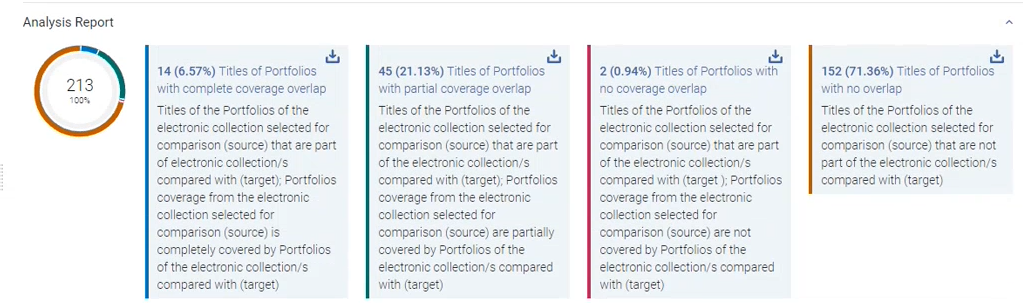 In addition, Alma places the report as the top-most report in the left section, where you can access it at a later time. For detailed information about the report, see Compare Electronic Collections Reports.
Performing Look Up Titles Analysis
Compare a list of identifiers contained in an Excel spreadsheet with Alma records from various population scopes to generate overlap analysis reports.
This comparison generates a number of reports, see Look Up Titles Reports.
Some characters in the Excel file, for instance, "#" may cause an error.
For Look Up Titles Analysis, when there are many matching title's items (and/or related titles' items) for a single identifier, the information may not be fully displayed in the Excel table due to Excel's display limitations. In these situations, it is recommended to run the analysis by setting the report output format as "One Excel line per match".
File Excel contenente l'identificativo per il confronto
Prepare an Excel file containing the unique identifiers for the titles you want to compare against the Institution / Community / Network Zone.
Il file di input Excel può contenere più di un foglio. However, only the first sheet is handled by the Overlap Analysis job.
To identify the method for comparing the records, the identifier column must be placed first in the first sheet of the input excel file. The column heading must be one of the following: eISBN/ISBN (eISBN and ISBN values can occur in the same column (each in a separated line), eISSN/ISSN (eISSN and ISSN values can occur in the same column (each in a separate line), LCCN, TITLE.
The identifier column must not contain more than one identical identifier per title. If there are several rows with the same identifier, the job processes the first one only, and skips the processing of any additional identical rows.
The Excel file cannot be larger than 10 MB.
The Excel file may contain columns with additional information right after the identifier column on the first sheet only. These columns (from the first sheet only) will be also included in the report outputs. This will happen only for columns that have headers. Una colonna senza intestazione è un'indicazione per il sistema di interrompere la ricerca di colonne aggiuntive. The additional columns in the input file will be located in the output reports after the last column of the analysis information columns, in the same order they appeared in the input excel file. For each identifier, the values of the additional columns will appear in the output reports on the corresponding identifier's line, and will include the relevant information from the input file.
Cercando titolo
- Open the Overlap and Collection Analysis page (Resources > Advanced Tools > Overlap and Collection Analysis).
- Select New Analysis and then select Look Up Titles. A page opens where you can see existing reports on the left side, and create a new report on the right side.
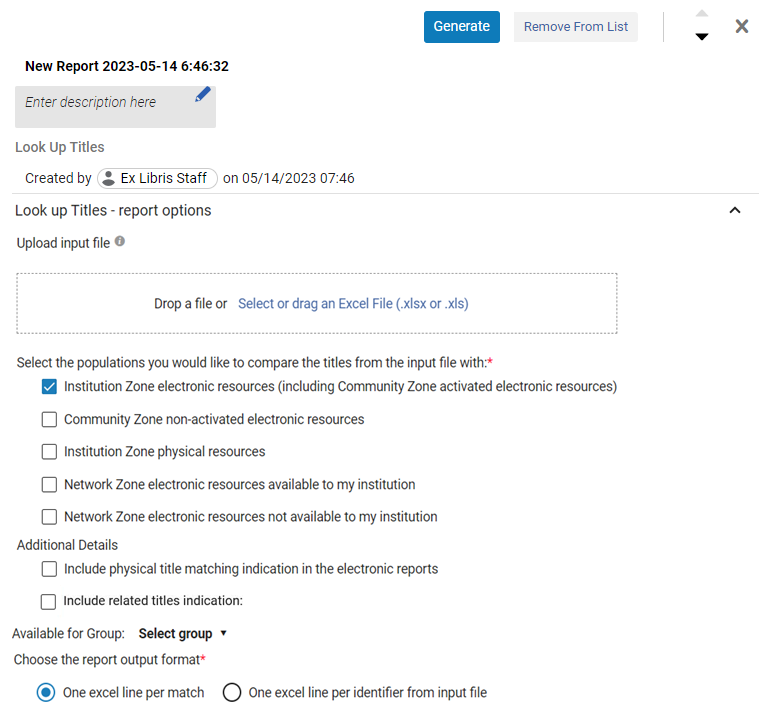 Pannello di ricerca del titolo
- Name your new report and provide a description. To do that, click inside the fields and start typing. To exit, click anywhere outside of the fields.
- Under Upload Input File, browse to locate the Excel file containing the identifiers of the titles for comparison.Some characters in the Excel file, for instance, "#" may cause an error.
- Under Available For group, select a group to compare only portfolios of the selected collection that are available for this group OR portfolios that are not associated with any group (which are then available for all groups). If no group is selected, portfolios are compared regardless of the group they belong to.
Questa opzione appare solo per le istituzioni definite come multi-campus. When an institution is defined as multi-campus, this feature is not activated by default. Contact Ex Libris Customer Support to enable it. The list of groups is taken from the Inventory Network Group code table.
-
Selezioni le popolazioni con cui desidera confrontare il Titolo dal file di input (può selezionare più di un'opzione):
Popolazione Descrizione Risorse elettroniche della Institution Zone (incluse le risorse elettroniche attivate dalla Community Zone) Alma compares the Excel file with the electronic resources in the Institution Zone and activated Community Zone resources.
This option generates the following report:Look Up Titles – Institution Zone Electronic Resources
See Overlap and Collection Analysis Job Reports for more information.
Once this option is selected, if institutions are defined as multi-campus, an additional dropdown option of Available for Group is displayed enabling users to select a group that will be included in the analysis.
Risorse elettroniche non attivate dell'area della Community Alma compares the Excel file with the non-activated Community Zone resources.
This option generates the following report:Look Up Titles – Community Zone non-activated electronic resources. See Overlap and Collection Analysis Job Reports for more information.
Risorse fisiche dell’Istituzione Enables users to upload a list of titles and compare it with the institution's Electronic and Physical holdings (or both). This option enables the institution to make informative decisions regarding titles/collections that they own or would like to purchase, and as a result, potentially assist the institution to manage the financial budget expenses/savings. Network Zone electronic resources available to my institution
Disponibile solo per i membri del consorzio dell'istituzione.
Alma compares the Excel file with the electronic resources available to your institution in the Network Zone.
This option generates the following report:Look Up Titles – Network Zone resources available to my institution. See Overlap and Collection Analysis Job Reports for more information.
Network Zone electronic resources not available to my institution
Disponibile solo per i membri del consorzio dell'istituzione.
Alma compares the Excel file with the electronic resources not available to your institution in the Network Zone.
This option generates the following report:Look Up Titles – Network Zone resources not available to my institution. See Overlap and Collection Analysis Job Reports for more information.
Include physical title matching indication in the electronic reports Quando si seleziona una qualsiasi delle opzioni relative all'elettronica, ovvero:
- Risorse elettroniche della Institution Zone (incluse le risorse elettroniche attivate dalla Community Zone)
- Risorse elettroniche non attivate dell'area della Community
- Risorse elettroniche del Network disponibili per la mia istituzione
- Risorse elettroniche dell'area Network non disponibili per la mia istituzione
abilita la sezione Ulteriori dettagli con la seguente opzione:
- Includi indicazione di corrispondenza dei titoli fisici nei report elettronici
This option enables users to select whether they would like to receive an indication in the Excel reports on whether the titles from the uploaded file also have a matching physical title.
Include related titles indication Quando si esegue un'analisi di sovrapposizione e si confronta il titolo con l'inventario fisico, Alma può (se lo desidera) individuare anche i titoli fisici correlati al titolo corrispondente. Ciò garantisce che l'Utente che esegue un'Analisi e cerca corrispondenze fisiche abbia un quadro completo della sovrapposizione Titolo/copia ed è in grado di prendere decisioni informate. Once this type of match that has a related physical title with physical inventory is found, the job marks the related physical indication. This physical hint indication is included as 4 new columns in the Excel report:
- Has Physical Matching(Yes / No)
- Holding fisiche biblioteca: Localizzazione di biblioteca (conteggio)
- Has Related Physical Matching(Yes / No)
- Holding fisiche correlate biblioteca: Localizzazione di biblioteca (conteggio)
The "Related" report incorporates a new column,Relation type that has the following values:
- Contiene
- Vuoto
When the "Contains" indication is displayed in the new column, an additional indication (Related title) is displayed next to the MMS ID.
Available for Group
Appears for institutions that are defined as multi-campus.
Alma compares the Excel file with the electronic resources that do not exist in the Institution Zone or in activated Community Zone electronic holdings for the selected Available For group.
This option generates the following report:Look Up Titles – From file not available for the selected Available For Group. See Overlap and Collection Analysis Job Reports for more information.
- Scegli il formato di output del rapporto:
Formato di output Descrizione One Excel line per match A single identifier might appear in multiple Excel rows, one row for every match. Since each cell holds just one value of a specific matching portfolio, filtering and sorting are more accurate and specific. For example, by adding a column "Origin (IZ or CZ)", you could distinguish between portfolios linked to the CZ and ones that are not. 
One Excel line per identifier from the input file For each unique identifier from the input file, there is a single row in the output report, with information of all matching portfolios concatenated in each cell:

- Tutti i valori del portafoglio sono visualizzati tra parentesi graffe {}.
- When there are several values within the {} brackets, each value appears within its own double quotes "", separated from other values by pipeline sign |.
- When finished setting the parameters, select Generate. Alma generates the report and displays the results in the Analysis Report section that opens in the right side. Clickto download the report as an Excel file to your machine. In addition, Alma places the report in the left section, where you can access it at a later time. For detailed information about the report, see Look Up Titles Reports.
- After the Overlap and Collection Analysis job completes, an Overlap and Collection Analysis Letter is sent to the staff user to indicate that the job is completed. For information on configuring the letter, see Configuring Alma Letters.
Report di analisi di sovrapposizione e raccolta
Una volta generati i report, sono visibili a tutti gli utenti dell'istituzione.
You cannot edit the reports, they can only be viewed.
Compare Electronic Collections Reports
| Report | Descrizione | Colonne del Report |
|---|---|---|
| Compare Collections - Titles of portfolios with complete coverage overlap |
Titles included in portfolios of the electronic collection selected for comparison (source) that are also part of electronic collection/s compared with (target); Portfolio coverage from the electronic collection selected for comparison (source) is completelycovered by portfolios of the electronic collection/s compared with (target). For the Analysis Information sheet, see Analysis Information below in this table. |
|
| Compare Collections - Titles of portfolios with partial coverage overlap |
Titles included in portfolios of the electronic collection selected for comparison (source) that are also part of the electronic collection/s compared with (target); Portfolio coverage from the electronic collection selected for comparison (source) are partially covered by portfolios of the electronic collection/s compared with (target). For the Analysis Information sheet, see Analysis Information below in this table. |
|
| Compare Collections - Titles of portfolios with no coverage overlap |
Titles included in portfolios of the electronic collection selected for comparison (source) that are part of the electronic collection/s compared with (target); Portfolios coverage from the electronic collection selected for comparison (source) are not covered by portfolios of the electronic collection/s compared with (target). For the Analysis Information sheet, see Analysis Information below in this table. |
|
| Compare Collections - Titles of portfolios with no overlap |
Titles included in portfolios of the electronic collection selected for comparison (source) that are not part of the electronic collection/s compared with (target). For the Analysis Information sheet, see Analysis Information below in this table. |
|
| Compare Collections - Titles of portfolios not available for selected Available For Group |
Titles included in portfolios that are part of the electronic collection selected for comparison (source), but are not available for the selected 'Available For Group'. Appears only for multi-campus and only if you selected to specify groups in the "Available for Group" option. For the Analysis Information sheet, see Analysis Information below in this table. |
|
| Analysis Information | Questo rapporto fornisce informazioni generali sul lavoro. Appare come l'ultimo foglio in tutti gli altri report. |
|
Cerca il titolo del report
| Report | Foglio Report | Colonne del Report |
|---|---|---|
| Look Up Titles – Institution Zone Electronic Resources All titles from input files that have a match with electronic resources in the Institution Zone. |
Matches with Single Resource Includes all the titles with a single match (either in the Institution Zone or activated Community Zone populations) |
|
|
Matches with Multiple Resources Include all the titles with multi matches (either in Institution Zone or activated Community Zone populations). |
||
|
No Matches or No Resources include all the titles with no match. |
|
|
|
Analysis Information General information about the job |
|
|
| Look Up Titles – Community Zone non-activated electronic resources All titles in input file that have a match in with electronic resources in the Community Zone that are not activated in the Institution Zone. |
Match Includes all the titles with one or more matches in the non-activated Community Zone population. |
|
|
No Match Includes all the titles with no matches in the non-activated Community Zone population. |
|
|
|
Analysis Information General Information about the job |
See Analysis Information Sheet. | |
|
Look Up Titles – Network Zone resources available to my institution All titles in input file that have a match with electronic resources managed in the Network Zone for my institution. Disponibile solo per i membri del consorzio dell'istituzione. |
Match Includes all the titles with one or more matches in the Network Zone electronic resources available for your institution. |
|
|
No Match Includes all the titles with no matches in the Network Zone electronic resources that are available for my institution. |
|
|
|
Analysis Information General Information about the job |
See Analysis Information Sheet. | |
|
Network Zone resources not available to my institution All titles in input file that have a match with electronic resources managed in the Network Zone for other institutions in my consortia. Disponibile solo per i membri del consorzio dell'istituzione. |
Match Include all the titles withone or more matchesin the Network Zone electronic resources that are not-available for my institution). |
|
|
No Match Includes all the titles withno matchesin the Network Zone electronic resources that are not-available for your institution. |
|
|
|
Analysis Information General Information about the job |
See Analysis Information Sheet. | |
|
Look Up Titles - from file not available for the selected Available For Group Titles that do not exist in the Institution Zone or in activated Community Zone electronic holdings for the selected Available For group |
Titles not available for the selected group |
|
|
Look Up Titles - Institution Zone physical resources All titles from input files that match with the institution's Electronic or Physical holdings (or both). |
Matches with Single Resource Includes all the titles with a single match (in the institution's Physical holdings). |
|
| Matches with Multiple Resources Include all the titles with multi matches (in the institution's Physical holdings). | ||
| No Matches or No Resources include all the titles with no match. |
|
|
|
Analysis Information General Information about the job |
See Analysis Information Sheet. |
Page tags: article:topicproduct:almacontent:Documentationlang:english
