
注文明細の延期ワークフロー
このページでは、注文明細の延期ワークフローの概要を説明します。For instructions on how to defer a PO line see Deferring PO Lines.For information on the overall purchasing workflow see Purchasing Workflow.For an overview of working with acquisitions in Alma, including links to relevant sections such as Infrastructure, Invoicing, Configuration, etc., see Introduction to Acquisitions.
注文明細を延期すると、注文を保存して後で使うことができます。
The Defer action is not supported for PO lines with the following Acquisition methods:
- ベンダーシステムで購入
- 承認計画
- レター付き承認計画
以下は、注文明細の延期から再有効化またはキャンセルまで、注文明細の処理方法を管理する繰延注文明細ワークフローの図です。
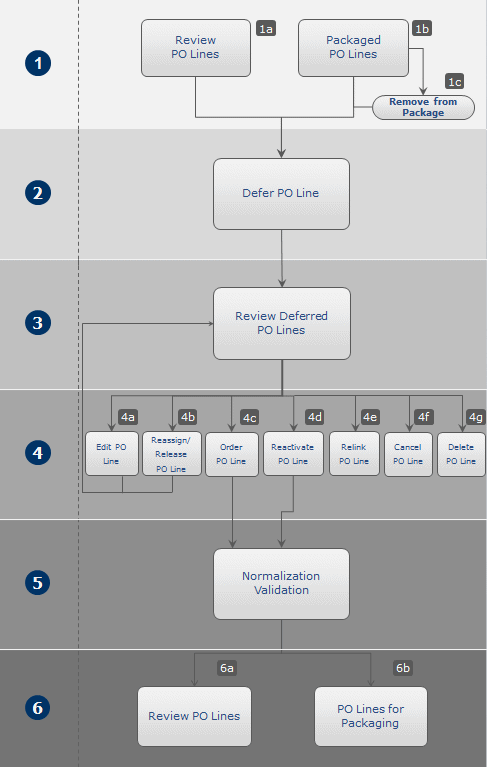
以下は、このワークフロー内の手順に関する詳細な説明です(図内の番号に対応しています):
- 延期する注文明細を選択すると、延期プロセスが開始します。承認プランまたはベンダーシステムで購入の受入方法のものを除き、すべての注文明細を延期することができます。PO lines that you want to defer must be at one of the following stages in the purchasing workflow (see Purchasing Workflow):
- レビュー中 – レビュー中の注文明細で、修正または完了を待っています。
- Manual Packaging – PO lines that are complete and ready for packaging, and are configured for manual packaging.
- 注文明細> レビュー – パッケージ化されたがまだ承認されていない注文明細。Before you can defer a PO line in this status, you must remove it from the PO.If the PO line is packaged with other PO lines, the PO line is removed from the PO, but the PO can still be sent, with the remaining PO lines.If the PO line is the only one in the packaged PO, the PO is deleted when you remove the PO line from it.
- 注文明細を延期するには、注文明細の「延期」を選択し、注文明細について通知する日付と延期の理由を入力します。これを完了すると、注文明細のワークフロー ステップ (ステータス) が 延期 になります。PO line deferral reasons can be configured by an administrator on the Acquisitions Configuration menu (see Configuring PO Line Deferral Reasons).For details on deferring a PO line, see Deferring PO Lines.
- At a later time, you review the deferred PO line and decide how to handle it (see Reviewing Deferred PO Lines).
- 繰延注文明細については、次のアクションを実行できます:
- 編集 – 注文明細の任意のフィールドを編集します。注文明細を編集した後、保存または再有効化できます。When you save the PO line, its status remainsDeferred.注文明細を再有効化すると、再び正規化および検証されます。If the PO line passes the normalization and validation phase, it moves to the next step in the purchasing workflow (see Purchasing Workflow).If the PO line is still incomplete, its status is set to In Review, and remains thus until it is corrected.For details on editing a PO line, see Editing Deferred PO Lines.
- Assign to or Release assignment – For more about theAssigned to Me,Unassigned, and Assigned to Others tabs, see Assigned to Me, Unassigned, Assigned to Others Tabs.
- Order now— Move the PO line to the purchasing workflow, where it is normalized and validated (see step 5) before being packaged (see step 6) and sent (see Packaging a Deferred PO Line into a PO).今すぐ注文を選択した場合、注文が処理用に送信後、メッセージ(今すぐ注文レター)が届きます。For information on the Order Now Letter, see ConfiguringAlma Letters.
- 再有効化 – 注文明細を再有効化します。注文明細は、延期前に達した購入ワークフローの段階に戻ります。The PO line is normalized and validated (see step 5) before being returned to eitherReview or Automatic/Manual Packaging(see step 6).For details on reactivating a PO line, see Reactivating Deferred PO Lines.
- Relink – Link the PO line to a different bibliographic record (see Relinking PO Lines).
- Cancel – Cancel a PO line that is no longer required (see Canceling Deferred PO Lines).
- Delete – Delete a PO line from Alma (see Deleting PO Lines).
- 注文明細が再アクティブ化されるか、「今すぐ注文」オプションを使用して処理されると、注文明細は購入ワークフロー (ステップ 2 を参照) に戻り、そこで正規化および検証されます。
- 注文明細が正規化および検証段階を通過するかどうかに応じて、ワークフローは次のように進みます:
- 注文明細が正規化および検証段階を通過しない場合、修正されるまでレビュー中のままです。
- 注文明細が正規化および検証プロセスを通過した場合、ワークフローのパッケージング段階に移動します。パッケージングが完了した後に送信されます。
Page tags: article:topicproduct:almacontent:Documentationlang:englishdeferraldeferral workflow
