
注文明細のクローズ・再オープン・再リンク
このページでは、注文明細を閉じ、キャンセル、削除する方法と、注文明細を再度開き、再リンク/再アクティブ化する方法について説明します。It includes information on changing a PO line's bibliographic reference.For a high level overview of the receiving stage for physical items with links to details for closing PO lines, post receiving and processing claims see Receiving Material.For information on the overall purchasing workflow see Purchasing Workflow.For an overview of working with acquisitions in Alma, including links to relevant sections such as Invoicing, Renewals, Configuration, etc., see Introduction to Acquisitions.
The following sections describe certain actions that you can perform on PO lines from the PO Lines task list (Acquisitions > Purchase Order Lines > All PO Lines; see Communicating with Vendors), to either remove them from active processing, return them to active processing, or change the resources they relate to.Depending on your role, the status of the PO line, the type of PO line, and other factors, you may or may not be able to perform all of these actions on all PO lines in your system.For more information about task lists in general, see Record Lists.
In order to perform any of these actions on a PO line, the PO line must be assigned to you; see Editing PO Line Information.
注文明細をクローズ、キャンセル、および削除
以下の表は、注文明細のクローズ、キャンセル、および削除のアクションを比較しています。
To change the status of PO lines in bulk (cancel, close, or delete), use the Change PO Lines Status job (see Manual Jobs).
| アクション | 理由 | 以下に利用可 | 結果 |
|---|---|---|---|
| 注文明細のクローズ | 注文書を完了するには |
|
クローズとして保存された注文明細で、この注文明細は再開可能です。 |
| 注文明細のキャンセル | 注文明細処理中のエラー | 有効ではないアクティブな注文明細
|
キャンセル済みとして保存された注文明細で、再オープン可能 |
| 注文明細の削除 | クリーンアップシステム |
|
注文明細およびすべての関連資料がAlmaから削除されました |
注文明細のクローズ
注文明細のクローズは、購入が完了したことを示すために使用されます。次のタイプの注文明細を閉じることができます:
- 送信済み (少なくとも 1 つの受領または有効化されたリソースを含む) で、請求書の支払いを待っているワンタイム注文明細 (これらは通常、自動的に支払われるか、 [全額請求済み] に設定されているか、ワークフローによってクローズされるか、またはそれらすべてとなっています)
- Continuous PO lines with recurring renewal (when a serial subscription must be stopped, for example)
注文明細を閉じるとき、目録は削除されません。For PO lines associated with electronic resources, a task is added to the Electronic Activation task list with the following note:The order for this resource was closed.非アクティブ化が必要かどうかを確認してください。
購入注文明細を閉じると、予算引当がリリースされます。
注および添付ファイルは、注文明細が閉じている場合でも追加できます。
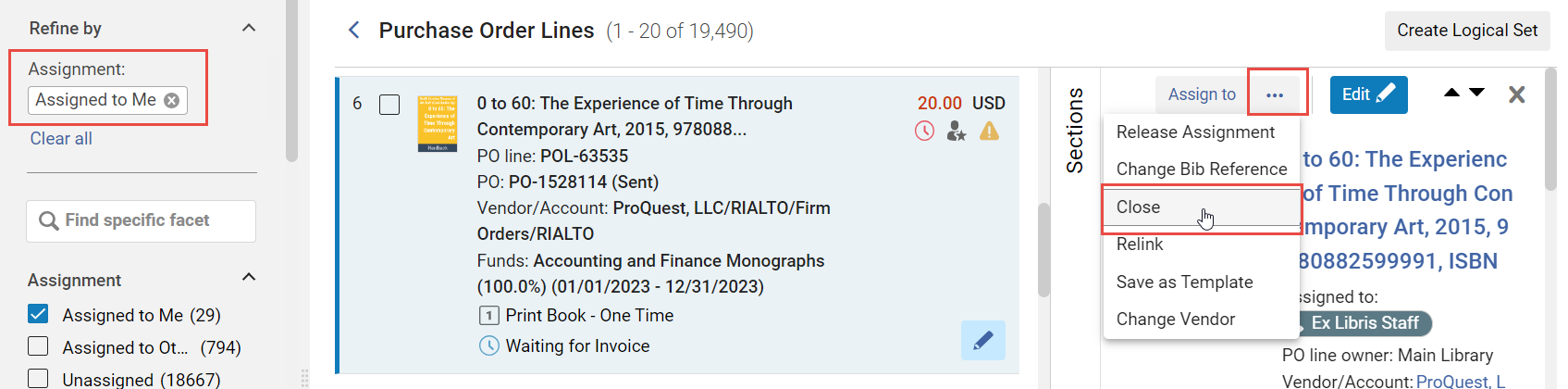
- [注文明細] タスク リストの注文明細の行アクションで [閉じる] を選択し、確認ダイアログ ボックスで [確認] を選択します。
- 一部の受領済みアイテムと一部の未受領アイテムを含む注文明細を閉じるには、未受領アイテムを削除し、注文明細のアイテム数を変更してから、受領アイテムを再受領します。
注文明細のキャンセル
Cancelling a PO line invalidates the PO line.You can cancel any active PO line, except ones being evaluated (in the Under Evaluation workflow step i.e., PO lines that are part of a trial - see Evaluation Workflow) or waiting for invoice payment.キャンセルされた注文明細は削除できます。
注文明細がキャンセルされても、Almaから削除されません。Cancelled PO lines are still included in the PO Lines task list, and you can edit or delete notes and attachments in cancelled PO lines (see Editing PO Line Information).If a cancelled PO line has an e-task associated with it, the e-task is deleted.A PO line's encumbrances are released when it is cancelled.
If the PO line is a main PO line, Alma attempts to delete the PO line's inventory.注文明細が追加の注文明細である場合、または目録が受信またはアクティブ化されている場合、Almaは目録を削除しません。目録を削除できない場合は、注文明細とその目録の間のリンクが削除されます。
Alma attempts to delete both the item and, if the holdings is then empty, it attempts to delete its holdings as well.If the bibliographic record is then also itemless, the handling of the record depends on the value of the pol_handle_bib_record_without_inventory customer parameter.For more information, see Configuring Other Settings (Acquisitions).
(New for February 2026) If the delete_linked_portfolio_upon_pol_cancellation parameter (Configuration > Acquisitions > Other settings) is set to true (false by default), when cancelling a PO line, both local inactive portfolios and inactive portfolios that are linked to the CZ or that are part of an electronic collection will be deleted.
- 「注文明細」タスクリストの注文明細の行アクションで、「明細のキャンセル」を選択します。注文明細キャンセル制限注記を設定している場合は、それが表示されます。確認した後、またはメモを設定していない場合は、[明細のキャンセル] を選択すると、[キャンセル情報] ダイアログ ボックスが表示されます。
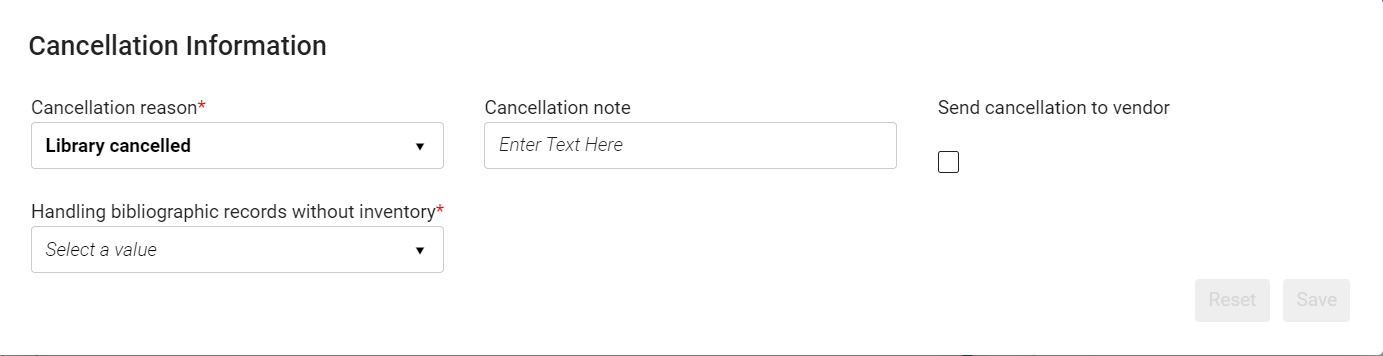 キャンセル情報ダイアログボックス
- キャンセル理由を選択します。To configure the available reasons, see Configuring PO Line Cancellation Reasons.
- キャンセル注記で 、必要に応じてベンダーの注記を入力します。メモの詳細は、注文明細の詳細ペインのメモセクションに表示されます。
- Select Send cancellation to vendor to send a cancellation notification to the vendor (PO Line Cancelation Letter), if required.ベンダーがEDIキャンセル用に設定されていない限り、キャンセルは電子メールで送信されます。その場合、キャンセルはEDIを使用して送信されます。電子メールで送信する場合、ベンダーに定義された優先アドレスが使用されます。For information about EDI, see Electronic Data Interchange (EDI).
-
If the pol_handle_bib_record_without_inventory customer parameter is set to MANUAL, an additional field,Handling bibliographic records without inventory, appears in the dialog box (see Configuring Other Settings (Acquisitions).In this case, you must specify what should be done with the bibliographic record if cancelling this PO line causes it to become itemless.To do so, select one of the following options from the dropdown list:
-
Do nothing– Leave the bibliographic record in the database.
-
Delete bibliographic records– Delete the bibliographic record from the database.
-
Suppress bibliographic records– Leave the bibliographic record in the database, but suppress it from publishing in discovery.
-
- [確認]を選択してください。注文明細はキャンセルされました。ベンダーに送信キャンセルを選択した場合、解除指示は、ベンダーに送信されます。注文が以前にベンダーに送信された場合にのみ、キャンセル指示がベンダーに送信されます。注文がレビュー中である場合は、ベンダーに送信されません、ベンダーにキャンセル送信を選択する必要がありません。
- [注文明細] タスク リストのファセットの [ワークフロー ステップ] で、 [キャンセル済み] を選択します。タスクリストがフィルタリングされ、キャンセルされた注文明細のみがリストに表示されます。
Deleting PO Lines
注文明細を削除すると、その注文明細がAlmaから削除され、関連付けられている取引がすべて削除されます。メインの注文明細を削除すると、その注文明細に関連付けられた在庫リソースも削除されます。追加の注文明細を削除しても、在庫は削除されません。
削除オプションは、次のステータスの注文明細で使用できます:
- レビュー中
- Packaging(Automatic or Manual)
- 延期またはキャンセル済み
次の場合、注文明細は削除できません:
- ユーザーは1点の請求書にリンクされています。
- 注文書 に添付され、ベンダーに送信されました。(注文書が送信されていない場合、注文明細を注文書から除いてから削除できます)。
- これはメインの注文明細で、注文明細リソースの1つが受領または有効化された(注文明細がレビュー中であっても)ものです。
- In the PO Lines task list, in the row actions of the PO line, select Delete, and then select Confirm in the confirmation dialog box.注文明細が削除されます。
For additional information about deleting PO lines, see Deleting POs.
注文明細の再リンクと再有効化
以下の表では、注文明細の再リンク、書誌リファレンスの変更、および再オープンのアクションを比較しています。
| アクション | 理由 | 以下に利用可 | 以下に利用不可 | 結果 |
|---|---|---|---|---|
| 注文明細の再リンク | より良い書誌レコードが存在します | レビュー中、延期, 準備完了、または未送信の一回限りクローズのステータスにある注文明細 |
|
注文明細はより良いレコードにリンクされ、そのアイテム/所蔵はその書誌レコードの下に移動されます |
| 書誌リファレンスの変更 | レコードのより良い説明が存在します | 有効な注文明細 |
|
注文明細は、より良く、より完全な説明を想定しています |
| クローズまたはキャンセルされた注文明細の再オープン | クローズまたはキャンセルされた(多くの場合、誤操作による)注文明細を開くには | クローズまたはキャンセルされた注文明細 | 削除された注文明細を含む他のすべての注文明細 | ステータスがレビュー中に変更されます |
Relinking PO Lines
注文明細がリンクされている書誌レコードを変更できます。これを行うにあたって考えられる理由は次のとおりです:
- EODは、既存のリンクよりもリンクするのに適したマルチボリューム作業内の単一ボリュームに対して到着します。
- 注文時にインポートされた新規書誌レコードよりも適切に既存の書誌レコードに一致するアイテムが到着します。
The Relink option is available for PO lines with the status In Review,Deferred,Ready(packed into a PO and ready to be sent), or Waiting for Manual Renewal, as well as for unsent one-time closed PO lines.次のいずれかに該当する場合、注文明細を再リンクすることはできません:
- 注文明細は、セントラルナレッジベースに関連しています(注文明細は電子収集です)。これが発生すると、再リンクオプションが表示されません。
- 注文明細には MMS_ID がありません。
- 注文明細には、2つの異なる書誌レコードに属するアイテムが含まれています。
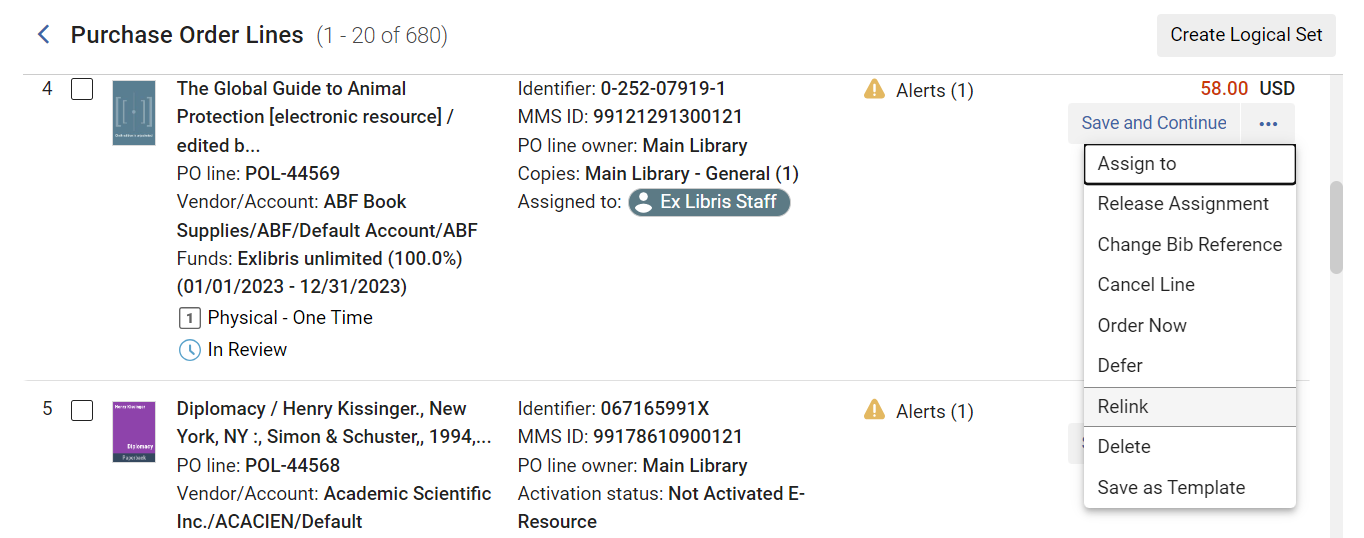
- Select Relink in the row actions list of the PO line you want to relink.
-
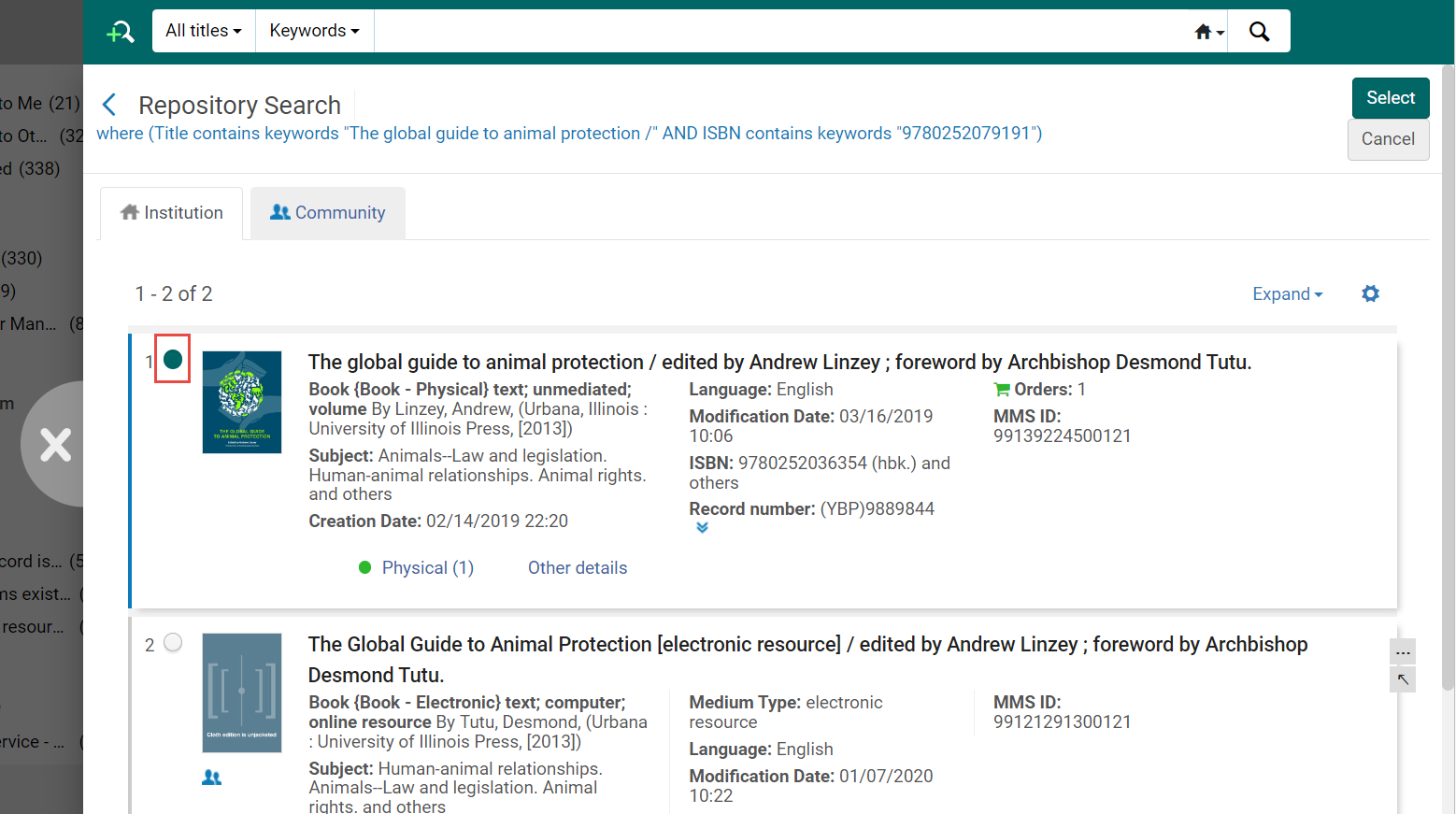
確認ダイアログボックスで確認を選択します。[リポジトリ検索] ページがスライド パネルで開き、この注文明細に類似したリソース (たとえば、同じタイトルや ISBN を持つリソースが存在する場合) の検索結果が表示されます。
- Modify the search if required (see Searching for PO Lines).
- Select the button beside the number of the new resource, and then select Select.注文明細は新しいリソースにリンクされています。Additionally, the associated holdings and items are also moved to the new bibliographic record.
注文明細の書誌リファレンスを変更します
在庫を変更せずに、注文明細の書誌レコード参照を別の書誌レコードに変更できます。注文明細説明のみが変更されます。
この機能は、例えば、短い(スタブ)書誌レコードで注文が行われる場合に便利です。この場合、注文明細の説明は、短い書誌レコードの説明です。短い書誌レコードが完全な書誌レコードで更新された場合でも、注文明細にはタイトルの不正確な古い説明が残ります。このようなケースでは、レコードの新しいバージョンの記述に注文明細説明を更新するため書誌リファレンスを変更を選択することができます。
- この機能は、タイトルベースの注文明細にのみ関連します。また、この機能はキャンセルされた注文明細では実行できません。
- PO lines of type Electronic Collection-Subscription are treated the same as Other Services - Subscription.
- 参照を変更する注文明細の行のアクションリストに書誌リファレンスを変更を選択します。
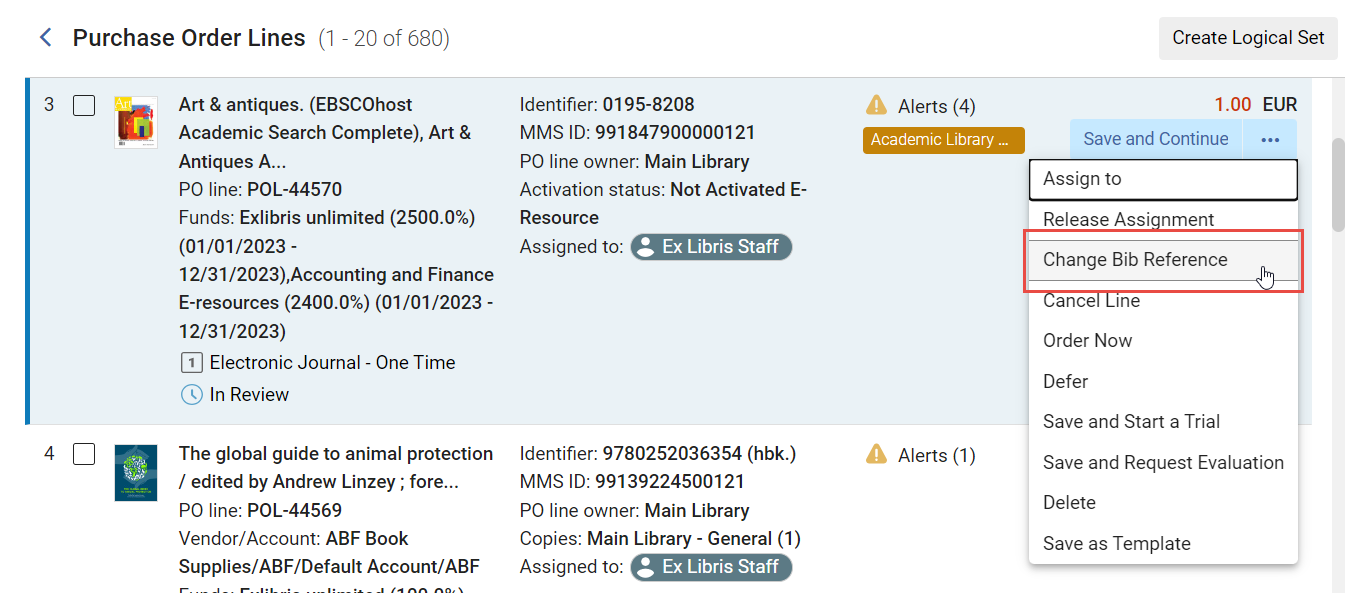 注文明細(POL)リスト
- 確認ダイアログボックスで確認を選択します。[リポジトリ検索] ページがスライド パネルで開き、この注文明細に類似したリソース (たとえば、同じタイトルや ISBN を持つリソースが存在する場合) の検索結果が表示されます。
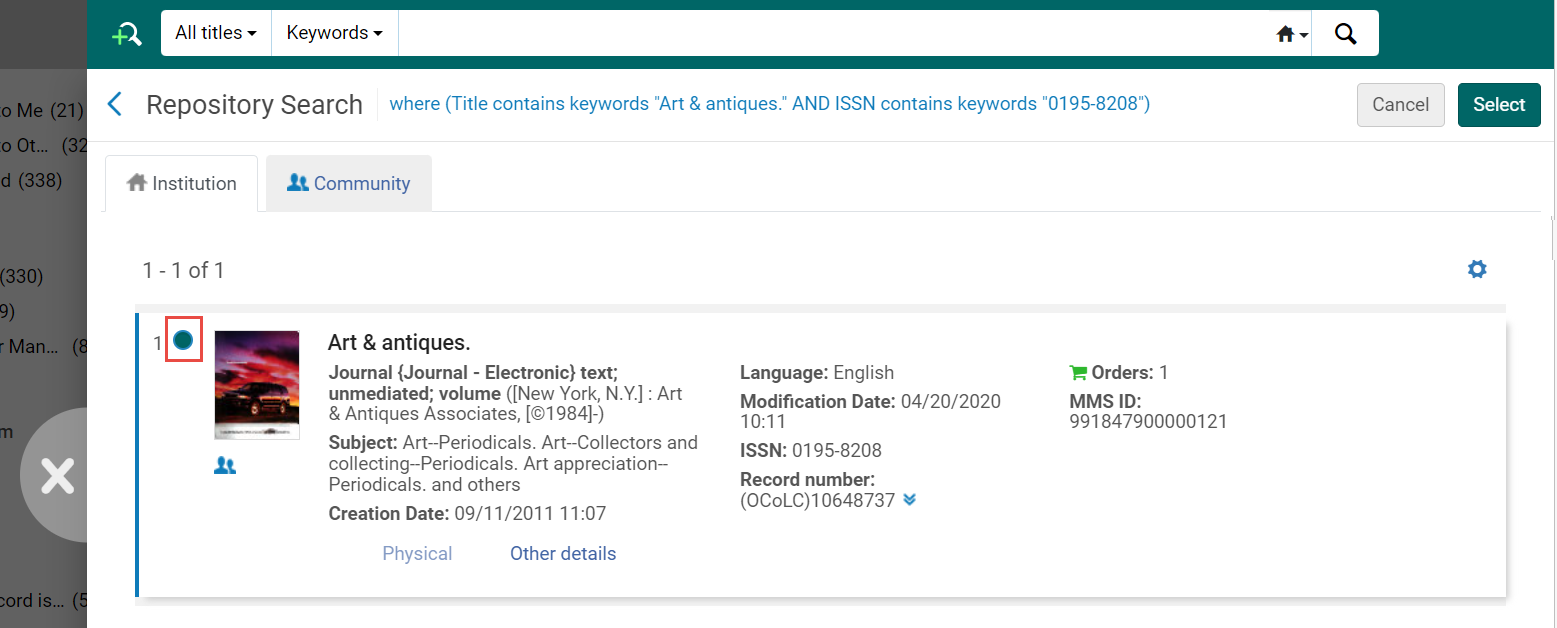
- Modify the search if required (see Searching for PO Lines).
- Select the button beside the number of the new resource, and then select Select.注文明細のリファレンスが変更されます。
クローズまたはキャンセルされた注文明細の再オープン
- 購入オペレータ
- 購入マネジャー
PO lines that have been closed or cancelled can be reopened and reused.閉じた発注明細を開き直すと、発注が削除され、発注明細はレビュー中にステータスに更新されます。キャンセルされた注文明細が再オープンされると、元の予算は削除されます。 注文明細に新しい予算を追加する必要があります。
クローズまたはキャンセルされた注文明細は、個々の注文明細から、または自動化されたプロセスを使用して、再オープンできます。
- Select Reopen in the row actions list of the PO line you want to reopen, and then, in the confirmation message, select Confirm.The PO line status is changed to In Review.
- 注文明細ワークフローを更新ジョブを実行します。For more information, see Running Manual Jobs on Defined Sets.
Page tags: article:topicproduct:almacontent:Documentationlang:englishclose PO linecancel PO linedelete PO linereassign PO lineassign PO linerepoen PO linereactivate PO linechange bibliographic referenceclosed PO linecancelled PO linedeleted PO linerelink PO line
