
請求書をレビュー
このページでは、請求書がレビュー段階に達するさまざまなシナリオを含め、Almaで請求書をレビューする方法について説明します。It includes how to access invoices in review and the actions that can be done from the Invoice Review page, such as editing and deleting invoices, and changing who an invoice is assigned to.For an overview of the end to end invoice workflow with links to relevant sections for details see Invoicing Workflow.
- インボイスオペレーター
- インボイスオペレーター拡張機能
- インボイスマネージャー
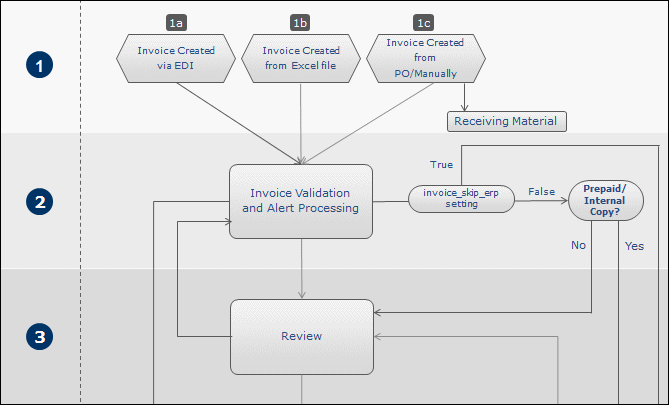
請求書は、次のいずれかのシナリオで手動レビュー用に送信されます:
- 請求ワークフローの請求書処理段階の結果、図書館スタッフの確認を必要とするデータの問題またはアラートがあり、請求書レビュールールは請求書のレビューを行う必要があることを示しています。
- Save(as opposed to Save and Continue) is selected at the end of the manual invoice creation process.See Creating an Invoice from a PO or Manually.
請求書は、[レビュー中の請求書]ページ(受入> 受領と請求> レビュー)に表示されます。You can also view this page starting on a specific tab by selecting one of the following tasks in the Tasks List in the persistent menu (see Tasks in the Task List):
- 請求書 - レビュー - 自分に割り当てられました
- 請求書 - レビュー - 割り当てなし
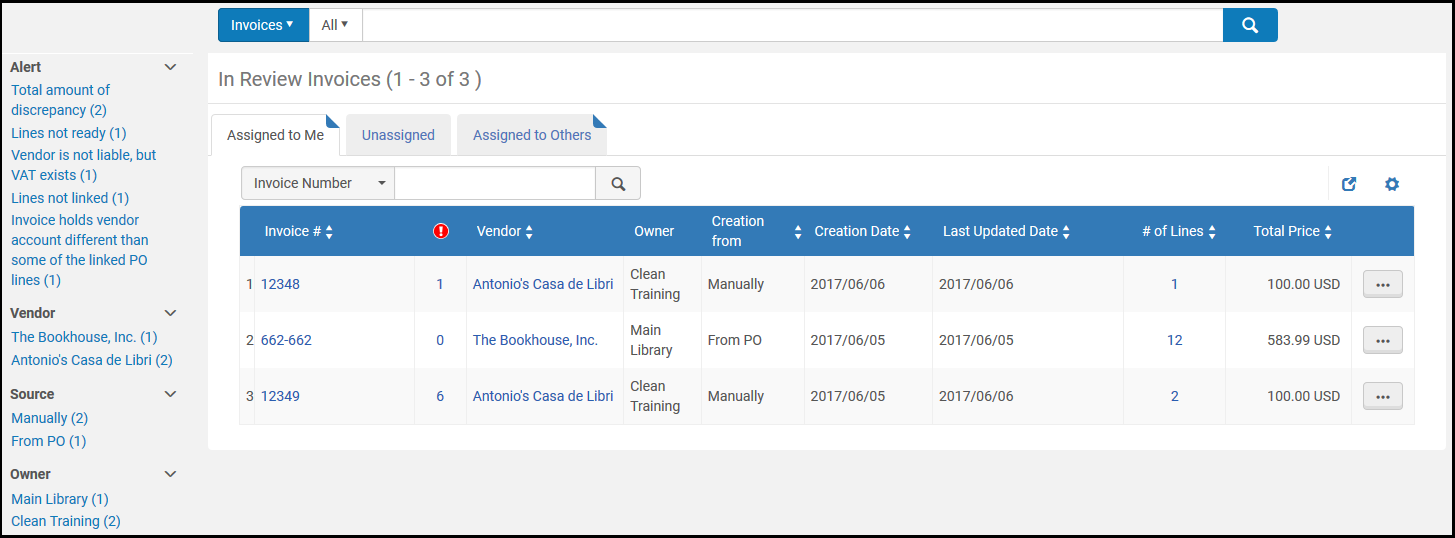
このページはタスクページです。このページでは、請求書を編集または削除したり、請求書の割り当て先を変更したりできます。
Invoices appear in the following tabs (see Assigned to Me, Unassigned, Assigned to Others Tabs):
- Assigned to Me— Only you can edit these invoices.
- Unassigned— You or any other staff person with review permissions can edit these invoices.
- Assigned to Others— Only the user assigned to the invoice can edit it, unless it is reassigned to someone else.
- [レビュー中請求書]ページで、アクションリスト列の編集を選択すると、請求書が表示されます。[請求書の詳細]ページが表示されます。
- アラートタブで請求書について生成されたアラートを表示し、必要に応じて、他の各タブの情報を変更します。For information on the fields in each of these tabs, see Creating an Invoice From a PO or Manually.
- 変更を保存したり、請求ワークフローの処理段階に請求書を移動したりするには、保存して続行を選択します。保存を選択した場合、変更内容が保存されますが、請求書はワークフローの次の段階に移動しません。In addition, for invoices with 10 or more PO lines, when updating the invoice, the related PO lines are re-indexed.This is done by a background job that appears in the Monitor Jobs page.この再インデックスをトリガーした更新を行ったユーザーがオペレーターとして表示されます。A letter is sent to the user who initiated the re-indexing job.If the invoice data has been properly modified, the invoice continues to move through the invoicing workflow as described in Invoicing Workflow.Some invoice updates require re-indexing of all the related PO lines.関連する 注文明細が最大 10 個ある場合は、すぐにインデックス化されます。If there are more, they are indexed by a background job.The triggered indexing job appears in the Monitor Jobs page.この再インデックスをトリガーした更新を行ったユーザーがオペレーターとして表示されます。
また、参照手順に記載されているように、[承認待ち請求書]ページ(受入> 受領と請求> 承認)で請求書管理タスクを実行することもできます:
- 請求書の割り当てを変更する - 請求書の行のアクションリストで割り当て先を選択します。再割り当てダイアログボックスが開きます。See Assigned to Me, Unassigned, Assigned to Others Tabs .
- 請求書の割り当てを解除する - 請求書の行のアクションリストで割り当ての解除を選択します。請求書が、割り当てられておらず、割り当てなしタブに移動します。
- 請求書を削除する - 請求書のアクションリスト列で削除を選択し、確認ダイアログボックスで確認を選択します。関連する支出が削除され、関連する注文書の負債が再計算されます。
Page tags: article:topicproduct:almacontent:Documentationlang:englishreview invoiceedit invoicedelete invoice
