
請求ワークフロー
このページでは、請求書の作成から支払い、完了までのワークフローについて説明します。For an overview of working with acquisitions in Alma, including links to relevant sections such as Infrastructure, Renewals, Configuration, etc., see Introduction to Acquisitions.For the end to end purchasing worklfow with links to relevant sections for details see Purchasing Workflow.
以下は、請求書の作成から請求書がクローズまでの、請求書の処理方法を具体的に説明した請求ワークフローの図です。注文明細が完全に請求されると、関連する注文明細はクローズされます。If, for some reason, you do not require invoices, use a PO line that does not require a price and funds, such as Technical; see Manually Creating a PO Line.
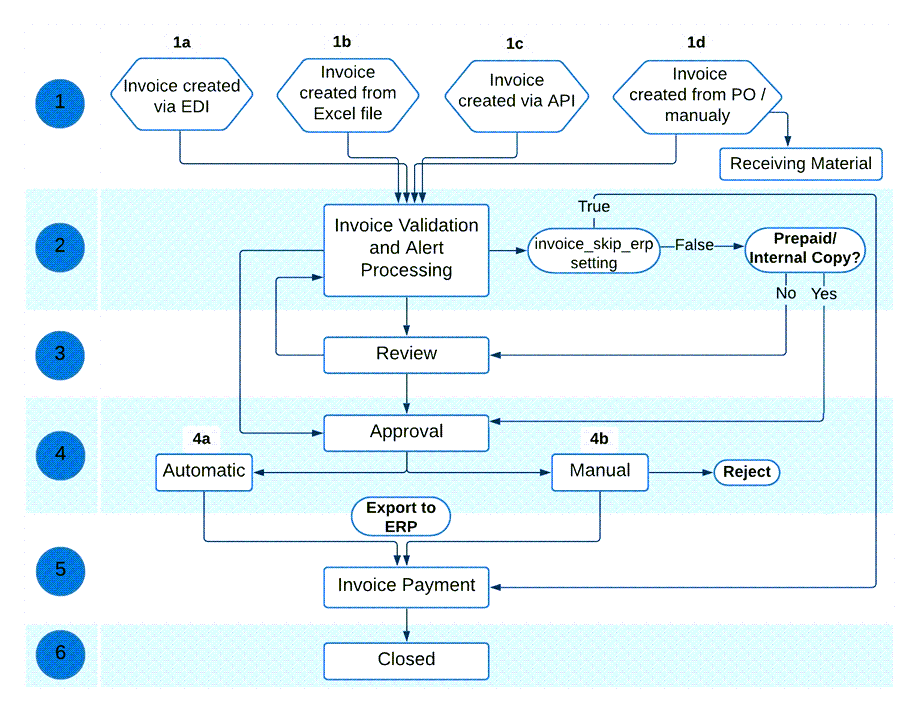
以下は、このワークフロー内の手順に関する詳細な説明です(図内の番号に対応しています)。For the complete list of invoice statuses, see Invoice Statuses.
- 請求書は、次のいずれかの方法で作成されます:
- Importing an EDI message from the vendor (see Creating an Invoice by EDI)
- Importing an Excel file (see Creating an Invoice From a File)
- Creating invoices in batch via the Create Invoice API (see Batch invoicing in Alma in the Ex Libris Developer Network)
- Using a PO or manually (see Creating an Invoice From a PO or Manually).After creating an invoice using a PO or manually, you can choose to move directly to the Receive New Material page (see Receiving Material).
For invoices imported using EDI, if all PO lines in the EDI file that are assigned to this invoice are owned by the same library, then that library will be the owner of the invoice.If all PO lines are assigned to the institution are not for the same library, the invoice will get the institution as the owner.新規の請求書や既存の請求書を、一連の発注書明細に一括で追加することはできません。After an invoice is created (whether through importing an EDI/Excel file, manually or API), you can change the Owner. - 請求書は、管理者が事前に設定したルールに基づいて特別な注意が必要な要素があるかどうかを判断するために処理されます。この処理は、システムによって自動的に実行されます。注意が必要なデータの問題がある場合、請求書のステータスがレビュー中に設定され、請求書はレビュー(ステップ3)のために送信されます。For information on this manual activity, see Reviewing Invoices.データに問題がなく、事前設定されたルールにより、請求書を自動的に処理できると判断された場合、請求書はステップ4に移動します。
- If invoice_skip_erp = true on the CustomerParameters Mapping Table page (indicating that the invoice is not to be sent to the ERP; see Configuring Other Settings), the invoice proceeds to the payment stage of the workflow (step 5).
- If invoice_skip_erp = false on the CustomerParameters Mapping Table page (see Configuring Other Settings), the invoice is set to Ready to be Paid and proceeds accordingly in the workflow.
- ワークフローのレビュー段階では、レビュー担当者が不足している情報を請求書に追加したり、請求書の誤った情報を修正したりできます。レビュー担当者が請求書のレビューページで保存して続行を選択すると、請求書はワークフローのステップ2に戻り、特別な注意が必要な要素があるかどうかを判断するために再処理されます。データの問題が引き続き存在する場合、請求書はレビューに戻ります。すべてのデータの問題が解決している場合は、請求書のステータスが承認中に設定され、請求書はステップ4に進みます。Invoices that have been closed or sent to the ERP can be sent back to the review stage, to enable editing of the invoice (see Setting Invoices Back to Review).
- 10以上の注文明細を含む請求書の場合、請求書を更新すると、関連する注文明細のインデックスが再作成されます。This is done by a background job that appears in the Monitor Jobs page.この再インデックスをトリガーした更新を行ったユーザーがオペレーターとして表示されます。
- クローズした請求書の行の特定のフィールドを編集することもできます。For more information see Creating Invoices.
- The invoice is either automatically approved and sent to the next stage of the workflow (Ready to be Paid), or awaits the appropriate library staff person's manual approval before continuing with the workflow.
- 管理者が事前に設定した承認ルールにより、請求書を自動的に承認できると判断された場合、請求書はステップ5に移動します。
- 管理者によって事前設定された承認ルールが手動承認が必要であると判断した場合、請求書は手動承認のために送信されます。For information on this manual activity, see Approving Invoices.When the person performing the manual approval selects Approve on the Invoice Information page (accessed from the Approve Invoices page), the invoice status is set to Ready to be Paidand the approved invoice is ready to be sent to the payment system or ERP.(請求書が拒否された場合、レビュー段階に戻ります。ステップ3参照)。
- The invoice reaches the payment stage, in which the invoice awaits payment processing, either through Alma or through the institution's ERP system.(For information on setting up your external system to receive invoices from Alma and running the job that exports invoices from Alma to this external system, see Financial Systems).
- If the handle_invoice_payment parameter in the Acquisitions Configuration Other Settings menu is set to true, the invoice status is set to Waiting for Payment so that the institution itself can manage the payment of the invoice, either automatically through the import process (see https://developers.exlibrisgroup.com/alma/integrations/finance), or manually by an operator (see Working with Invoices Waiting for Payment).
- 受入設定その他の設定メニューでhandle_invoice_payment(請求書の支払い)パラメータがfalseに設定されている場合、請求書は支払いを待たずにクローズ(クローズステータス)されます。
When a negative amount is entered for the invoice's amount, a refund is granted to the user (see theTotal Amount field description in Invoice Details Page Fields). - その後、請求書はクローズされます(ステータスクローズ)。Almaは、請求書に関連付けられている注文書明細が全て請求され、支払われているかどうかをチェックします。請求書に関連付けられた注文明細は、受領/有効化され、請求書が支払われる、またはERPシステムに送られるとクローズされます。If the PO line's items are not yet received/activated, the PO line remains open.
Invoice Statuses
請求書は、次のいずれかのステータスになります:
- In Review- The invoice was created but not yet reviewed.
- In Approval- The invoice is waiting for manual approval.
- Ready to be Paid- The invoice was approved and is ready to be sent to the ERP.
- Waiting for Payment- The invoice was approved and sent to the ERP (or skipped the ERP if the institution does not use one).
- Closed- The invoice is paid and closed.
Page tags: article:topicinvoicinginvoiceproduct:almacontent:Documentationlang:englishinvoice statusinvoice stage
