
請求書を検索
このページでは、請求書ステータスによる検索、検索結果のフィルタリング(ファセットによる)、検索結果に表示される列とさまざまなオプションの説明など、Almaで請求書を検索する方法について説明します。For an overview of the end to end invoice workflow with links to relevant sections for details see Invoicing Workflow.
- インボイスマネージャー
- 請求書オペレータ
- インボイスオペレーター拡張機能
- 購入マネージャー
- 購入オペレーター
You search for invoices using the persistent search box (see Searching in Alma).役職に割り当てられた範囲で関連付けられた請求書のみが表示できます。
When performing an Invoice>All searchfrom the persistent search box, only Status, Library, Invoice number, Invoice reference number, Invoice unique ID, Vendor name, and Vendor code are searchable fields.注文明細タイトル、注文明細番号、および注文書番号は、[すべて]の検索では索引付けされません。However, if you select one of these fields, instead of All, you can search for specific values of that field.
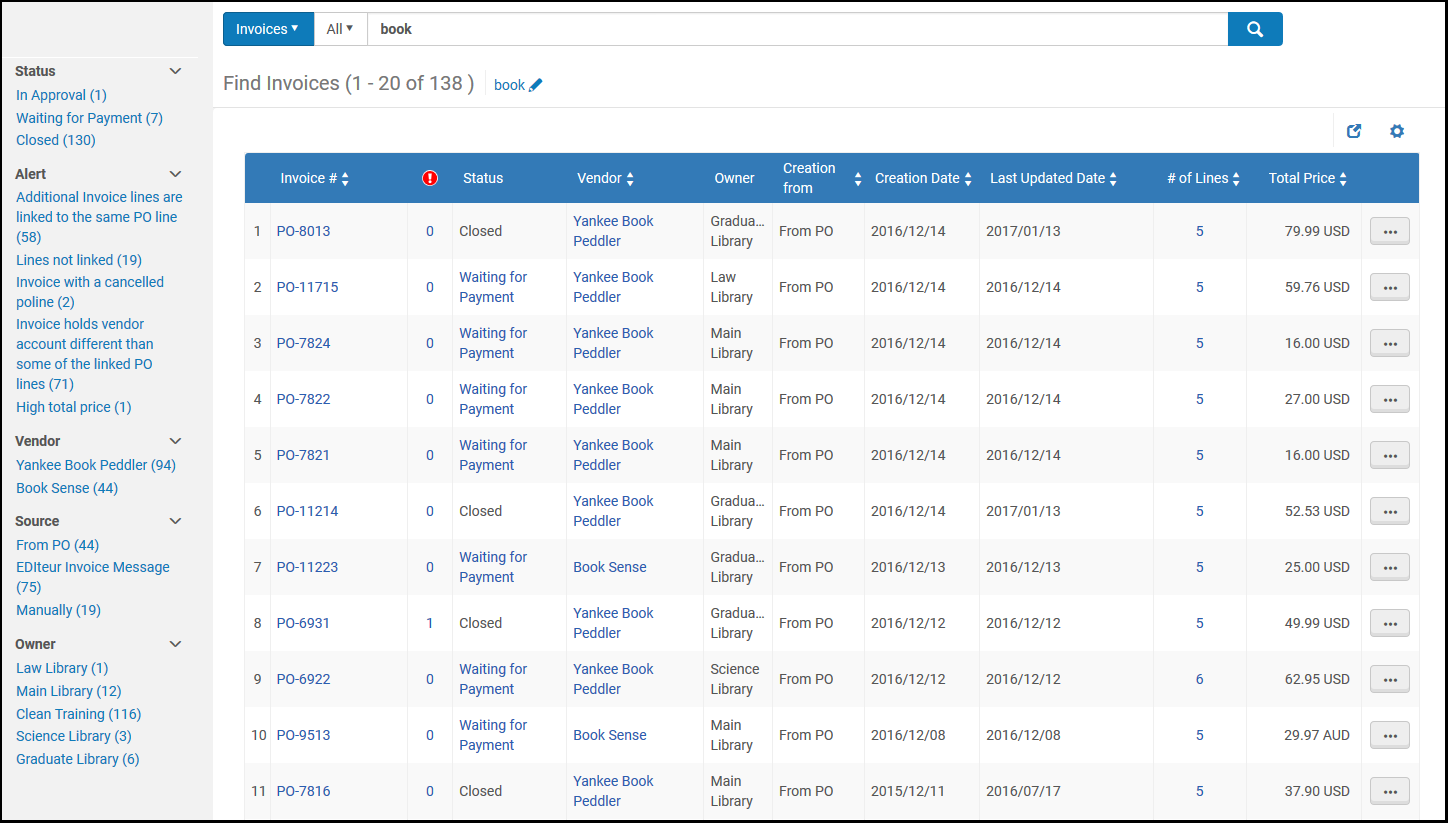
Search results for invoices (see Searching in Alma) appear on a results page.
ステータスによる請求書の検索
次の検索文字列を使用して、特定のステータスの請求書を検索することもできます:
- クローズ - closedを検索しますInvoices whose status is "Closed" are displayed as "Approved" when opening the invoice.This is because the status in "Invoice details" refers to the Approval Status and not the Status of the Invoice.
- 承認中 - inapprovalを検索します
- レビュー中 - inreviewを検索します
- Ready to be paid – Search for ready to be paidこれらの請求書は、次のERPエクスポートジョブによって処理されます。For more information, see Financial Systems.
- Waiting for Payment – Search for waiting to be sentこれらの請求書はERPエクスポートジョブによって処理され、現在支払ステップ待ちの状態です。
ファセットを使用して検索結果をフィルタリングする
ページの左側にあるファセットを使用して、選択した基準を満たすものだけを表示するように結果をフィルタリングすることで、特定の請求書を見つけることができます。
以下のファセットが利用可能です:
- ステータス – 請求書のステータス。
- Alert – The type of alert for the invoice—for example,Additional invoice lines are Linked to the same PO line, Currency different from PO, and Invoice with the same number exists
- ベンダー – 請求書の支払い先となるベンダー
- ソース – 請求書が作成されたモード(ファイル、EDI、注文書明細、または手動)
- 所有者 – 請求書に関連付けられた機関または図書館
検索結果の列とオプション
[請求書の検索]ページには、各請求書について次の列が表示されます。
| 列 | 説明 |
|---|---|
| 請求書 # | 請求書番号 |

|
請求書のアラート数
値を選択して[請求書の詳細]ページを開き、請求書のアラートを表示します。 |
| ステータス | 請求書のステータス |
| ベンダー | 請求書の送付先となるベンダー |
| 所有者 | 請求書に関連付けられた機関または図書館 |
| 作成方法 | 請求書が作成された方法 |
| 作成日 | 請求書が作成された日付 |
| 最終更新日 | The date of the invoice's most recent update |
| 総額 | 請求書の総額 |
| ライン数 | 請求書に含める注文書明細の数 |
請求書を表示するには、行アクションリストで表示を選択します。[請求書の詳細]ページが開きます。このページのフィールドは編集できません。
レビュー中の請求書のリストに移動するには、行アクションリストでタスクリストへ移動するを選択します。The In Review Invoices page opens (see Reviewing Invoices).
Page tags: article:topicproduct:almacontent:Documentationlang:englishfind invoicesearch for invoice
