
Jobs Progress Details
Introduction
Almaジョブを使用すると、多数のエンティティでバッチプロセスを実行できます。一部のジョブでは、ジョブ群をバルクと呼ばれる個別の作業単位に分割します。これらの作業単位は相互に依存せず、並列処理できます。
ジョブの進行状況の詳細は、バルク実行されるジョブで利用でき、実行全体を通した進行状況を示すことで、ステータスの透明性を高め、ジョブの健全性を判断する助けになります。
Job Stages
- Pending — A submitted job waiting to be triggered by Alma.利用可能なシステムリソースが存在しない場合は、ジョブはシステム リソースが利用可能になるまで保留中ステータスを維持します。
- 初期化 - ジョブが開始されると、初期化段階から始まります。初期化段階で実行される操作は、ジョブの種類によって異なります。バルクを処理するジョブの場合、初期化段階でバルクが作成されます。
- Processing — The main job stage during which the job’s work is done.
- 最終処理— ジョブが終了する前に、最終処理段階が実行されます。最終処理段階で実行される操作は、ジョブの種類によって異なります。
Jobs Queue
バルクはジョブの初期化中に作成され、最初に処理待ちステータスが割り当てられます。Bulks in the waiting list are periodically moved to the queue in a process called a Round.A job cannot exceed the maximum allowed number of bulks in the queue at a time.A job Round moves the maximum number of bulks to the queue without exceeding the limit.
Bulks are processed from the Jobs Queue.Alma continuously optimizes and prioritizes running jobs to allocate resources effectively.Bulks of jobs assigned a higher priority may be processed before bulks of jobs with lower priority.
Job Progress Details
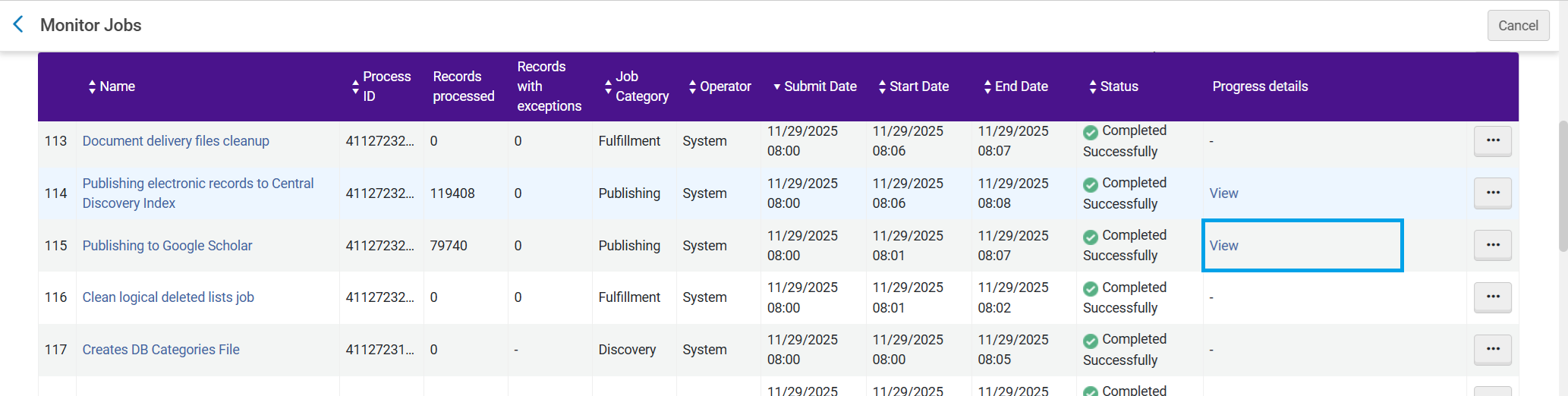
To access a job’s “Progress Details” page, from the Monitor Jobs page (Admin > Monitor Jobs), in the Progress details column, select View, or from the job's action menu, select Progress details.
すべてのジョブに進捗状況の詳細ページがあるわけではありません。
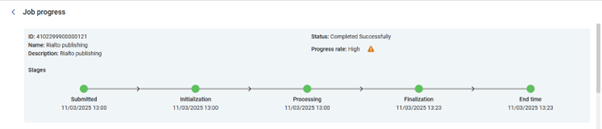
Basic Details
ジョブの進捗状況の詳細には次のものが含まれます。
- ジョブID、名前、説明、ステータス
- ジョブ進捗率 – ジョブの全体的な進捗のスコア
- Low— when the progress is significantly lower than expected
- Medium— when the progress is slightly lower than expected
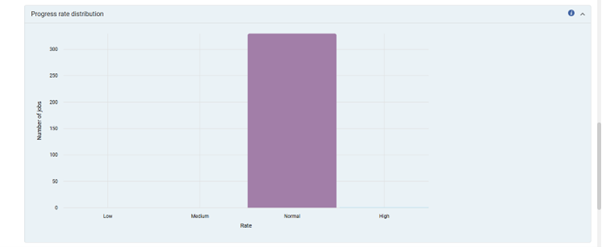
- Normal— when the progress is as expected
- High— when the progress is higher than expected
- ジョブステージの開始時刻
Bulks Awaiting Processing
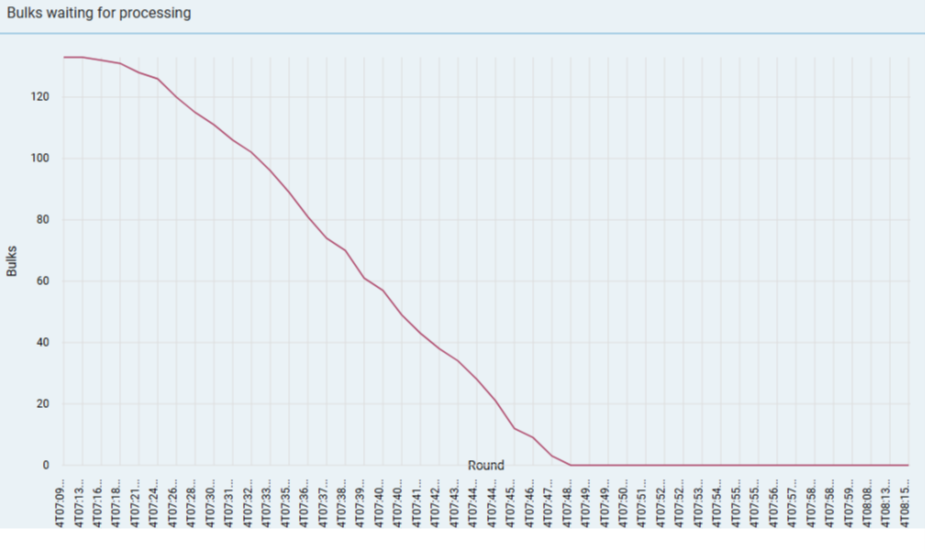
The number of bulks awaiting processing and have not yet been moved into the Jobs queue in each Round.After the initialization stage, the number of awaiting bulks should decrease steadily.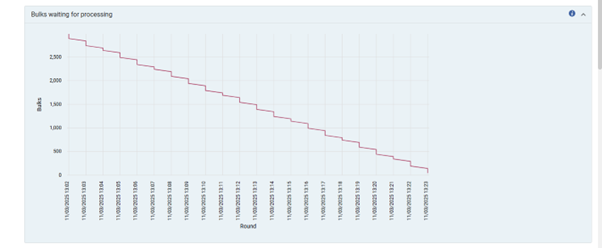
Bulks in Queue and Transferred
The Bulks in queue transferred graph displays the number of bulks in the Jobs Queue and the number of bulks transferred from the waiting list into the Jobs Queue in each Round.
ラウンドの実行時にキュー内にバルクが残っている場合、キューに転送されるバルク数は少なくなります。The number of bulks transferred corresponds to the decrease in the number of waiting bulks.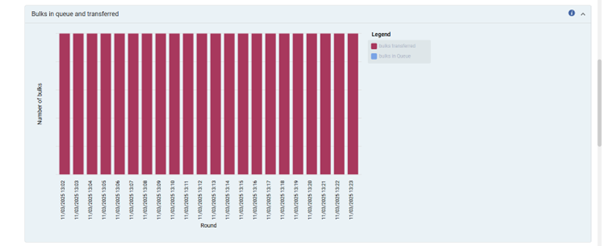
Progress Rate Distribution
各進捗率について、過去3か月間の同じタイプのジョブでその進捗率であったジョブ実行の数を表示します。
Bulks Processing Examples
- 順調な進行 - 待機中のバルク数は着実に減少し、各ラウンドの開始時にキュー内のバルクの数は 0 になります。
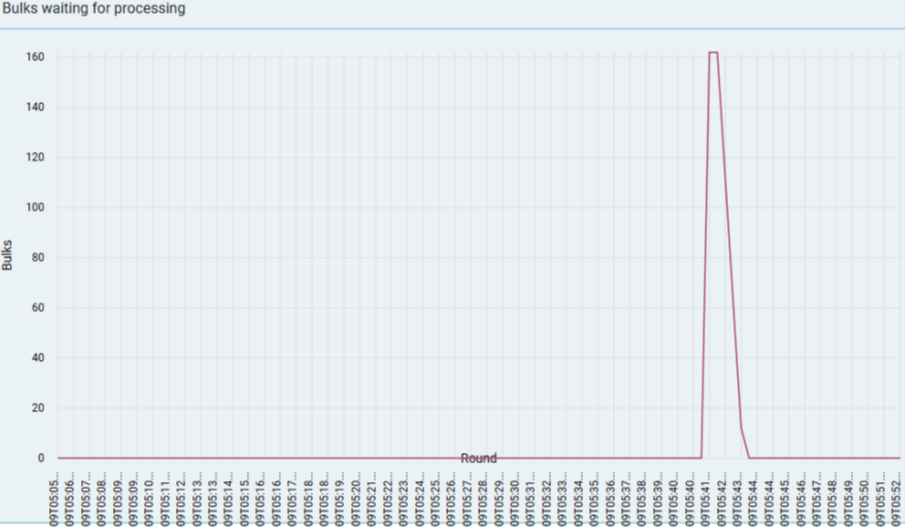
- Waiting bulks is 0 at the end of the job for multiple rounds, and there are still bulks in the queue.The job is still running and needs to process the remaining bulks in the queue, and there are no more bulks waiting to be moved into the queue.
- Waiting bulks is 1 at the start of the job for multiple rounds.This is the initialization stage.
FAQ
Q: ジョブに進捗状況の詳細が表示されないのはなぜですか?
A: Not all jobs have progress details.進捗状況の詳細は、バルクで処理されるジョブでのみ利用できます。
Q: Why was my job in Pending status for an extended time?
A: A job may remain in Pending status for several reasons, for example, when waiting for available system resources.
Q: ジョブの初期化/最終段階に他のジョブに比べて時間がかかったのはなぜですか?
A: 初期化段階と最終段階で実行される操作はジョブの種類によって異なり、場合によってはジョブが実行されるアイテムによっても異なります。
