
Viewing Running Jobs
このページでは、Alma で完了したジョブを表示する方法について説明します。For a page with links to information about managing jobs in Alma including scheduled and manual, see Managing Jobs in Alma.
You can view all jobs that are currently running on the Running tab of the Monitor Jobs page (Admin > Manage Jobs and Sets > Monitor Jobs).さらに、Almaには、特定タイプの実行中および完了済のジョブのリストを表示する専用ページが含まれています。For the list of job types with their own Alma pages, see Job Types with Their Own Management Pages.
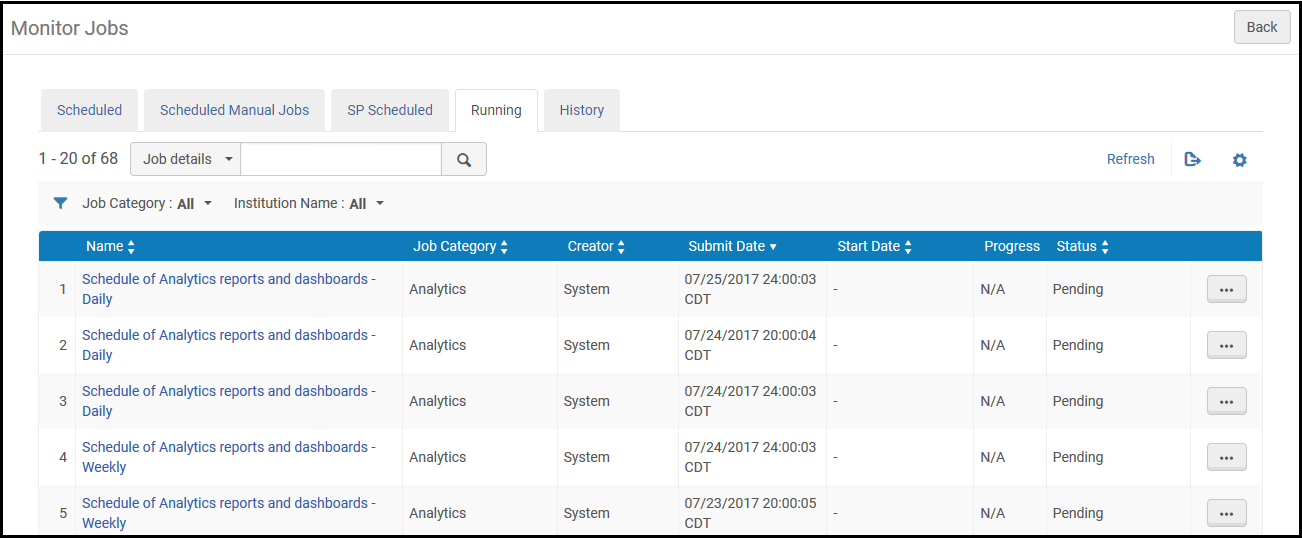
The Running tab of the Monitor Jobs page lists all running jobs.ジョブカテゴリでリストをフィルタリングでき、クイック検索の検索フィールドを使用して検索できます。
共同ネットワークのネットワークゾーンでは、機関名でフィルタリングして、特定の機関で実行されるジョブを表示することもできます。ネットワークゾーンの管理者は、メンバー機関によって実行されたジョブを中止できません。
Almaのジョブは、シングルスレッドまたはマルチスレッドのいずれかで実行されます。両者間の違いは下記の通りです:
- シングルスレッド – これらのジョブは、比較的短時間 (最大30分) 内に1回の実行で処理されます。The progress of the job is not shown in the Running tab.シングルスレッドジョブの例は、会計期間ロールオーバージョブです。
- マルチスレッド – これらのジョブは、並列スレッドを使用して小さなバルクで処理されます。The Running tab shows the job's progress as it is run.マルチスレッドジョブの例は、索引付け、公開、学生情報システムのインポート/同期です。
Each job in the Running tab includes the following information:
| 各列の名称 | 説明 |
|---|---|
| 名称 | ジョブの名称。 |
| ジョブカテゴリ | ジョブに関連付けられたユーザー役職および図書館のコンポーネントによって定義されたカテゴリ。 |
| 作成者 | ジョブを実行したユーザー。For user-submitted jobs, the name is the user's user name.システムジョブの場合、その名称はSystemです。 |
| 送信日時 | ジョブが送信された日時。 |
| 開始日時 | ジョブが開始された日時。 |
| 進捗状況 | ジョブの実行の進捗率。 |
| ステータス | ジョブの現在の進捗状況。下記のステータスが利用可能です:
|
ジョブの進捗に伴ってページの表示を更新するには、更新を選択します。
Job Types with their Own Management Pages
Almaには、特定タイプの実行中および完了済のジョブのリストを表示するページが含まれています。ジョブタイプとそのAlmaページには下記のものが含まれます:
- 受入:
- Delete POs – See Deleting POs
- Roll over ledgers – see Rolling Over Ledgers
- Roll over encumbered PO lines – see Rolling Over PO Lines
- Roll over resource sharing requests – See Rolling Over Resource Sharing Requests
- Import an embedded order data or inventory using an import profile – Monitor and View Import Jobs
- EDI communication – see Monitoring EDI Jobs
- アドミン:
- Purge users – see Purging Users
- Waive fines – see Waiving Fines in Bulk
- Manage circulation desk operators – see Managing Circulation Desk Operators
- Health check –HealthCheck Tool
- 統合プロファイル – これらのジョブの多くには、独自の実行/履歴ページがあります。For more information, see Configuring Integration Profiles.
- フルフィルメント:
- Change due dates – see Changing Loan Due Dates in Bulk
- Restore temporarily shelved items –Viewing Restore Request Jobs
- Upload loans and transactions created off-line – see Offline Circulation
- Mark items requiring action – see Items Requiring Action
- Run transfer requests – see Transferring All Requests to a Different Circulation Desk
- Create a fines and fees report – see Creating Fines and Fees Reports
- Match citations to inventory in bulk – see Matching Citations to Inventory in Bulk
- Lost Loans – see Viewing Overdue and Lost Loan Jobs
- Suggest alternate editions for citations – see Finding Alternate Resource Suggestions for Citations
- RENEW_PPU_LICENSE – see Renewing PPU Licenses After a Course Rollover
- 統合および公開プロファイル:
- Export/import invoice information from financial systems – see Financial Systems
- Send/receive EDI communication with vendors – see Monitoring EDI Jobs
- Publish inventories – see Publishing and Inventory Enrichment
- Import resource sharing borrowing requests – see Importing Resource Sharing Borrowing Requests From an External System
- Send requests to remote storage – see Requests to Remote Storage Facilities
- Import/export users from/to Student Information System (SIS) – see Student Information Systems
- Publish fines to a bursar system – see Bursar Systems
- Aleph Central Catalog – see Integrating an Aleph Central Catalog
- SBN – see SBN Job Report for Bibliographic and Authority Alignment
- リソース管理:
- Import a file using an import profile – see Monitor and View Import Jobs
- Overlap and Collection Analysis – see Overlap and Collection Analysis
- Export records using a publishing profile – see Publishing Profiles
