スケジュールされたジョブ
スケジュールされたすべてのジョブの表示
このページでは、Alma でスケジュールされたジョブを表示する方法について説明します。For a page with links to information about managing jobs including manual jobs, viewing running jobs, etc., see Managing Jobs in Alma.
The Scheduled tab of the Monitor Jobs page (Admin > Manage Jobs and Sets > Monitor Jobs) lists scheduled jobs:
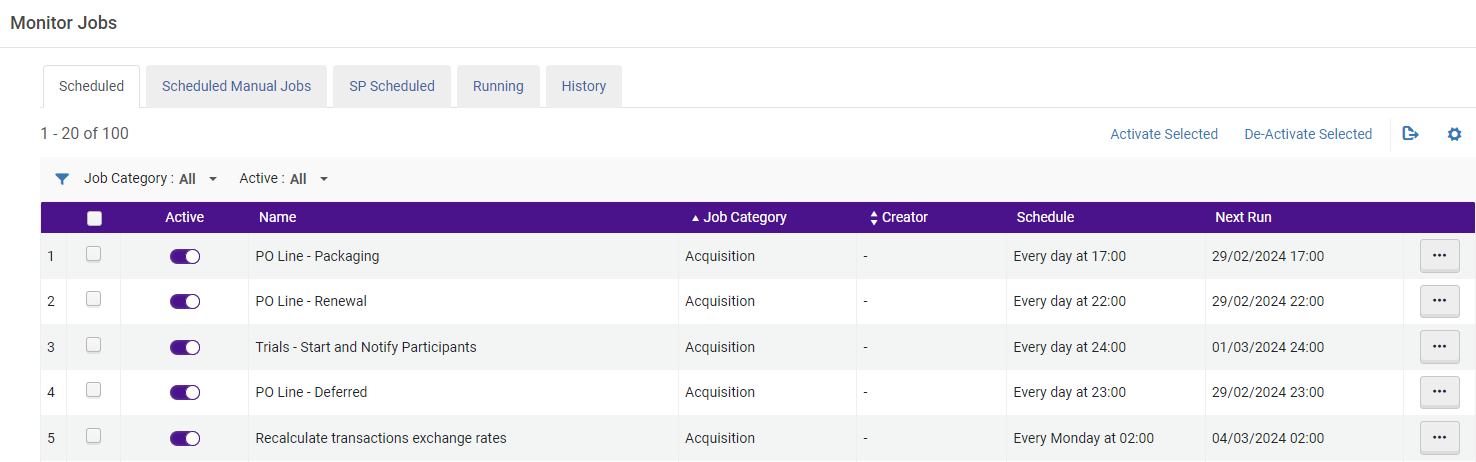
Whether a job appears in the Scheduled tab or not depends on the definitions in the "Scheduling" section definition of the job profile.If "Not scheduled" is defined, the job will not appear in the list: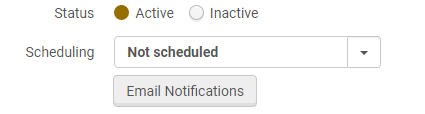
Viewing Scheduled Manual Jobs
The scheduled manual jobs are displayed in the Scheduled Manual Jobs tab (Admin > Manage Jobs and Sets > Monitor Jobs > Scheduled Manual Jobs).This list enables users to manage the scheduled manual jobs, edit the schedule, delete the schedule and so forth.This scheduling enhancement is applied to all manual jobs that can be run via Admin > Manage Jobs and Sets > Run a Job.「ジョブの実行」ウィザードの最後のステップにスケジュールフォームが追加されました。For more information, see Manual Jobs.
手動ジョブをスケジュールする場合、スケジュールされた時間はジョブの実行がトリガーされる時間であり、実際の実行は後で開始される場合があります(システムリソースによって異なります)。
The functionality in the Scheduled Manual Jobs tab is identical to the Scheduled tab with the exception that listed jobs can be Deleted or Run directly from the tab.
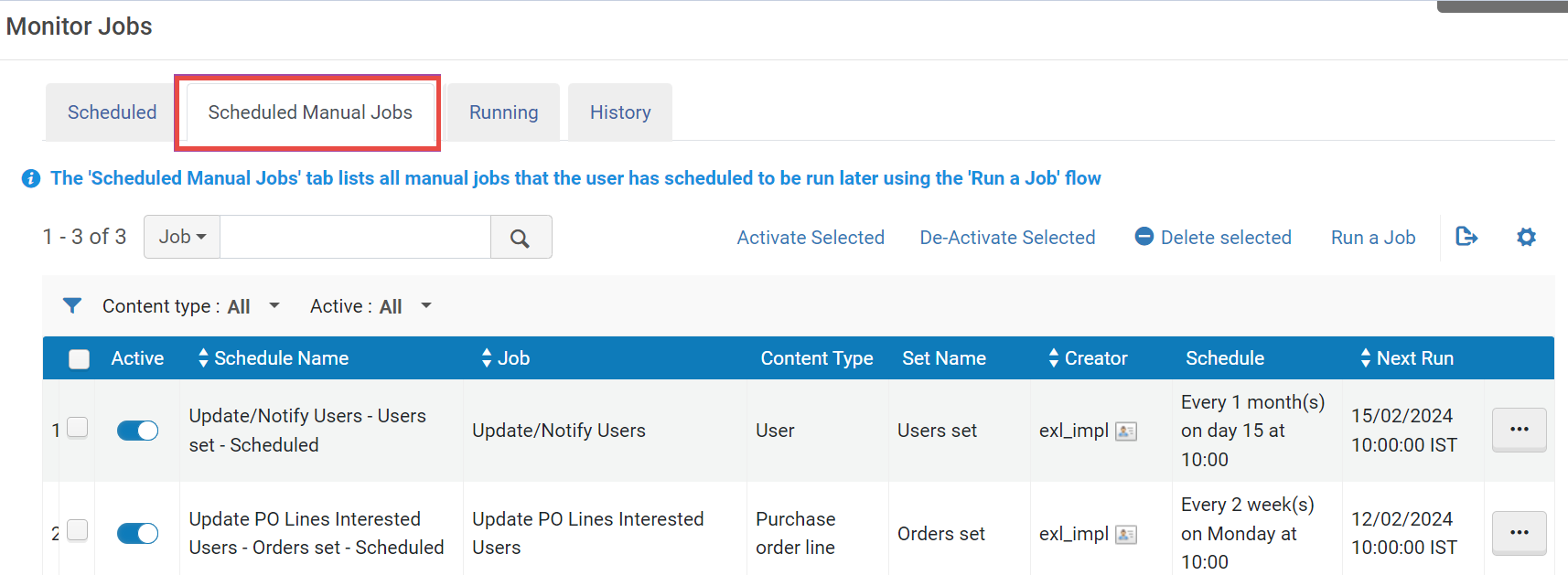
ジョブカテゴリでリストをフィルタリングできます。リスト内の各ジョブには、次の情報が含まれます。
| 各列の名称 | 説明 |
|---|---|
 (Checkbox) |
ジョブをアクティブ化または非アクティブ化する一括選択のための 1 つまたは複数のジョブの選択 (複数選択が有効) を有効にします。If for bulk action, after selecting the checkboxes of the desired jobs, select the Activate Selected or De-Activate Selected. |
| 有効 | ジョブがアクティブか非アクティブか。ジョブをアクティブや非アクティブにできるのは、Ex Librisのスタッフのみです(ただし、一部のジョブは図書館員がスケジュールできます)。 |
| 名称 | ジョブの名称。 |
| ジョブカテゴリ | ジョブのカテゴリ。 |
| 作成者 | ジョブをスケジュールしたユーザー。Almaによってスケジュールされたジョブは、ハイフン (-) で示されます。 |
| スケジュール | ジョブを実行する頻度と時期 (たとえば、毎日X時)。 |
| 次回の実行 |
このジョブを次に実行する日時。 時間は、貴機関に最も近いAlmaデータセンターのタイムゾーンに従って設定されます。 |
スケジュールされたジョブは、スケジュールされた時間にできるだけ近い時間に実行されます。一部のジョブは並行して実行できます。ただし、ジョブの一部またはすべてについて、サーバーに利用可能なリソースができるまで待機する場合もあります。
技術的な理由により、以下のジョブの開始時刻は予定時刻と異なる場合があります。
- CDI_PUBLISHING_JOB
- MAINTENANCE_JOB
各ジョブについて、下記のことができます:
- ジョブの実行後に送信されるEメール通知を設定します (Eメール通知)。For more information, see Configuring Email Notifications for Scheduled Jobs.
- ジョブの完了した実行を表示します (ジョブ履歴)。履歴内のスケジュールされたジョブはタイプ別にグループ化されていることに注意してください。For more information, see Viewing Completed Jobs.For reviewing history and reports of "Upload electronic holdings" jobs, we recommend viewing the information in the integration profile.
今すぐ実行オプションは、サンドボックス環境のみで利用可能です。
このタブに通常表示されるジョブを下表で説明します。The User column indicates if you can (partially or fully) control the job's schedule; see the Description column for a link to the section that discusses scheduling the job.
Rialto, Leganto, Esploroに関連するジョブは以下を参照してください:
- Rialto - Jobs related to Rialto are labeled "Rialto [job name]", for instance, Rialto Title Alerts.
- Esploro - Jobs related to Esploro are described with "Esploro customers only" and in the Scheduled Jobs of the Esploro documentation.
- Leganto - Jobs related to Leganto are under "Fulfilment" and are not particularly labeled "Leganto" since both Alma and Leganto use these jobs.
Scheduled Jobs
| 名称 | ユーザー | カテゴリ | 説明 |
|---|---|---|---|
| 発注明細 - パッケージング | はい | 受入 |
ベンダーに送信される注文書への自動パッケージングを待っている注文明細をパッケージします。For details on PO line packaging, see Packaging PO Lines into a PO. このジョブは、注文明細の自動パッケージングにのみ関係します。Ex Libris must enable this job in order for PO lines to automatically be packaged into POs.The e-mail generated from the "PO Line - Packaging job" will not be sent to the operator if there are no PO lines to package.If a PO line is assigned to a user, the job will not be able to process it.その場合、割り当てを解除する必要があります。 For more information and scheduling options, see Configuring Acquisition Jobs. |
| 発注明細 - 更新 | いいえ | 受入 |
雑誌、ジャーナル、定期刊行物など、電子資料と冊子資料の両方の購読を更新します。For more information about the renewal workflow, see Renewal Workflow. 注文明細を更新するには、Ex Librisがこのジョブを有効にする必要があります。 Each day the system checks for all PO lines whose status is Recurring Renewal and whose renewal date is equal to the current date.更新日は、更新日 (注文明細による) から更新通知期間を引いて計算されます。 更新は次のように処理されます:
|
| 発注 - クレーム - 自動プロセス | いいえ | 受入 |
関連付けられたリソースがまだ受入されていないかアクティブ化されていない注文明細へのクレームを生成します。For more information about claims, see Processing Claims. クレームを生成するには、Ex Librisがこのジョブを有効にする必要があります。
See Configuring Other Settings (Acquisitions). |
| EDI - Load Files <vendor name> | はい | 受入 | ファイルデータはEDI形式である必要があります。そうでない場合、ファイルの読み込みに失敗し、ベンダーレコードに添付されたままになります。For more information, see Electronic Data Interchange (EDI).
You can run this manually on a single EDI invoice file; see Creating an Invoice From a File. |
| 試行 - 開始、参加者に通知 | いいえ | 受入 |
トライアルを開始し、トライアルが開始されたことを参加者に通知します。For details, see Evaluation Workflow.参加者に送信される通知は、トライアルレターです。For more information on the letter, see Configuring Alma Letters. トライアル参加者が通知を受入するには、Ex Librisがこのジョブを有効にする必要があります。 |
| 注文明細 – 延期済み | いいえ | 受入 | 延期された注文明細にアラートを追加します。アラートは、注文明細が延期された際に設定された延期リマインダーの日付に基づいています。See Deferring PO Lines. |
| 取引為替レートを再計算する | いいえ | 受入 | このジョブが実行されると、過去30日間に作成された取引は、取引の時点で適用されていた為替レートに従って更新されます。
明確な比率が取引のために設定されている場合、使われるレートは請求書発行時に定義されます;これらの取引は、このジョブには含まれていません。 デフォルトでは、このジョブは過去30日間が取引日である注文明細の為替レートと取引金額を更新します。為替レートの日付が取引日以降の場合、このジョブは、すべてのアクティブな取引 (負債と支出の両方) の為替レートと取引金額を更新します。 This job updates only transactions with incorrect exchange rates and is unrelated to the job Recalculate PO Line Encumbrances Based on Current Exchange Rates (see Configuring Explicit Exchange Rates). |
| PDA - PDAが閾値に達した際のアラート | はい | 受入 |
Sends notifications when funds for a patron-driven acquisition program are entirely expended; customers can suppress publishing the patron-driven acquisition until the program's funds are replenished.送信される通知は、PDA閾値レターです。For more information on the notification letter, see Configuring Alma Letters. For more information about pausing the patron-driven acquisition program, see To pause a PDA program. |
| 現在の為替レートに基づいて注文明細の負債を再計算する | いいえ | 受入 |
現在の為替レートに基づいて負債と予算残高を更新します。This is only relevant for open encumbrances (not yet entirely matched with equal or greater value disencumbrances), and where the encumbrances' currency is not the same as the fund's currency.See Managing Funds and Ledgers. This job is impacted by the recalculate_fund_transaction_with_explicit_exchange_rate customer parameter (see Configuring Other Settings). このジョブはデフォルトでは非アクティブになっています。ジョブを有効にするには、サポートにお問い合わせください。 このジョブは、取引為替レートの再計算ジョブとは無関係です;このジョブが正常に実行された場合、取引為替レートの再計算ジョブを訂正すべき問題のある取引はありません。It also does not update any transaction where the Explicit Ratio parameter = "Yes". |
| リモートストレージにリクエストを送信 | いいえ | フルフィルメント | リモート ストレージ アイテムに配置されたリクエストをリモート ストレージ システムにエクスポートします。 |
| Eアクティベーション期限通知タスク | いいえ | 受入 | Sends a notification, Notify E-Activation due Letter, to the assigned operator when an electronic activation task's due date has passed.For more information about this due date, see Activating Electronic Resources and the Activation Task List.
To configure the notification, see Configuring Alma Letters. |
| プロファイル <integration profile> を使用したERPエクスポート | はい | 受入 | プロファイルとして定義されている場合、請求書をエンタープライズリソースプランニング (Enterprise Resource Planning, ERP) システムに送信します。For more information, including scheduling, see Financial Systems. |
| プロファイル <integration profile> を使用したERPインポート | はい | 受入 | プロファイルとして定義されている場合、エンタープライズリソースプランニング (ERP) システムから支払い確認を受入します。For more information, including scheduling, see Financial Systems. |
| 資金のTX作業の更新 | はい | 受入 | エンタープライズリソースプランニング (ERP) システムの予算割当を読み込みます。For more information, including scheduling, see Financial Systems. |
| Sushi harvesting job | いいえ | 受入 | すべてのアクティブなSUSHIアカウントからすべてのCOUNTERデータを収集します。See Managing SUSHI Harvesting. |
| 発注承認をインポートする | はい | 受入 | エンタープライズリソースプランニング (ERP) システムがERP番号を注文書に追加した後に注文書をロードします。For more information, including scheduling, see Financial Systems. |
| Inn-Researchリクエストの更新ジョブ | いいえ | フルフィルメント | D2IR API の V3 が実装されている中央の Inn-Reach システムからリクエストの更新をプルするために使用されます。 |
| Distribute Network Acquisition Changes to Members | はい | 受入 | Distributes new vendor information and/or centrally managed licenses that were added to a Network Zone to member institutions since the date in the acq_distribute_changes_last_run parameter.For more information, see Jobs for Centrally Managing Configurations and Profiles in the Network Zone. |
| 発注明細 - 関心のあるユーザーを削除する | いいえ | 受入 |
Runs weekly to delete interested users that are linked to closed or canceled PO lines.このジョブは、PO行から関心ユーザーを削除する前に、『関心あり』レターがそのユーザーへ送信されたことを確認します。レターが送られていない場合、関心のあるユーザーは、閉鎖またはキャンセルされた注文明細から削除されません。See Manually Creating a PO Line. このジョブはデフォルトでは非アクティブになっています。ジョブを有効にするには、サポートにお問い合わせください。 |
| 設定 - システムでヘルスチェックテストを実行 | はい | アドミン | Almaの管理者が、設定に問題があるかどうかを識別できます。See HealthCheck Tool for more information. |
| 機関推奨作業 | いいえ | アドミン | 他のジョブでは生成されない一般的な推奨事項を生成します |
| スマート推奨反映作業 | いいえ | アドミン | 無関係な推奨事項を排除します |
| 機能推奨作業 | いいえ | アドミン | Almaの新機能を使用するための顧客向けの推奨事項を生成します |
| アナリティクスレポートに基づいて推奨内容を生成する | いいえ | アドミン | 分析レポートに基づく推奨事項を生成する |
| ジョブに関する推奨事項 | いいえ | 管理部門 | Monitors Student Information System (SIS) jobs and Metadata Import (MD Import) jobs for the No Job Instance, Job Failure, and No Data Processed recommendations.
ジョブレポートには次の情報が表示されます。
|
|
いいえ | アナリティックス | スケジュールされたすべてのリポートとダッシュボードを処理し、購読するユーザーに配布します。See Working with Analytics Objects.
毎日・毎週・毎月の処理のためにそれぞれ2つのジョブがあります。これにより、スタッフユーザーは、ETLプロセスの完了と同時にダッシュボードとリポートを実行するようにスケジュールできます。 |
| アナリティックス利用の追跡 | いいえ | アナリティックス | 機関におけるAlmaアナリティックスの利用状況を収集します。これは、「アナリティックス利用の追跡」サブジェクトエリアに反映されます。For more information, see Analytics Usage Tracking. |
| アナリティクスレポートに基づいて推奨内容を生成する | いいえ | アナリティックス | Almaアナリティックスレポートに基づくDARA推奨を生成します。For more information, see DARA – Data Analysis Recommendation Assistant. |
| 推奨事項 グローバルインデックス 求人 | いいえ | アナリティクス | Some Dara recommendations are based on global indexes, for example SUSHI harvesting recommendations.このジョブは関連するインデックスを構築します。 |
| Springshare からデータをインポートする | いいえ | アナリティクス | SpringshareからAlma Analyticsにデータをインポートします。For more information, see Springshare Integration. |
| コンテキストオブジェクトをBX作業へエクスポートする | いいえ | データサービス |
このジョブは、Almaリンクリゾルバデータ統計をbXコミュニティと共有して、bXの推奨サービスを充実化します。 See Sharing Alma Link Resolver Data Statistics with bX for more information. |
| CZから変更を同期 | いいえ | Data Services + Administration |
このジョブはCZで行われた変更を機関と同期します。たとえば、SUSHIベンダーの収集URL、ポートフォリオ、書誌レコード、および典拠情報の更新などです。 コミュニティゾーンの書誌レコードへの変更は、コミュニティゾーンの書誌レコードを使用するすべての機関に自動的に反映されます。更新されたコミュニティゾーンレコードにリンクされたレコードを使用する教育機関の場合、CZジョブからの変更の同期の実行が終了した後、変更は教育機関のレコードに反映されます。 For more information, see Last Updated from Community Zone.
|
| NZで CZ レコードをキャッシュする | いいえ | Data Services + Administration | CZ データを、CZ にリンクされている NZ レコードと同期します。 |
| CZ更新CDI プロバイダー | ディスカバリー |
このジョブはCDI構成内のプロバイダーのリストを確認しますCDI リンクのプロバイダーの優先順位最新の状態に保たれます。This configuration can be found in Discovery > Central Index and proxy set-up for Primo VE customers and also in Fulfillment > Discovery Interface Display Logic > Central Index for Alma/Primo customers. |
|
|
DBカテゴリファイルの作成 |
いいえ |
ディスカバリー |
PrimoおよびPrimo VEの場合、このジョブは毎日1回実行されデータベースカテゴリのツリーを作成/更新します。これには最大3つのカテゴリレベルが含まれ、データベース検索ページに表示されます。このジョブは、以下が当てはまる電子コレクションに接続されているすべてのMARCレコードを処理します:
データベース検索の設定の詳細については、ご自身の環境に関連するページを参照してください。
DBカテゴリを使用していて、このジョブがアクティブでない場合は、サポート チケットを開いてアクティブにしてください。 |
| ジャーナルカテゴリファイルを作成する | いいえ | ディスカバリー |
PrimoおよびPrimo VEの場合、ジャーナル検索に表示されるカテゴリ/サブカテゴリを作成/更新するために、ジャーナルカテゴリファイルの作成ジョブが毎日1回実行されます。システムは最大 3 つのカテゴリレベルを作成します。 For more information, see Configuring Journal Search for Primo VE. ジャーナルカテゴリを使用していて、このジョブがアクティブでない場合は、サポートチケットを開いてアクティブにしてください。 |
| 保存された検索のアラート | いいえ | ディスカバリー |
Primo VEのユーザーは、保存された検索に新しい結果が含まれる場合、クエリを作成し、毎週のEメールアラートをリクエストできます。このプロセスはこれらのクエリを確認し、保存した検索レターを使用して結果を送信します。 これらのアラートには、Primo VEに直接ロードされたものなど、すべてのレコードが含まれます。 |
| Requests - Handle Expiration Step | いいえ | フルフィルメント |
リクエストの期限設定、リクエストされたアイテムを行方不明としてマークする、リクエストをリソースシェアリクエストに変換するなど、リクエストのピックアップ設定で定義されたアクションを実行します。For more information on configuring the rules, see Configuring Request Pickup Rules.If no rules are configured, the requested items are marked as missing. For information on configuring this job, see Configuring Fulfillment Jobs. |
| 貸出 - カレンダー変更後の返却期限訂正 | いいえ | フルフィルメント |
カレンダーの変更により、返却期日が休業日(ポリシーで定められている場合)に当たる場合、貸出の期日を変更します。これは、たとえばカレンダーの例外として閉館日が追加された場合に必要です。元の返却期日が閉館日である貸出資料は、関連する利用規約のポリシーに従って更新されます。返却期日のポリシーに時間/分パラメータが含まれている場合、このジョブは返却期日をそのまま保持し、閉館図書館の返却期日管理ポリシーを無視します。 このジョブを正しく実行するには、貸出ステータス通知レターを有効にする必要があります。Otherwise, the job will complete with errors. For information on configuring this job, see Configuring Fulfillment Jobs. |
| 通知 - 案内通知と取扱貸出更新の送信 | はい | フルフィルメント |
その返却期日からauto_renew_loan_daysパラメータの値を引いたものが、現在の日付かそれより短くなる貸出資料を管理します。For additional information and examples see Configuring Fulfillment Jobs. このジョブは、自動貸出更新ルール、利用規約、および既存のリコールに応じて、次のいずれかを実行します。
For short term loans see Configuring Short Term Loans. When first running this job, or running it after a period of inactivity, an internal parameter that stores the date of the job's last run needs to be manually updated to the day before the expected run date to prevent courtesy notices for loans with due date in the past.パラメータをアップデートする必要がある場合は、Ex Libris サポートにお問い合わせください。 For information on configuring this job, see Configuring Fulfillment Jobs.For information on configuring the notifications, see Configuring Alma Letters.For more information about the parameters, see Configuring Other Settings. |
| 通知 - 取置き棚リマインダーの送信ジョブ | はい | フルフィルメント |
Allows you to send a reminder notification to the patron after a set number of days.This scheduled job sends out the letter On Hold Shelf Letter Reminder, and it is possible to configure how many days after being placed on the hold shelf the reminder will be sent, and whether the reminder will continue to be sent at the configured interval until the Hold Shelf expiry. For information on configuring this job, see Configuring Fulfillment Jobs. |
| フルフィルメント - 履歴アーカイブの処理 | いいえ | フルフィルメント |
スケジュールされた時にのみ表示されます。完了した貸出、罰金および手数料、取り置きリクエスト、リソースシェアリクエストをアーカイブします。 アクティブな罰金は、アイテムおよび貸出情報へのリンクを保持しています。 For information on configuring this job, see the Anonymization job entry in Configuring Fulfillment Jobs. |
| 通知 - 定期フルフィルメントアクティビティレポートの送信 | はい | フルフィルメント | 定期フルフィルメントアクティビティリポートを、アクティブな貸出や手数料を有するユーザーに送信します。リポートには、貸出と手数料の両方に関する情報が含まれています。リポートには、最大100件のアクティブな貸出資料が含まれています。For information on configuring this job, see Configuring Fulfillment Jobs.For information on configuring this notification, the Borrowing Activity letter, see Configuring Alma Letters.
このジョブがエラーで完了した場合、ジョブは正常に実行されたが送信されたEメールをユーザーが受信していない、という可能性があります。 |
| 通知 - 返却期限リマインダーの送信 | はい | フルフィルメント |
Sends the Overdue Notice letter to patrons to indicate that loaned items are due on the current date.Note that this letter does not include short loans: items which have a loan period defined by hours and were loaned and are due the same day the letter is sent.For details on these type of loans and for configuring the reminder, see Configuring Short Term Loans. The Courtesy Letter is sent before this notice.For information on configuring this job, see the Overdue Notices job in Configuring Fulfillment Jobs. このジョブは、貸出の処理フィールドから毎日のリマインダーを送信するように設定できます。For more information, see Configuring Fulfillment Jobs. |
| リクエスト - 一時的に書架に配置されたアイテムを戻す | いいえ | フルフィルメント |
返却期限日が現在の日付かそれ以前であり、一時的に書棚に配置されたすべてのアイテムについてアイテム復元リクエストを作成します。これにより、これらの場所にある貸出・返却受付オペレータに対し、アイテムを恒久的な場所に復元するよう通知します。For more information on this job, see Viewing Restore Request Jobs.For information on configuring this job, see Configuring Fulfillment Jobs. これらのアイテムには次のものが含まれます。
|
| Requests - Recalculate after Inventory Update | いいえ | フルフィルメント |
目録に変更が加えられた後、リクエストを再計算します。その結果、リクエストがキャンセルされたり、リソースシェアリクエストに変換されたり、別のアイテムが添付されたりする場合があります。 For example, if an item's policy changes or a request for the item can no longer be fulfilled due to the item having been added to the repository or deleted from it, marked as missing, or moved to a different owning library/location, and no other items can fulfill this request, the job cancels the request.ポリシーに従って2番目のアイテムが利用可能な場合、リクエストは2番目のアイテムにリンクされます。 If an item is determined to be lost or claimed returned and the policy for a lost or claimed returned loan is Not Requestable, this job detaches the request from the item and cancels the request. リクエストの作成後に他のアイテムが利用可能になった場合、シェルフリクエストポリシーは無視され、リクエストはキャンセルされません。 システムは、目録が削除されることを許可します-したがって、付随するリクエストは、リクエストが取置き棚に到達するまでに別のアイテムに振り替えられるかキャンセルされます。この時点では、リクエストとそれに関連付けられている目録をキャンセルや削除することはできません。 このジョブは、過去7日間の目録変更のみを処理します。 このジョブは、フルフィルメントジョブの設定ページでアクティブ化およびスケジュールできます。See Configuring Fulfillment Jobs. |
| システムメンテナンス | いいえ | 管理部門 |
このバックグラウンド・ジョブは、最適なパフォーマンスとデータの一貫性を徹底するために、定期的なシステムメンテナンスのタスクを実行します。It runs automatically and does not require any user action. |
| 貸出 - 延滞と紛失アイテム | はい | フルフィルメント | Notifies patrons about overdue loans and/or changes a loan's status to lost according to the configuration for lost loan profiles.単一の延滞・紛失アイテム通知 (ユーザーの延滞・紛失貸出資料のすべてをリスト化したもの) を、ユーザーに送信するように設定できます。このように設定すると、ユーザーは通知タイプごとに1つの通知を受入します。
For information on configuring lost loan profiles, see Configuring Overdue and Lost Loan Profiles.For information on lost loan management, see Lost Loan Management.For information on configuring this job, see Configuring Fulfillment Jobs. To configure the notifications Ful Overdue and Lost Loan Letter and Ful Overdue and Lost Loan Notification letter, see Configuring Alma Letters. |
| 罰金/手数料通知 | はい | フルフィルメント | 未払いの罰金および手数料のあるユーザーに対するEメールやSMS通知を生成します。For information on fines/fees notifications, see Sending Patron Notifications for Fines and Fees.Letters are based on the Ful Fines/Fees Notification letter.For information on configuring letters, see Configuring Alma Letters.For information on configuring this job, see Configuring Fulfillment Jobs. |
| リソース共有のクレームとキャンセル | フルフィルメント |
パートナーレコードに設定されている期間に達すると、自動クレームレター (RSBorrowerClaimEmailLetter) がトリガーされます。For example, when the Automatic Claim check box is selected on the partner record and the Time to Claim (days) field is set to 7, then if a request was sent 7 days ago and the request's status is still Sent, a claim letter is automatically triggered, and the request status is set to Claimed. キャンセル メッセージを送信して当番表を続行するオプションを設定することもできます。電子メール/SLNP パートナーの場合、レターは電子メールで送信されます。For ISO requests, the notice is sent in a General Message.メッセージのテキストは設定できます。 |
|
| 延滞メッセージをリソースシェア・貸出パートナーに送信 | いいえ | フルフィルメント |
Labels lending requests as Overdue when a request's due date arrives and the request's status is not one of the following: Deleted, Canceled, Rejected, Expired, Returned by Partner. The job is working with Email, ISO, SLNP and NcipP2P partners.このジョブは、ILL(受付)が延滞としてマークされると、借用している図書館に自動で通知を発行します。When working with an ISO or ISO18626 partner, the job updates the borrowing institution with the request's Overdue status. If the partner has defined a "Resending Overdue Days Interval" in the Parameters tab, overdue messages will be resent every configured number of days (for the parameter, see ISO Parameters).アクティブな取寄せリクエストが見つからない場合、延滞メッセージは、ジョブが実行されるたびに送信されるのではなく、一度だけ送信されます。 取寄せ機関に送信されるレターは、取寄せ利用者延滞Eメールレターです。This letter must be active for overdue messages to be sent successfully to NcipP2P partners.Note that this letter is only sent to email partners.ISOパートナーはISOメッセージのみを受信します。 For information on configuring this job, see Configuring Fulfillment Jobs. |
| コース有効化/無効化 | いいえ | フルフィルメント |
コースのステータスを、開始日と終了日に合わせて変更します。コースを有効化すると、このジョブはすべての書誌データをコースデータとともに再公開します。コースを無効化すると、このジョブはすべての書誌データをコースデータなしで再公開します。 ステータスがアクティブまたは非アクティブの際に、コースのリーディングリストのステータスを自動化します。When multiple courses use the same reading list, this job is performed on the reading list as follows:
このジョブは、コース開始後に追加された書誌レコードも更新します。 For detailed information on courses, see Managing Courses. For information on configuring this job, see Configuring Fulfillment Jobs. |
| ユーザー - ブロックを削除 | いいえ | フルフィルメント |
期限切れのブロックをユーザーレコードから削除します。 This job determines whether suspended users fulfilled their suspension period, and if so, the user block is lifted.For demerit blocks, the job checks whether users exceeded the configured demerit threshold while on suspension, before removing the block.For more information, see Configuring Demerits.For information on configuring this job, see Configuring Fulfillment Jobs. |
| 期限切れのリソース共有リクエスト | はい | フルフィルメント | 期限切れのリソースシェアリクエストを確認します。有効期限は、貸出リクエストにおいて借り手により自動で通知されたため、貸し出す側の設定は必要ありません。リクエストが貸し手側で期限切れになると、借用者には有効期限が自動で通知されます。それに応じて、借用者は順番内の次のパートナーを有効化します。
このジョブは、有効期限が過去にあり、次のステータスのいずれかを含むリクエストについて実行されます。
期限切れにしたくないILL(受付)がある場合、そのリクエストに無期限のステータスを割り当てます。 ジョブが実行され、期限切れのリクエストが検出されると:
借用者は、期限切れのISOメッセージを受入すると、順番表内の次のパートナーを有効化します。順番表内に追加のパートナーがいない場合、リクエストは期限切れになります。 For information on configuring this job, see Configuring Fulfillment Jobs. |
| Distribute Central Resource Sharing Configuration | はい | フルフィルメント | ネットワークゾーン内のすべての機関に次を配布します。
For more information, see Jobs for Centrally Managing Configurations and Profiles in the Network Zone. |
| Distribute network fulfillment changes to members | はい | フルフィルメント | Distributes policies, Terms of Use, and fulfillment units configured in a Network Zone to all of the network's member institutions.For more information, see Jobs for Centrally Managing Configurations and Profiles in the Network Zone. |
| Legantoの通知をユーザーにEメールで送信する | はい | フルフィルメント |
貴機関でLegantoが有効になっている場合にのみ表示されます。Legantoへのリンクがあるインストラクターが通知を待っている際にEメールで通知します。Eメールのレターは、Leganto通知レターです。For information on configuring letters, see Configuring Alma Letters. To configure this job, see Configuring Fulfillment Jobs. |
| リクエスト - リポートを送信する | はい | フルフィルメント | 1人のユーザーごとに1つのレターを生成します。このレターでは、「アクティブでない」、「処理中」、「取置き棚」といったステータスごとにすべてのリクエストを詳細に提示します。レターは、Fulリクエストリポートレターです。For information on configuring this job, see Configuring Fulfillment Jobs.For information on configuring letters, see Configuring Alma Letters. |
| BLDSSリクエストの更新 | いいえ | フルフィルメント |
大英図書館からステータスのアップデートを受入するために有効にします。このジョブは、大英図書館がそのサーバーに投稿したアップデートを取得します。このジョブは、スケジューラーに2回表示されます。両方が有効になっている場合、ステータスの取得は1日に2回行われます。For more information, see British Library Document Supply Service (BLDSS). For information on activating/deactivating or manually running this job, see Configuring Fulfillment Jobs. |
| ドキュメントデリバリーファイルのクリーンアップ | いいえ | フルフィルメント |
ユーザーがアクセスした後にデジタル配信されたファイルを削除します (最大表示数パラメータで決定)。See Adding A Digitization and Copyright Rule. Document Delivery Files Cleanup job is not visible to users, including in the Job history. |
| CCCの同期 (Legantoのみ) | いいえ | フルフィルメント | 貴機関でLegantoが有効になっている場合にのみ表示されます。データをCCCと同期します。See Clearing Copyrights Through the Copyright Clearance Center (CCC). |
| UPDATE_READING_LIST_SCORE (Legantoのみ) | いいえ | フルフィルメント | 貴機関でLegantoが有効になっている場合にのみ表示されます。図書リストアドバイザーのスコアを更新します。See Managing the Reading List Advisor. |
|
期限切れ予約リクエストを処理する |
はい | フルフィルメント |
Considers all expired booking requests that are not in Failed,Rejected, or Completed statuses.The job runs daily by default.基準を満たす各リクエストはキャンセルされ、機関のリクエスト匿名化設定に従って匿名化されます。消去されたリクエスト手数料が設定されている場合、ジョブはその手数料を適用します。
For information on configuring this job, see Configuring Fulfillment Jobs. |
| DCS同期 | はい | フルフィルメント | 引用に対するDCSリクエストのステータスを6時間ごとに更新します。See Attaching a Citation to the CLA Digital Content Store.
To configure this job, see Configuring Fulfillment Jobs. |
| リソース共有完了済リクエストクリーンアップ | はい | フルフィルメント | リクエストが最終ステータスに到達してからの日数と、リクエストのステータスに基づいて、リソースシェアタスクリストからリクエストを削除できます。
取寄せリクエストの最終ステータスは次の通りです:
ILL(受付)の最終ステータスは次の通りです:
上記のステータスのいずれかにあり、リクエストの有効期間(リクエストの変更日に基づく)の範囲内にあるリクエストは、ステータスが削除済みに変更されます。Not selecting ‘number of days' means all requests that match the selected statuses are removed, regardless of when the request was completed.削除されたリクエストは、アクティブなタスクリストや完了したタスクリストに表示されません。削除されたリクエストは、アナリティックスでのみ表示可能です。 For information on configuring this job, see Configuring Fulfillment Jobs. |
| 電子ポートフォリオの利用可否を更新する | はい | リポジトリ |
Activates or deactivates portfolios based on the "Active from date" field. Almaは、カレンダー日付の終わりまでポートフォリオを有効化または無効化するのを待ちます。 |
| 論理削除されたリストのクリーンアップジョブ | はい | フルフィルメント | The Clean Logical Deleted Lists Job is a system operation designed to manage and optimize lists or datasets that contain logically deleted or marked-as-deleted records. |
| コース著作権の変更 | いいえ | フルフィルメント | The Course Copyright Change feature in Alma is a functionality designed to streamline the process of updating and managing copyright information associated with course materials within the library's database.For more information, see Configuring Copyright Management. |
| Bolk同期 | いいえ | フルフィルメント | This job can be enabled to check Bolk's (service to support Norwegian copyright requests - see Integrating with Bolk) status and update the status in Leganto accordingly.このジョブのデフォルト設定は無効です。このジョブを有効にするには、サポートにお問い合わせください。 |
| ReShare更新ジョブ | いいえ | フルフィルメント | Rapido ユーザーのみ対象です。Rapido creates a ReShare ID so that both Rapido and ReShare stay in sync.When configuring the ReShare credentials, the job runs every four hours and is enabled automatically upon configuring ReShare. |
| Rapidoデジタルのリクエスト・ジョブの自動発送 | はい | フルフィルメント | Rapido ユーザーのみ対象です。See Automating Digital Requests. |
| パートナーに請求書を送信 | はい | フルフィルメント | Rapido ユーザーのみ対象です。See Send Invoice to Partner Job. |
| <import profile> によるメタデータのインポート | はい | インポート |
FTPを使用するインポートプロファイルの書誌レコードをインポートします。For more information, see Configuring New Import Profiles. When the OAI Import Profile fails due to socket timeout exception, the system loads into Alma the number of records that it was able to import up to the moment of exception.If reconnect attempts are unsuccessful, the system saves the resumption token and attempts to use it in the next session of the job, resuming import from the resumption token. |
| はい | 公開中 | Publishes institution or Network Zone records to Primo, Primo Central, or CDI.For more information, including scheduling, see Publishing to Primo, Publishing Bibliographic Records to Primo When Working with a Network Zone and Publishing Electronic Records to Central Discovery Index. | |
| RSSフィードの公開 <profile name> | はい | 公開 | RSSフィードを公開します。For more information, including scheduling, see RSS Publishing. |
| プラットフォームジョブの公開 <profile name> | はい | 公開 |
一般プロファイルの設定に従ってレコードを公開します。For more information, including scheduling, see Publishing and Inventory Enrichment. Note that if the publishing process fails, all the records that did not publish will be published by the next publishing process. |
| Google Scholarへ公開中 | はい | 公開 | レコードをGoogle Scholarに公開します。For more information, including scheduling, see Publishing Electronic Holdings to Google Scholar. |
|
はい | 公開 | 書誌/所蔵レコードおよび埋め込まれた所蔵情報をOCLCに公開します。For more information, see Publishing to OCLC. |
| PubMedにレコードを公開する | はい | 公開中 | Publishes bibliographic records to PubMed. For more information, see Publishing to PubMed. |
| オーストラリアの図書館へ所蔵をアップロードする | はい | 公開中 | Publishes records (all, or updates) marked to be published to Libraries Australia (by the job Synchronize MMS with National Catalog)
For configuration and scheduling information, see Libraries Australia Publishing Profile. |
|
Summonへ公開中 |
はい |
公開 |
書誌レコードをSummonに公開しますThis job is scheduled with the Publish bibliographic records to Summon publishing profile.See Publishing Records to Summon for more information. |
|
目録 - 電子パッケージのアクティベーション/非アクティベーション |
いいえ |
リポジトリ |
有効化の開始日と終了日に従って電子コレクションの利用可否を設定します。For more information, including configuration, see Activation Tab Options. |
| MMS - レコード関連性の構築 | いいえ | リポジトリ | MMS (書誌) レコード間の関係を作成します。See Using the MARC Linking Fields for Related Records for more information. |
|
典拠 - ローカルな典拠レコードの更新を処理する |
いいえ |
リポジトリ |
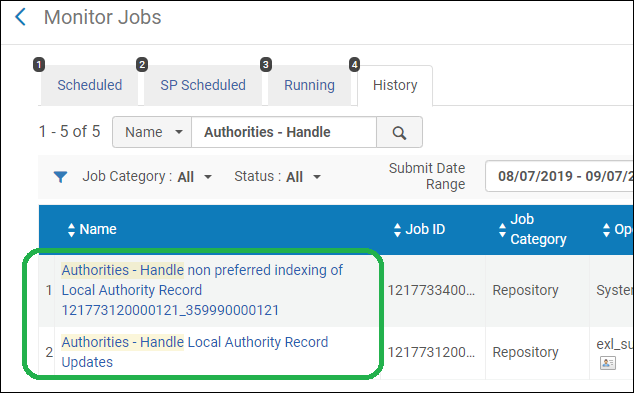
このジョブは、MDエディタでローカル典拠レコードをインポートする際や、ローカル典拠レコードを更新する際に使用されます。 このジョブは、IDに基づく典拠の制御用に設定され、メタデータ設定で直接ID接頭語を実装した機関について自動ID変更を処理するためにも使用されます。See the Updating the Authority Record ID Automatically in Bibliographic Records section for more information. In cases where this job runs and the system finds more than 10,000 bibliographic headings linked to one authority record, a new indexing job called Authorities - Handle non preferred indexing of Local Authority Record <job ID of the related "Authorities - Handle Local Authority Record Updates" job> is automatically triggered to handle the non-preferred term indexing.これにより、ジョブを完了するためのパフォーマンスが向上します。
|
| Authorities - Link BIB Headings | いいえ | リポジトリ |
一致する典拠の見出し (優先および非優先) に書誌の見出しをリンクします。ローカルな典拠が有効になっている場合、その典拠を優先します。非優先典拠の見出しにリンクされている書誌の見出しは、優先語の訂正用にマークされます。 処理は次の方法で行われます。
For more information, see Working with Authority Records. |
|
典拠 - 優先語の修正 |
いいえ | リポジトリ |
Updates bibliographic data fields that were marked for preferred term correction by the Authorities - Link BIB Headings job.See Authorities – Link BIB Headings in this table. When the Authorities – Preferred Term Correction job is run, the order of the subfields is corrected when the bibliographic headings match the non-preferred term correction. 「典拠 – 優先語の訂正」ジョブが実行された場合、データフィールドの訂正がないと、サブフィールドの順序は変更されません。 Note that there is a configurable customer parameter that controls how punctuation is handled when a bibliographic record is updated by headings information (see add_punctuation_for_heading). For more information, see Working with Authority Records.
|
| Authorities - Linking BIBFRAME Records | いいえ | リポジトリ | BIBFRAMEレコードは、名前と主題に関して次の典拠にリンクされています。
Records with URIs from the above mentioned authorities as part of <bf:contribution> or <bf:genreForm> or <bf:subject>, can link the records to the authority as part of the daily job Authorities – Link BIB Headings.これにより、ユーザーは非推奨の用語でBIBFRAMEレコードを検索できるようになります。 非推奨用語で検索するオプションは、有効化された顧客パラメータによって異なります:enable_extender_index_linked_aut 優先用語修正ジョブ(機関 - 優先用語の修正)は、BIBFRAMEレコードに対してはアクティブ化されていません。これは、現在、BIBFRAMEレコードが外部で管理されており、Almaでは編集できないためです。 |
| Authorities - Authority Search by Subdivisions | いいえ | リポジトリ | Conducts comprehensive searches within authority records enabling users to search for subdivisions across a wide array of fields.これにより検索プロセスが強化され、サブフィールド v/x/y/z をサブディビジョン化して典拠レコードデータベース内の特定の情報を見つけやすくなります。 |
|
ランキング構造を構築する |
いいえ |
リポジトリ |
Primo VEがユーザーに検索候補を提供できるよう、Did You Mean (DYM) 索引を構築します。For more information, see Did You Mean. このジョブは、「実装者」の役職を持つユーザーにのみ表示されます。 |
| 目録リモートストレージ更新 - <integration profile> | いいえ | リポジトリ | アイテムのメタデータの変更やASRSデータベースへの追加/削除など、リモートストレージ目録の変更がAlmaに登録された際に、リモートストレージを更新します。 |
| CitationMetadataPopulation | いいえ | リポジトリ | Internal job for synchronizing citations in Alma with Analytics. |
| デポジットの下書きを削除する | はい | リポジトリ | すべての為替手形の保証金を削除します。For more information, see Configuring the Delete Draft Deposits Job. |
| デポジットアクティビティリポート | はい | リポジトリ | アクティブな保証金のステータスを示すEメールを預けた人に送信します。For more information, see Configuring the Deposit Activity Report Job. |
| 電子所蔵資料のアップロード - SPRINGER | はい | リポジトリ |
Springerの所蔵ファイルをダウンロードします。 これは、ポートフォリオ内のSpringerターゲットを最新の状態に保つために、自動で実行されるようスケジュールできます。 For information regarding the job report, see Upload Electronic Holdings - Springer. For information about setting up the integration profile used in running this job, see Upload Electronic Holdings from Springer. |
| 電子所蔵資料のアップロード - JSTOR | はい | リポジトリ | This is a scheduled job that is displayed depending on the existence of an integration profile of type “Upload electronic holdings” with JSTOR selected as the provider.For more information, see Upload Electronic Holdings from Project JSTOR. |
| すべての論理コレクションの同期 | いいえ | リポジトリ |
このジョブは次のサブジョブを実行します:
Select a default collection in which to put all digital titles that do not have a collection after this job is run. |
| コレクションにエンティティを割り当てます | いいえ | リサーチ | For Esploro customers only - see Adding Collections. |
| ポータル エンティティの url マッパー | いいえ | リサーチ | For Esploro customers only - see Esploro scheduled jobs. |
| 研究資産のオープンアクセス指標とアクセスステータスを計算する | いいえ | リサーチ | For Esploro customers only - see Esploro scheduled jobs. |
| 不要な非所属研究者を削除する | いいえ | リサーチ | For Esploro customers only - see Esploro scheduled jobs. |
| メディア言及ローダー | いいえ | リサーチ | For Esploro customers only - see Research Jobs Configuration. |
| システムで使用する資産数の定期的な更新 | いいえ | リサーチ | For Esploro customers only - see Esploro scheduled jobs. |
| 歴史的著者マッチングタスクの削除 | いいえ | リサーチ | For Esploro customers only - see Esploro scheduled jobs. |
| 研究資産のフラット化 | いいえ | リサーチ | For Esploro customers only - see Esploro scheduled jobs. |
| 外付けキャプチャー | いいえ | リサーチ | Esploroのお客様のみ。将来的に使用するため。 |
| 研究使用統計Eメールジョブ | いいえ | リサーチ | Sends email notifications to ETD authors and affiliated researchers with outputs that have been either viewed or downloaded in the past month.オプトアウトした作成者は、Eメール通知を受け取りません。If you want to change the job status (Active/Inactive/Run Now), see Research Jobs Configuration. |
| DOI登録エージェンシーを更新 - 研究アセット | いいえ | リサーチ | Esploroのお客様のみ。アセットを変更してDOI機関を更新します。For more information, see Configuring DOI Agencies in the Esploro documentation. |
| リアルトタイトルアラート | いいえ | Rialto | Rialto 内では、タイトルアラートを個別に計算し、プロファイル(クエリ)とランキングに基づいてタイトルのリストを作成できます。タイトルアラートの作成者は、特定の日と頻度で生成するリストを設定できます。この作業は毎日実行され、その日の結果を生成するよう設定されたタイトルアラートが開始されます。See Title Alerts for more information. |
| Rialto Sushi利用出版 | いいえ | Rialto | Rialto は、インターフェイスを介して管理されるエビデンスベースの受入プールの表示と並べ替えに SUSHI を使用します。この作業は、前述の処理を実行できるよう、Almaに蓄積された使用状況データを Rialto マーケットプレイスに送信します。For more information on SUSHI usage with EBA management in Rialto, see Working with Evidence Based Acquisition (EBA) |
|
ネットワークユーザー管理の変更を会員に配信する |
いいえ | ユーザー | The Distribute network user management changes to members job distributes changes made in the Network Zone for role profiles and role assignment rules to the member institutions.
See Distribute network user management changes to members for more information. |
| ユーザー <external action> プロファイルの使用 <integration profile> | はい | ユーザー |
外部アクションを実行します。たとえば、学生情報システム (Student Information System, SIS) などの外部ソースからユーザー情報をインポートまたは同期します。For more information, including configuration, see Student Information Systems. 少なくとも1つのユーザータイプ統合プロファイルがある場合に表示されます。 |
| プロファイルを使用して会計課へエクスポートする <integration profile> | はい | ユーザー |
ユーザーの罰金および手数料をBursarシステムにエクスポートします。For more information, including scheduling and configuration, see Bursar Systems. アクティブなBursarタイプ統合プロファイルが少なくとも1つある場合に表示されます。 |
| Import from Bursar Using Profile <integration profile> Fines and Fees | はい | ユーザー |
次のアクションを実行します。
|
| 保存期間を考慮したレターの消去 | いいえ | ユーザー | 保存日より前に作成されたレター保存設定テーブルにリストされているレターのすべての添付ファイルを削除します。毎週実行されます。For more information, see Setting Letter Retention Periods. |
| 保存期間を考慮したユーザー監査の消去 | いいえ | ユーザー | 顧客パラメータ「保存期間」で指定された値よりも古いユーザー履歴レコードを削除します。For information on setting the customer parameter, see Configuring Other Settings (User Management).For more information on user history retention, see User Audit History. |
| リサーチアセットをGoogleに公開する | はい | リサーチ | Esploroのお客様のみ。For more information see Esploro Publishing to External Systems. |
| Googl Scholarにリサーチアセットを公開する | はい | リサーチ | Esploroのお客様のみ。For more information see Esploro Publishing to External Systems. |
| アナリティックスのAPI使用統計の取得 | いいえ | アナリティクス | 内部ジョブ。 |
| 全体の成功率 | はい | 管理部門 |
Institution Zone (IZ) Success Rate: COUNTER 4 の使用にのみ関連します。 UpdateSushiSuccessRate_IZ- this job will check the success rate of every SUSHI_VENDOR_ACCOUNT and will update the relevant fields in SUSHI_VENDOR_ACCOUNT table.ジョブは、収集と収集の履歴をチェックして、完全に実行されたプロセスの数と、正常にロードされた方法を確認し、それに応じて成功率を計算します。The job will ignore the processes that their severity is "Warning" or "Info" and will consider only those that their Error severity are "Error" or "Fatal" according to the new mapping table. For each SUSHI vendor:
Community Zone (CZ) Success Rate: The global success rate is defined as the number of successful processes per total executions for a certified vendor.This can give a global picture of this vendor and how the SUSHI processes run and may help the institution to verify if an issue is due to a Vendor's problem or Alma or the connection between them. 成功率は、CZ企業体であるCERT_SUSHI_VENDOR企業体に保存され、同じORIGINATING_IDを持つSUSHIベンダーごとにローカル環境に配布されます。 This is done by a process automation that is executed per certified SUSHI vendor in the CZ and will search the vendor in the local IZ by ORIGINATING_ID. |
| CZ収集のPrimo VE索引付け | いいえ | 管理部門 |
This job is complementary to the CZ Community Zone Harvesting (Synchronize Changes from CZ) job.Its objective is to improve the CZ harvesting synchronization process. このジョブはEx Librisによって継続的に監視されているため、Almaユーザーからのアクションは必要ありません。 |
| CZ収集典拠索引付け CZHarvestingAuthIndexing | いいえ | 管理部門 | CZ Harvesting AuthIndexing job is one of the CZ synchronization jobs.Part of the 'Synchronize Changes from CZ' job is to update Authority Records.典拠レコードを変更すると、更新された典拠レコードにリンクされている書誌レコードの索引付けがトリガーされる可能性があります。
「CZ収集典拠索引付け」ジョブは、「CZからの変更を同期」ジョブによって更新された典拠レコードにリンクされた書誌レコードの索引作成を処理する責任があります。 |
Configuring Email Notifications for Scheduled Jobs
- 総合システム管理者
スケジュールされたジョブの実行後に送信されるEメール通知を設定できます。Almaユーザーや手動で入力したEメールアドレスに送信される通知を設定できます。
To configure email notifications for scheduled jobs:
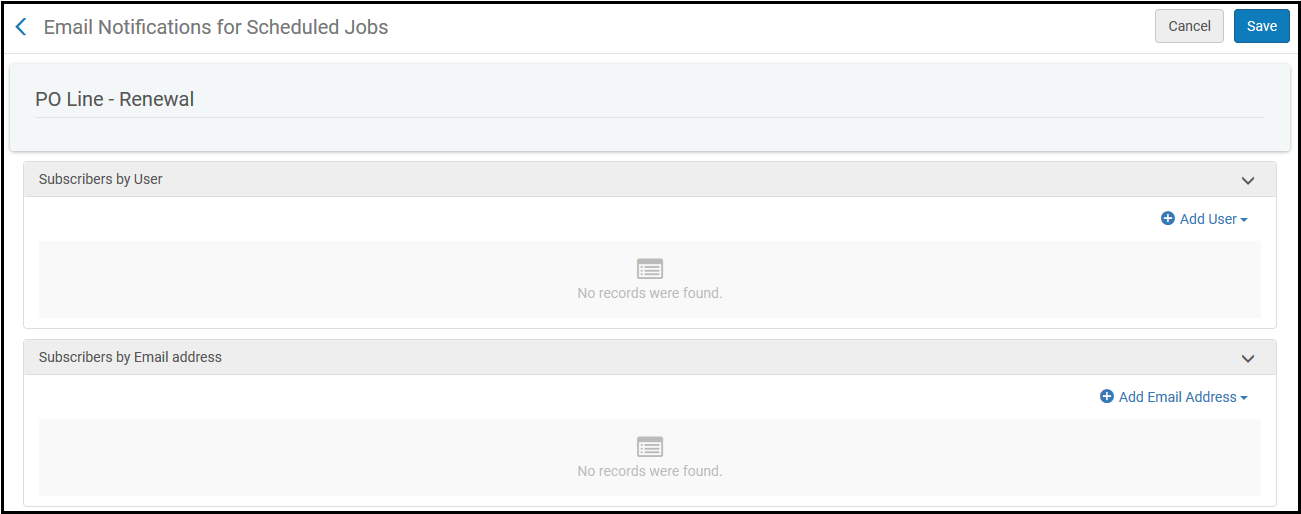
- On the Monitor Jobs page (Admin > Manage Jobs > Monitor Jobs), select Email Notifications in the row actions list on the Scheduled tab for the job whose email notification you want to configure.The Email Notifications for Scheduled Jobs page appears.
- ユーザーに送信するためにEメール通知を設定するには、ユーザーを追加を選択します。The following pane appears.
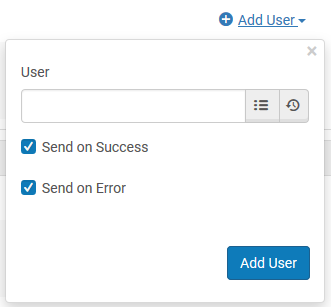
- ユーザーテキストボックスで、Eメール通知を送信したいAlmaユーザーを入力または選択します。
- Select Send on success to have an email notification sent when the job completes successfully and select Send on error to have an email notification sent when the job does not complete successfully.
ジョブが正常に完了しても、エラーが発生しなかったわけではありません。Rather, it means that the job completed with the status of Completed Successfully(as shown in History tab of the Monitor Jobs page).
- 追加して閉じるを選択します。
- 任意のEメールアドレスにEメール通知を送信するよう設定するには、Eメールアドレスを追加を選択します (上記のステップに従ってください)。
- Eメール通知の受信者の設定が完了したら、保存を選択します。
ジョブが完了すると、すべての購読者がそのジョブのEメール通知を受入します。The email that is sent is the System Job Letter; see Letter Types.
Viewing Status of Recently-run Jobs
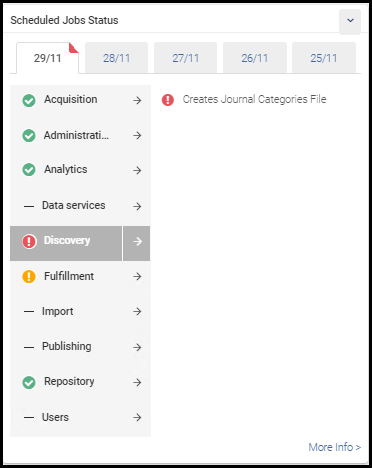
To view an overview of the status of the last few days of scheduled jobs, enable the Scheduled Jobs Status dashboard widget.For information about adding this widget, see Managing Widgets.
すべての役職がウィジェットをホームページに追加できます。ただし、自分の役職に関連するスケジュールされたジョブに関する情報のみが表示されます。リストには、MDインポートジョブと、PrimoやGoogle Scholarに公開するジョブなどの公開ジョブが含まれます。Note that for imports, manually-run import jobs are not considered in the summaries (as is the case for the other lines in the widget).
To open a pop-up with the names of any failed jobs, select an error icon  .
To open the Monitor Jobs page with with these jobs pre-selected, select the arrow  by the job category OR select More Info