
Primoでのコースリザーブの設定
Almaが公開したコースリザーブ情報を利用するようPrimoを設定するために使用される説明。
If you are working with Primo VE, see Configuring Course Reserves for Primo VE for more details.
はじめに
Course reserve information is not published to Primo unless Alma is configured to publish course enrichment information (see the Course information enrichment parameter in Exporting Alma Records to Primo), which is stored in the MARC CNO field.(see The Format of Published Data).
Primo's normalization rules map the course information from Alma to provide the following functionality in the Primo Front End:
-
アイテムの簡易表示と完全な表示でコース情報を表示する
-
コースリザーブの検索範囲を作成する
-
コースリザーブの検索索引を作成する
-
コースリザーブのファセットを作成する
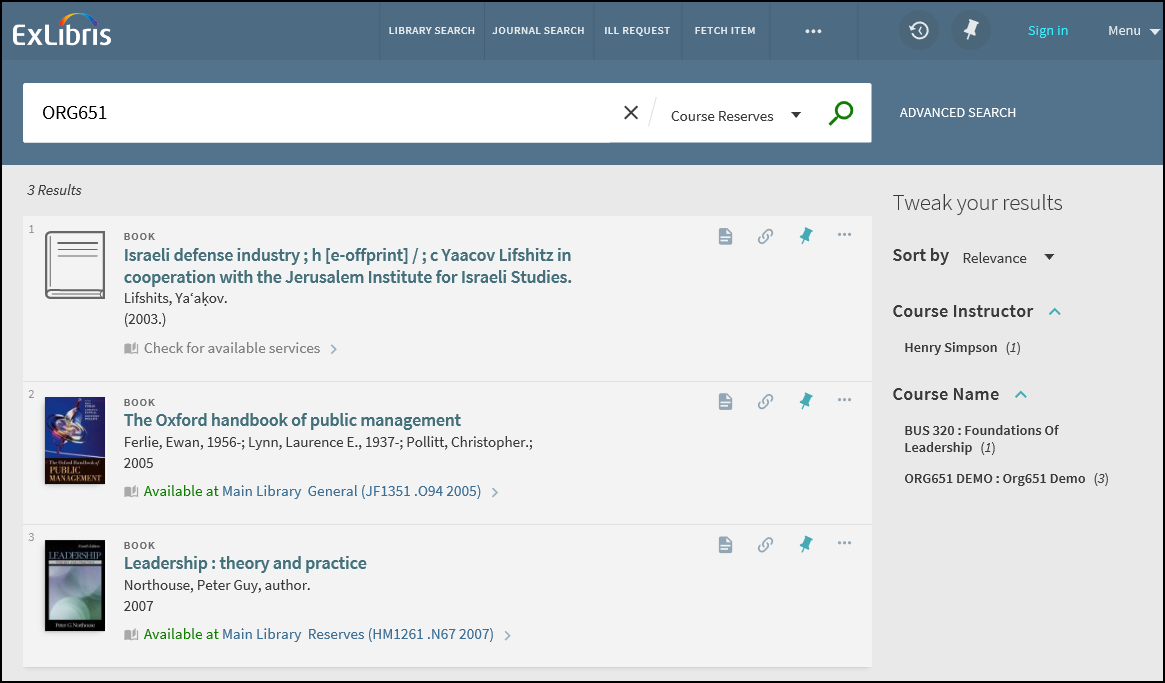
残りのセクションでは、関連する機能と構成について説明します。
同じコースの詳細
The More from the same Course section on the Full Display page allows users to expand the search of the current title to other items in the course and in additional courses that also contain the current title.
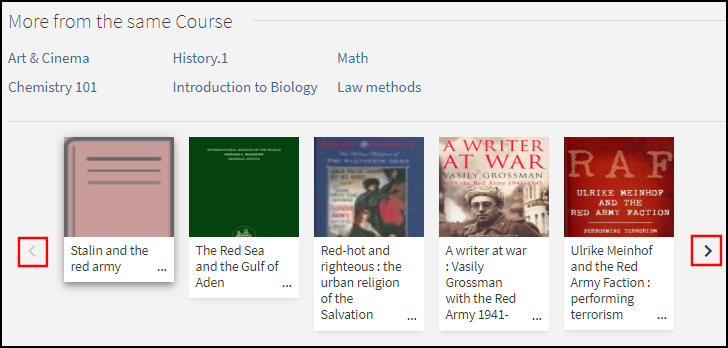
The top half of this section lists all courses to which this titles belongs.はじめは最大6つのコースが表示されます。Users can select the View all courses icon to view the remaining courses.コースがLegantoに関連付けられている場合、ユーザーはそのコースを選択してLegantoで図書リストを表示できます。
このセクションの下半分では、ユーザーはアイテムの関連コースに属するアイテムを閲覧できます。ユーザーは次のいずれかを選択できます。
-
左右の矢印を使用して、アイテムのリストをスクロールする
-
an item in the list to open its Full Display.
設定オプション
The following table lists the settings used to configure this functionality.
| 要素 | 説明 |
|---|---|
|
ビューウィザード |
To enable this functionality in the new Primo UI, select the following field in the General section of the Views Wizard: More from the same Course. |
|
Ariaラベル |
この機能のアクセシビリティをサポートするために、次のコードが追加されました。
|
|
GetIT!Tab1コードテーブル |
この機能をサポートするために、次のコードが追加されました。
|
|
正規化ルール |
In the Alma MARC Template and Alma UNIMARC Template normalization rule templates, the course information is now mapped to following subfields in the display/crsinfo field, but it will not display in the Primo UI:
To include the correct linking information on the Full Display page, make sure that you map the following search fields instead of using local search fields for course information: crsinfo, crsname, crsinstrc, crsid and crsdept. |
Legantoへのリンク
When enabled this functionality improves the integration between Primo and Leganto by allowing users to select a course link from a record's full display and view the relevant reading list in Leganto.
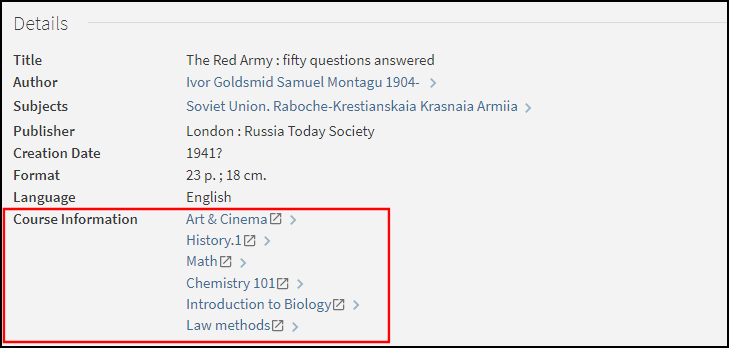
設定オプション
この機能はデフォルトでは無効になっています。下表で、この機能に関連する設定オプションのリストを示します。
| 要素 | 説明 |
|---|---|
|
ビューウィザード |
The following field on the Edit Full Details Attributes page in the Views Wizard enables the linking from the Course Information field in the record's full details: Enable Linking the Course Information to Leganto. |
|
テンプレートマッピングテーブル |
The following code creates the links to Leganto for Alma customers:
|
|
正規化ルール |
In the Alma MARC Template and Alma UNIMARC Template normalization rule templates, the course information is now mapped to following subfields in the display/crsinfo field, but it will not display in the Primo UI:
|
Primoバックオフィスの設定
PNXおよび正規化ルールはPrimoですぐに使用できますが、ローカルの正規化ルールにコースリザーブルールが含まれていることを確認する必要があります。
PNXの設定
The following table lists the fields that are used to map course reserve data from Alma.For details on how this information is mapped from Alma to the CNO field, see Publishing to Primo.
| セクション | フィールド | コード |
|---|---|---|
| 表示 | Course info – The crsinfo field is created by merging the following Alma CNO subfields into a single line:
|
crsinfo |
| ファセット | Course name Course instructor Course_ID (contains the course code from Alma) Course department (contains the course section from Alma) |
crsname crsinstrc crsid crsdept |
| 検索 | コース名(Almaのコース名とコースコードを含む) コースインストラクター コースID(Almaのコースコードを含む) コース部門(Almaのコースセクションを含む) |
crsname crsinstrc crsid crsdept |
検索結果に表示フィールドを表示したい場合は、ビューウィザードでビューを変更する必要があります。
コードテーブル設定
The following table lists the codes that are defined in the code tables under the Front End subsystem to support course reserve information:
| コードテーブル | コード | 説明 |
|---|---|---|
| ファセットラベル |
facets.facet.facet_crsname facets.search-box.facet_crsname |
コース名 |
|
facets.facet.facet_crsinstrc facets.search-box.facet_crsinstrc |
コースインストラクター | |
|
facets.facet.facet_crsid facets.search-box.facet_crsid |
コースID | |
|
facets.facet.facet_crsdept facets.search-box.facet_crsdept |
コース部署 | |
| ファセットコードフィールド | facet_crsname | コース名 |
| facet_crsinstrc | コースインストラクター | |
| facet_crsid | コースID | |
| facet_crsdept | コース部署 | |
| Advanced Index Fields and Basic Index Fields |
crsname |
コース名 |
| crsinstrc | コースインストラクター | |
| crsid | コースID | |
| crsdept | コース部署 | |
| フロントエンド表示フィールド | crsinfo | コース情報 |
| 完全な表示ラベル | fulldisplay.crsinfo | コース情報 |
正規化ルール
The following rules are included in the Alma MARC normalization rules template to allow the mapping of course reserve information.For additional normalization rules, see Alma MARC 21 Template.
-
ディスプレイセクション:
A rule concatenates the crsid, crsname, crsdept, and crsinstrc fields into the crsinfo field using the following format:
<コースID> : <コース名> ; <コース部門> ; <コースインストラクター>例:
PSYCH 101 : Introduction to Psychology ; 01 ; Bube, Kenneth P. -
ファセットセクション:
The following tables lists the rules that map course reserve information to the Facets section of the PNX:
新しいファセット正規化ルール フィールド ルール ファセット/コース名
MARC CNOフィールドのサブフィールドjからデータを取得する
変換:そのままコピー
ファセット/コースインストラクター
MARC CNOフィールドのサブフィールドgからデータを取得する
変換:そのままコピー
ファセット/コースID
MARC CNOフィールドのサブフィールドkからデータを取得する
変換:そのままコピー
ファセット/コース部署
MARC CNOフィールドのサブフィールドlからデータを取得する
変換:そのままコピー
-
検索セクション:
下表で、コースリザーブ情報をPNXの検索セクションにマッピングするルールのリストを示します。
新しい検索正規化ルール フィールド ルール 検索/コース名
-
MARC CNOフィールドのサブフィールドjからデータを取得する
変換:そのままコピー
-
MARC CNOフィールドのサブフィールドjからデータを取得する
変換:スペースを削除 + 句読点を削除 + そのままコピー
-
MARC CNOフィールドのサブフィールドkからデータを取得する
変換:そのままコピー
-
MARC CNOフィールドのサブフィールドkからデータを取得する
変換:スペースを削除 + 句読点を削除 + そのままコピー
-
MARC CNOフィールドのサブフィールドkからデータを取得する
変換:スペースを削除
-
MARC CNOフィールドのサブフィールドkからデータを取得する
変換:句読点を削除
検索/コースインストラクター
MARC CNOフィールドのサブフィールドgからデータを取得する
変換:そのままコピー
検索/コースID
-
MARC CNOフィールドのサブフィールドkからデータを取得する
変換:そのままコピー
-
MARC CNOフィールドのサブフィールドkからデータを取得する
Transformation: Delete spaces
-
MARC CNOフィールドのサブフィールドkからデータを取得する
Transformation: Remove punctuation
-
MARC CNOフィールドのサブフィールドkからデータを取得する
p>Transformations: Delete spaces + Remove Punctuation
検索/コース部署
MARC CNOフィールドのサブフィールドlからデータを取得する
変換:そのままコピー
検索/検索範囲
MARC CNOフィールドのサブフィールドaからデータを取得する
変換:
マッピングテーブルを使用:Alma機関コード
文字列の最後に追加:_CR
-
新しい検索範囲は<institution>_CRになります。
-
MARC CNOフィールドデータが存在する場合、レコードが検索範囲に追加されます。
-
Page tags: article:topic Course Reserves product:alma content:Documentation lang:english course information enrichment CNO field
