
データベース検索
はじめに
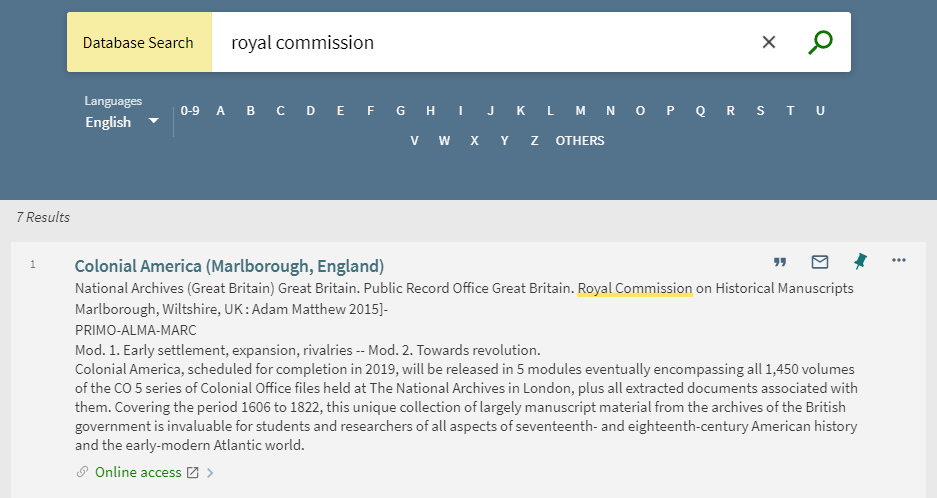
データベース検索ページ(新しいPrimo UIのみ)では、数字(0-9)、文字(A-Z)、または他の非ラテン文字(その他)で始まるデータベースをユーザーが参照したり検索したりできます。[言語]ドロップダウンリストでは、検索ボックスの下にリストされているリンクの言語を指定できます。For configuration information, see General Configuration.With the expanded DB Search capability enabled, users can search by all data fields (not just the title) and categories (see Expanded DB Search).
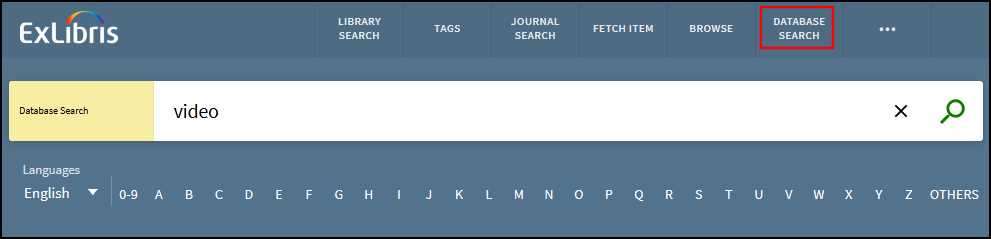
Primoは、Primo VEと異なり、Almaで有効になっているデータベースについてオートコンプリート候補を提供しません。
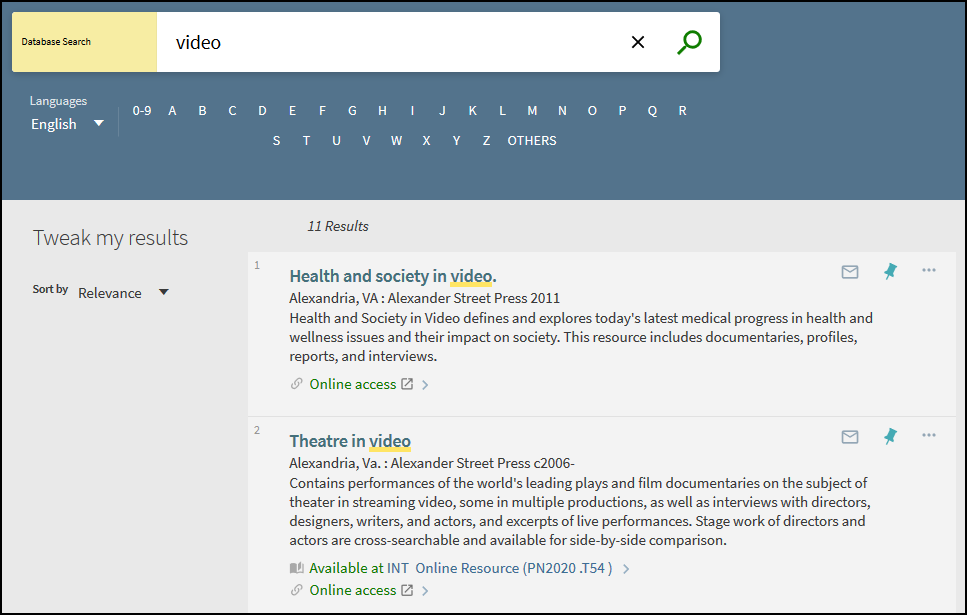
1ページあたりの結果の上限は20件(変更不可)で、各結果には、タイトル、出版者、日付、説明、利用可否、およびアクション(書誌情報やEメールなど)が含まれます。
DB検索の一般的な構成
[データベース検索]ページをサポートする一般的なバックオフィス設定について、下表で説明します。
| 要素 | 説明 |
|---|---|
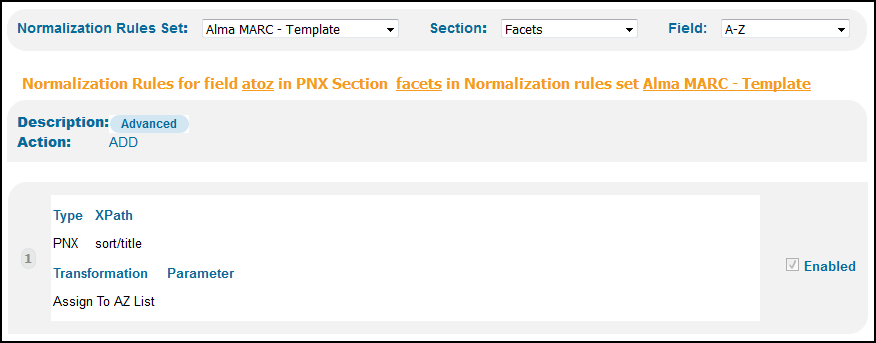
| 正規化ルール |
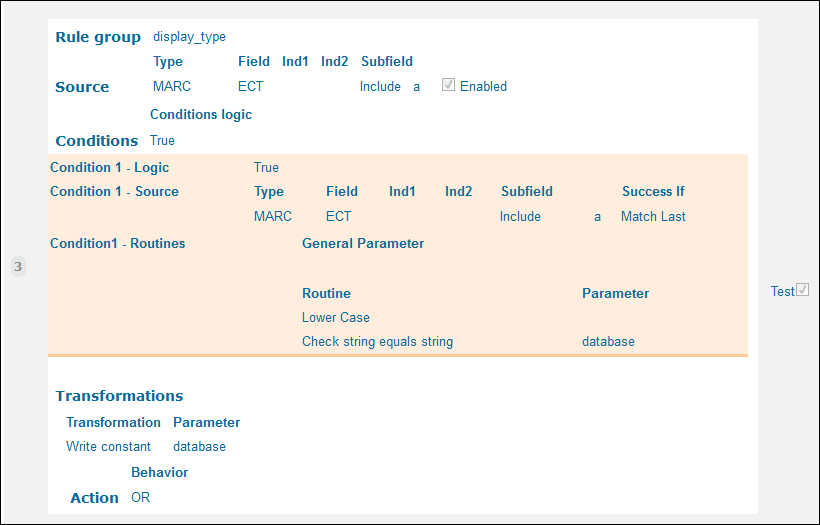
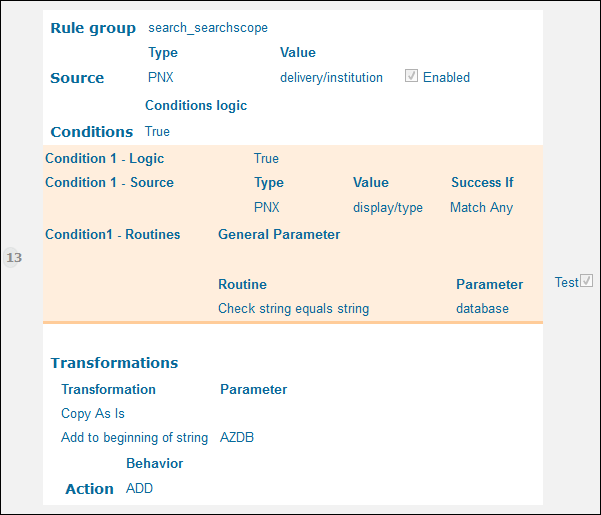
使いやすい正規化ルールは、この機能をサポートするためのAlma MARCテンプレートにあります。この機能を他のソースに提供するには、次のマッピングを含める必要があります。
|
|
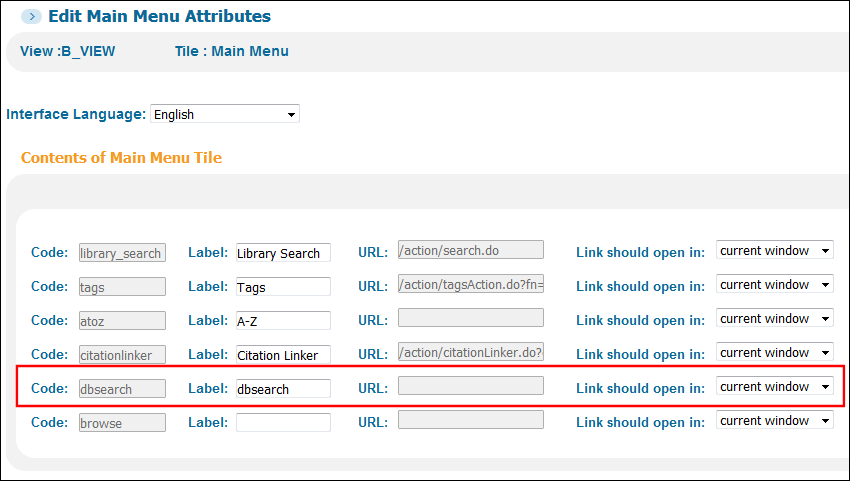
ビューウィザード - メインメニュータイル(変更) |
新しいUIのメインメニューに表示されるデータベース検索リンクを定義します。
ビューウィザード - メインメニュータイルの編集
|
|
検索タイルのコードテーブル |
次のコードで、データベース検索に関連付けられた表示ラベルを設定します。
|
|
ビューラベルのコードテーブル |
次のコードで、メインメニューのデータベース検索に関連付けられた表示ラベルを設定します。
|
|
AからZまでのリストのコードテーブル |
[データベース検索]検索ボックスの下に表示されるA-Zリンクに関連付けられたラベルを定義します。 |
拡張DB検索
拡張DB検索機能はデフォルトで有効になっており、DB検索をDBカテゴリと、タイトルフィールドだけでなくすべてのフィールド(件名や作成者など)に拡張します。
構成オプション - 拡張DB検索
この機能はデフォルトで有効になっていますが、DBカテゴリで検索するには、追加の構成と索引の再作成が必要です。下表で、この機能に関連する設定オプションのリストを示します。
| 設定メニュー | 説明 |
|---|---|
|
Institution Properties mapping table (Primo Home > Advanced Configuration > All Mapping Tables) |
拡張されたデータベース検索機能は、デフォルトで有効になっています。タイトルのみで検索する場合は、新しいexpanded_db_searchパラメーターをfalseに設定します。 |
|
正規化セットエディタ(Primoホーム > [ローカルデータ] > [正規化セット]) |
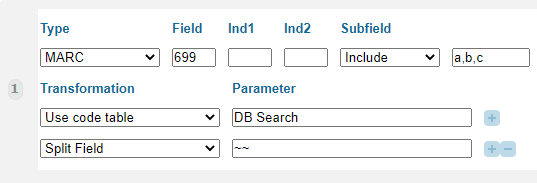
The search/dbsearch field in the following templates allow you to map DB categories from your source records: Alma MARC - Template and Alma UNIMARC - Template. To enable searching by DB category, you must create a normalization rule for search/dbsearch that includes the following mapping information:
例:
|
|
DB Search code table (Primo Home > Advanced Configuration > All Code Tables) |
If you want to permit searching by DB category, add additional codes and translations for any DB categories that include the following characters: dot (.), ampersand (&), and apostrophe (').For more details, see Creating Display Labels and Translations for Categories. |
|
Search Tile code table (Primo Home > Advanced Configuration > All Code Tables) |
次のコードは、拡張DB検索機能が有効になっている場合に[データベース検索]ページの検索ボックスに表示される表示ラベルを定義します。 default.nui.databasesearch.searchbox.expanded – Enter a search term
|
カテゴリ別にデータベースを表示する
When configured (see Assigning Categories to the Database Records), the Database Search page allows users to display a list of databases by clicking specific categories and subcategories, up to three levels.
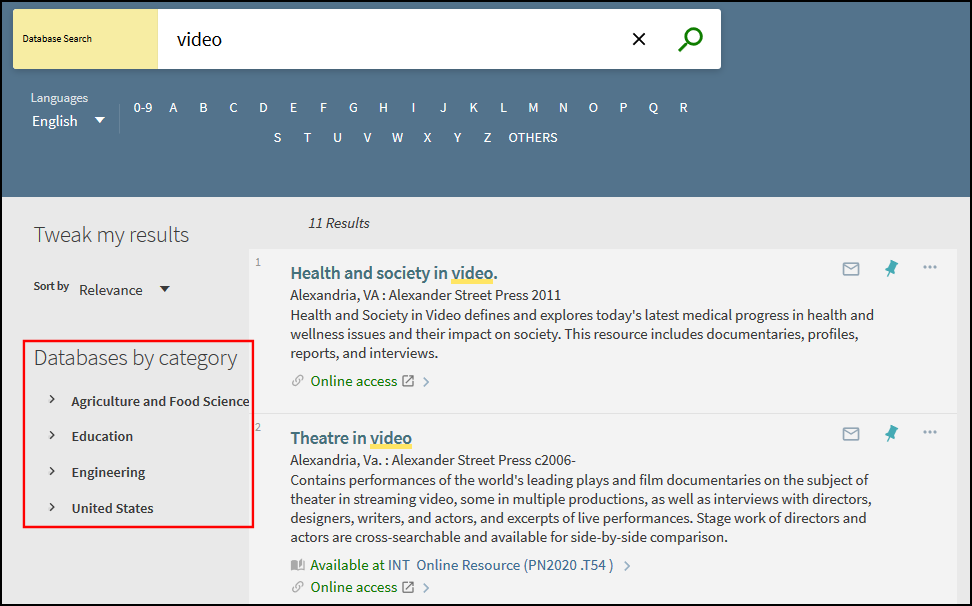
[データベース検索]`ページが開くと、カテゴリには第1のカテゴリレベルのみが表示されます。Users can select the  icon to display the category's next level.
データベースレコードにカテゴリを割り当てる
この機能を使用するには、最大3つのカテゴリレベルを含むことができるデータベースカテゴリを、ローカルデータベースの書誌レコードに適用する必要があります。
-
In Alma, choose a local bibliographic field (for example, select any 6XX or 9XX field for MARC21) in which to store the database categories in your local bibliographic records, and then enter that field in the db_categories_field parameter on the Alma Customer Parameters page (Configuration Menu > Resources > General > Other Settings).
管理者が上記のパラメータを更新するには、次の役職のいずれかが必要です。
-
目録管理者
-
リポジトリ管理者
-
総合システム管理者
-
-
ローカルデータベースごとに、メタデータエディタ([リソース] > [目録] > [メタデータエディタを開く])を使用して、選択したMARCフィールドに次のサブフィールドを追加し、$$a(レベル1)、$$b(レベル2)、$$c(レベル3)の最大3つのカテゴリレベルを割り当てます。たとえば:
699 ##$aEducation $bMedical $cFitness
699 ##$aEducation $bHealth
上記の例で示したように、1つのデータベースは複数のカテゴリ/サブカテゴリに属することができます。
DBカテゴリの翻訳を提供し、拡張DB検索機能(デフォルト)の使用を計画している場合は、すべてのカテゴリにドット(.)が含まれていないことを確認してください。For example, if you want to display the M.B.A. category, replace all dots with an underscore (_) in the source record.例:
699 ##$aM_B_A_
-
Wait for the Creates DB Categories File job (Admin > Monitor Jobs > Scheduled tab) under the Discovery filter to update the record's categories for discovery in Primo.このジョブは毎日実行されるようにスケジュールされています。For more details, see Scheduled Jobs in Alma.
-
Primoで正規化ルール設定を編集し、ソースレコードからカテゴリ情報をPrimoにマッピングするために新しいファセットまたはdbcategoryルールを更新し、変更をフロントエンドに展開します(Primoホーム > [詳細設定] > [完全な正規化ルールの設定])。サブフィールドの区切り文字(U + 2500)を含める必要があることに注意してください。
例:
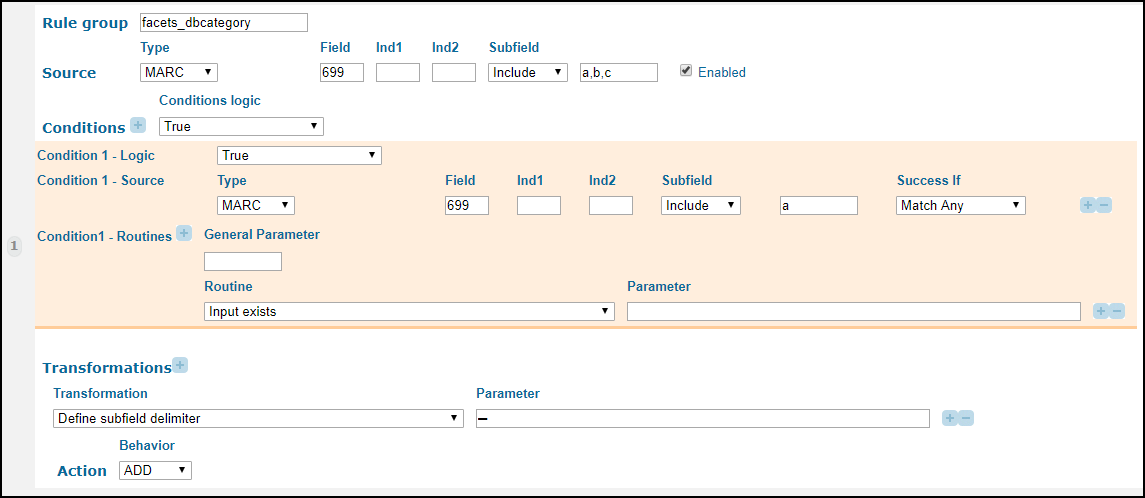 Alma MARCテンプレートからファセット/dbcategory正規化ルールを更新する
-
If you are using the Expanded DB Search functionality, update the search/dbsearch rule to map the category information from the source records to Primo, and then deploy your changes to the Front End (Primo Home > Advanced Configuration > Full Normalization Rule Configuration).For more details, see Expanded DB Search.
-
機関ウィザード([Primoホーム] > [継続的な設定ウィザード] > [機関ウィザード])、基本配信URLセクションの新しいDBカテゴリフィールドのAPI基本URLで使用したのと同じ値を入力します。
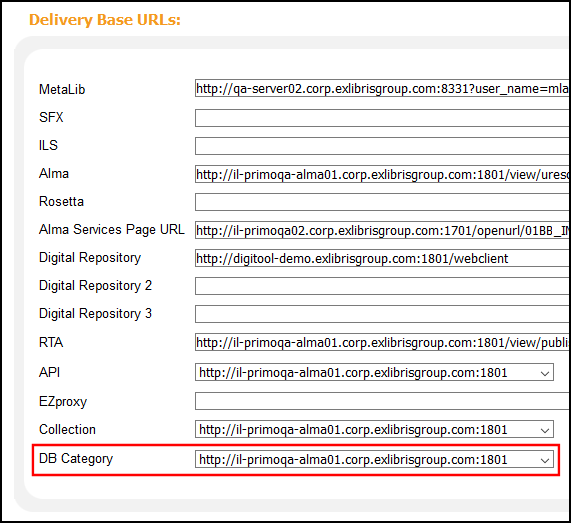 機関ウィザードのDBカテゴリ基本URL
ビューでカテゴリを無効にする場合は、このフィールドをクリアします。
-
通常のパイプを実行し、索引を再作成して、新しいPrimo UIの[データベース検索]ページにデータベースカテゴリを表示します。
データベース検索ページの表示ラベルのカスタマイズ
The DB Search code table (Primo Home > Advanced Configuration > All Code Tables > Front End subsystem) defines the display labels (including all customer-defined categories) that appear on the Database Search page.次のラベルは初めからデータベース検索ページに表示されます。
| コード | 説明 |
|---|---|
|
default.dbcategories.databases |
データベースを検索します。 |
|
default.dbcategories.description |
データベースを検索するには、次の手順を実行します。 |
|
default.dbcategories.option1 |
検索ボックスにキーワードを入力します。 |
|
default.dbcategories.option2 |
上の文字をクリックしてください。 |
|
default.dbcategories.option3 |
カテゴリ別にデータベースを参照します。 |
|
default.dbcategories.results |
見つかったデータベース |
|
default.dbcategories.title |
カテゴリ別データベース |
カテゴリの表示ラベルと翻訳の作成
In addition to the labels that appear on the Database Search page, the DB Search code table allows you to translate the display labels used for your categories.カテゴリとその翻訳に示される表示ラベルは、MARCサブフィールドからマッピングされた値に基づいています。別の表示値を指定したり、カテゴリの翻訳を提供するには、各言語について行の定義を作成する必要があります。
-
Code – Specify the value of the MARC subfield that is to be mapped from the source record.マッピングされた値の各スペースがアンダースコア(_)に変換されていることを確認してください。たとえば、カテゴリがMedicine and Technologyの場合、このフィールドの値はdefault.dbcategories.Medicine_and_Technologyに設定する必要があります。
拡張DB検索機能(デフォルト)を使用する場合:
-
Ensure that all categories defined in the source do not include a dot, and configure their codes identically in the DB Categories code table so that they are indexed properly.For example, if you want to configure M.B.A., replace all dots with an underscore (_):
default.dbcategories.M_B_A_
-
For each DB category that contains ampersands (&) and apostrophes ('), create an additional row in the DB category that replaces these characters with their HTML character code.たとえば、Guns & RosesとWomen's and Gender Studiesのカテゴリを定義する場合は、それぞれに次のコードを定義します。
default.dbcategories.Guns_&_Roses
default.dbcategories.Guns_&_Roses
default.dbcategories.Women's_and_Gender_Studies
default.dbcategories.Women&pos;s_and_Gender_Studies
-
-
Description – Specify the value of the category/translation to display in the UI.たとえば、Medicine and Technologyのスペイン語訳を作成する場合は、Medicina y Tecnologíaを指定します。
-
Language – Specify the browser language for which the translation displays.
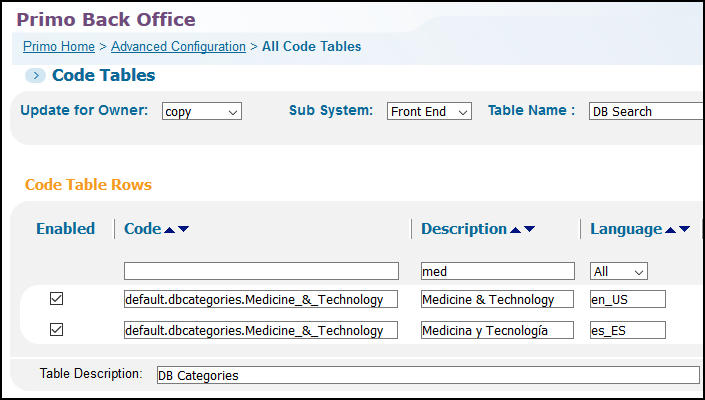
行の定義が存在しない場合、PrimoはMARCサブフィールドの値を表示します。
Page tags: article:topic product:alma content:Documentation lang:english Database Search
