サービスへのアクセス
Duration: 8 min.
- コード
- 説明
- c.uresolver.ServicesForRelatedTitles
- 関連タイトルのサービス
- c.uresolver.viewit.related_type_list.PRECEDES
- 先行
Refer to the documents under Alma and SFX that provides specific linking parameters which are required to enable full text linking.
Display Condition Rules
Almaリンクリゾルバ(およびPrimoの[見る])は、電子コレクションがエンドユーザーに表示される条件を決定するルールをサポートします。Display condition rules are defined in the Community Zone knowledge base and include, for example, a requirement that the incoming OpenURL includes article-level metadata elements.Condition rules are available for newspaper electronic collections and electronic collections like CCC Get It Now.
After you activate or edit the electronic collection, you can view the display condition information and rules.Note that display condition rules cannot be edited or locally created.To view this information, select the Linking tab on the Electronic Service Editor page; and next to Availability rules, select the Service display condition rules link (for newspaper electronic collections) or the Service filter condition rules link (for the CCC Get It Now electronic collection).
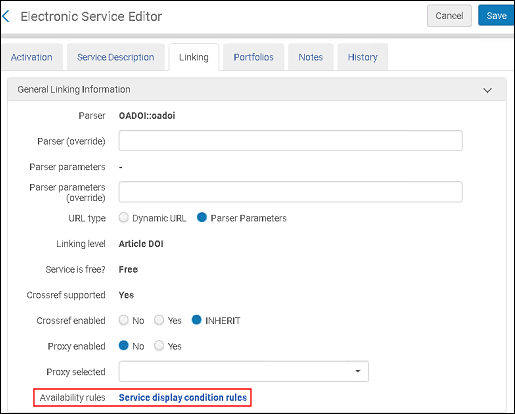
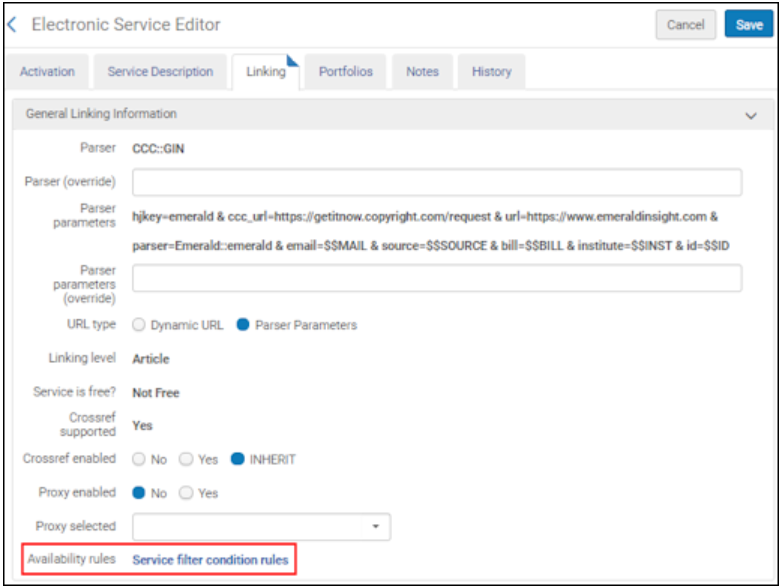
This opens the Service Display Condition Rules page (for newspaper electronic collections) or the Service Filter Condition Rules page (for the CCC Get It Now electronic collection).
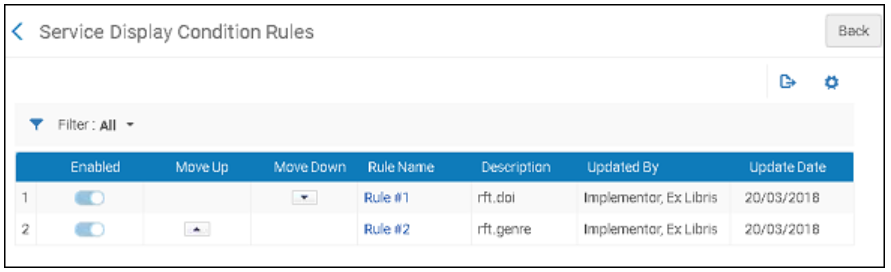
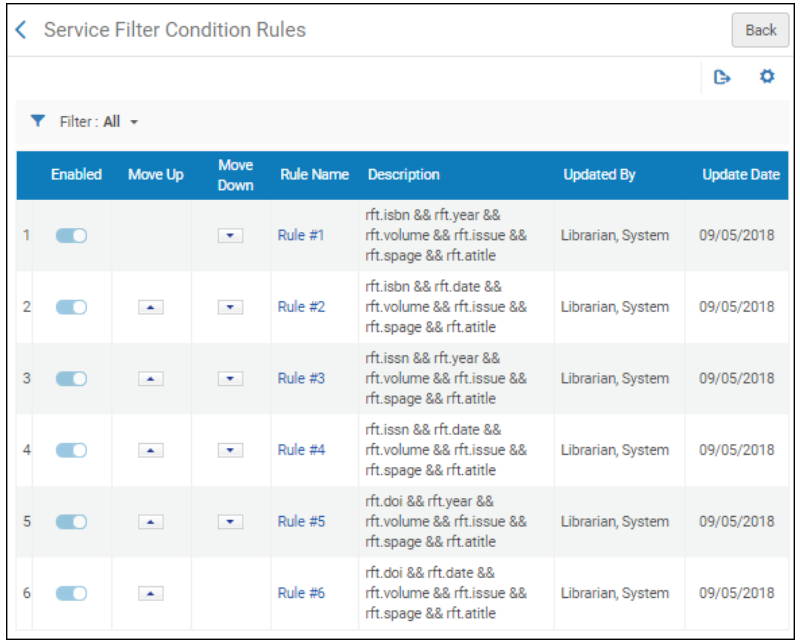
デフォルトでは、ルール名列で識別されたルール間にORロジックが適用されます。つまり、例に挙げたいずれかのルールが満たされると、「Almaリンクリゾルバ」または「Primoの[見る]」を使用しているときに新聞の電子コレクションまたはCCC Get It Now電子コレクションが表示されます。いずれのルールも満たされていない場合、新聞の電子コレクションまたはCCC Get It Now電子コレクションは、「Almaリンクリゾルバ」または「Primoの[見る]」に表示されません。
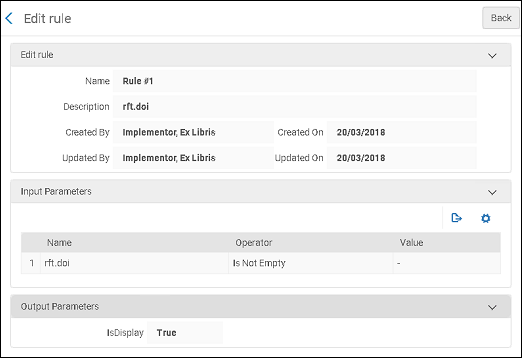
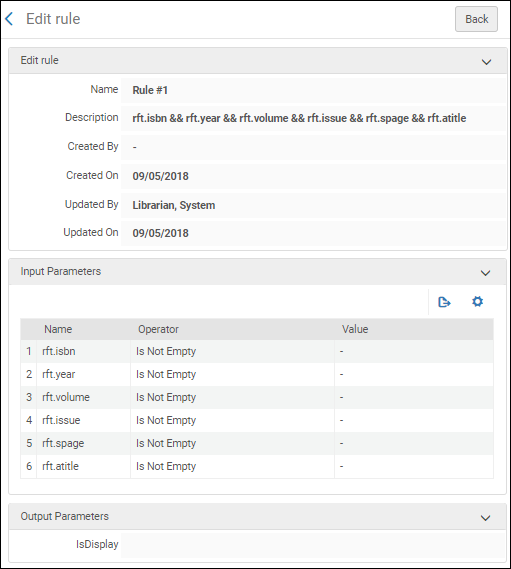
各ルールの詳細を表示するには、ルール名列でルール番号のリンクを選択します。これらのルールの例については、以下を参照してください。
電子コレクションおよびポートフォリオ用の動的URLを構成する
- 電子目録オペレータ
- 拡張電子目録オペレータ (削除操作に必要)
- リポジトリマネージャー
ローカル電子コレクションとポートフォリオの静的リンクを管理する代わりとして、ローカル電子コレクションとポートフォリオ用の高度な動的URLを作成し、OpenURLメタデータ情報を動的に埋め込むことができます。さらに、動的URLを使用して、コミュニティナレッジベースから提供されるリンクを上書きすることもできます。
[電子サービスエディタ]ページと[電子ポートフォリオエディタ]ページでは、サービスまたはポートフォリオのリンクURLをぞれぞれ選択するために使用される条件のリストを定義できます。
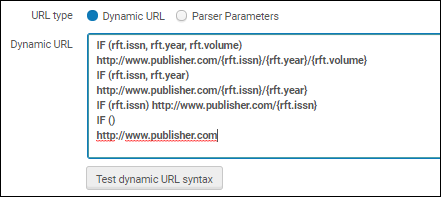
動的URLを使用する場合、各条件は、ContextObjectおよびOpenURLパラメータの存在をチェックするIF文で開始する必要があります。リスト先頭から始まる条件のすべてのパラメータが存在する場合、その条件で指定されたURLがリンクに使用されます。それ以外の場合、次の条件がチェックされます。全てのケースをキャッチするには(これを使用して、他のすべてのチェックが失敗した場合に一致させます)、 IF () <url>を使用します。
例:
IF (rft.issn, rft.year, rft.volume)
http://www.publisher.com/{rft.issn}/{rft.year}/{rft.volume}
IF (rft.issn, rft.year)
http://www.publisher.com/{rft.issn}/{rft.year}
IF (rft.issn)http://www.publisher.com/{rft.issn}
IF ()
http://www.publisher.com
上記の例で最初の条件が満たされている場合、結果の動的URLは次のようになります:
http://www.publisher.com/1364-0321/2010/2In addition to rft.year, you can also use rft.month,rft.day, and rft.date attributes.
動的URL構文をテストするでは、条件の構文を検証できます。
See Commonly Used OpenURL Attributes for the URL Template for more information.
URL機能
さらに、動的URLには、指定されたパラメータで返される値を処理するために、次の関数のいずれかを含めることができます:
- SUBSTR (string, from, length)- Return a substring of the specified string, based on the starting position and length of the string.{rft.date}に2010-08-01が含まれ、文字列先頭から最初の4文字が指定されている場合、以下のようになります:http://www.publisher.com/{rft.issn}/SUBSTR({rft.date},0,4)Almaは次のURLを使用します:http://www.publisher.com/1824-6321/2010
- REPLACE (string, search, replace)- Replace text in the specified string, based on search and replacement text.If {rft.isbn} contains dashes (for example,978-1-285-13563-2) and no replacement text is specified, as follows:IF (rtf.isbn)http://www.publisher.com/REPLACE({rft.isbn},-,"")Almaは次のURLを使用します:http://www.publisher.com/9781285135632
To replace a special character, use the encoded value of the replacement string.
例:
REPLACE({rft.isbn},%3F,"")
次の代わり
REPLACE({rft.isbn},?,"")
- URLENCODE (string)- Encode special characters in the specified string.{rft.atitle}にタイトル[The Grapes of Wrath]が含まれ、エンコーディングが要求される場合、以下のようになります:http://www.publisher.com/URLENCODE({rft.atitle})Almaは次のURLを使用します:http://www.publisher.com/The%20Grapes%20of%20Wrath
電子コレクションは、有効化後に利用可能です(Primoに公開されます)。この例外はデータベース型の電子コレクションであり、URL や関連するサプレス解除された書誌レコードで定義されるとすぐに公開できます。
Resolver Proxies
- 統括システム管理者
キャンパス外のユーザーがさまざまなベンダーサイトのフルテキストサービスにアクセスできるようにするには、これらのユーザーの認証に使用されるプロキシサーバーを定義する必要があります。
Alma リンクリゾルバは、受信したOpenURLに応答し、リゾルブ(解決)されたURLに追加のプロキシ情報を自動的に含めることにより、電子リンクに変更します。一部の機関では、単一のプロキシサーバーを使用しています。この場合、1つのプロキシプロファイルを定義する必要があります。機関が複数のプロキシサーバーを使用している場合、プロキシサーバーごとにプロキシプロファイルを定義する必要があります。次に、各電子コレクション、サービス、またはポートフォリオに関連するプロキシを定義する必要があります。
ネットワークゾーンを通じて電子リソースへのアクセスをメンバーに配布する場合、プロキシはネットワークゾーンではなく、機関ゾーンで管理しなければなりません。機関ゾーンのプロキシは、ネットワークゾーンコレクションで定義されたプロキシを上書きします。
追加のプロキシ情報については、次を参照してください:
- Linking Information Tab Options – describes the Linking Information tab options of the Electronic Service Editor
- Electronic Collection Editor Tabs and Fields – describes the Additional Information tab options of the Electronic Collection Editor
- Electronic Portfolio Editor Page – describes the Linking Information tab options of the Electronic Portfolio Editor
プロキシ関係
The following table presents the relationships between the proxy-enabled setting for electronic collections, services, and portfolios.ポートフォリオは、接続されているサービスレベル設定からプロキシ対応設定を継承します。As a result, set a portfolio-level proxy-enabled setting only when you want it to be different from the service-level setting (in which case, leave the Proxy selected field on the service level blank).電子コレクションプロキシ対応の設定は、ポートフォリオに継承されません。
| 電子コレクションレベルでプロキシを有効化 | サービスレベルでプロキシを有効化 | ポートフォリオレベルでプロキシを有効化 | プロキシ対応の設定結果 |
|---|---|---|---|
| N | N | N | リソースにリダイレクトされました |
| N | N | Y | プロキシログインにリダイレクトされました |
| N | Y | N | プロキシログインにリダイレクトされました
ポートフォリオはサービス設定を継承します |
| N | Y | Y |
電子コレクションは、サービスまたはポートフォリオからプロキシ設定を継承しません。サービスレベルでプロキシプロファイルが選択されている場合、ポートフォリオはサービスレベルからプロキシ設定を継承します。ポートフォリオレベルのプロキシを設定するには、サービスレベル設定の選択されたプロキシフィールドを空白のままにします。
|
| Y | N | N | リソースにリダイレクトされました
電子コレクションプロキシは、サービスまたはポートフォリオレベルに継承されません |
| Y | N | Y | プロキシログインにリダイレクトされました |
| Y | Y | N | プロキシログインにリダイレクトされました
ポートフォリオはサービス設定を継承します |
| Y | Y | Y | プロキシログインにリダイレクトされました |
- ポートフォリオに「グループ設定」プロキシを適用するには、電子サービスの「グループ設定」タブでプロキシを適用する必要があります。
- 電子コレクションに「グループ設定」プロキシを適用するには、電子コレクションエディタの「グループ設定」タブでプロキシを適用する必要があります。
Configuring a Proxy
-
統合プロファイルリストページ(設定メニュー > 一般 > 外部システム > 統合プロファイル)で、統合プロファイルを追加を選択します。統合プロファイルウィザードの最初のページが表示されます。
-
統合タイプには、リゾルバプロキシを選択します。
-
定義するプロファイルの名前(コード)を入力し、オプションで説明を入力します。
-
定義しようとしているプロファイルを、デフォルトのプロキシ定義プロファイルにしたい場合は、デフォルトを選択してください。(以前に別のプロファイルをデフォルトプロファイルとして定義していた場合は、このプロファイルでデフォルトを選択する前に、他のプロファイルでデフォルト選択を解除してください )。If the proxy is set as the default, and Actions(see below) is set to Always, then this proxy is used for resolving any resource, even resources that do not have ProxyEnabled=Yes.
-
次へを選択します。ウィザードの2ページ目が表示されます。
 リゾルバープロキシ統合プロファイル - ステップ2(プロキシ定義)
-
このプロファイル用に設定するプロキシサーバーのタイプを選択します。
There is no option to enter multiple IP addresses.The "Proxy IP" field should hold the proxy server IP address and not some allowed IP range.In case the OpenUrl request is received from this IP address, the proxy is not added to the target Url, and this is to avoid looping.
次のオプションが利用可能です:
-
Biblio-Pam – このサーバープロキシは、次のURL構造を使用します:
構造の<Biblio-PAM URL>の部分は、ベンダーが提供するBiblio-PAMからのURLです。
<短縮ターゲット URL>は、http://またはhttps://なしのターゲットURLです。
-
https://<Biblio-PAM URL>/http/<短縮ターゲット URL>
-
https://<Biblio-PAM URL>/https/<短縮ターゲットURL>
-
-
EZProxy – This option uses the following URL structure where $@ is the placeholder for the target URL:
- https://www.ezproxy.unibo.it/login?
See EZProxy URL Database for more information.
-
HAN – This option uses the following URL structure:
- http://<HAN server>/hanapi/?hash=<HASH>
プロキシURLパラメータには、http://<HAN サーバー> 部分を入力します。
URL構造の残りの部分はAlmaによって構築され、プロキシURLパラメータに入力したURLの部分に追加されます。
For the HAN proxy server type, you need to enter a Salt parameter.The Salt parameter is a free text field that may contain any alpha-numeric value.The value that you enter must identically match the salt value in the HAN proxy server configuration in your HAN account.When you create the HAN salt value in your HAN account, copy it to the Salt parameter in Alma.
-
LIBProxy
-
OpenAthens Redirector – This option uses the following URL structure:
- https://<OpenAthens リダイレクターURL>?url=<エンコードされたターゲットURL>
この構造の <OpenAthens リダイレクター URL> 部分は、ベンダーが提供するOpenAthensからのURLです。
Enter https://go.openathens.net/redirector/<your domain> for the Proxy url parameter.URLの?url=の部分は、Almaによって追加されます。<エンコードされたターゲットURL> は、エンコードされた形式のターゲットURLです。
リダイレクタはプロキシサーバーではありませんが、Almaプロキシサーバー設定を使用できることに注意してください。
-
WAM
Note that you should omit the 0- at the beginning of your proxy URL.
-
リモートXS
RemoteXSプロキシを利用している機関は、Almaのリンクリゾルバーをこのプロキシとシームレスに統合するように設定する機能を備えています。
-
-
Enter the proxy URL as provided by the vendor (including http:// or https://) and the proxy IP address.
-
プロキシを使用には、以下の値のいずれかを選択します:
-
常に - あらゆるリゾルブ(解決)にこのプロキシが使用されます。
このプロキシがデフォルトとして選択されている場合、EnableProxy=No(プロキシを有効化する)=いいえとされているリソース(サービス、コレクション、またはポートフォリオ)も含めて、あらゆるリゾルブ(解決)にこのプロキシが使用されます。
このプロキシがデフォルトで選択されていない場合は、はEnableProxy=Yes(プロキシを有効化する=はい)とされているリソースと、とこのプロキシが選択されたリソースにのみ使用されます。
この設定は、ネットワークゾーンの設定を上書きします。 -
決して - このプロキシは、それが特定のリソースに対して有効化または選択されていても、いかなるリゾルブ(解決)のためにも使用されることはありません。
-
選択的 - このプロキシはEnableProxy=Yes(プロキシを有効か=はい)とされていて、かつこのプロキシが選択されているリソースで使用されます。(これは、非デフォルトのプロキシで常にが選択されているのと等価です)。
このプロキシがデフォルトとして選択されている場合でも、明確にリソースに追加する必要があります。
-
-
保存を選択します。プロファイルが保存されます。
メッセージのカスタマイズ
OpenURLリクエストに使用できるフルテキストサービスがない場合、[電子サービス]ページにメッセージが表示されます。管理者は、メッセージの文言をカスタマイズできます。
この設定はAlma-Primo環境に適用でき、Primo VEには適用されません。
- ディスカバリーインターフェイスラベルコードテーブルを開きます([設定メニュー]>[フルフィルメント]>[ディスカバリーインターフェイス表示ロジック]>[ラベル])。
- Locate the row with c.uresolver.emptyList in the Code column.
- Select Customize.その行の[説明]列のセルが開き、カスタマイズしたメッセージテキストを入力できます。
- フルテキストが利用できない場合、[電子サービス]ページに表示するテキストを入力します。
フルテキストを利用できない際にメッセージを表示しない場合は、このオプションを空白のままにします。
- 保存を選択します。
トラブルシューティング - OpenURLリンクリゾルバデバッガツールの使用
デバッガツールを使用して、OpenURLリンクリゾルバによって提供されるコンテキストサービスのトラブルシューティングを行うことができます。
The tool enables you to get the following information:
- サービス計算を決定できます:
- OpenURLの解析、拡張、および関連サービスに基づいて計算されたコンテキストオブジェクトを表示できます。
- コンテキストサービスオブジェクトの生成方法が分かります:
- 見込まれるサービスは何ですか?
- 関連サービスの計算に基づいて追加されたサービスはどれですか?
- 一般的な電子サービスおよび表示ロジックの対象範囲またはルールに基づいて、どのサービスが除外されましたか?
- リンクの解像度とOpenURLの生成方法を決定できます:
- どのターゲットパーサーを使用しましたか?
- プロキシを使用しましたか?
- ポートフォリオレベルの静的URLでしたか?
- 直接リンクはありますか?
- 生成されたtargetURLを表示します。
- 提供されているデバッグコンテンツで元のOpenURLを表示します。
-
DOIによるCrossRefからのデータ(コンテキストオブジェクト)の強化を処理してから、照合します。
-
For information about debugging a citation's uResolver (OpenURL) link, see the knowledge article Debugging Citation uResolver Links.
-
アクセスをテストする電子タイトルまたはポートフォリオのリポジトリを検索します。
Primo VE環境では、Primo VEを使用して、電子レコードの全表示を検索、表示することもできます。Skip to step ii in the Primo VE section.
-
Primo環境のタイプに応じて、次の手順を実行します:
-
Alma-Primo:
-
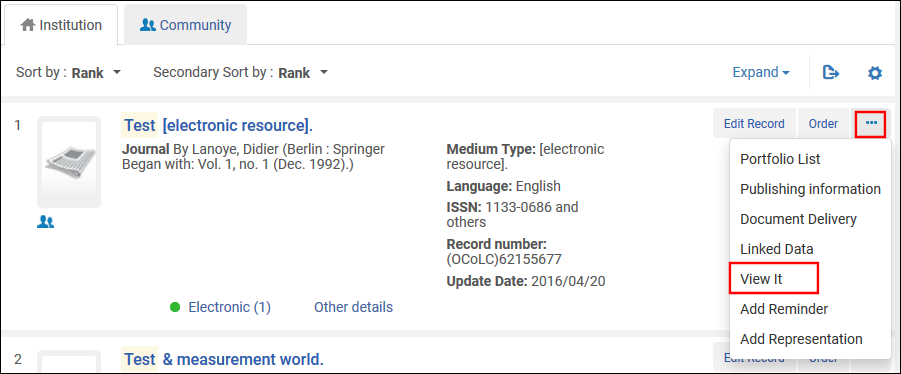
Depending on the type of results, select View It(electronic titles) or Test Access(electronic portfolios) for an item in the results list.[ポートフォリオ一覧]ページ、または[電子サービスエディタ]ページの[ポートフォリオ]タブからも、アクセスをテストできます。
-
In the View It tab, select Display in a new window.

-
[電子サービス]ページを右クリックし、ページソースまたはフレームソースを表示するオプションを選択します。オプションはブラウザごとに多少異なります。
 [ページソースの表示]オプションを選択します
-
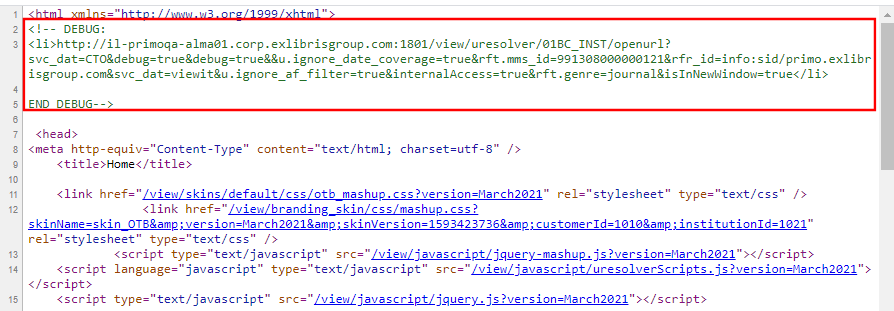
Locate the DEBUG section at the top of the source view.Select and and copy the URL.
-
Open a new browser page or tab, paste the debug URL that you copied into the address bar, and press enter to view the XML debugger output.
-
-
Primo VE: To debug, you will enable the Display CTO button, which is hidden in regular use.Selecting this button displays the Context Object (CTO) that provides you with additional information about the result, to help you troubleshoot the context services that are offered by the OpenURL Link Resolver.
-
結果リストのレコードについて、[ディスカバリーで表示する]を選択して、全表示を開きます。

-
To enable the Display CTO button, add the following parameter to the end of the record's full display URL and then press enter:&displayCTO=true.
例:
https://<Alma instance>/discovery/fulldisplay?docid=alma9926095600521&context=U&vid=PRIMO_OAP_INST:Alma&lang=en &displayCTO=true
-
[CTOを表示する]を選択して、XMLデバッガ出力を表示します。
-
-
-
Scroll through the XML output to analyze/debug your search result issues.
XML出力
XML出力は、次の2つの要素で構成されています。
- The <context object> element - this is the container for the metadata information about the OpenURL object.This element is a container of all the metadata information, such as the ISSN, the title, the publication date, etc. This is the metadata that Alma collected as part of the analysis of this OpenURL.
- <context services>要素 - サービスタイプ、解析、プロキシ、ターゲットURLなどに関する情報が含まれます。Alma calculated these services as relevant for this OpenURL.This element also contains the target_url.
This is an example of XML Debugger Output:
Analyzing/Debugging Search Result Issues
The debugger provides information about the processing of the OpenURL, about the calculation of services, and also provides the target_url that was created in order to link to a title.
Looking at the <context services> element, we can see all services that Alma calculated as being relevant to this OpenURL.これは、次の方法で有用です。
- The target_url key displays the link that was generated by Alma.This can help you see if this is a problem with the URL that was created by Alma, or a problem with the vendor side.This link has information that can help you debug some of the issues you are facing.
- You can also better understand the Linker Service page.たとえば、特定のサービスが表示されるはずであったのに表示されない場合は、
- カバレッジ情報を確認してください。It may be that the expected service does not fit the coverage information.For example, you may be looking for vol. 1, issue 1, but the library only purchased access as of vol. 2.Thus, Alma filtered out this specific service.
- ISBN/ISSN番号The link might be one that requires an ISBN.Your citation might be one that has an ISSN.Thus, the link to Alma is not appearing.
- 表示ロジックルール定義された表示ロジックルールが原因で、サービスが除外される場合もあります。
Note that in cases where records were filtered out from displaying in the results, the XML output contains key IDs for Filter(true or false) and Filter reason.たとえば、フィルター理由にデータフィルターが含まれていて、OpenURL入力でyear=2010のデータパラメーターが指定されている場合、指定された日付範囲外であるためにレコードがフィルターで除外されたことを示している可能性があります。
リンクリゾルバ使用状況分析レポート
For information about the fields available in Alma Analytics with which you can create analytics reports concerning link resolver usage, see Link Resolver Usage.For general information on Alma Analytics, see Analytics.
Almaリンクリゾルバ特別サービス
Open Access
ユーザーは、Unpaywall Open Access記事のリンクリゾルバーサービスを有効にできます。
- To enable the service, set the enable_open_access_services_from_unpaywall_api customer parameter to true(see enable_open_access_services_from_unpaywall_api in Configuring Other Settings (Fulfillment).
- Where the open access information is placed can be configured in the Online Services Order configuration (Configuration Menu > Fulfillment > Discovery Interface Display Logic > Online Services Order).See the section Configuring the Order of Online Services for more information.オープンアクセス情報のデフォルト配置は最後です。
- オープンアクセスルールは、オープンアクセスに基づき表示または非表示を指定するように構成できます。See Configuring Display Logic Rules for more information.
- オープンアクセスのダイレクトリンクも設定できます。See Configuring Direct Linking for more information.
- Unpaywall Open Access 記事の検索結果については、Alma は、ディスカバリー (Primo VE) からのレコードのフルビューを開くときに、Unpaywall フルテキストアクセスのみをチェックすることに注意してください。記事やリソースの唯一利用できるフルテキストソースがUnpaywallを介する場合、(Expand My Resultsフィルターが適用されない限り)検索結果には表示されません。
- さらに、Unpaywall APIの応答にPDFに対する応答がない場合、Unpaywall サービスは表示されません。
- Unpaywallサービスは、APIリクエストで送信されたEメールに基づいて通話を制限します。機関の電子メールが定義されていない場合は、機関固有の一般的に無効な電子メールを作成し、APIに含めます。Go to Configuration > General > Add a Library or Edit Library Information > Contact information.
- Indication added to verify no proxy used in CDI Links for OA Links.Alma verifies that links returned by CDI do not use a proxy for OA links.これは、プロキシが設定されているが、OAリンクにプロキシを使用したくない場合に特に便利です。To verify the proxy is not used, an OA indication is added.この表示は、CDIによって返される次のリンクに適用されます:
- linktorsc (通常の 「レコード内のリンク」 リンク)
- linktorsradditional (すべてのリンク)
- linktopdf (クイックリンク)
- linktohtml (クイックリンク)
リンクリゾルバ - 関連レコードのサービス
電子サービスの関連レコードの設定
このセクションは、Primoにのみ適用されます。For information on how to configure related records in Primo VE, see Configuring Related Record Services for Primo VE
関連レコードは、OpenURLリンクリゾルバーに、ユーザーが検索結果で特定のレコードを受け取ったときに、別のレコードも関連レコードとして返却する必要があることを示します。リンクエントリと呼ばれる特定のMARCフィールド(MARCフィールド76X-78Xなど)を使用すると、レコードを関連する書誌レコードにリンクし、ユーザーとの関係を区別できます。For a full list of MARC fields that are used as linking entries, see Modifying the Display Labels for Related Electronic Services.For additional information regarding physical resources, see Configuring Related Records for Physical Inventory.
電子サービスの場合、関連レコードの設定は次の理由で有用です。
- ユーザーが検索する記事は、ジャーナルの関連バージョンでのみ利用できます。
- OpenURLのメタデータは、ある発行物のものである場合がありますが、実際には、別の名前の関連ジャーナルがエンドユーザーが求めていたものです。
- ベンダーは、以前のバージョンまたは新しいバージョンを所蔵しているため、コミュニティゾーンに不整合が生じる可能性があります。たとえば、雑誌土木工学システムの名前は土木工学と環境システムになりました。
次の例では、[表示する]が検出されたレコードと関連レコードについて利用できるサービスを表示します:

密接な関係は、2つのレコードが検索結果で同様に有用であると見なされることを示します。OpenURLでリクエストされたレコードが別のレコードと密接な関係(MARC 773および774)をがある場合、関連レコードの電子サービスは[表示]に含まれ、これらのサービスが関連レコード用であることは示されません。ユーザーには、これらのサービスはOpenURLで送信されたレコード用であるかのように見えます。関係タイプは非常に近いため、同等と見なすことができます。ユーザーにとっては、区別する必要はありません。他のタイプの関係はリモートと見なされ、[表示する]の関連タイトルへのサービスセクションの下にリスト表示されています。
To configure close relations to appear in the same section as the related titles in View It, see the Display closely related record services option in Enabling the Display of Related Records in Primo.
773$gにフィルタがあり、対応する項目フィールドが空の場合、その項目はフィルタ条件を満たします。
関連電子サービスの表示ラベルの変更
ディスカバリーインターフェイスラベルコードテーブル(設定>フルフィルメント>ディスカバリーインターフェイスの表示ロジック>ラベル)では、[表示する]で次のラベルをカスタマイズおよび翻訳できるようにします:
- Title – The label that displays above the list of related records in View It:
- Relationship – The label that appears for each related entry in View It and Get It.ラベルを変更するには、以下の表の関連する関係を参照してください。

For the example above, you can customize the labels for the title and relationship by modifying the Description field for the following codes in the Discovery Interface Labels code table:
次の表は、書誌レコードで定義されているMARCフィールドと[表示する]の関係の各タイプに表示されるすぐに使用可能なラベルの相関関係を示しています。For information on modifying labels, see Configuring Service Labels in the Discovery Interface.
Primo詳細セクションに表示されるラベルと情報は、Primoで定義されている正規化ルールによって決まります。
| 関係/タイプ | MARCフィールド | UNIMARCフィールド | Primoのロケーション |
|---|---|---|---|
| メインシリーズエントリ(リモート) | 760 | 410 | 表示: c.uresolver.viewit.related_type_list.MAIN_SERIES = Main Series |
| 指針0# | |||
| $w, $x | $1、001で始まる | ||
| サブシリーズエントリ(リモート) | 762 | 411 | 表示: c.uresolver.viewit.related_type_list.SUBSERIES = Subseries |
| 指針0# | |||
| $w, $x | $1、001で始まる | ||
| 元の言語エントリ(リモート) | 765 | 454 | 表示: c.uresolver.viewit.related_type_list.ORIGINAL_LANGUAGE = Original Language |
| 指針0# | |||
| $w、$x、$z | $1、001で始まる | ||
| 翻訳エントリ(リモート) | 767 | 453 | 表示: c.uresolver.viewit.related_type_list.TRANSLATION = Translation |
| 指針0# | |||
| $w、$x、$z | $1、001で始まる | ||
| サプリメントエントリ(リモート) | 770 | 421 | 表示: c.uresolver.viewit.related_type_list.SUPPLEMENT = Supplement |
| 指針0# | |||
| $w、$x、$z | $1、001で始まる | ||
| 親エントリの補足(リモート) | 772 | 422 | 表示: c.uresolver.viewit.related_type_list.SUPPLEMENT_PARENT = Supplement Parent |
| 指針00 | |||
| $w、$x、$z | $1、001で始まる | ||
|
ホストアイテムエントリ(クローズ)
|
773
|
461
|
表示するおよび入手する:c.uresolver.viewit.related_type_list.PART_OF = Part Of
詳細:Display/Is Part Of (Primo正規化ルールで定義されている)
For Primo VE, Get It does not display the type of relation after the title, and closely related items always appear under the Locations for Related Titles section.
|
| インジケータ## | |||
| $w、$x、$z | $1、001で始まる | ||
|
構成単位の入力(閉じる)
|
774
|
462-464
|
表示するおよび入手する:c.uresolver.viewit.related_type_list.CONTAINS = Contains
For Primo VE, Get It does not display the type of relation after the title, and closely related items will always appear under the Locations for Related Titles section.
|
| 指針0# | |||
| $w | 462 $1 and starts with 001 463 $1 and starts with 001 464 $1 and starts with 001 | ||
| $x | |||
| $z | |||
| 他のエディションのエントリ(リモート) | 775 | 451 | 表示: c.uresolver.viewit.related_type_list.OTHER_EDITION = Other Edition |
| 指針0# | |||
| $w、$x、$z | $1、001で始まる | ||
| 追加の冊子フォームエントリ(リモート) | 776 | 452 | 表示: c.uresolver.viewit.related_type_list.ADDITIONAL_FORM = Additional form |
| 指針0# | |||
| $w、$x、$z | $1、001で始まる | ||
| エントリの発行(リモート) | 777 | 423 | 表示: c.uresolver.viewit.related_type_list.ISSUED_WITH = Issued With |
| 指針0# | |||
| $x | $1、001で始まる | ||
| $w | |||
| 先行エントリ(リモート) | 780 | 430 431 432 433 434 435 436 437 | 表示: c.uresolver.viewit.related_type_list.PRECEDES = Precedes
詳細:表示/関係 - 関連タイトル:以前のタイトル(Primo正規化ルールで定義) |
| 指針00、01、02、03、04、05、06、07 | |||
| $w、$x、$z | $1、001で始まる | ||
| 後継エントリ(リモート) | 785 | 440 441 442 443 444 445 446 447 | 表示: c.uresolver.viewit.related_type_list.SUCCEEDS = Succeeds
詳細:表示/関係 - 関連タイトル:後のタイトル(Primo正規化ルールで定義) |
| 指針00、01、02、03、04、05、06、07、08 | |||
| $w、$x、$z | $1、001で始まる | ||
| データソースエントリ | 786
$w、$x、$z |
表示:c.uresolver.viewit.related_type_list.CONTAINS = Contains | |
| その他の関係エントリ(リモート) | 787 | 412 413 424 425 455 456 470 481 482 488 | 表示: c.uresolver.viewit.related_type_list.OTHER_RELATIONSHIP = Other Relationship |
| 指針0# | |||
| $w、$x、$z | $1、001で始まる | ||
| シリーズにエントリの個人名が追加されました | 800
$w, $x |
表示:c.uresolver.viewit.related_type_list.CONTAINS = Contains
詳細:表示/関係 - シリーズ:(Primo正規化ルールで定義) |
|
| シリーズにエントリー企業名が追加されました | 810
$w, $x |
表示:c.uresolver.viewit.related_type_list.CONTAINS = Contains
詳細:表示/関係 - シリーズ:(Primo正規化ルールで定義) |
|
| シリーズにエントリ会議名が追加されました | 811
$w, $x |
表示:c.uresolver.viewit.related_type_list.CONTAINS = Contains
詳細:表示/関係 - シリーズ:(Primo正規化ルールで定義) |
|
| シリーズにエントリー統一タイトルが追加されました | 830
$w, $x |
表示:c.uresolver.viewit.related_type_list.CONTAINS = Contains
詳細:表示/関係 - シリーズ:(Primo正規化ルールで定義) |
|
| 有効なISBN、ISSN、またはその他の標準番号(リモート) | 020 $a, $e | 010 $a | 表示: c.uresolver.viewit.related_type_list.REPLACED_BY = Replaced By |
| 022 $a, $e | 011 $a | ||
| 024 $a | 013 $a, 014 $a, 015 $a, 016 $a, 017 $a, 072 $a, 073 $a | ||
| キャンセル/無効なISBN、ISSN、またはその他の標準番号(リモート) | 020 $z | 010 $z | 表示: c.uresolver.viewit.related_type_list.REPLACES = Replaces |
| 022 $y, $z | 011 $g, 011 $y, 011 $z | ||
| 024 $z | 013 $z, 014 $z, 015 $z, 01 $z, 017 $z, 072 $z, 073 $z | ||
| ISSNのリンク(リモート) | 022 $l | 011 $f | 表示: c.uresolver.viewit.related_type_list.LINKS_TO = Links To |
For more information about configuring related records, see Configuring Related Records for Electronic Services.
Enabling the Display of Related Records in Primo
- 一般システム管理者
- フルフィルメント アドミン
[関連レコードサービスの設定]ページでは、View ItおよびGet It for Primo/Primo VEに表示される関連タイトルの電子サービスおよび物理的目録を設定できます。
-
[関連レコードサービス設定]ページ([設定メニュー] > [フルフィルメント] > [ディスカバリーインターフェイスディスプレーロジック] > [関連レコード])を開きます。
関連レコードサービスの設定 -
For electronic inventory, refer to the following table to configure how related records display in View It.For more information, see Configuring Related Records for Electronic Services and Modifying the Display Labels for Related Electronic Services.
Related Record Services Configuration Options – View It Section パラメータ 説明 関連するレコードサービスを有効化する
Select Yes if you want to display a record's related titles in View It and enable the following fields to restrict or modify the display of related titles for specific types of records.
When set to Yes, View It will display only the services for related records and will not display matching records from the NZ if a matching title is not found in the IZ for environments using Distributed Access to Electronic Resources from the NZ.
Select No if you do not want to display a record's related titles in View It.
When set to No, View It will display matching records from the NZ if a matching title is not found in the IZ for environments using Distributed Access to Electronic Resources from the NZ.
フルテキストが利用可能な場合に関連サービスを表示
フルテキストが利用可能な場合に関連レコードのサービスを表示します。OpenURLに元のレコードのフルテキストサービスがある場合、関連レコードのサービスは表示されません。
逐次刊行物の関連サービスを表示
逐次刊行物の関連サービスを表示します(雑誌資料タイプがある)。
研究論文用の関連サービスを表示
モノグラフに関連するサービスを含める(書籍資料タイプがある)。
電子コレクションサービスの重複排除
リモート関連サービスに電子収集サービスの重複排除を使用します。これにより、関連レコードが同じ電子コレクションに関連付けられている場合、Primoは1つのサービスのみを表示します。
This function is handled by Duplicate of local filter, which cannot be turned off.
関連サービスへのダイレクトリンクを有効にする
ダイレクトリンク機能をオンにします。
デジタルの関連レコードサービスを無効にする
デジタルレコードの関連レコードの表示を無効にします。
関連性の高いレコードサービスを表示
関連性の高いサービス(書誌レコードのMARC 773または774フィールドで定義)の[表示]への表示方法:
-
元のサービスの一部として - 関連性の高いサービスは、[表示する]のレギュラーサービスのリストに配置されますが、これらのサービスが関連タイトルであることを示すものはありません。
-
元のレコードサービスとは別に - 関連性の高いサービスは、[表示する]の関連タイトルのサービスセクションの下に配置されます。
-
-
For physical inventory, refer to the following table to configure how related records display in Get It.For additional information, see Configuring Related Records for Physical Inventory.
関連レコードサービス設定オプション - [入手する]セクション パラメータ 説明 関連するレコード保持を有効化する
Select Yes if you want to display a record's related titles in Get It.有効にした場合、残りのフィールドを使用して、特定のタイプのレコードの関連タイトルの表示を制限または変更できます。
Related records are displayed in Get It even if a related bib record is suppressed.If you do not want to display related holdings for suppressed related records you must suppress its holdings.
逐次刊行物の関連所蔵を表示する
逐次刊行物の関連所蔵レコードを表示するには、このオプションを選択します。
モノグラフの関連所蔵を表示する
モノグラフの関連所蔵レコードを表示するには、このオプションを選択します。
モノグラフの場合、[入手する]に表示される関連目録は、ユーザーからのタイトルレベルのリクエストを実行するときに考慮されることに注意してください。If you disable the display of related records for monographs, the related records' inventory that isn't displayed is not considered when fulfilling title-level requests.
Display closely related records holdings
次のオプションのいずれかを選択して、関連性の高いレコード(書誌レコードのMARC 773または774フィールドで定義されている)を[入手する]に表示する方法を指定します。
-
As part of the original holdings – Closely related records are placed in the list with the original holdings in Get It with an indication that these are related holdings, including title and relation type.
-
Separately from the original record holdings – Closely related records are placed under the Locations for Related Titles section in Get It.See c.uresolver.getit2.display_related_holding_separately_from_original_record in the table above for more information.
- Primo VEの場合、この設定に関係なく、関連するレコードは個別に表示されます。
- デフォルトでは、関連タイトルの場所が最大10個表示されます。場所の最大数を増やすには、検出顧客設定マッピングテーブル内のmax_holding_per_recordパラメータ(設定メニュー > 検出 > その他 > 顧客設定)を編集します。
-
-
[保存]を選択します。
Page tags: article:topicproduct:almacontent:Documentationlang:englishAccess to ServicesAccess to Services, Link ResolverServices - Link Resolver