
OpenID Connect
To configure an OpenID Connect type of integration profile, you must have the following role:
- 一般システム管理者
Alma integration supports the OpenID Connect standard for user authentication.See the Developer Network for more information.
Almaのスタッフユーザー(またはPrimo VEユーザー)がログインを試みると、Auth0やAzureなどのOpenID Connect標準をサポートするシステムを使用してユーザー認証を処理できます。これは、Almaのソーシャルログインプロセスと同様の方法で機能します。
For Primo VE information, see Configuring User Authentication for Primo VE.
Multiple OpenID Connect integration profiles can be defined in Alma.これにより、学生や教職員など、ユーザーのさまざまなグループごとに、それぞれユーザー認証を定義できます。
Creating an OpenID Connect Integration Profile
If you want to use this method of authentication, you need to create and configure an OpenID Connect integration profile.
OpenID Connect統合プロファイルを作成するには:
- 統合プロファイルリストページ(設定メニュー > 一般 > 外部システム > 統合プロファイル)を開きます。
- 統合プロファイルを追加を選択します。
- [統合タイプ]ドロップダウンから、[OpenID Connect]を選択します。
- From the System dropdown, select the option that represents the OpenID Connect authentication system that you are using.
-
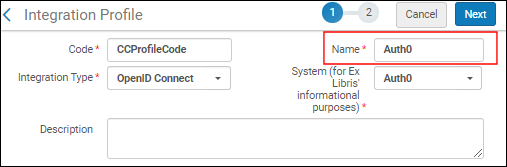
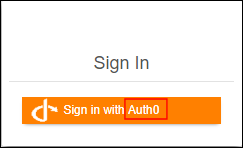
この統合プロファイルのコードと名前を入力します。This name is used in the label for the log-in option in Primo:
- [次へ]を選択します。
- 保存した後、この統合プロファイルの使用を開始したい場合、有効を選択します。Select Inactive if you want to enabled the profile at a later time.
- OpenID Connect認証システムによって提供される以下の情報を入力します。
- アプリID
- アプリシークレット
- 既知のURL-以下のすべてのフィールドにデフォルトのOIDC情報を自動的に入力する場合に選択します。This saves you time and helps ensure that all the fields are defined correctly.既知のURLを使用しないことを選択した場合は、以下のフィールドに手動で入力してください。
- 承認エンドポイント
- トークンエンドポイント
- スコープ-スコープのスペース区切りリストを選択します。認証プロセスの最小範囲は「openid」です。
- 一致するクレーム-ユーザーIDを含むクレームコード。For most OpenID providers that would be 'sub', the subject identifier.If you elect a different claim code, the "UserInfo endpoint" field opens where you can call the UserInfo endpoint with the access token to retrieve the additional claims.Alma will locate the user using the configured claim in either the id_token or in the output of the UserInfo request.
- Force Authentication- Select this if you want to force authentication when Alma authenticates users via OIDC.This helps ensure that the user is properly authenticated with the correct institution.
- Base64 encode the state parameter - Select this to encode the relay state parameter in base64 (instead of URL-encode).これはAWSとの統合で必要になる場合があります。
- Logout URL - Add a Logout URL to which the system will redirect after logging out.これにより、同じOpenIDプロバイダーに接続されている他のシステムからユーザーがログアウトされます。
- Login hint - Configure a login hint for single sign-on.
- [保存]を選択します。
Page tags: article:topicproduct:almacontent:Documentationlang:english
