
ソーシャルログインとEメールでのログイン
ソーシャルログイン統合プロファイルを設定します。
ソーシャルログインプロファイルを設定するには、次の役職が必要です:
- 統括システム管理者
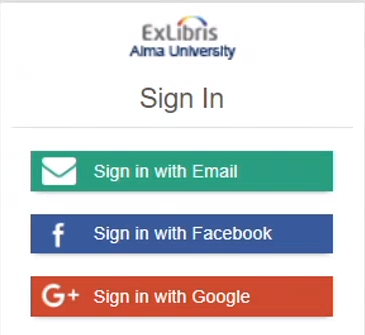
Facebook、Google、またはTwitterを使用して、AlmaおよびPrimo(Almaを使用している場合)アカウントにログインできます。The setup below is required to enable users to use their existing credentials from a social network providers like Facebook, Twitter, or Google to sign in to Alma and Primo, instead of using separate Alma/Primo credentials.
もう1つのソーシャルログインオプションは電子メールです。Whenever a user wants to log in to Alma/Primo, a one-time password is sent to their email account, using which they can log in. This option is available only for users whose active email account is registered on their Alma user record.For more information on email login, see Primo Login Using Email.
Ex Librisは、サンドボックスと本番サーバーの両方で同じソーシャル認証プロファイルを使用することをお勧めします。この場合、更新後、サンドボックスでソーシャルログインの追加設定は必要ありません。For more information, see Recommended Configuration to Account for Sandbox Refresh.
The overview of the setup process is as follows: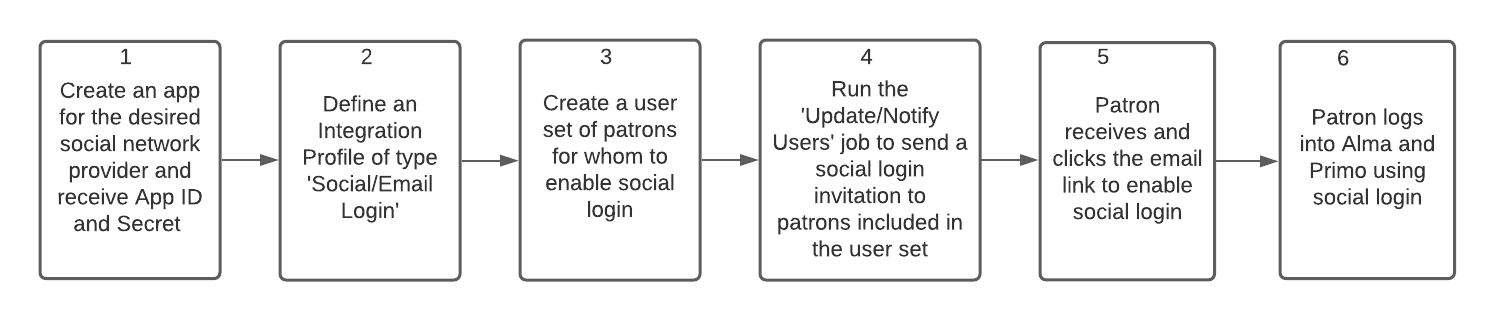
- For information on Primo VE configuration, see Configuring User Authentication for Primo VE.
- For information on Primo configuration, see Using Social Networks for User Authentication.
Creating an App for Social Network Provider
To allow social login, you must first obtain a Google/Facebook/Twitter account for the library, and configure an OAuth app for these accounts.Once you configure an OAuth app, you will receive an app ID and Secret, which you will need to save to later provide in Alma.
For detailed steps on configuring OAuth apps for Google/Facebook/Twitter, see the below links:
For a detailed overview of social logins, see the Developer Network.
タイプ「ソーシャル/Eメールログイン」の統合プロファイルの定義
- 統合プロファイルリストページ(設定メニュー > 一般 > 外部システム > 統合プロファイル)で統合プロファイルを追加を選択します。
- 外部システム情報を入力します:
- (プロファイル)コードと名前を入力します。
- 統合タイプとしてソーシャル/Eメールログインメールを選択します。
- 接続システムを選択します。複数のソーシャルログインタイプを定義できます。利用可能なオプションは次のとおりです:
- Eメール
- 次へを選択します。ソーシャル/Eメールログイン設定ダイアログボックスが表示されます:
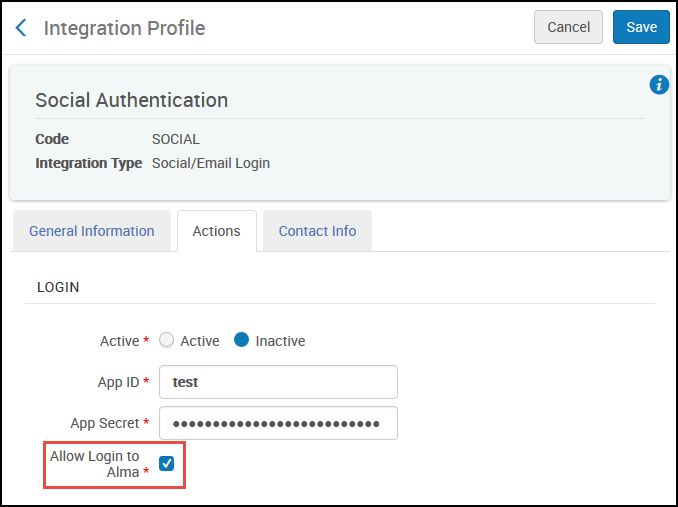
ソーシャル/Eメールログイン統合プロファイル
- ログインセクションは、外部アプリケーションとの認証を確立するためにOAuthプロトコルに必要な属性を定義します。
- 統合プロファイルを有効化します。
- アプリIDとアプリシークレットを入力します。これらはソーシャルネットワークによって提供されます。These fields do not appear for Email login.Note: App ID and App Secret are not required when setting up email login.It is also not possible to set up self registration with email login.
- スタッフがソーシャル/Eメールログインを使用してAlmaにログインできるようにするには、[Almaへのログインを許可する]チェックボックスをオンにします。チェックボックスをオフにすると、スタッフはソーシャル/Eメールログインオプションを使用できなくなり、標準のAlmaログインプロセスのみ使用できるようになります。If cleared, only social login in to Primo is enabled.
- 自己登録がアクティブに設定されている場合、Almaはソーシャル認証でPrimoにログインする未登録ユーザーについてユーザーを作成します。新しく作成されたユーザーに割り当てるユーザーグループを選択します。自己登録設定で選択された場合、リソースシェア図書館と統計カテゴリもユーザーに割り当てられます。自己登録は、ユーザーにのみ関連します。When setting up social login, this section can be ignored.
- [保存]を選択します。
- 各ユーザーは、ユーザーアカウントにソーシャルログイン識別子を追加する必要があります。See Managing User Identifiers (Tab).
ソーシャル/Eメールログイン招待受信者のセットの作成
機関のポリシーに応じて、すべてのAlma/Primoユーザーに対して、またはこれらのサブセットに対してのみソーシャルログインを有効にすることができます。To do this, create an itemized user set (see Managing Search Queries and Sets).
Sending a Social/Email Login Invitation to Users
To send social login invitations in bulk to all users included in the user set, use the "Update/Notify Users" job (Admin > Run a job).ジョブの「ユーザーに通知を送信する」パラメーターで、「ソーシャルログインへの招待」オプションを必ず選択してください。For further details on the job, see Update/Notify Users job.
送信されるレターは、ソーシャルログイン招待レターです。For example: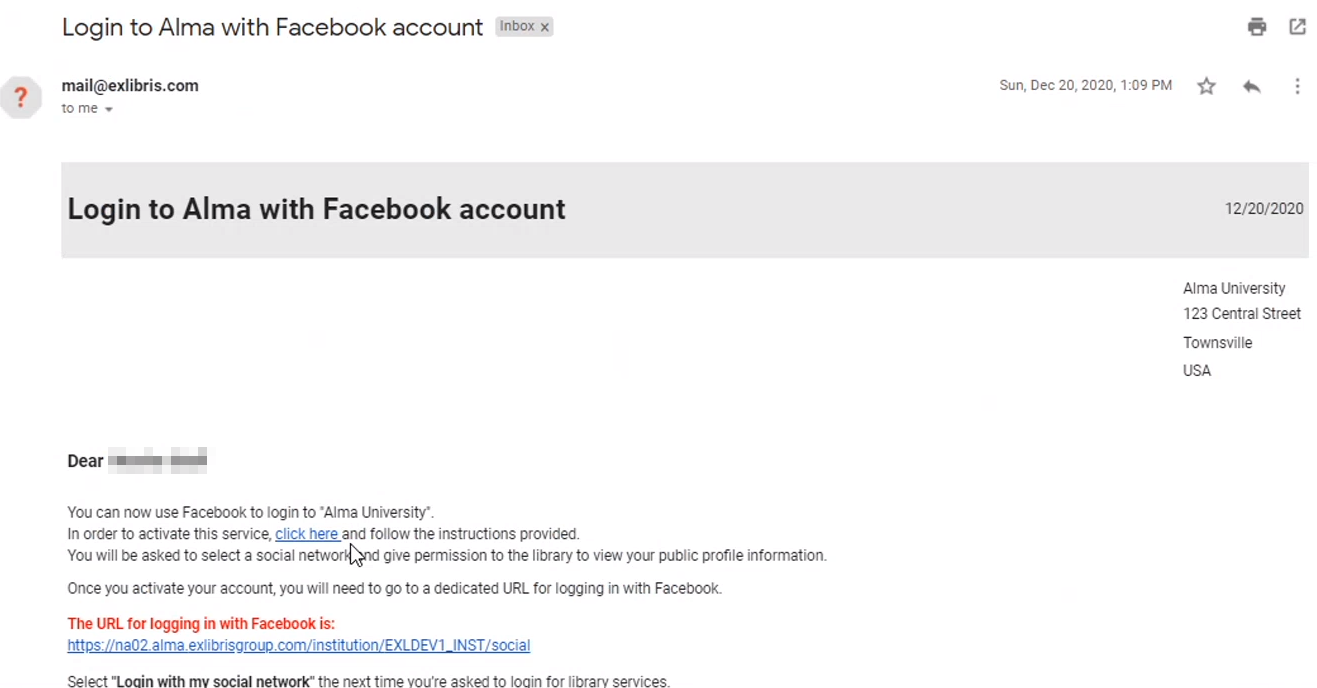
After attaching a user account to a social logic provider, an additional Social Login Account Attached Letter is sent.図書館員の場合、このEメールには、Almaにすばやくログインするために使用できるリンクが含まれています。招待は数日有効となります。If the user missed the expiration period, the invitation to an individual user can be sent from the Manage Users page.
If the System Type 'Email' has been selected, then users can also sign in to Primo using email.このEメールレターは、ワンタイムトークンレターを使用したログインです。
機関がすべてのユーザーのソーシャルログイン招待を有効にすることを決定した場合、すべてのユーザーが招待を確実に受信できるように、以下のアクションを実行する必要があります。
- 現在のすべてのユーザーのセットを作成し、招待を送信します。
- At the beginning of each term, create a set of all new patrons, and send them the invitation.
- ユーザーのAlmaアカウントの有効期限が切れると、ソーシャルログインはそのユーザーに対して機能しなくなります。
Page tags: article:topicproduct:almacontent:Documentationlang:englishsocial loginsocial login integration profile
