
Ex Libris アイデンティティサービス
Ex Libris アイデンティティサービスは、専用のID管理ソリューションに基づいています。このサービスは、これまでAlmaのお客様が使用していた内部認証方法に代わるものです。内部のAlmaユーザーのすべてのパスワードは、Ex Libris アイデンティティサービスに保存されます。Ex Libris アイデンティティサービスは、Ex Librisがデータセンターでホストしています。For more information on this service, see https://developers.exlibrisgroup.com/alma/integrations/user-management/authentication/exl_identity_service.
The following password considerations are applicable with the Ex Libris Identity Service:
- パスワードの強度は設定できません。
- The password does not have an expiry date.
- 15回ログインに失敗すると、パスワードは30分間ロックされます。
- When a staff user enters a wrong user and password combination on the Alma login page, the error message includes a Forgot password? link, which links to the reset password page.In order to display a Forgot Password option in Primo/PrimoVE, a configuration update is required.For more information, see the knowledge article,How to add a 'Forgot My Password' link to the login page in the new UI when using Alma for authentication.
アイデンティティサービスラベルは、内部ログインメッセージコードテーブルで設定できます。See Configuring Identity Service Labels.
For Alma users, a Reset Password Letter is sent to an individual user by selecting the Reset your password for the identity service option in the Send message drop-down list on the User Details page.The letter is sent to a group of users by running the Update/Notify Users job and selecting the Identity Service mail option in the Send notification to user drop-down list on the job parameters page.
- 新しいパスワードは8文字以上に設定する必要があり、ユーザーネームや、パスワードによく使われる単語の使用はできません。
- パスワードのリセットレターがユーザーへのアップデートまたは通知ジョブから、またはメッセージを送信のドロップダウンリストから送信された後、そのリンクは24時間有効となります。レターがパスワードをお忘れですか?のリンクから送信されると、 そのレターは1時間有効です。
- パスワードの初期化画面で、ユーザーはユーザー名またはEメールアドレスを入力するように求められます。ユーザーがユーザー名を入力すると、ユーザーの優先アドレスにEメールが送信されます。ユーザーがEメールアドレスを入力すると、システムは指定されたEメールアドレスを検索し、見つかった場合は、優先アドレスではなくてもそのEメールアドレスを使用します。Eメールアドレスが見つからないか、複数のユーザーに帰属している場合、Eメールは送信されません。
For more information on logging into Alma, see Logging Into and Out of the User Interface.
多要素認証 (MFA)
This feature requires the mfa_for_alma_hep parameter to be enabled (see User Settings).
Almaを設定して、多要素認証 (MFA) の使用を推奨 (または強制) することができます。The Login Using One Time Token Letter needs to be enabled to support MFA (see Configuring Alma Letters).
-
If MFA is activated, the Allowed Emails list (see External Systems) should be configured with the email addresses of all staff members who need to be able to login.
MFAの推奨
This requires the mfa_for_alma_hep parameter to be set to "suggest" (see User Settings).
- When logging in for the first time after setting the mfa_for_alma_hep parameter to "suggest", the user is prompted with the regular username and password.
- After logging in, a message appears recommending that the user enable multi-factor authentication.
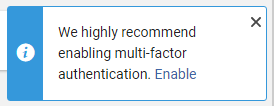
- ユーザーはメッセージを無視したり、Xボタンでキャンセルしたり、あるいは、有効にするを選択することができます。
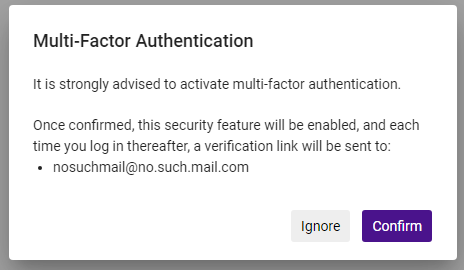
- If the user selects Enable, a message prompts the user to Ignore or Confirm.This message includes the user email address/es to which the login link will be sent.
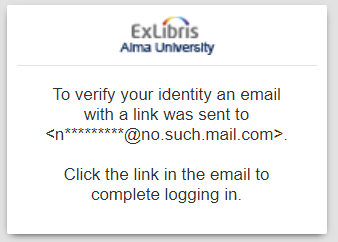
- If the user selects Confirm, the next time they login, a login link is sent to their email/s and a message appears letting them know that the link was sent.
 If the user selects Ignore, the MFA recommendation message will be displayed each time the user logs in.
- 今後、ユーザーがログインするたびに(ユーザー名とパスワードの検証後)、このメッセージが表示されます。The link is active for 10 minutes.Activating the link directs the user to the product home page.Note that the link is usable only in the same browser from which the login flow started.
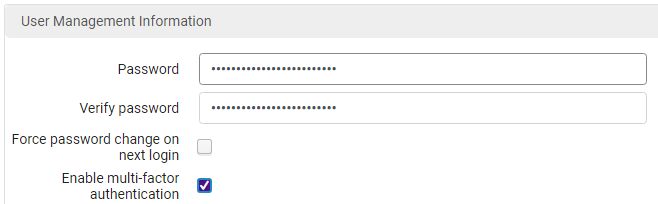
- Users can also enable/disable MFA from the User Management Information page at Admin > Manage Users > Staff > User Management Information.
MFAの強制
This requires the mfa_for_alma_hep parameter to be set to "force" (see User Settings).
- After setting the mfa_for_alma_hep parameter to "force", all users will be required to authenticate with MFA.
- ログインすると、通常のユーザー名とパスワードの認証が求められます。
- A link will be sent to the user's email before entering the product (from the login page), and a message will appear.
- The link is active for 10 minutes.Activating the link directs the users to their product home page.Note that the link is usable only in the same browser from which the login flow started.
With the mfa_for_alma_hep parameter set to "force", there is no way to turn off the MFA flow for a specific user.
Page tags: article:topicproduct:almacontent:Documentationlang:english
